
We built a Mitchell1 Manager SE bridge that reads shop-completion data from Followup.csv and Shop Reports, pushes it to your CRM, and fires review requests and post-service follow-ups automatically. It is for auto repair shops running Manager SE that want modern CRM messaging without switching systems. This guide shows the exact pattern we shipped and the limits that matter.
Mitchell1 review automation is: a Windows-side file watcher and relay that normalizes Manager SE output (Followup.csv or read-only Shop Reports), then posts to a cloud processor that de-duplicates, maps to your CRM, and triggers email or SMS follow-ups.
The problem it solves
Manual review asks and follow-up from Manager SE take time and break easily. A service advisor exports a list, copies contacts into a sender tool, writes a message, and tries not to double-send. If they get busy, nothing goes out. CSV formats drift, and the one person who knows the steps is on PTO.
| Workflow | Manual | Automated |
|---|---|---|
| Getting completed jobs | Run a report and export to CSV when you remember | Windows agent watches for Followup.csv or Shop Reports and picks up new rows on its own |
| Contact selection | Sort by date, filter comebacks, skip unsubscribed | Rules engine filters and dedups based on job date, RO number, opt-out flags |
| Message drafting | Rewriting the same "Thanks, please review us" note | Templated email or SMS with tokens for advisor name, vehicle, and service category |
| Sending | Copy-paste into Gmail or a bulk tool | CRM API or webhook fires one-per-customer with rate limits and quiet hours |
| Logging | A pile of sticky notes and a sent folder | Every send is logged with a dedup key for safe re-runs |
How the automation works
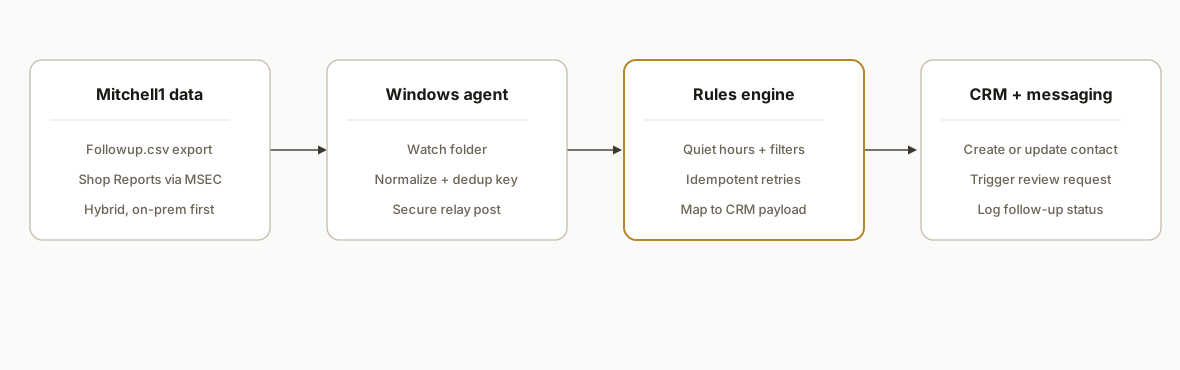
The architecture respects Mitchell1's hybrid reality: most data lives on a shop PC, and integrations often rely on local exports and the Manager SE Connection (MSEC) that feeds Shop Reports. We do not depend on undocumented webhooks.
- Mitchell1 data source: Manager SE produces Followup.csv via the built-in report workflow. Shops that use Shop Reports get a read-only mirror synced by MSEC. We support either path.
- Windows agent: A small service on the shop PC watches for new or modified CSVs, handles file-lock backoff, and posts normalized rows to a secure relay. No ports are opened inbound.
- Cloud processor (accent): Applies rules: build a deterministic dedup key, screen out recent sends, honor opt-outs, and map to your CRM's payload. Retries are idempotent.
- CRM and messaging: We hit your CRM's inbound webhook or API to create a timeline event and trigger an email or SMS template. Quiet hours and day-of-week rules are enforced before enqueueing.
Step-by-step: how to build it
1) Pick the data path: Followup.csv or Shop Reports
Use the path your shop already has. Manager SE supports exporting follow-up data to CSV via its report workflow (Followup.csv). Shops using Shop Reports get a remote, read-only reporting surface synced by MSEC. We point the agent to the folder that receives the CSV and define the date window used for follow-up.
; agent.config.ini
[watcher]
path = C:\\Mitchell1\\Exports\\
pattern = Followup*.csv
poll_ms = 3000
stable_ms = 2000

[shop]
timezone = America/Denver
lookback_days = 7
quiet_hours = 20:00-08:00

[relay]
url = https://relay.example.com/intake/mitchell1
api_key = YOUR_SHARED_SECRET
Gotcha to plan for: CSV names and headers drift over time. Always parse by header name, not column number.
2) Install the Windows agent as a service
We ship the watcher as a Node.js or .NET executable. On Windows, register it as a service so it starts at boot and survives logouts.
# PowerShell: create a scheduled task as a simple service surrogate
$Action = New-ScheduledTaskAction -Execute "C:\\mitchell1-agent\\agent.exe"
$Trigger = New-ScheduledTaskTrigger -AtStartup
Register-ScheduledTask -TaskName "Mitchell1Agent" -Action $Action -Trigger $Trigger -RunLevel Highest -User "SYSTEM"
Key detail: back off when the file is still being written. A simple stable-ms check prevents reading half-written CSVs.
3) Parse and normalize Followup.csv on the agent
Normalize dates and phone numbers, and build a deterministic dedup key so replays are safe. We use RO number plus customer ID plus job-closed date.
// agent: parse-and-post.js
const fs = require('fs');
const { parse } = require('csv-parse/sync');
const fetch = require('node-fetch');

function normalize(row){
  const phone = (row.Phone || '').replace(/\D/g,'');
  const closed = new Date(row.ClosedDate);
  const key = [row.RONumber, row.CustomerID, closed.toISOString().slice(0,10)].join(':');
  return {
    key,
    name: row.CustomerName?.trim(),
    email: row.Email?.trim() || null,
    phone: phone.length === 10 ? `+1${phone}` : null,
    vehicle: row.Vehicle?.trim(),
    advisor: row.Advisor?.trim(),
    service: row.ServiceCategory?.trim(),
    closedDate: closed.toISOString(),
  };
}

function ready(file){
  const raw = fs.readFileSync(file, 'utf8');
  const rows = parse(raw, { columns: true, skip_empty_lines: true });
  return rows.map(normalize);
}

async function post(batch){
  await fetch(process.env.RELAY_URL, {
    method: 'POST',
    headers: { 'Content-Type': 'application/json', 'X-Api-Key': process.env.RELAY_KEY },
    body: JSON.stringify({ source: 'mitchell1', records: batch })
  });
}
Guard against BOM in CSV and inconsistent date formats. We coerce with new Date and fall back to a YYYY-MM-DD parser when needed.
4) Orchestrate in the cloud: dedup, rules, mapping
The relay stores a small ledger for idempotency and applies the sending rules before touching the CRM.
// relay: rules-and-map.js
import { isWithinInterval, subDays } from 'date-fns';

export function shouldSend(r, now){
  const closed = new Date(r.closedDate);
  if (!isWithinInterval(closed, { start: subDays(now, 7), end: now })) return false;
  if (quietHours(now, process.env.QUIET_HOURS)) return false;
  return true;
}

export function toCrmPayload(r){
  return {
    event: 'post_service_followup',
    properties: {
      ro_key: r.key,
      advisor: r.advisor,
      vehicle: r.vehicle,
      service: r.service,
      closed_date: r.closedDate
    },
    contact: { name: r.name, email: r.email, phone: r.phone }
  };
}
We write each key to a dedup table with a 45-day TTL. Replays from the agent or multi-pickups of the same CSV become no-ops.
5) Push to your CRM and trigger messaging
Most CRMs accept a generic webhook to create or update a contact and attach an event. We map the payload and let the CRM's workflow send the review ask or follow-up template.
// relay: sink-http.js
import fetch from 'node-fetch';

export async function sendToCrm(crmUrl, token, payload){
  const res = await fetch(crmUrl, {
    method: 'POST',
    headers: { 'Content-Type': 'application/json', Authorization: `Bearer ${token}` },
    body: JSON.stringify(payload)
  });
  if (!res.ok) throw new Error(`CRM ${res.status}`);
}
Gotcha: respect quiet hours and local time. We compute shop-local time in the relay and defer sends to the morning window.
6) Add a fallback path using Shop Reports
If the shop leans on Shop Reports via MSEC, we add a daily pull that exports the completed-work subset to CSV on the same watched folder. The agent treats it like Followup.csv and the rest of the flow is identical. This preserves a single code path while supporting Manager SE's hybrid environment.
# Windows Task Scheduler action
Program/script: C:\\shopreports\\export.exe
Arguments: --report CompletedWork --format csv --out C:\\Mitchell1\\Exports\\ShopReports_CompletedWork.csv
We do not depend on Website Launcher flows for data. Mitchell1 notes that Website Launcher is a pass-through and does not return data to the caller.
Where it gets complicated
- No public Zapier or Make app: There is no official Mitchell1 app listed in Zapier or Make as of July 2026. Use file watchers, local connectors, or vendor-provided connectors rather than expecting a point-and-click cloud app.
- Website Launcher is one-way: Mitchell1's Website Launcher and UI Integration are pass-through patterns. They do not return data to your app, so they are not suitable as a data source for review automation.
- Hybrid and batched reality: Manager SE is largely server-based. Shop Reports rely on MSEC sync. Expect batching rather than true real time. We design for near-real-time via frequent pickups, or same-day via a daily export.
- CSV drift and Windows locks: Headers change and jobs finish while the file is still being written. Parse by header, add BOM handling, and wait for stable file sizes before reading.
- Idempotency is non-negotiable: A staff rerun of the export, or a reboot, will replay the same rows. Dedup with a composite key and store a short TTL ledger to keep sends one-per-customer-per-job.
What this actually changes
For an auto repair shop on Manager SE, the bridge removed the weekly scramble to export and send review requests. Service advisors stopped copy-pasting lists and the CRM now tracks every follow-up against a job and a dedup key. The Mitchell1 ecosystem often runs in batches, so we set expectations around timing. One documented third-party connector for Mitchell1 runs on a once-daily pull, which means review asks can arrive up to 24 hours after job completion (source: Birdeye's Mitchell1 connector notes a daily pull cadence: https://support.birdeye.com/en/articles/12654815-integrating-birdeye-with-mitchell1). Our agent-based pickup can run more frequently on-prem, but we keep quiet hours and same-day guarantees explicit in the rollout plan.
Frequently asked questions
Does Mitchell1 have an API for this?
Mitchell1 documents gated integration mechanisms and mentions token-based Secure Intents, but there is no self-serve public API guide for Manager SE. In practice you use Manager SE's CSV exports and the Shop Reports surface that syncs via MSEC to power follow-up automations.
Can this run in real time?
Shops typically run in a hybrid, batched environment. We run near-real-time by watching for new CSVs on short intervals and posting changes, and we enforce quiet hours so nothing sends at night. If you prefer batch, a daily export works too.
How do you prevent duplicates?
We compute a composite key of RO number, customer ID, and job-closed date, and store each key in a short-lived ledger. Replays of the same CSV or re-exports become no-ops, so customers receive one request per job.
Which CRMs does this connect to?
Any CRM with an API or inbound webhook. The relay maps to your CRM's contact and event objects, then the CRM triggers the email or SMS template you already use for reviews and post-service follow-ups.
What does setup require at the shop?
A Windows PC that runs Manager SE, a folder path where Followup.csv or a Shop Reports export lands, and permission to install a small agent as a service. No inbound firewall changes are needed. We provide the installer and harden it for file-lock backoff.
Is there a native Zapier or Make connector?
No official Mitchell1 app is listed in Zapier or Make's directories. The working approach is a local agent that posts to a secure cloud relay, or a vendor connector that runs on a schedule.
If you run Mitchell1 and want review requests and post-service follow-ups to run by themselves, we have shipped this exact bridge on a Windows shop PC with a cloud relay. See our broader CRM automation services at /services#crm-automation, read how we handle similar closed systems in our /blog/axon-trucking-software-integration, and book a working session at /book to scope your shop's path.
Want us to build this for you?
Nine questions, about 90 seconds. You see the hours it is costing you, then pick a time. No pitch.
Get your free assessment