
Towbook dispatch analytics without a public API works by leaning on Towbook's native QuickBooks sync for completed calls and invoices, then polling QuickBooks Online for AR and revenue while fetching live truck GPS from your telematics provider. A serverless orchestrator normalizes everything into Google Sheets, and a Next.js dashboard renders KPIs, call tables, and driver panels; if you prefer BI tooling, see our Looker Studio dashboard with BigQuery.
If you operate a towing fleet and want calls, drivers, and receivables on one screen, this guide shows the production path that actually ships when a public Towbook API is not available.
Towbook integration for dispatch analytics is: a QuickBooks-backed and telematics-backed data bridge that converts Towbook operational and financial records into a live dashboard without relying on an unconfirmed public Towbook API.
The problem it solves
A dispatcher spends hours every day switching tabs to answer basic questions: how many active calls, where are the trucks, who is overdue, what is booked today, what did we collect this week. Without a single surface, updates come from Towbook screens, texts, and accounting exports.
The manual loop looked like this: export or read Towbook call histories, retype or push to accounting, pull AR from QuickBooks, screenshot a GPS app, paste into a spreadsheet, then email a status update before the data goes stale. McKinsey estimates knowledge workers spend about 1.8 hours per day searching and gathering information, which is exactly the anti-pattern here (source: https://www.mckinsey.com/industries/technology-media-and-telecommunications/our-insights/the-social-economy).
We replaced the swivel-chair work with a QuickBooks-backed sync and a Sheets-powered dashboard that refreshes itself.
| Manual process | Automated with our pattern |
|---|---|
| Log into Towbook, re-key invoice lines into accounting | Towbook pushes completed calls to QuickBooks. Orchestrator polls deltas |
| Screenshot GPS app to ask where drivers are | Telematics API polled on schedule, positions rendered live |
| Export CSVs, copy into a spreadsheet board | Serverless jobs normalize to a single Google Sheet schema |
| Email a status every few hours | Dashboard shows KPIs, AR, and active calls in one place |
How the automation works
We built and shipped this pattern as a demo for UBK Towing: a static Next.js dashboard to prove the UX, plus the integration plan we implement in production. Because we found no public Towbook developer API, the reliable production path uses QuickBooks sync and your telematics provider.
- Towbook QuickBooks sync: Inside Towbook you map Accounts to QuickBooks Customers and enable push on completed calls. This writes invoices and optional payments to QuickBooks Online or Desktop. Desktop requires Towbook Agent on the same server as the company file. Plan requirement: Professional or higher.
- QuickBooks Online: Becomes the authoritative source for completed calls, invoices, and payments. We poll for changes since the last run and compute AR and revenue KPIs.
- Telematics provider API: Towbook relies on providers like Samsara or Webfleet for live GPS. We call the provider API for driver and vehicle locations. Freshness depends on the provider, not Towbook.
- Orchestrator: A small serverless job on a schedule. It polls QuickBooks, fetches GPS, dedupes by external IDs, and writes normalized rows into Google Sheets.
- Next.js dashboard: Renders KPI cards, an active calls table, receivables, and driver panels from the Sheet. The UBK demo proves the surface. The production variant reads the live Sheet.
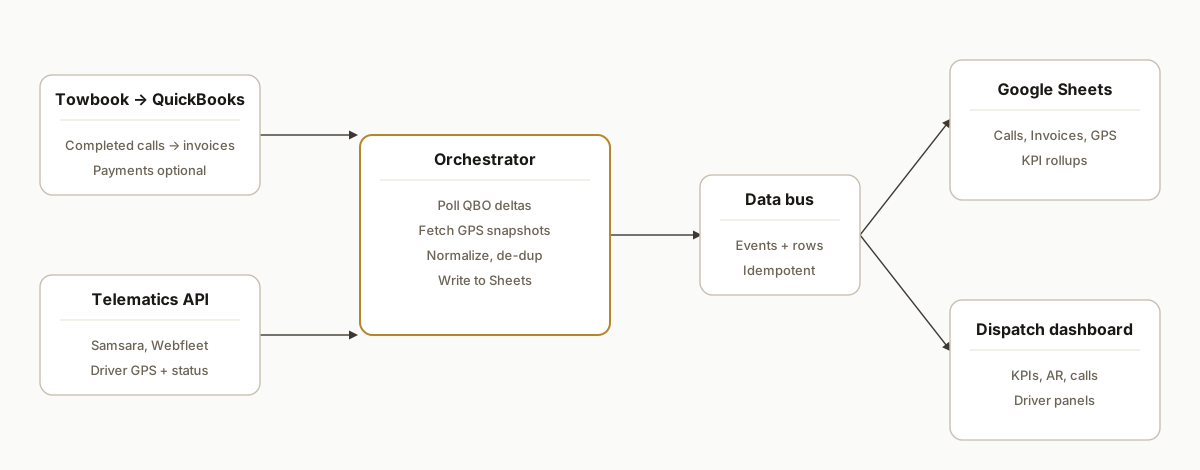
Towbook API documentation: what exists and how we bridge it
We found no public developer documentation or webhook catalog for Towbook. What is confirmed today:
- QuickBooks integration inside Towbook: completed calls and invoices post to QuickBooks Online or Desktop.
- GPS comes from telematics partners: Towbook displays those feeds but the data lives in provider APIs.
- Digital dispatch per motor club: your Provider IDs must be enabled by Towbook support.
The bridge that ships:
- Use Towbook's QuickBooks push as the authoritative record of completions, invoices, and payments.
- Poll QuickBooks for deltas, compute AR and revenue, and key records by the QuickBooks invoice id.
- Pull driver locations directly from your telematics provider API, not from Towbook.
- Where Towbook-only fields are required, add a controlled export or file-drop that our orchestrator ingests.
If you are comparing tooling paths, we wrote how to proceed without a native Zapier app in Towbook API integration: Zapier alternatives: /blog/towbook-api-integration-zapier-alternatives. For finance alignment details, see Towbook to QuickBooks invoicing sync: /blog/towbook-to-quickbooks-invoicing-sync.
QuickBooks Online or Desktop: which works better with Towbook?
Both work. The choice affects how you operate the bridge:
- QuickBooks Online: simplest for cloud orchestration. OAuth happens in the browser. Our job polls deltas on a short cadence and writes to Sheets. Minimal on-prem constraints.
- QuickBooks Desktop: requires Towbook Agent on the same server as the company file. Desktop posts from Towbook still land in your company file, then our cloud job reads from your mirrored dataset or a secure connector you approve. Keep the Agent updated and verify tax mappings before enabling teamwide.
Rule of thumb: if you already run Desktop reliably and want to avoid change, keep Desktop. If you want fewer moving parts in the bridge, Online reduces operational friction.
Google Sheets or Power BI: which sink for a Towbook dashboard?
- Start with Google Sheets when you want a fast, owner-friendly surface, easy edits, and low cost, or use a BigQuery-backed Looker Studio dashboard when your team standardizes on Google marketing tools and wants governed sharing without Zapier.
- Choose Power BI when you need row-level security, multi-location rollups, or big historical datasets. We use the same QuickBooks and GPS feeds but write into a warehouse and publish a Power BI dataset and report.
See our deeper guides:
- Towbook to Google Sheets automation: schema, idempotent writes, and backfill.
- Towbook to Power BI reporting: model design, refresh strategy, and permissions.
Can I get alerts or webhooks from Towbook into Slack or my CRM?
Public webhooks from Towbook are unconfirmed. We deliver event-like behavior by polling QuickBooks for invoice or payment deltas and your telematics API for driver status, then raising Slack or CRM alerts on thresholds you define: aging buckets, no-movement windows, or high-priority jobs. If Towbook exports are required for a specific field, we add a file-drop that the orchestrator watches and converts to an alert.
Explore the pattern here: Towbook webhooks to Slack and CRM.
Towbook dashboard: the modules that matter
The dashboard that earns clicks and answers dispatch questions in one view:
- KPI bar: active calls, completed today, drivers on shift, revenue today, A R, tickets.
- Trend charts: 30 day call volume and month to date revenue bar.
- Active calls table: customer, status, ETA, assigned driver, notes.
- Receivables table: invoice, customer, amount, balance, days overdue with a heatmap.
- Driver panels: name, last five calls, current GPS with last seen timestamp, flag status.
- Exceptions lists: flagged drivers, parking tickets, outstanding invoices.
We validated this layout in the UBK Towing demo before wiring production sources. For a deeper dive on the surface and rollout path, read Tow company ops dashboard: demo to live: /blog/tow-company-ops-dashboard-demo-to-live.
Step-by-step: how to build it
Step 1: Configure Towbook to push into QuickBooks
Set up Towbook's built-in QuickBooks integration: associate Towbook Accounts to QuickBooks Customers and confirm tax rate mappings. If you use QuickBooks Desktop, install Towbook Agent on the machine that hosts the company file.
Gotcha: plan must be Professional or higher. Desktop requires the Agent to run on the same server, and mismatched tax settings can block posts.
Towbook → Settings → QuickBooks Integration
- Map Accounts → Customers
- Choose Online or Desktop
- Payments: enable if you want receipts to post
- Desktop: install Towbook Agent on the QuickBooks server
- Test post on a single completed call before enabling teamwide
Step 2: Stand up a normalized Google Sheet
Create a Sheet with tabs like Calls, Invoices, Payments, Drivers, and KPI. Use stable headers and keep types obvious: timestamps as ISO strings, cents as integers, and IDs as text.
Calls: call_id, customer_name, status, created_at, completed_at, qbo_invoice_id
Invoices: qbo_invoice_id, customer_name, amount_cents, balance_cents, txn_date
Payments: qbo_payment_id, qbo_invoice_id, amount_cents, received_at
Drivers: driver_id, driver_name, lat, lng, heading, last_seen_at, provider
KPI: label, value, updated_at
Step 3: Ingest QuickBooks changes on a schedule
Authenticate your QuickBooks app, then poll for invoices updated since the last run. Write rows into the Invoices tab and link to calls via the QuickBooks Invoice Id field you store in Calls.
// node: qbo-ingest.js
import { google } from 'googleapis';
import dayjs from 'dayjs';

async function listRecentInvoices(qbo, sinceIso) {
  // Use your QBO SDK or REST client to fetch updated invoices since 'sinceIso'
  // Shape each record into { qbo_invoice_id, customer_name, amount_cents, balance_cents, txn_date }
  const items = await qbo.listInvoices({ updatedSince: sinceIso });
  return items.map(x => ({
    qbo_invoice_id: String(x.Id),
    customer_name: x.CustomerRef?.name || "",
    amount_cents: Math.round((x.TotalAmt || 0) * 100),
    balance_cents: Math.round((x.Balance || 0) * 100),
    txn_date: x.TxnDate
  }));
}

async function appendToSheet(auth, sheetId, rows) {
  const sheets = google.sheets({ version: 'v4', auth });
  await sheets.spreadsheets.values.append({
    spreadsheetId: sheetId,
    range: 'Invoices!A:E',
    valueInputOption: 'RAW',
    requestBody: { values: rows.map(r => [r.qbo_invoice_id, r.customer_name, r.amount_cents, r.balance_cents, r.txn_date]) }
  });
}

// Orchestrate: read last sync from KPI, pull, then write and update KPI
Key guardrail: idempotency. Keep a small ledger of invoice IDs you have written so reruns do not create duplicates.
Step 4: Fetch live driver GPS from your telematics provider
Use the provider's documented API to pull recent locations. Store one row per driver with a last_seen_at timestamp. Towbook itself relies on those providers for GPS, so freshness is constrained by the provider, not Towbook.
// node: gps-fetch.js
import fetch from 'node-fetch';

async function fetchDrivers({ baseUrl, token }) {
  const r = await fetch(`${baseUrl}/fleet/locations?limit=100`, {
    headers: { Authorization: `Bearer ${token}` }
  });
  if (!r.ok) throw new Error(`GPS ${r.status}`);
  const data = await r.json();
  return data.items.map(d => ({
    driver_id: String(d.driverId),
    driver_name: d.driverName,
    lat: d.lat,
    lng: d.lng,
    heading: d.heading,
    last_seen_at: d.timestamp
  }));
}
Tip: cache responses for 30 to 60 seconds. GPS does not need sub-second updates for dispatch KPIs.
Step 5: Normalize and write to Google Sheets
Apps Script is reliable for Sheet writes when you need lightweight transforms.
// apps script: Code.gs
function upsertRows(sheetName, keyColIndex, rows) {
  const ss = SpreadsheetApp.getActive();
  const sh = ss.getSheetByName(sheetName);
  const existing = sh.getDataRange().getValues();
  const header = existing.shift();
  const idx = new Map(existing.map((r, i) => [String(r[keyColIndex - 1]), i + 2]));
  rows.forEach(row => {
    const key = String(row[0]);
    const line = [key, ...row.slice(1)];
    const pos = idx.get(key);
    if (pos) sh.getRange(pos, 1, 1, line.length).setValues([line]);
    else sh.appendRow(line);
  });
}
Keep every write idempotent using stable keys like qbo_invoice_id and driver_id.
Step 6: Render the dashboard
A small Next.js route can read the Sheet and return typed JSON to your UI.
// nextjs: app/api/kpi/route.ts
import { google } from 'googleapis';
import { NextResponse } from 'next/server';

export async function GET() {
  const auth = new google.auth.GoogleAuth({ scopes: ['https://www.googleapis.com/auth/spreadsheets.readonly'] });
  const sheets = google.sheets({ version: 'v4', auth });
  const [kpi, ar] = await Promise.all([
    sheets.spreadsheets.values.get({ spreadsheetId: process.env.SHEET_ID!, range: 'KPI!A:C' }),
    sheets.spreadsheets.values.get({ spreadsheetId: process.env.SHEET_ID!, range: 'Invoices!A:E' })
  ]);
  return NextResponse.json({ kpi: kpi.data.values || [], invoices: ar.data.values || [] });
}
Render KPIs, a receivables table, and a drivers panel. The UBK Towing demo that we shipped shows the UI surface. In production it reads the live Sheet.
Where it gets complicated
-
No public Towbook API: We found no published developer docs or webhook streams. The practical path uses Towbook's QuickBooks push as the source of truth for completed calls and invoices. For operations that require Towbook-only fields, we design a light file-drop bridge into Drive that our orchestrator can parse.
-
QuickBooks setup details: You must map Towbook Accounts to QuickBooks Customers and align tax settings. Desktop requires Towbook Agent on the same server as the QuickBooks file. The recommended setup flow keeps both Towbook and QuickBooks open in the same Chrome window during connect.
-
GPS depends on your telematics provider: Towbook relies on partners like Samsara or Webfleet for live GPS. Data freshness and schema come from those providers, not Towbook.
-
Digital dispatch activations are per motor club: Integrations like Allstate or GEICO require you to provide your Provider IDs to Towbook support to enable digital dispatch. This lives outside the dashboard build and can affect what fields you see in Towbook.
-
Idempotency across systems: QuickBooks, GPS, and any file-drop bridges will emit overlapping records. We store a small sync ledger keyed by external IDs and timestamps to prevent duplicates and missed updates.
-
Dashboard performance: Google Sheets is forgiving but not infinite. We batch reads, avoid per-cell writes, and cache API responses server-side so the UI stays snappy under load.
Real-world results
We shipped the UBK Towing dispatch dashboard as a proof-of-concept: a single-screen Next.js app with KPIs, call charts, driver scorecards, flagged drivers, parking tickets, and invoices. The demo used static seed data to align UX and decision flow before wiring live sources. The production variant follows the pattern above: Towbook pushes completions into QuickBooks, the orchestrator polls QuickBooks and your telematics provider, and the dashboard renders from a normalized Google Sheet.
The qualitative shift mattered: dispatchers no longer chased three systems for a status. They opened one URL and saw active calls, where drivers were, and what was owed. That solves the search-and-gather tax that McKinsey quantified at 1.8 hours per day for knowledge workers, which in a dispatch context shows up as radio calls and tab hunting instead of road time.
Frequently asked questions
How do I automate Towbook dispatch data to a dashboard?
Because Towbook has no public API, the reliable path is to use its native QuickBooks sync as the source of truth for completed calls, invoices, and payments, poll QuickBooks Online for deltas, and pull live truck GPS from your telematics provider's API. A small serverless orchestrator normalizes those feeds into a Google Sheet keyed by stable IDs, and a Next.js dashboard reads the Sheet to render KPIs, an active-calls table, receivables, and driver panels. Keep every write idempotent with a sync ledger so reruns never create duplicates.
Does Towbook have an official public API I can use directly?
We found no published developer API documentation for Towbook. Our production path uses the confirmed QuickBooks integration inside Towbook for financial and completion data, then bridges GPS via your telematics provider's API. Where Towbook-only fields are needed, we add a controlled file-drop ingestion.
Where can I find Towbook API documentation and what should I do instead?
There is no public API doc we could cite. Use the Towbook QuickBooks push as your completion and invoice source, poll QuickBooks for deltas, and read GPS from your telematics provider. If you are evaluating tooling paths, start with Towbook API integration: Zapier alternatives: /blog/towbook-api-integration-zapier-alternatives.
What Towbook plan do I need for QuickBooks sync?
Towbook's QuickBooks integration requires the Professional plan or higher. Desktop users must run the Towbook Agent on the same server as the QuickBooks company file. Online users connect Towbook to QuickBooks Online inside a logged-in browser session.
Can this stream into Google Sheets in real time?
Towbook webhooks are unconfirmed. We poll QuickBooks for deltas on a short cadence and poll your telematics provider for GPS on a 30 to 60 second cadence. For Towbook-only data we either accept a small lag via file-drop or confirm a safe manual export routine for the fields you actually need.
How do you get live driver locations into the dashboard?
Through your existing telematics provider. Towbook relies on third parties like Samsara or Webfleet for GPS. We connect to that provider's API, not Towbook, and store driver positions with timestamps in the Drivers tab for the dashboard to render.
What does this cost to run monthly?
The orchestrator and dashboard are lightweight. You pay for your existing QuickBooks and telematics subscriptions. Google Sheets and serverless hosting are typically low or bundled. The main cost is the one-time build and any ongoing tweaks to add fields or reports.
Can a non-technical owner maintain this after handoff?
Yes. We expose configuration in the Sheet and ship a small health page. You can add KPI tiles, swap labels, or change polling intervals without touching code. Engine changes or new data sources are where you bring us back in.
If you are running Towbook and want a live dispatch view tied to the numbers that matter, we have already built and shipped this pattern. See how we handled a similar bridge in our post on moving Shopify orders into Sheets for local routing, then book a short call. We will tell you in the first five minutes whether your setup maps to this design.
- Service details: /services#workflow-automation
- Related build: /blog/automate-shopify-local-orders-google-sheets
- More Towbook patterns: Towbook to Google Sheets automation, Towbook to Power BI reporting
- Book a call: /book
Want us to build this for you?
Nine questions, about 90 seconds. You see the hours it is costing you, then pick a time. No pitch.
Get your free assessment