
Towbook to Google Sheets automation works by extracting Towbook reports via an API token through an ETL connector, pairing invoicing through Towbook's QuickBooks integration, then persisting both into a durable, append-only ledger that a Google Apps Script writes into analysis-ready tabs. In production it feeds dispatch KPIs and AR snapshots without anyone running manual exports.
Towbook to Google Sheets automation is: a scheduled pipeline that lands Towbook report rows and Towbook-synced QuickBooks invoices into Sheets for dashboards and analysis, with deduplication and history protection.
We built and shipped this for a regional towing operation that wanted one spreadsheet to power a dispatch console and a cash-collection view. This guide shows the exact pattern we used, why we chose it, and the gotchas we hit.
The problem it solves
Towing teams live in Towbook all day, but reporting is fragmented. Dispatch leads need call volumes and statuses. Owners want daily revenue, AR aging, and driver performance. Manually exporting and copy-pasting into a spreadsheet breaks as volume rises and people change shifts.
| Process | Manual workflow | Automated workflow |
|---|---|---|
| Dispatch volume | Run a report in Towbook UI, copy-paste to a sheet, reformat columns | Connector pulls Towbook reports, Apps Script writes normalized rows by timestamp |
| Invoices and payments | Export from Towbook or retype numbers into Sheets | Towbook syncs invoices to QuickBooks, Sheets pulls from the QuickBooks ecosystem into AR tabs |
| History and trends | Tabs get overwritten, last week disappears | Append-only ledger with idempotent upserts, nothing is lost on resync |
| Refresh cadence | Whenever someone remembers | Time-based triggers, predictable morning snapshots |
How the automation works
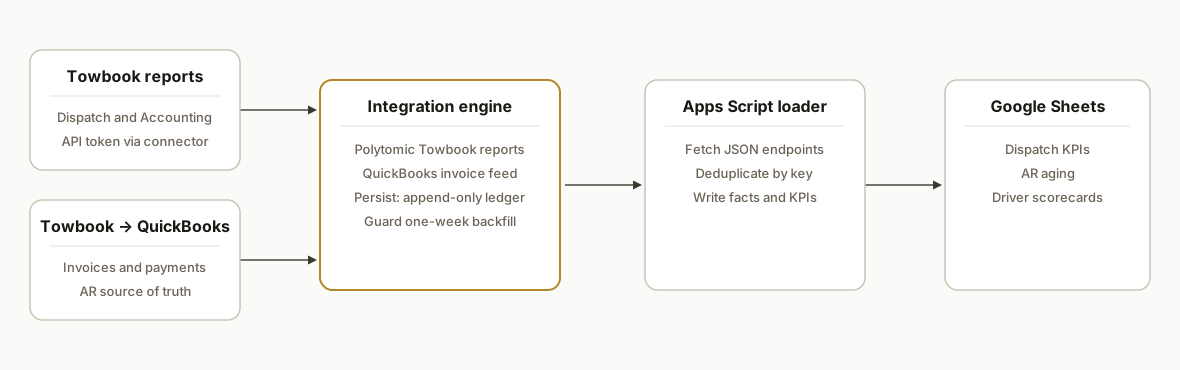
We bridge Towbook to Sheets along two safe paths: Towbook reports for dispatch metrics, and Towbook's QuickBooks integration for invoicing. A persistence layer prevents accidental history loss when the connector resyncs short windows.
- Towbook reports via connector: Polytomic documents a Towbook source that connects with a Towbook API token and syncs Towbook reports, including an Accounting report. We authenticate with the token and select the dispatch report our client uses in ops. Public API docs, base URLs, and rate limits are not published, so we treat the connector as the supported path.
- Invoicing through QuickBooks: Towbook offers a QuickBooks integration for invoices and payments. We then pull those invoice rows to Google Sheets through the QuickBooks ecosystem to power AR and daily cash metrics. If you only need invoicing, see our focused write-up in Towbook to QuickBooks Invoicing Sync.
- Durable ledger: Polytomic notes its Accounting report export only backfills about one week on first run and resyncs can delete history beyond a week unless you persist it yourself. We write every row into an append-only ledger keyed by a stable external ID, then derive dashboards from that ledger so a destructive resync never erases trends.
- Google Apps Script loader: A container-bound Apps Script fetches new rows from our integration endpoints, dedupes by key, and writes into normalized tabs in Sheets. Time-based triggers run the loader on a schedule.
- Dashboards and KPIs: Pivot tabs and formulas read from the normalized tables to render call counts, revenue, AR by age bucket, and driver scorecards.
Step-by-step: how to build it
Step 1: Create a schema in Google Sheets
Stand up a spreadsheet with these tabs: Config, Dispatch_Ledger, Invoices_Ledger, Dispatch_Fact, AR_Fact, and KPI.
- Config: lastRunISO, connector endpoints, and any secrets stored as Script Properties.
- Ledgers: raw append-only rows.
- Facts: modeled, denormalized tables for dashboards.
// Apps Script: helpers/config.gs
function getConfig() {
  const props = PropertiesService.getScriptProperties();
  return {
    lastRunISO: props.getProperty('LAST_RUN_ISO') || '1970-01-01T00:00:00Z',
    dispatchUrl: props.getProperty('DISPATCH_URL'), // your integration endpoint
    invoicesUrl: props.getProperty('INVOICES_URL'), // your integration endpoint
    bearer: props.getProperty('BEARER'),
  };
}

function setLastRunISO(ts) {
  PropertiesService.getScriptProperties().setProperty('LAST_RUN_ISO', ts);
}
Key gotcha: store secrets in Script Properties, not in sheet cells.
Step 2: Append-only, idempotent writes to the ledgers
Design a deterministic key per row. For dispatch: concat of call_id and updated_at. For invoices: invoice_id.
// Apps Script: lib/ledger.gs
function upsertLedger(sheetName, rows, keyFn) {
  const sh = SpreadsheetApp.getActive().getSheetByName(sheetName);
  const data = sh.getDataRange().getValues();
  const header = data.shift();
  const keyIdx = header.indexOf('row_key');
  const index = new Map(data.map(r => [r[keyIdx], r]));

  const out = [];
  rows.forEach(obj => {
    const row = header.map(h => (h in obj ? obj[h] : ''));
    const key = keyFn(obj);
    row[keyIdx] = key;
    index.set(key, row);
  });

  index.forEach(v => out.push(v));
  sh.clearContents();
  sh.getRange(1,1,1,header.length).setValues([header]);
  if (out.length) sh.getRange(2,1,out.length,header.length).setValues(out);
}
Key gotcha: if you must preserve original row order, keep a created_at column and sort before writing.
Step 3: Pull Towbook-synced invoices through the QuickBooks path
Enable Towbook's QuickBooks integration in-app so Towbook pushes invoices and payments to QuickBooks. Then fetch invoice data into Sheets through the QuickBooks ecosystem or a small proxy service.
// Apps Script: fetch/invoices.gs
function fetchInvoicesSince(lastISO) {
  const { invoicesUrl, bearer } = getConfig();
  const resp = UrlFetchApp.fetch(invoicesUrl + '?since=' + encodeURIComponent(lastISO), {
    headers: { Authorization: 'Bearer ' + bearer }, muteHttpExceptions: true
  });
  if (resp.getResponseCode() !== 200) throw new Error('Invoices fetch failed');
  const json = JSON.parse(resp.getContentText());
  const rows = json.map(i => ({
    row_key: '',
    invoice_id: i.id,
    customer: i.customerName,
    issue_date: i.txnDate,
    due_date: i.dueDate,
    total: i.total,
    balance: i.balance,
    status: i.status,
    updated_at: i.updatedAt
  }));
  upsertLedger('Invoices_Ledger', rows, o => String(o.invoice_id));
}
Key gotcha: model balances and payments separately if you need AR aging to reflect partial payments.
Step 4: Pull dispatch report rows via the connector path
Use the ETL connector that supports Towbook to extract report rows. Authenticate with the Towbook API token in that connector. We read the landed output through our integration endpoint.
// Apps Script: fetch/dispatch.gs
function fetchDispatchSince(lastISO) {
  const { dispatchUrl, bearer } = getConfig();
  const resp = UrlFetchApp.fetch(dispatchUrl + '?since=' + encodeURIComponent(lastISO), {
    headers: { Authorization: 'Bearer ' + bearer }, muteHttpExceptions: true
  });
  if (resp.getResponseCode() !== 200) throw new Error('Dispatch fetch failed');
  const json = JSON.parse(resp.getContentText());
  const rows = json.map(d => ({
    row_key: '',
    call_id: d.id,
    opened_at: d.openedAt,
    closed_at: d.closedAt,
    status: d.status,
    service_type: d.serviceType,
    driver: d.driverName,
    revenue: d.revenue,
    updated_at: d.updatedAt
  }));
  upsertLedger('Dispatch_Ledger', rows, o => String(o.call_id) + '|' + String(o.updated_at));
}
Key gotcha: Polytomic notes Accounting report backfills only about one week and resyncs can delete older history unless you persist it. The append-only ledger pattern avoids data loss when upstream windows shift.
Step 5: Build facts and KPIs from the ledgers
Transform ledgers into analysis-ready facts. You can do this in formulas or in Apps Script to keep logic in one place.
// Apps Script: model/facts.gs
function rebuildFacts() {
  const ss = SpreadsheetApp.getActive();
  const d = ss.getSheetByName('Dispatch_Ledger').getDataRange().getValues();
  const h = d.shift();
  const idx = Object.fromEntries(h.map((k,i)=>[k,i]));
  const byDay = new Map();
  d.forEach(r => {
    const day = String(r[idx.opened_at]).slice(0,10);
    const cur = byDay.get(day) || { date: day, calls: 0, revenue: 0 };
    cur.calls += 1;
    cur.revenue += Number(r[idx.revenue] || 0);
    byDay.set(day, cur);
  });
  const out = Array.from(byDay.values()).sort((a,b)=>a.date.localeCompare(b.date));
  const sh = ss.getSheetByName('Dispatch_Fact');
  sh.clearContents();
  sh.getRange(1,1,1,3).setValues([["date","calls","revenue"]]);
  if (out.length) sh.getRange(2,1,out.length,3).setValues(out.map(o=>[o.date,o.calls,o.revenue]));
}
Key gotcha: time zones. Normalize to the business time zone before grouping by date.
Step 6: Schedule refresh and protect history
Create a time-based trigger that runs every hour during business hours.
// Apps Script: main.gs
function run() {
  const lastISO = getConfig().lastRunISO;
  fetchDispatchSince(lastISO);
  fetchInvoicesSince(lastISO);
  rebuildFacts();
  setLastRunISO(new Date().toISOString());
}
Key gotcha: when you deploy a significant schema change, reset the lastRunISO backwards a few days so new fields get populated, then let the ledger dedupe protect you from duplicates.
Which Towbook data should you export first
Start with the smallest set that answers daily operations questions, then expand.
- Dispatch report fields: call_id, opened_at, closed_at, status, service_type, driver, revenue, updated_at.
- Invoicing fields: invoice_id, customer, issue_date, due_date, total, balance, status, updated_at.
- Keys and joins: use call_id to tie dispatch to downstream revenue if your connector includes revenue on the call, and invoice_id for AR logic.
A simple starter header layout for each ledger:
Dispatch_Ledger: row_key, call_id, opened_at, closed_at, status, service_type, driver, revenue, updated_at
Invoices_Ledger: row_key, invoice_id, customer, issue_date, due_date, total, balance, status, updated_at
If you need a deeper dispatch view and a live console, see our pattern in Towbook API Integration: Dispatch Dashboard.
Looker Studio: turn the Sheet into a live dashboard
- Create a new Looker Studio report and add Google Sheets as a data source.
- Select the spreadsheet and the Dispatch_Fact and AR_Fact tabs.
- Set date as the default dimension. Set calls and revenue as metrics for dispatch. Set balance for AR.
- Build two pages: Daily Dispatch and Collections. Use a date range control and a driver filter.
- If you need customer names on AR charts, add a small lookup table in the Sheet and join in Looker Studio or pre-join in the Facts step.
This keeps Sheets as the system of record while Looker Studio handles visuals and sharing.
Choosing the connector path: ETL vs custom
- ETL connector: fastest path to Towbook reports with a Towbook API token. You accept short backfill windows and design around them with a ledger. For Zapier-style questions, we covered options in Towbook API Integration: Zapier Alternatives.
- QuickBooks only: if the goal is just AR and cash, rely on Towbook's QuickBooks integration and pull from the QuickBooks ecosystem into Sheets. We outline the invoicing bridge in Towbook to QuickBooks Invoicing Sync.
- Custom adapter: when you need CRM handoffs or collections automation, pair this export with downstream workflows as in Towbook to HubSpot CRM Integration.
Where it gets complicated
- No public API docs: Towbook does not publish developer docs that we could find. The safe path we used relies on a documented ETL connector that authenticates with a Towbook API token to sync reports. Base URLs, webhook events, and rate limits are not public, so build with polling and retries on your side.
- One-week backfill windows: Polytomic documents that its Towbook Accounting report export only backfills about one week on first run and that resyncs can delete older history unless you persist it. We solved this with an append-only ledger in Sheets and idempotent keys.
- No official Zapier or Make app: As of today there is no official Towbook app in Zapier or Make listings. Expect to use an ETL tool, QuickBooks as a bridge, or a custom integration.
- Document-style UI exports: Some Towbook outputs like Accident Reports are document or PDF centric. When a CSV is not available, keep those artifacts out of the numeric pipeline and store links alongside metrics.
- Dispatch time normalization: Cross-shift teams open and close calls across midnight. Normalize timestamps to the operator's time zone before daily groupings or you will see phantom dips.
What this actually changes
For a towing operator, this turned the daily huddle from anecdotes into a single sheet that shows yesterday's call volume, revenue, AR by aging bucket, and any driver-level outliers. The QuickBooks bridge means invoice status aligns with dispatch volume automatically. We anchored the pipeline in a ledger so a short upstream backfill window never wipes trends. Google Sheets supports up to 10 million cells per spreadsheet, which is ample headroom for most operators building multi-year ledgers in one file (source: support.google.com documentation on Google Sheets limits).
If you want to see where this goes next visually, we outlined the path from a static console to a live dispatch view in Tow Company Ops Dashboard: Demo to Live.
Frequently asked questions
Does Towbook have an official API for this?
Public developer documentation is not published. An ETL vendor documents a Towbook connector that uses a Towbook API token to sync Towbook reports, including an Accounting report. Base URLs, webhooks, and rate limits are not public, so we treat the connector and the QuickBooks bridge as the reliable paths.
Can I do this with Zapier or Make?
There is no official Towbook app in the Zapier or Make directories as of today. In our deployments we either use the Towbook connector from an ETL tool, use Towbook's QuickBooks integration for invoices and pull from the QuickBooks ecosystem, or build a small custom integration that reads from the connector's output.
Will this run in real time?
We run it on a schedule. The connector side polls Towbook and Apps Script writes to Sheets on time-based triggers. For dispatch, hourly snapshots are sufficient for most dashboards. There are no public Towbook webhooks documented, so we avoid promising sub-minute updates.
How do you prevent duplicate rows and history loss?
We key each ledger row by a stable external ID and updated timestamp, and we never hard-delete in Sheets. When the connector resyncs a short window, the ledger protects prior history. Facts are rebuilt from the ledger so you always have trend continuity.
What does this cost monthly?
You pay for the ETL connector subscription if you use one, your existing QuickBooks plan if you leverage the Towbook QuickBooks sync, and a modest maintenance budget for the Apps Script and dashboards. We design for low compute and free Sheets where possible.
Can a non-developer set this up?
The Towbook connector setup is point-and-click once you have the API token. The durable ledger, merge logic, and dashboard modeling require engineering. We ship it as a turnkey pipeline with clear tabs so your team can maintain it.
If you want a single sheet that shows yesterday's calls, revenue, and AR without manual exports, we have already built this. See our related write-up on the Towbook integration pattern in Towbook API Integration: Dispatch Dashboard and our workflow automation services. When you are ready, book a 15-minute call and we will map your exact dispatch and invoicing fields to this pattern.
Want us to build this for you?
Nine questions, about 90 seconds. You see the hours it is costing you, then pick a time. No pitch.
Get your free assessment