
Here is how we build a Towbook to HubSpot bridge that turns jobs, customers, and invoices into HubSpot companies, contacts, deals, and activities. It runs on two safe paths: an ETL pull of Towbook reports or a QuickBooks accounting bridge. This post shows how it works, how to build it, and the gotchas that show up in production.
Definition: Towbook to HubSpot integration is a bridge that stages Towbook jobs, customers, and invoices, applies mapping and deduplication, then creates or updates HubSpot CRM records so sales and account follow-up live in one place.
The problem it solves
A towing dispatcher works in Towbook. Sales follow-up and account management live in HubSpot. Without a native sync, teams copy and paste job details, forget to create follow-ups, or lose invoice context. When a fleet account calls back, nobody sees prior tows or unpaid balances tied to that company.
| Manual process | Automated Towbook to HubSpot |
|---|---|
| Staff retype job details into HubSpot after each call | Jobs sync into a staging table and create or update HubSpot deals |
| Invoices pasted into notes, often missed | Invoice rows map to deal properties and timeline activities |
| Customers created ad hoc with duplicates | Deterministic keys prevent duplicates across customers and deals |
| No consistent follow-up tasks | Rules engine creates tasks and next steps per job type and status |
| Reporting is fragmented | HubSpot becomes the sales system of record for towing revenue |
How the automation works
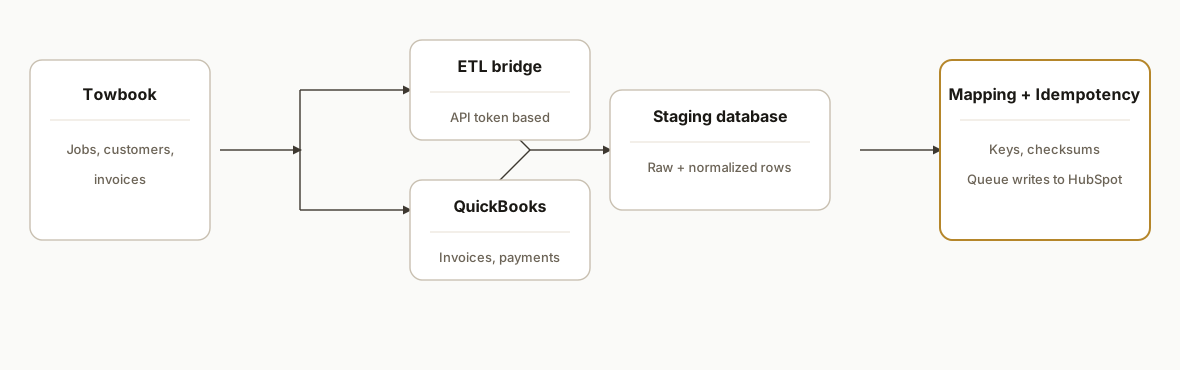
Our standard design is a two-path architecture: an ETL connection that pulls Towbook reports via API token, or a QuickBooks bridge when accounting is already connected. Both paths land in a staging database. A mapping engine normalizes rows, enforces idempotency, and pushes clean CRM objects into HubSpot on a schedule.
- Towbook source: The operational system of record for jobs, customers, rates, and invoices. There is no native HubSpot app. We avoid direct assumptions about a public developer API and use supported bridges.
- ETL pull option: Polytomic documents a Towbook connection using an API token and can pull reports such as an Accounting report. We treat Polytomic as the read surface and persist every row before any resync.
- Accounting bridge option: Towbook integrates with QuickBooks to push invoices, payments, and customers. We read from accounting and map those rows into CRM context.
- Staging and rules engine (accent): A Postgres schema holds raw and normalized tables. We compute deterministic keys, apply mapping, and keep an append-only ledger for idempotency.
- HubSpot write layer: A worker reads the normalized queue and creates or updates companies, contacts, deals, and timeline notes. It batches writes and retries on transient errors.
Step-by-step: how to build it
1) Pick the bridge and declare mappings
Decide whether you will pull Towbook reports via an ETL connector or read the accounting trail from QuickBooks. Declare the mapping up front so engineers and operators share one truth.
# config/mappings.yaml
bridge: etl  # etl or quickbooks
keys:
  job: [towbook_job_id]
  invoice: [invoice_number]
  customer: [towbook_customer_id, phone, email]
match_rules:
  company: [normalized_name, billing_postal]
  contact: [email|phone]
  deal: [invoice_number|towbook_job_id]
associations:
  deal_to_company: company_id
  deal_to_contact: primary_contact_id
  activity_to_deal: deal_id
Gotcha: no native Zapier or Make app exists for Towbook. Plan on an ETL or accounting bridge and the mapping work that comes with it.
2) Land raw rows and compute deterministic keys
Stage every ETL or accounting row before transforming. Deterministic keys prevent duplicate HubSpot objects and let you re-run safely.
-- staging/raw_towbook_rows.sql
create table if not exists raw_towbook_rows (
  src text not null,              -- 'etl' or 'quickbooks'
  payload jsonb not null,
  seen_at timestamptz not null default now()
);

-- staging/normalized_jobs.sql
create table if not exists normalized_jobs (
  dedupe_key text primary key,    -- e.g., 'job:123456'
  job_number text,
  customer_ref text,
  pickup_at timestamptz,
  dropoff_at timestamptz,
  status text,
  amount_cents int,
  updated_at timestamptz
);

-- compute keys in SQL for transparency
create or replace view v_jobs as
select
  'job:' || (payload->>'towbook_job_id') as dedupe_key,
  payload->>'towbook_job_id' as job_number,
  payload->>'towbook_customer_id' as customer_ref,
  (payload->>'pickup_at')::timestamptz as pickup_at,
  (payload->>'dropoff_at')::timestamptz as dropoff_at,
  coalesce(payload->>'status','') as status,
  ((payload->>'amount')::numeric * 100)::int as amount_cents,
  (payload->>'updated_at')::timestamptz as updated_at
from raw_towbook_rows
where (payload->>'towbook_job_id') is not null;
Key point: Polytomic's Towbook Accounting report sync starts with one week of history. Persist raw rows immediately to avoid losing history on a resync.
3) Add an idempotency ledger for safe re-runs
The ledger records every successful HubSpot write per dedupe key and target object. Workers check this before attempting another write.
create table if not exists write_ledger (
  dedupe_key text not null,
  target text not null,           -- 'company'|'contact'|'deal'|'activity'
  external_id text not null,      -- HubSpot object id returned
  checksum text not null,         -- hash of fields written
  written_at timestamptz not null default now(),
  primary key (dedupe_key, target)
);
We compute a SHA-256 over the normalized fields. If nothing changed, we skip the write.
4) Normalize rows into CRM-ready shapes
Keep the mapping logic explicit and testable. This function expresses the business rules only. The transport lives elsewhere.
// lib/mapTowbook.js
import crypto from "node:crypto";

export function mapJobToDeal(job, customer) {
  const name = `Tow ${job.job_number} for ${customer?.name || "Unknown"}`;
  const amount = Number.isFinite(job.amount_cents) ? job.amount_cents : 0;
  const stage = stageFromStatus(job.status); // e.g., 'new', 'invoiced', 'paid'
  const properties = {
    dealname: name,
    amount: Math.round(amount / 100),
    closedate: job.dropoff_at || job.pickup_at,
    pipeline: "Towing",
    dealstage: stage
  };
  const checksum = crypto
    .createHash("sha256")
    .update(JSON.stringify(properties))
    .digest("hex");
  return { dedupeKey: `deal:${job.job_number}`, properties, checksum };
}

function stageFromStatus(status) {
  const s = (status || "").toLowerCase();
  if (s.includes("paid")) return "paid";
  if (s.includes("invoice")) return "invoiced";
  return "new";
}
Unit test the mapper with staged fixtures so changes are intentional.
5) Queue writes and enforce order of operations
Companies and contacts should exist before deals and activities. Use a small work queue and explicit association IDs.
create table if not exists write_queue (
  id bigserial primary key,
  target text not null,           -- company|contact|deal|activity
  dedupe_key text not null,
  body jsonb not null,
  depends_on text[],              -- prior dedupe keys to resolve
  enqueued_at timestamptz not null default now(),
  attempts int not null default 0,
  status text not null default 'queued' -- queued|sent|failed
);
We enqueue in this order for each record group: company, contact, deal, then activity. The worker skips any record whose checksum already matches the ledger.
6) Backfill, then schedule ongoing syncs
Run a backfill against staged history first. Then schedule incremental pulls and pushes. Without confirmed Towbook webhooks, schedule polling at a cadence that fits volume.
# backfill all staged jobs to the queue
node scripts/enqueue-jobs.js --since 2024-01-01

# run worker every 5 minutes via your scheduler of choice
node scripts/worker.js
If you use QuickBooks as the bridge, plan around its own push timing and only treat posted invoices as deal updates to avoid premature pipeline moves.
Where it gets complicated
No native Zapier/Make or HubSpot app. There is no Towbook app in Zapier or Make. Expect to bridge through an ETL connector or QuickBooks. That adds mapping work and limits real time triggers.
ETL history limits. Polytomic's Towbook Accounting report sync starts with one week of history. Resyncs can drop older rows unless you persist them. Our pattern: land every row immediately in Postgres, then transform.
Webhooks are unconfirmed. We did not rely on Towbook outbound webhooks. We schedule pulls. If you need minute-level freshness, tune cadence and scope to avoid rate or cost surprises.
Accounting semantics vs sales stages. QuickBooks reflects accounting truth. HubSpot reflects sales process. An invoice paid in accounting may not mean the relationship is won in CRM. Encode this separation in your stage rules.
Consumer tows complicate matching. A lot of jobs are one-time consumers. Domain-based company matching is weak. We match companies for fleet and insurer accounts, and route consumer jobs to contacts plus activities without creating empty companies.
Versioned updates. Invoices and jobs can be edited. We checksum the normalized fields and only write when the hash changes so edits propagate without duplicate objects.
What this actually changes
For a towing operator, this integration moves sales and account context out of inboxes and into HubSpot. Dispatch still runs Towbook. Sales sees every job and invoice as a deal with timeline context, and account managers get tasks when invoices age or fleet jobs recur. When the bridge is an ETL pull, the first sync starts with one week of Towbook Accounting history as documented by the connector, so stage earlier history before turning it on. Source: Polytomic's Towbook connector notes that its Accounting report sync begins with one week and resyncs can remove older rows if not persisted (https://docs.polytomic.com/docs/towbook).
Frequently asked questions
Does Towbook have a native HubSpot or Zapier app?
We did not find a Towbook app in the public Zapier or Make directories. We treat Towbook as a closed source and bridge it through an ETL connector that accepts a Towbook API token or through the QuickBooks accounting integration. That is the safest way to get Towbook data into HubSpot today.
Can this run in near real time?
We schedule pulls. Without confirmed Towbook webhooks, we do not promise instant events. Most towing teams run a 5 to 60 minute cadence. If accounting is the bridge, updates follow QuickBooks push timing. The worker batches and retries so HubSpot stays consistent.
What data do you sync into HubSpot?
We map Towbook jobs, customers, and invoices into companies, contacts, deals, and timeline activities. Which fields land where is controlled by a mapping file and a testable mapper so you can evolve it safely as processes change.
How do you prevent duplicates in HubSpot?
We compute deterministic dedupe keys per record type and keep an append-only ledger with a checksum of the last write. If the checksum matches, we skip. If it changes, we update in place and keep associations stable.
Do we have to change our Towbook workflow?
No. Dispatch keeps using Towbook. The integration reads Towbook via an ETL or QuickBooks and mirrors the right pieces into HubSpot for sales and account follow-up. That lets each team use purpose-built tools without retyping.
What does it cost to run monthly?
The ongoing footprint is modest. An ETL connector fee and a small worker on your infra are typical. We quote the build as a fixed scope. Volume and cadence drive the ETL cost; we size it during discovery.
If you want Towbook flowing into a usable sales system without manual copy and paste, this is the pattern we build. See our other Towbook posts like Towbook to QuickBooks invoicing sync and our broader CRM automation services. When you are ready, book a 15 minute call. We will confirm which path fits your stack and timeline.
Want us to build this for you?
Nine questions, about 90 seconds. You see the hours it is costing you, then pick a time. No pitch.
Get your free assessment