
We built and shipped a Zenoti integration that syncs guests and bookings into HubSpot or your CRM so rebooking, recall, and win-back campaigns run automatically. In production it listens to Zenoti webhooks, enriches guests, upserts contacts and timeline events, and triggers sequences based on last visit and service history.
Zenoti retention integration is: using Zenoti's API, webhooks, and scheduled exports to keep your CRM updated with guests and appointments so you can rebook on time, recall by service, and win back lapsed clients.
The problem it solves
Most med-spas still export Zenoti reports, paste lists into a CRM, and click send on one-off emails. That breaks whenever staff get busy, custom fields do not map, or a client rebooks between export and blast. The result: missed rebooks, generic messages, and no structured view of who returned.
| Task | Manual in Zenoti + CRM | Automated with our Zenoti integration |
|---|---|---|
| Guest updates | Export CSV weekly. Import to CRM. Fix duplicates | Webhooks fan-in to a service that upserts contacts in seconds |
| Rebooking reminders | Filter last-visit by hand. Build a list each week | Rules trigger when no next appointment and last visit in X days |
| Recall by service | Build report by service codes and date range | Mapped service codes tag the contact and start the right flow |
| Win-back lapsed clients | Ad hoc searches. One-size emails | Segments by lapse windows and service history, with tailored copy |
| Data hygiene | Spreadsheet fixes and merges | Idempotent keys and timeline events keep the CRM accurate |
How the automation works
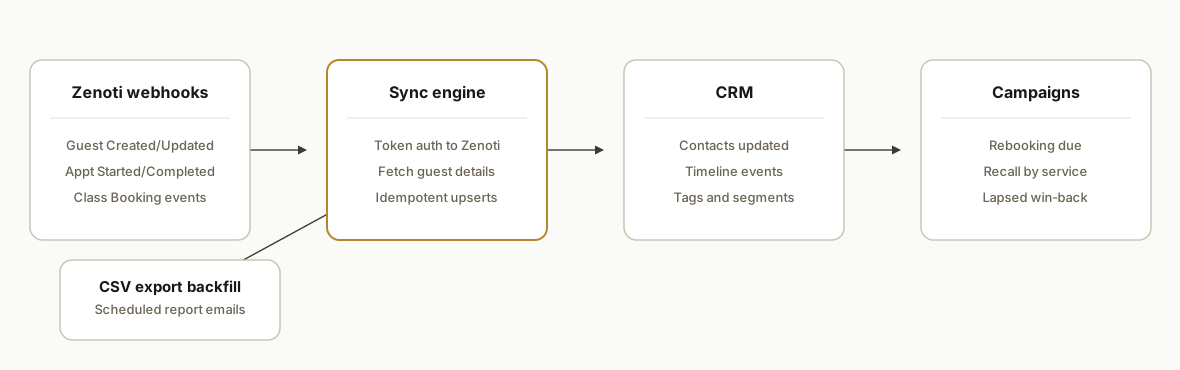
Answer first: Zenoti sends webhooks for guest and appointment changes. A small service verifies the call, fetches the latest guest record via the Zenoti API, normalizes it, and upserts to your CRM with timeline events that power rebooking, recall, and win-back automations. A scheduled CSV email export acts as a safe backfill path.
- Zenoti webhooks: We subscribe to events like Guest Created or Updated, Appointment Started or Completed, and Class Booking Created or Cancelled. Webhooks are the real-time spine that eliminates export lag.
- Token auth: We generate an access token against Zenoti using the documented token endpoint. Tokens are stored server-side and rotated.
- Sync engine: A stateless handler dedupes, enriches, and upserts guests and appointments to the CRM. It is idempotent by design.
- CRM triggers: We compute segments in code: due to rebook, due for recall by service, and lapsed by 60, 120, or 180 days, then set fields or tags the CRM sequences listen for.
- CSV backfill: We schedule Zenoti report emails to a service mailbox. Attachments are parsed to backfill history or heal gaps after outages.
Step-by-step: how to build it
1) Create a Zenoti access token
Generate an access token using Zenoti's documented token endpoint. Keep credentials server-only and rotate on schedule.
// auth/zenoti.js
import fetch from "node-fetch";

export async function getZenotiToken() {
  const url = "https://api.zenoti.com/v1/tokens"; // per Zenoti docs
  const resp = await fetch(url, {
    method: "POST",
    headers: {
      "Content-Type": "application/json"
    },
    body: JSON.stringify({
      // populate with your Zenoti credentials or API key payload
      // follow https://docs.zenoti.com/reference/generate-an-access-token
      client_id: process.env.ZENOTI_CLIENT_ID,
      client_secret: process.env.ZENOTI_CLIENT_SECRET,
      grant_type: "client_credentials"
    })
  });
  if (!resp.ok) throw new Error(`Zenoti token failed: ${resp.status}`);
  const data = await resp.json();
  return { token: data.access_token, expiresIn: data.expires_in };
}
Key gotcha: do not put Zenoti credentials in client code. Keep them in server env and rotate proactively.
2) Receive Zenoti webhooks and verify
Stand up a minimal HTTPS endpoint to receive guest and appointment notifications. Zenoti documents numerous webhook events and failure handling when deliveries repeatedly fail.
// api/webhooks/zenoti.js
import express from "express";
import { queueSync } from "../jobs/sync.js";

const app = express();
app.use(express.json());

app.post("/webhooks/zenoti", async (req, res) => {
  // Optionally verify a shared secret if configured
  const evt = req.body; // contains event type and resource ids
  // Only enqueue the event types you map
  const allowed = new Set([
    "Guest Created",
    "Guest Updated",
    "Appointment Completed",
    "Class Booking Cancelled"
  ]);
  if (!allowed.has(evt.eventType)) return res.status(202).end();
  await queueSync(evt);
  res.status(202).end();
});

export default app;
Tip: handle retries idempotently and return 2xx quickly. Zenoti can inactivate failing webhooks until issues are resolved, so keep the endpoint healthy.
3) Fetch the latest guest record before writing
On webhook, pull the canonical guest from Zenoti so your CRM write reflects the latest state.
// zenoti/guests.js
import fetch from "node-fetch";
import { getZenotiToken } from "../auth/zenoti.js";

export async function getGuest(guestId) {
  const { token } = await getZenotiToken();
  const resp = await fetch(`https://api.zenoti.com/v1/guests/${guestId}`, {
    headers: { Authorization: `Bearer ${token}` }
  });
  if (!resp.ok) throw new Error(`Guest fetch failed ${resp.status}`);
  return await resp.json();
}
Reference: Zenoti documents retrieving guest details at the guests endpoint.
4) Normalize into a CRM-ready payload
Map core fields consistently. If Zenoti custom fields are important, note Zapier does not support custom fields; use the API path for a full map.
// map/payloads.js
export function toCrmContact(guest, lastAppt) {
  return {
    external_id: `zenoti:${guest.id}`,
    email: guest.email,
    phone: guest.phone,
    first_name: guest.first_name,
    last_name: guest.last_name,
    tags: [
      ...(guest.gender ? [`gender:${guest.gender}`] : []),
      ...(lastAppt?.service_name ? [`svc:${lastAppt.service_name}`] : [])
    ],
    properties: {
      last_visit_at: lastAppt?.end_time || null,
      next_appointment_at: guest.next_appointment_at || null,
      zenoti_loyalty_tier: guest.loyalty_tier || null
    }
  };
}
Guardrail: make the external_id deterministic so upserts are idempotent across replays.
5) Upsert to the CRM and write a timeline event
Keep the sink pluggable. We upsert the contact, then append a timeline event for appointment completed. Sequences key off either tags or properties.
// sinks/crm.js
import fetch from "node-fetch";

export async function upsertContact(contact) {
  const resp = await fetch(`${process.env.CRM_URL}/contacts`, {
    method: "PUT",
    headers: {
      "Content-Type": "application/json",
      Authorization: `Bearer ${process.env.CRM_TOKEN}`
    },
    body: JSON.stringify(contact)
  });
  if (!resp.ok) throw new Error(`CRM upsert failed ${resp.status}`);
  return await resp.json();
}

export async function addTimelineEvent(contactId, evt) {
  await fetch(`${process.env.CRM_URL}/contacts/${contactId}/events`, {
    method: "POST",
    headers: {
      "Content-Type": "application/json",
      Authorization: `Bearer ${process.env.CRM_TOKEN}`
    },
    body: JSON.stringify(evt)
  });
}
Make sure the CRM side has sequences that watch for properties like last_visit_at and next_appointment_at to start rebooking or win-back flows.
6) Backfill safely via scheduled CSV email exports
Zenoti can schedule report emails. Pipe those to a service mailbox and parse attachments to backfill history without hammering APIs.
// backfill/email-csv.js
import { simpleParser } from "mailparser";
import imaps from "imap-simple";
import Papa from "papaparse";

export async function consumeCsvMailbox() {
  const conn = await imaps.connect({
    imap: {
      user: process.env.IMAP_USER,
      password: process.env.IMAP_PASS,
      host: process.env.IMAP_HOST,
      port: 993,
      tls: true
    }
  });
  await conn.openBox("INBOX");
  const searchCriteria = ["UNSEEN"];
  const fetchOptions = { bodies: [""], struct: true };
  const messages = await conn.search(searchCriteria, fetchOptions);
  for (const m of messages) {
    const parsed = await simpleParser(m.parts.find(p => p.which === "").body);
    for (const att of (parsed.attachments || [])) {
      if (!att.filename.endsWith(".csv")) continue;
      const { data } = Papa.parse(att.content.toString(), { header: true });
      // Map CSV rows to CRM upserts here
    }
  }
  await conn.end();
}
This path also insulates you from temporary webhook inactivation while you fix an endpoint.
Does this work with HubSpot, Salesforce, and GoHighLevel?
Yes. We keep the sink pluggable and ship with mappings for common CRMs:
- HubSpot: we upsert contacts, set custom properties for last and next visit, and let workflows enroll when properties change. For a pattern on lightweight CRM wiring, see our GoHighLevel CRM automation pattern.
- Salesforce: we upsert Contact by external id and write an Activity or custom object event for Appointment Completed so Process Builder or Flow can branch by service and lapse window.
- GoHighLevel: we set tags and custom values the automations listen for to start rebooking or win-back sequences per service.
We also support Pipedrive and HubSpot task creation when you want staff calls rather than fully automated messages. If you need rapid-response follow-up on inbound replies, see how we structure customer response automation.
How we set rebooking and recall windows by service
Rebooking is not one-size. Injectables, laser, and facials have different cadences. We encode windows by service code and unit in a small config so the engine computes due dates consistently.
// config/recall-windows.js
export const recallWindows = {
  BOTOX: { rebookInDays: 90, winbackAfterDays: [120, 180] },
  FILLER: { rebookInDays: 180, winbackAfterDays: [210, 270] },
  FACIAL: { rebookInDays: 30, winbackAfterDays: [45, 90] },
  LASER_HAIR: { rebookInDays: 42, winbackAfterDays: [60, 120] }
};
On Appointment Completed, we look up the code, stamp next_due_at, attach a service tag, and let your CRM start the correct flow. We also skip rebooking when next_appointment_at is already present so guests are not double messaged.
Multi-location and consent: what to map
- Location mapping: we normalize Zenoti location identifiers into a single CRM field so reporting and segments aggregate correctly across branches. If a guest visits multiple locations, we maintain one contact with a multi-value location history.
- Consent and channel rules: we carry over email or SMS opt-in flags when available, and we honor CRM-side consent where Zenoti reports do not expose a flag. No enrollment happens without a consent indicator. If you operate in Canada or the EU, review our data residency considerations.
- Duplicate control: we key upserts on a deterministic external id plus email or phone fallback to avoid duplicates when staff update contact details between visits.
How to integrate Zenoti with HubSpot: fields and workflows
When the sink is HubSpot, we keep it simple and reliable:
- Contact identity: set a deterministic external id like zenoti:guestId and use email or phone as secondary identifiers.
- Core properties: last_visit_at, next_appointment_at, and zenoti_loyalty_tier as custom properties. Update on every Appointment Completed or Guest Updated.
- Service context: write service tags such as svc:Botox or svc:Facial on the contact and add a timeline event for Appointment Completed with the service name and location.
- Enrollment: create HubSpot workflows that enroll when last_visit_at changes and next_appointment_at is empty. Branch by svc: tag to send the right rebooking or recall. For win-back, use date math on last_visit_at and your configured lapse windows.
- Human handoff: for higher value services, create tasks instead of emails so staff can call or text. Our approach mirrors how we wire low-lift CRM actions in the GoHighLevel CRM automation pattern.
This gives you near real-time enrollment without custom code inside HubSpot. The sync service owns correctness and idempotency.
Zenoti webhook setup checklist
Use this to avoid false starts during provisioning:
- Identify events: start with Guest Created, Guest Updated, Appointment Completed, and cancellations you care about. Add more only when you have a use case.
- Endpoint readiness: expose a stable HTTPS endpoint that returns 2xx quickly and queues work. Log the event type and resource id, not the full payload, for privacy.
- Verification: if you configure a shared secret, validate it before queuing. Reject on mismatch and alert.
- Retries: keep your handler idempotent so a retried event cannot double-enroll a contact. Always re-fetch the latest guest before writing to the CRM.
- Backstop: schedule the CSV report email for daily or weekly backfill so you can heal gaps after downtime.
GoHighLevel specifics: tags and custom values that trigger flows
If your sink is GoHighLevel, we lean on tags and custom values the automations already watch:
- Tags: svc:ServiceName for service context, lapse:60d or lapse:120d for win-back windows, and loc:ShortCode for location.
- Custom values: last_visit_at and next_appointment_at as ISO strings. Automations trigger when next_appointment_at is empty and last_visit_at moves into a due window.
- Mixed mode: for premium services, tag needs-call so staff get a task instead of sending an automated SMS.
This keeps the Zenoti sync decoupled from builder logic while giving marketers control inside GoHighLevel.
Where it gets complicated
- Zapier limits and field gaps: The official Zapier app supports up to 40 webhook subscriptions, does not support custom fields, and only works with cloud-hosted Zenoti accounts. If you need custom fields or many event subscriptions, use the API path.
- Webhook failure handling: Zenoti documents that failing webhooks can be inactivated until issues are resolved. Build fast 2xx responses and a retryable job queue so a transient CRM outage does not disable your feed.
- Community Make app: A Make.com connector exists but is community-developed and not maintained by Make. Treat it as a convenience for light tasks, not the backbone of a production sync.
- Real-time versus correctness: Always re-fetch the guest on webhook before writing to your CRM so you do not sync a stale payload when multiple edits land quickly.
- Appointment semantics: Rebooking logic depends on next_appointment_at and completion state. Model the window by service. For example, inject a different rebook cadence for injectables versus facials.
- Multi-location mapping: Normalize location identifiers so segments and reports work across branches without duplicating contacts.
What this actually changes
For a multi-location med-spa, this removed the weekly export ritual and stopped recall campaigns from missing clients who rebooked after a CSV was pulled. Staff saw rebooking prompts fire on time, recall flows align to the last service, and lapsed-client win-backs get sequenced without manual slicing. The structural value is retention: it is widely cited that acquiring a new customer can cost five to twenty-five times more than retaining an existing one (Harvard Business Review: https://hbr.org/2014/10/the-value-of-keeping-the-right-customers). Turning rebooking and recall into always-on flows protects that margin.
Frequently asked questions
Does Zenoti have an API we can use for this?
Yes. Zenoti publishes API docs on api.zenoti.com and documents token generation and guest retrieval. We use the token endpoint to obtain an access token and then call endpoints like guests to keep the CRM accurate.
Can this run in real time or is it a nightly batch?
It runs near real time using Zenoti webhook events such as Guest Created or Updated and Appointment Completed. We add a scheduled CSV email backfill to heal gaps and to load history safely.
Do we have to use Zapier or Make?
No. We use Zenoti's API and webhooks directly for production. Zapier exists but is capped at 40 webhook subscriptions and does not support custom fields. A Make.com app exists as community-developed, which we treat as non-critical.
Will custom fields map into our CRM?
Through the API path, yes. Zapier does not support custom fields for Zenoti, so if your retention logic depends on custom fields we integrate via the API and store those fields in your CRM.
How fast is the initial setup?
The build is measured in weeks, not months. We establish webhook subscriptions, token auth, CRM mappings, and backfill. Exact timing depends on how many custom fields and segments you want to drive.
If you are on Zenoti and want rebooking, recall, and win-back handled without exports, we have this running in production. See our related post on Boulevard CRM rebooking integration. For broader CRM buildouts, see our services at /services#crm-automation or book a 20-minute call.
Want us to build this for you?
Nine questions, about 90 seconds. You see the revenue it is costing you, then pick a time. No pitch.
See your options