
A complete AI automation contract in 2026 has nine parts: pricing model, scope, milestones, acceptance, IP ownership, data and security, SLAs, warranty and maintenance, and a change order process. We wrote this from first-hand experience delivering automations for small businesses in Vancouver and across North America. Use this as your clause-by-clause checklist before you sign.
AI automation SOW definition: a statement of work is the addendum to your master agreement that itemizes deliverables, dates, validation steps, and how changes are handled for one build.
The problem it solves
A vague quote and a handshake leave you exposed to scope creep, data risks, and schedule slips. A written contract plus a precise SOW turns that into a testable plan with clear gates, so you pay for outcomes not effort. McKinsey reported large IT projects run 45 percent over budget on average, mostly from unclear scope and weak governance (source: https://www.mckinsey.com/capabilities/mckinsey-digital/our-insights/delivering-large-scale-it-projects-on-time-on-budget-and-on-value).
| Manual ad hoc approach | Written contract and SOW automation |
|---|---|
| One-line quote, no dates | Milestoned deliverables with acceptance tests |
| Fuzzy scope, endless tweaks | Change orders with impact on cost and time |
| No data terms | Data ownership, retention, residency, and encryption spelled out |
| Pay for hours | Pay for milestones or outputs in production |
| Surprises during go-live | Shadow mode and backfill plans defined up front |
What automating one manual process is worth
Move the sliders to your own numbers. The defaults are only an example business, not client data.
Revenue the freed hours could earn each year
$41,600
8 hrs a week × 52 × $100
- Cost of errors and rework each year
- $6,000
- $500 a month × 12
- Staff cost of doing it by hand each year
- $14,560
- 8 hrs a week × $35/hr × 52 weeks
- Hours handed to the system each month
- 35 hrs
- 8 hrs a week × 52 ÷ 12
How the engagement should work
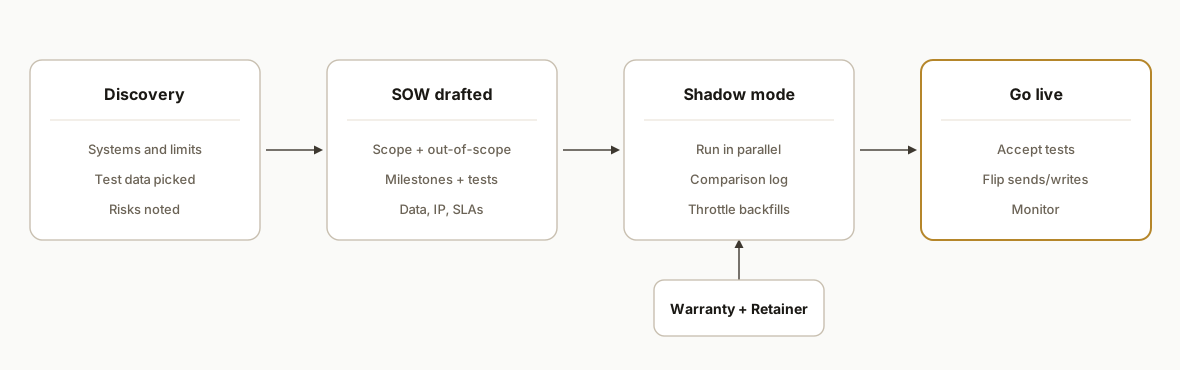
The safest path is a gated flow: discovery. SOW draft. sign. build by milestones. accept or fix. warranty. then optional retainer. We designed this after shipping real systems where backfills, API blind spots, data residency, and PII surfaced at the worst possible time if not captured in writing.
- Discovery and scoping notes: capture systems, constraints, and test data. We include rate-limit realities, data sensitivity, and backfill windows here.
- SOW draft and redlines: list outputs and tests that prove them. Clients edit here, not mid-build.
- Milestone delivery with shadow mode: run the automation in parallel before touching live sends or writes.
- Acceptance and go-live: you validate against the SOW tests, then we flip the switch.
- Warranty then retainer: bug-fix window is time-bound. Enhancements move under a monthly plan if you want ongoing changes.
Step-by-step: how to build your SOW
1) Lock the pricing model before scope
Pick one pricing spine and write it in the SOW header: fixed fee per milestone, time and materials with a not-to-exceed, or a monthly retainer with defined throughput. Tie payments to artifacts you can verify. PMI has long flagged poor requirements as a primary failure driver, so pricing that hides scope is risky (source: https://www.pmi.org/learning/thought-leadership/pulse).
# section: commercial-terms
pricing_model: milestone-fixed-fee
milestones:
  - id: M1
    name: Data ingestion + mapping
    fee: 3500
    acceptance: "CSV sample X ingested to table Y with 0 schema errors"
  - id: M2
    name: Shadow-mode run
    fee: 2500
    acceptance: "7-day shadow log matches human output within agreed rules"
payment_terms: Net 7
change_orders: "Required for any scope outside acceptance tests"
Key gotcha: if you choose a retainer, define throughput in units per month, not hours, and state what rolls over.
2) Write a tight scope and out-of-scope list
List deliverables as testable outputs: endpoints, dashboards, files, or messages that exist by the end. Add an explicit out-of-scope list for anything the buyer might assume. We learned to list vendor limitations up front when a platform exposes no API or drops fields during export.
# section: scope
in_scope:
  - "Nightly sync from System A to Postgres with idempotent upsert"
  - "Reply drafting in shadow mode. No auto-send until acceptance"
  - "Admin toggle to pause automation"
out_of_scope:
  - "Platform-native webhooks that do not exist"
  - "Bulk backfill older than 180 days unless added by change order"
  - "Unlimited copy iterations; two rounds included"
3) Add milestones and acceptance tests that a non-engineer can run
Each milestone should include an acceptance procedure you can perform without our help. On builds with customer messaging, we require shadow mode and a comparison log so acceptance is objective, not a vibe.
# section: milestones
- id: M1
  tests:
    - "Open /admin -> Settings shows live creds redacted"
    - "Run 'Test Sync' -> 50 sample rows appear in table target.records"
- id: M2
  tests:
    - "Shadow run for 7 calendar days"
    - "Open /admin/logs and export CSV"
    - "Variance <= 5% vs human baseline on the agreed fields"
Key gotcha: acceptance cannot depend on third parties flipping switches. If a vendor approval is pending, isolate it as its own milestone or risk sitting blocked.
4) State IP ownership and license clearly
Small businesses should own their data and the configuration unique to their process. Agencies often retain a reusable framework license. Write both. If you need assignment of custom code, say it and include a license-back so we can maintain it. Ambiguity here creates friction later if you switch vendors.
# section: ip
ownership:
  data: client
  config_and_prompts: client
  reusable_frameworks: agency
license_to_client: "Perpetual, worldwide, royalty-free for delivered artifacts"
license_back_to_agency: "Non-exclusive right to use generic components for other clients"
5) Lock down data, security, and residency
Spell out what data the system touches, where it is stored, who holds the keys, and how long logs persist. If you operate in Vancouver or serve Canadian customers, document data residency expectations in writing. IBM's 2024 report pegged average data breach costs at USD 4.88M, which is why we default to encryption for sensitive fields and short log retention (source: https://www.ibm.com/reports/data-breach).
# section: data-security
pii_classes:
  - email
  - phone
  - last4_ssn
storage: "Postgres on client tenant"
encryption_at_rest: "AES-256-GCM for sensitive columns"
key_ownership: "Client-owned cloud KMS"
log_retention_days: 30
canada_residency: true  # set true if data must remain in Canada
Key gotcha: vendor API keys should live in your accounts. If we start with ours for speed, the SOW must include a transfer step before go-live.
6) Define SLAs, warranty, and maintenance
Separate build warranty from live SLAs. Warranty is a time-limited bug-fix window for what was delivered. SLAs apply only if you opt into ongoing support. Write severity levels, response targets, and a maintenance calendar to handle upstream API changes.
{
  "warranty_days": 30,
  "sla_plan": "standard",
  "severities": {
    "S1": {"impact": "system down", "response_hours": 4},
    "S2": {"impact": "major function degraded", "response_hours": 12},
    "S3": {"impact": "minor defect", "response_hours": 48}
  },
  "maintenance": {
    "api_monitoring": true,
    "dependency_updates": "quarterly",
    "incident_comms": "email + status page"
  }
}
Key gotcha: do not imply a 24 by 7 SLA unless it is priced and staffed. State coverage hours and holidays.
7) Make change orders boring and fast
Changes are normal. Price them with a small assessment plus either a fixed add or a micro-milestone. Tie each change to a modified acceptance test so it cannot balloon silently.
# section: change-order
trigger: "Any request outside in_scope or that alters acceptance tests"
review_fee: 250
pricing: "Fixed per change with updated acceptance steps"
impact_doc: "Always states cost, timeline delta, and risk"
Key gotcha: backfills can explode email volume or API costs. Your SOW should require a backfill plan and a throttle setting before any bulk run.
Where it gets complicated
- Shadow mode and backfills: Automations that send emails or update CRMs should run in parallel first. We have seen backfills accidentally trigger hundreds of messages when the sent-state was not seeded. Your SOW needs a safe backfill plan and a throttle.
- Vendor limitations: Some platforms lack APIs or ignore filters on key reports. The SOW must list these constraints so the output is judged against what is actually retrievable.
- PII handling and audit logs: If you touch SSNs or health data, store last four only, encrypt at rest, and use append-only audit logs. This avoids silent edits and supports compliance reviews.
- Ownership of connections: Put OAuth connections and API keys on your accounts. We have migrated keys mid-build when a vendor rotated credentials and it always costs time without adding value.
- Model and provider swaps: Keep the model swappable. Contracts that name a single model create brittle systems and turn upgrades into projects. Write a clause that allows provider switches with no functional change order.
- Regional considerations for Vancouver buyers: Many Vancouver small businesses need Canadian data residency. Write residency and hosting regions directly into the SOW and reference your privacy policy. See our separate guide on data residency for details.
What this actually changes
For small businesses in Vancouver evaluating an AI automation agency, a precise SOW turns risk into a plan you can manage. You get predictable payment gates, a safe shadow period, and clarity on data and ownership. McKinsey's analysis of large IT projects shows governance and scoping are the levers that prevent budget creep, so the contract is not paperwork. It is the control surface that protects your outcome (source: same McKinsey link above).
We also find negotiations are faster when out-of-scope is explicit and change orders are lightweight. You do not need legalese. You need short, testable sentences and a table of what is in and out.
Frequently asked questions
What pricing model should a small business pick in 2026?
For a first build, milestone fixed fee tied to acceptance tests is simplest. Retainers work after trust is built and only if throughput is defined in units per month. Time and materials needs a not-to-exceed to protect working capital.
Does a Vancouver small business need Canadian data residency?
If you store personal information for Canadian customers, write your residency expectation into the SOW and host accordingly. Many vendors offer Canada regions. We cover this in our separate post on Vancouver data residency.
Do I need a separate SOW if I already have a master services agreement?
Yes. The MSA handles legal boilerplate. The SOW is where you specify deliverables, tests, dates, and prices. That is the only place scope, acceptance, and change orders live.
How do we prevent scope creep without slowing progress?
List out-of-scope items and a fast change order path. Keep change orders short. Include cost, days added, and the new acceptance test. Approve, then build.
What SLAs are reasonable for a small business?
Write business hours coverage by default, with clear severity targets. If you truly need 24 by 7, price it and staff it. Separate the build warranty from live SLAs.
How long should the warranty be?
Thirty days is common for bug fixes on delivered scope. Enhancements and new ideas sit outside warranty and move under a paid change order or retainer.
If you want a second set of eyes before you sign with any AI automation agency in Vancouver or elsewhere, we can annotate your draft SOW in one pass. See our service outline at /services#custom-ai-integration, read our guide on Vancouver data residency, and when you are ready, book a 20 minute call.
Sources
- 1.Delivering large scale IT projects on time on budget and on valuemckinsey.com
- 2.Thought leadershippmi.org
- 3.Cost of a Data Breach Report 2026ibm.com
Curious what this would actually save you?
Put real numbers to it. The ROI calculator estimates the hours and dollars an automation like this returns, in about a minute.
See your options