
AppFolio balance sheet automation works by pulling the fund-wide balance sheet, pairing it with property-level operational breakouts for each investor, then rendering a single PDF packet per owner and emailing it on a schedule with an audit log. We built this for property managers who need investor-specific packets even when the balance sheet will not filter by property.
AppFolio balance sheet automation: a scheduled system that assembles a fund-wide balance sheet plus investor-scoped breakouts into a per-owner PDF and delivers it by email with logging.
The problem it solves
You cannot reliably filter the AppFolio balance sheet to a subset of properties. If you try to pass property filters, AppFolio still returns fund-wide numbers. That breaks per-owner packaging. Manually, teams export the balance sheet, slice it, collect other per-property reports, paste a cover, and email owners one by one. It is slow, error prone, and repeats every month.
| Manual task | Automated packet builder |
|---|---|
| Export balance sheet for the whole portfolio, then hand-slice it for each owner | Pull one fund-wide balance sheet once, reuse across all owner packets |
| Run multiple operational reports per property to add context | Auto-fetch property breakouts per owner and attach summaries |
| Assemble a PDF in Word or Google Docs | Programmatic PDF render with consistent headers and footers |
| Send individual emails and track who got what | Automated per-owner email with a log row per send |
How the automation works
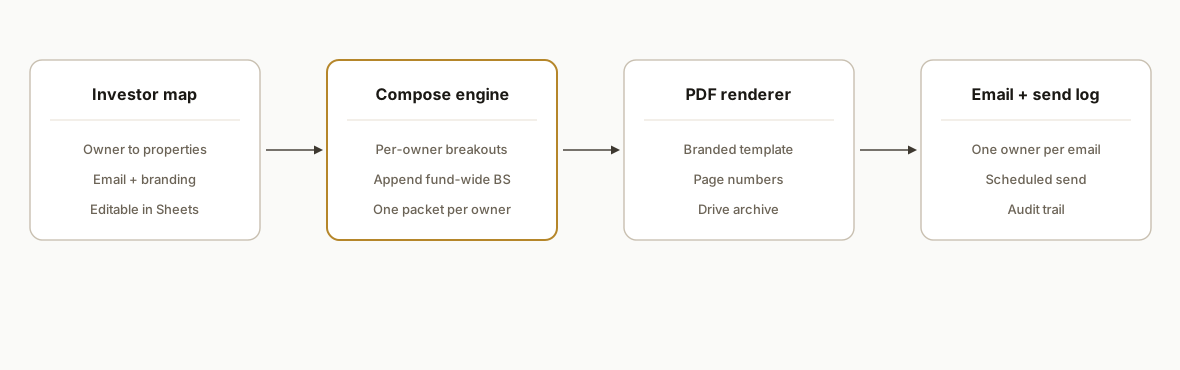
We treat the balance sheet as a fund-wide appendix. The engine builds an investor map to property IDs, fetches owner-relevant operational breakouts per property, and composes a per-owner PDF: cover, highlights, investor's properties, operational rollups, and the shared fund-wide balance sheet at the end. Delivery runs on a time trigger and logs every packet.
- Investor map: a simple table maps each owner to the properties they own. This drives the per-owner fan-out.
- Fund-wide balance sheet: fetched once per run and cached. Included as a shared appendix in all packets.
- Property breakouts: for each owner's properties, the system pulls operational summaries that can be scoped to properties and condenses them into one or two pages.
- PDF rendering: HTML templates render to PDF with consistent branding and page numbers.
- Distribution and logging: Gmail sends one packet per owner. A log records owner, period, file ID, and status so you can prove delivery.
Step-by-step: how to build it
1) Model owners and property IDs in a Sheet
Keep a single source of truth for ownership mappings so non-developers can maintain it. We use a Google Sheet tab Owners with columns: Owner, Email, PropertyIDs (comma-separated).
// Apps Script: read Owners tab into a map { ownerEmail: {name, props[]} }
function readOwnerMap() {
  const ss = SpreadsheetApp.getActive();
  const sh = ss.getSheetByName('Owners');
  const rows = sh.getRange(2,1,sh.getLastRow()-1,3).getValues();
  const map = {};
  rows.forEach(([name,email,ids]) => {
    if (!email) return;
    const props = String(ids || '')
      .split(',')
      .map(s => s.trim())
      .filter(Boolean);
    map[email] = { name, props };
  });
  return map;
}
Key gotcha: keep the property list authoritative here. Do not derive it from any single report. It drifts less if you make this the edit point.
2) Fetch and cache the fund-wide balance sheet once per period
We abstract the report fetch behind a helper so the URL and auth details stay in one place. The balance sheet fetch runs once and is reused across packets.
// Pseudocode wrapper: do not hardcode endpoints here
function fetchReport(reportName, options) {
  // behind this call: build URL, attach headers, retries, parse JSON
  // options: { periodLabel, propertyIds?, timeoutMs? }
  return ReportClient.fetch(reportName, options);
}

function getFundWideBalanceSheet(periodLabel) {
  const cache = CacheService.getScriptCache();
  const key = 'BS:' + periodLabel;
  const hit = cache.get(key);
  if (hit) return JSON.parse(hit);
  const data = fetchReport('balance_sheet', { periodLabel });
  cache.put(key, JSON.stringify(data), 3600); // 1 hour
  return data;
}
Key gotcha: treat this as immutable per period. Never try to slice it by property. It is the shared appendix in every owner packet.
3) Build per-property operational breakouts for each owner
Pull the operational reports that you can scope to properties, then condense to highlights per property: occupancy, delinquency, leasing notes, maintenance items, or whichever are relevant to your owners.
function getOwnerOperationalBreakouts(props, periodLabel) {
  // Fetch multiple scoped reports per owner's property list
  const byProperty = {};
  props.forEach(propId => { byProperty[propId] = {}; });

  const rentRoll   = fetchReport('rent_roll_summary', { periodLabel, propertyIds: props });
  const vacancy    = fetchReport('vacancy_summary',   { periodLabel, propertyIds: props });
  const workOrders = fetchReport('work_orders_view',  { periodLabel, propertyIds: props });
  const delinquency= fetchReport('delinquency_view',  { periodLabel, propertyIds: props });

  // Reduce raw rows into a compact per-property snapshot
  rentRoll.forEach(r => { byProperty[r.property_id].rr = compactRentRoll(r); });
  vacancy.forEach(v => { byProperty[v.property_id].vac = compactVacancy(v); });
  workOrders.forEach(w => {
    const p = byProperty[w.property_id];
    p.wos = p.wos || [];
    p.wos.push(compactWO(w));
  });
  delinquency.forEach(d => { byProperty[d.property_id].del = compactDel(d); });

  return byProperty;
}
Key gotcha: normalize property names across report types. Use a single canonical property ID to merge rows.
4) Compose the per-owner packet content
Build a single data object that the template can render: cover, highlights, property cards, and balance sheet appendix.
function composeOwnerPacket(owner, props, periodLabel) {
  const bsFundWide = getFundWideBalanceSheet(periodLabel);
  const breakouts  = getOwnerOperationalBreakouts(props, periodLabel);

  return {
    period: periodLabel,
    ownerName: owner.name,
    properties: Object.keys(breakouts).map(pid => ({
      id: pid,
      name: lookupPropertyName(pid),
      snapshot: breakouts[pid]
    })),
    appendix: { balanceSheet: bsFundWide }
  };
}
Key gotcha: keep the appendix separate so page numbering works when you render a multi-section PDF.
5) Render to a branded PDF with HTML templates
We render HTML with inline CSS, then convert to PDF. Brand elements live in one template so edits propagate everywhere.
function renderPdf(packet) {
  const tpl = HtmlService.createTemplateFromFile('packet_template');
  tpl.data = packet;
  const html = tpl.evaluate().setSandboxMode(HtmlService.SandboxMode.IFRAME);
  const blob = html.getAs('application/pdf').setName(
    `${packet.ownerName}, Balance Sheet Packet, ${packet.period}.pdf`
  );
  const file = DriveApp.getFolderById(getConfig().outputFolderId).createFile(blob);
  return { fileId: file.getId(), name: file.getName(), url: file.getUrl() };
}
Key gotcha: long packets can hit renderer limits. Keep breakout sections concise and push detail to the appendix.
6) Email and log each delivery
Send one email per owner, attach the PDF, and write a log row.
function sendOwnerPacket(email, packetFile, periodLabel) {
  const subj = `Balance Sheet Packet: ${periodLabel}`;
  const body = `Hi,
Here is your balance sheet packet for ${periodLabel}.`;
  GmailApp.sendEmail(email, subj, body, { attachments: [DriveApp.getFileById(packetFile.fileId).getBlob()] });

  const log = SpreadsheetApp.getActive().getSheetByName('Log');
  log.appendRow([new Date(), email, periodLabel, packetFile.fileId, packetFile.name, 'SENT']);
}
Key gotcha: sender identity. If owners expect a shared mailbox name, configure Send-As in Gmail first. The script cannot create that alias for you.
7) Add a monthly trigger and a safe backfill switch
Create one time trigger to run after close. Add a Backfill tab to list historical periods you want to generate without re-emailing by default.
function runMonthly() {
  const period = computePeriodLabel(new Date()); // e.g., 2026-06
  const owners = readOwnerMap();
  Object.entries(owners).forEach(([email, owner]) => {
    const packetData = composeOwnerPacket(owner, owner.props, period);
    const pdf = renderPdf(packetData);
    sendOwnerPacket(email, pdf, period);
  });
}
Key gotcha: backfills. Never email historical packets without an explicit confirm flag. It is easy to blast past months by accident.
Where it gets complicated
- Balance sheet filters are ignored: do not try to slice the balance sheet by property. Treat it as a fund-wide appendix and scope context with property-level operational reports instead.
- Period timing: owners expect statements after close. Align your trigger with the accounting calendar, not the first business day by default.
- Property naming drift: if a property is renamed in AppFolio, join keys based on a stable ID, not the display name.
- Packet size: multi-property owners can hit PDF size limits. Summarize per property and move detail into the appendix. Consider sending per-owner per-entity if an owner spans entities.
- Auth and ownership: Apps Script triggers and Drive writes run as the installer. Decide which account owns the schedule, output folder, and Send-As identity before handoff.
What this actually changes
In production we stopped trying to make the balance sheet behave like a per-property report. By reframing it as a shared appendix and automating the property-scoped context, owners received one packet that answered the two questions they ask most: how the portfolio did overall and how their properties performed.
As a broader benchmark, McKinsey estimates that about 60 percent of occupations have at least 30 percent of activities that could be automated. Source: https://www.mckinsey.com/featured-insights/mckinsey-global-institute/a-future-that-works-automation-employment-and-productivity. Monthly packet assembly and distribution sits squarely in that automatable band.
Frequently asked questions
Can you filter the AppFolio balance sheet by property or investor?
No. In practice the balance sheet returns fund-wide numbers even if you try to pass property filters. The reliable pattern is to include the balance sheet as a shared appendix and add per-owner property breakouts for context.
How do you make packets feel investor-specific if the balance sheet is fund-wide?
We combine an investor's property-scoped operational summaries with the fund-wide balance sheet. The first pages are owner-specific. The balance sheet follows as an appendix so every owner sees the same canonical financials.
Can this run monthly and also produce a weekly digest?
Yes. Keep the monthly packet focused on financials. Run a lighter weekly operational digest from property-scoped reports only. The investor map and email plumbing can be shared.
What tools does this require?
A Google Sheet for the investor map and logs, a small Apps Script codebase to fetch reports and render PDFs, and a Drive folder for output. We host the same pattern on Vercel when teams want a dashboard, but the core works fine in Apps Script.
What does this cost monthly?
Apps Script and Sheets are free within generous limits. PDF rendering and email sends do not add meaningful infrastructure cost. Your main cost is the initial build and ongoing maintenance when ownership or branding changes.
Can a non-developer maintain this once built?
Yes. The investor map, branding, and email copy live in editable tabs or templates. The schedule and send-as identity are one-time admin steps. We expose a Run Now and a Backfill controls sheet so operations can drive it safely.
If you are on AppFolio and want investor-specific packets without manual assembly, we have shipped this exact approach. See our related guide on how to automate AppFolio investor reporting. If you prefer a done-for-you build, read our document automation services and book a 15-minute call.
Want us to build this for you?
Nine questions, about 90 seconds. You see the hours it is costing you, then pick a time. No pitch.
Get your free assessment