
A working rent roll automation runs on a schedule, pulls the latest data, splits rows by property or owner, renders a clean summary, then emails the right packet to the right recipient. We built and shipped this pattern as part of our AppFolio investor reporting work. In production it eliminated the weekly export and reformat grind for the property team.
Rent roll automation is: a scheduled process that retrieves current tenants and unit economics, organizes the data by portfolio slice, and distributes it to stakeholders without anyone exporting or copy pasting.
If you manage assets in AppFolio and send rent roll snapshots to owners, this post shows how we wired scheduled distribution, the decisions that keep it reliable, and where most builds get complicated.
The problem it solves
Rent roll distribution by hand is slow and fragile. Someone exports a report, filters by property, hides columns, saves a PDF, and emails three owners. The same steps repeat next week. Any slip leads to the wrong data going to the wrong inbox, or to no email at all.
| Manual step | What breaks | Automated step | What changes |
|---|---|---|---|
| Log in and export rent roll | People forget, wrong date window | Scheduled pull | Runs on time in the right timezone |
| Filter by property or owner | Filters drift, columns misalign | Deterministic split | Same mapping every time |
| Save and attach files | Wrong filename, stale data | Auto-render packets | Consistent naming and current data |
| Email each owner | Missed sends, BCC mistakes | Targeted delivery | One recipient, one packet |
How the automation works
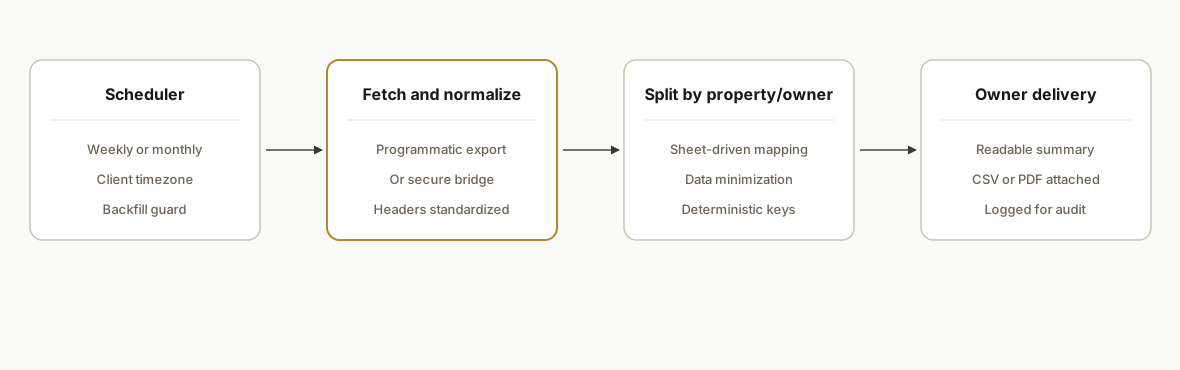
At a high level: a scheduler kicks off a run. We fetch the latest rent roll using either a programmatic export surface available to the account or a secure server-side export bridge when needed. We then normalize rows, split by property or owner mapping, render a readable summary, and deliver email with attachments or inline tables. A run log is written for audit.
- Scheduler and control plane: Time-based triggers fire weekly or monthly in the portfolio timezone. Backfill and pause flags guard against accidental mass sends.
- Fetch layer: Uses the account's allowed programmatic access. When unavailable, we invoke a server-side bridge that performs a controlled export on behalf of the system. No browser automation runs on team laptops.
- Normalizer: Standardizes headers, dates, currency, and unit identifiers so downstream steps are stable across minor report changes.
- Splitter: Maps rows to property or owner segments using a sheet-driven mapping. The mapping is the single source of truth for distribution.
- Renderer and delivery: Generates compact PDFs or HTML emails and sends to each recipient with consistent subject lines and filenames. Results log to a sheet or database.
Step-by-step: how to build it
Step 1: Model recipients and property mapping in a Sheet
Answer-first: keep the mapping outside code so ops can change routing without a deploy. We used a Google Sheet tab that maps owners to property IDs and an Email column.
// Apps Script: read OwnerMap from a Google Sheet
const SS_ID = PropertiesService.getScriptProperties().getProperty('SS_ID');
const OWNER_SHEET = 'OwnerMap';

type OwnerRow = { owner: string; email: string; propertyIds: string[] };

function loadOwnerMap(): OwnerRow[] {
  const sh = SpreadsheetApp.openById(SS_ID).getSheetByName(OWNER_SHEET);
  const rows = sh.getDataRange().getValues();
  const [header, ...data] = rows;
  const idx = (name: string) => header.indexOf(name);
  return data
    .filter(r => r[idx('Owner')] && r[idx('Email')])
    .map(r => ({
      owner: String(r[idx('Owner')]).trim(),
      email: String(r[idx('Email')]).trim(),
      propertyIds: String(r[idx('Property IDs')]).split(',').map(s => s.trim()).filter(Boolean)
    }));
}
Gotcha: use header-name lookups, not hard-coded column indexes, or a minor column re-order will break delivery.
Step 2: Fetch the latest rent roll via a secure bridge
Answer-first: do not bake AppFolio specifics into client code. Call a bridge endpoint your team controls. It returns the raw report for the requested properties.
// Apps Script: call your serverless bridge to retrieve rent roll
const BRIDGE_URL = PropertiesService.getScriptProperties().getProperty('BRIDGE_URL');

function fetchRentRoll(propertyIds: string[]): string { // returns CSV text
  const payload = {
    report: 'rent_roll',
    propertyIds,
    asOf: new Date().toISOString().slice(0,10)
  };
  const resp = UrlFetchApp.fetch(BRIDGE_URL + '/export', {
    method: 'post',
    contentType: 'application/json',
    payload: JSON.stringify(payload),
    muteHttpExceptions: true,
    headers: { 'X-Bridge-Key': PropertiesService.getScriptProperties().getProperty('BRIDGE_KEY') }
  });
  if (resp.getResponseCode() >= 300) throw new Error(`Bridge error: ${resp.getResponseCode()} ${resp.getContentText()}`);
  return resp.getContentText();
}
Gotcha: keep AppFolio credentials and mechanics on the server side. The bridge can use whichever access pattern the account allows, and you avoid leaking secrets into Apps Script.
Step 3: Normalize the CSV into typed rows
Answer-first: a consistent shape avoids fragile column-addressing later.
function parseCsv(csv: string): any[] {
  const rows = Utilities.parseCsv(csv);
  const [header, ...data] = rows;
  const norm = (h: string) => h.toLowerCase().replace(/[^a-z0-9]+/g, '_');
  const keys = header.map(norm);
  return data
    .filter(r => r.length === keys.length)
    .map(r => Object.fromEntries(keys.map((k, i) => [k, r[i]])));
}
Gotcha: rent roll columns can drift by portfolio. Normalize headers to snake_case and guard on length to avoid misaligned rows.
Step 4: Split rows per owner or property
Answer-first: the splitter enforces data minimization: each owner receives only their slice.
function splitByOwner(rows: any[], map: OwnerRow[]): Record<string, any[]> {
  const byOwner: Record<string, any[]> = {};
  for (const m of map) {
    const set = new Set(m.propertyIds);
    byOwner[m.email] = rows.filter(r => set.has(String(r.property_id || r.property || r.prop_id)));
  }
  return byOwner;
}
Gotcha: property identifiers can appear under different header labels across exports. Support a few known variants in the selector.
Step 5: Render a compact summary and attach
Answer-first: owners want readability. We add a 1 page summary plus full detail as CSV or PDF.
function renderSummary(rows: any[], asOf: string): string {
  const units = new Set(rows.map(r => r.unit || r.unit_number));
  const occupied = rows.filter(r => String(r.status).toLowerCase().includes('occupied')).length;
  const vacant = rows.length - occupied;
  const total = rows.length;
  return [
    `Rent Roll Summary as of ${asOf}`,
    `Units: ${total}. Occupied: ${occupied}. Vacant: ${vacant}.`,
    `Avg Rent: ${formatCurrency(avg(rows.map(r => num(r.scheduled_rent || r.rent))))}`
  ].join('\n');
}

function avg(nums: number[]) { const a = nums.filter(n => !isNaN(n)); return a.length ? a.reduce((x,y)=>x+y,0)/a.length : 0; }
function num(x: any) { return Number(String(x).replace(/[^0-9.]/g, '')) || 0; }
function formatCurrency(n: number) { return Utilities.formatString('$%,.2f', n); }
Gotcha: do not trust currency strings. Strip symbols and commas before math, then reformat for display.
Step 6: Deliver per-owner with deterministic subjects
Answer-first: consistent subjects and filenames help owners file emails and help you audit.
function sendPacket(email: string, subject: string, body: string, csvText: string, filename: string) {
  GmailApp.sendEmail(email, subject, body, {
    name: 'Asset Reporting',
    attachments: [
      Utilities.newBlob(csvText, 'text/csv', filename + '.csv')
    ]
  });
}
Gotcha: send-as name is configurable. A true alias requires the Gmail account to have that alias configured ahead of time.
Step 7: Orchestrate with a schedule and backfill guard
Answer-first: never blast historical packets by accident. Key each run by week or month and log it.
function runRentRoll() {
  const asOf = Utilities.formatDate(new Date(), Session.getScriptTimeZone(), 'yyyy-MM-dd');
  const weekKey = Utilities.formatDate(new Date(), Session.getScriptTimeZone(), 'YYYY-ww');
  if (alreadySent('rent_roll', weekKey)) return; // backfill guard

  const map = loadOwnerMap();
  const allProps = [...new Set(map.flatMap(m => m.propertyIds))];
  const csv = fetchRentRoll(allProps);
  const rows = parseCsv(csv);
  const slices = splitByOwner(rows, map);

  for (const m of map) {
    const body = renderSummary(slices[m.email], asOf) + '\n\nFull detail attached as CSV.';
    const subj = `[Rent Roll] ${m.owner}, ${asOf}`;
    const fname = `rent-roll_${m.owner.replace(/\W+/g,'-').toLowerCase()}_${asOf}`;
    sendPacket(m.email, subj, body, toCsv(slices[m.email]), fname);
    logSend('rent_roll', weekKey, m.email, 'OK');
  }
}

function toCsv(rows: any[]): string {
  if (!rows.length) return '';
  const headers = Object.keys(rows[0]);
  const lines = [headers.join(',')].concat(rows.map(r => headers.map(h => `"${String(r[h]).replace(/"/g,'""')}"`).join(',')));
  return lines.join('\n');
}
Gotcha: week keys use the script timezone. Set the project timezone so week boundaries match the operating team.
Programmatic access and the bridge: what to expect
Searchers frequently ask: can AppFolio be pulled directly programmatically. The answer depends on the account. Some AppFolio accounts expose export surfaces that support server-to-server requests. Others require an authenticated human export or use account-specific controls.
What we did: we treated the bridge as the single place that knows how to retrieve the rent roll. The bridge holds credentials, performs the export with the account's allowed access pattern, and returns a stable CSV to Apps Script. That pattern let us:
- keep secrets out of client-side scripts, where they are harder to rotate;
- implement retry and backoff centrally, so a transient export failure does not cause partial sends;
- add pre-send validation: the bridge verifies property IDs exist and returns a schema preview before the run commits to sends.
Do not assume a uniform API surface. Design for two modes: programmatic export available, or export-by-bridge. If your procurement team needs this clarified, ask the AppFolio account contact whether the account supports server-side exports for third parties or requires an interactive export workflow.
For platform-level integration details and known limits, see our guide to AppFolio integration patterns: AppFolio API integration: guide and limits.
Pre-launch checklist: seven items to verify before enabling sends
Answer-first: validate these items so the first production run is the last time you scramble.
- Sample export review: fetch a sample CSV for all mapped properties and validate headers and property IDs.
- Owner mapping verification: confirm every propertyId in the OwnerMap appears in the sample export.
- Test recipients: add a staging tab with test emails and run a dry run that writes log entries but does not send.
- Alias and DNS: confirm the sending account has the correct send-as alias and SPF/DKIM entries to avoid spam folders.
- Quiet hours and timezone: set the scheduler timezone and delivery window to client local time.
- Backfill safety: enable a preview step that shows how many emails would be sent during backfill and requires manual confirmation.
- Audit logging and retention: ensure sends write to a ledger you can query and export for owner disputes.
Where it gets complicated
Programmatic access vs bridge. Accounts differ in how report data can be retrieved programmatically. We keep a server-side bridge that handles access centrally. The Apps Script only ever talks to our bridge.
Property scoping and column drift. Column labels and property identifiers vary by portfolio. Normalize headers to a canonical shape and test with a few exports before turning on sends.
Owner mapping as the single source of truth. If the mapping is wrong, delivery is wrong. Keep it in a shared Sheet with change history, and validate that each listed property appears in the latest export before sending.
Backfills can flood inboxes. A one-click backfill that replays 26 weeks will send 26 emails per owner. We key by week, show a send count preview, and require an explicit confirm.
Timezones and quiet hours. The scheduler should fire in the client's timezone and respect quiet hours. We set delivery windows and queue messages outside of them.
Send identity and deliverability. Sending from a team account while wanting a branded alias requires preconfigured send-as aliases and DNS records. Without this, messages land in spam more often.
What this actually changes
For an investor-operator we support, rent roll packets now arrive with the rest of the weekly notes without anyone touching an export. The system produces the same structure every week, routes only the relevant slice to each owner, and logs the outcome for audit. The change is structural: the calendar drives the work instead of a person's to-do list.
One relevant benchmark: McKinsey estimates that about 60 percent of occupations have at least 30 percent of activities that are automatable, mostly around data processing and collection. Source: https://www.mckinsey.com/industries/technology-media-and-telecommunications/our-insights/what-the-future-of-work-will-mean-for-jobs-skills-and-wages
Frequently asked questions
Does AppFolio allow automated rent roll exports?
It depends on the account and plan. Our pattern uses a server-side bridge that performs an approved export and hands a clean file to the automation. When programmatic access is available, the bridge uses it. When it is not, the bridge performs a controlled export with proper safeguards.
Can you filter the rent roll by property or owner before sending?
Yes. We maintain a property to owner mapping in a Google Sheet. The automation either requests only the needed properties at fetch time when supported, or splits the export post-fetch using that mapping. Each owner receives only their slice.
Will this work monthly instead of weekly?
Yes. The scheduler supports weekly or monthly cadence. We use a simple key per week or month to prevent duplicates. Quiet hours ensure sends do not land at odd times for recipients.
How do you prevent duplicates and backfill floods?
We log every send with a period key and email. A run exits early if the current period key already exists. Backfills require an explicit confirm and show a preview of how many emails will be sent before proceeding.
What does this cost to run monthly?
The Apps Script scheduler is effectively free. The bridge runs on a small serverless footprint. Real cost is the one-time build. Ongoing costs are negligible for typical weekly or monthly cadences.
How secure is the bridge and where are credentials stored?
We keep credentials on the server side in the bridge using the platform's secret store or environment variables. The Apps Script only holds an opaque bridge key. Rotate bridge keys and enable audit logging on the bridge so you can see who requested exports and when.
Can a non-developer maintain the recipient list?
Yes. The recipient and property mappings live in a Google Sheet. Ops can add or edit owners and property IDs without touching code. We protect the Sheet with basic validation and change history.
We built this rent roll distribution as part of our AppFolio reporting stack. If you want a hands-off weekly packet with the right slice in each owner's inbox, we can implement the same pattern. Read our related post on automating AppFolio investor reporting, see practical integration limits in AppFolio API integration: guide and limits, explore our document automation services, or book a 15 minute call to scope your setup.
Want us to build this for you?
Nine questions, about 90 seconds. You see the hours it is costing you, then pick a time. No pitch.
Get your free assessment