
Vacancy and GPR automation is: a scheduled pipeline that pulls current unit vacancy and gross potential rent from AppFolio, computes leasing KPIs by property or portfolio, and delivers formatted summaries for asset and leasing reviews without anyone exporting a report by hand. We built and shipped this so weekly leasing calls start with facts, not spreadsheets.
If you run recurring leasing or asset reviews, this guide shows exactly how our system works, how to build it, and the handful of gotchas that matter in production.
The problem it solves
A typical weekly cadence looked like this: log into AppFolio, export vacancy and rent potential, VLOOKUP to last week, calculate deltas and exposures, then paste into a deck or email. One person repeated it every Monday across multiple properties and investor entities. The work was simple but brittle, and by the time the deck was ready the data could already be stale.
| Task | Manual workflow | Automated workflow |
|---|---|---|
| Data pull | Log in, run two reports, export CSVs | Scheduled fetch at a fixed time with retries |
| Cleanup | Normalize columns, fix headers, re-key IDs | Deterministic normalization in code |
| KPIs | Hand formulas and VLOOKUPs | Programmatic metrics and week-over-week deltas |
| Delivery | Paste into deck or email | Branded email, CSV attachment, or dashboard card |
| Audit | None or scattered files | Central log with run status and diffs |
We added this module to the AppFolio reporting stack we already run for investor communications. For Iron Age Investments we folded vacancy and GPR into the same weekly asset and leasing review pack so the team opened one email and saw trend lines and exceptions first.
How the automation works
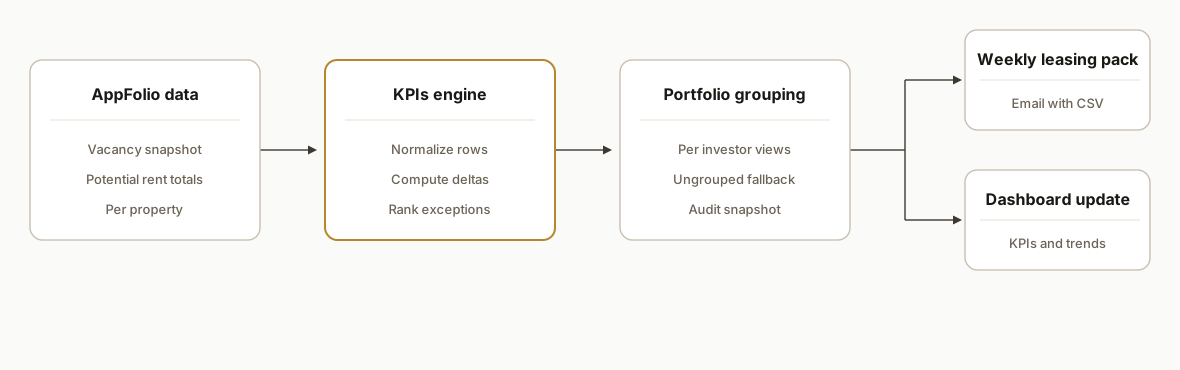
At a high level: a scheduled job reads current vacancy and potential-rent data from AppFolio, normalizes it, computes KPIs and deltas against a cached prior snapshot, and outputs a leasing-ready summary per property group or investor. The same run can publish a lightweight dashboard card and attach the raw CSV for audit.
- Source: AppFolio reports: Vacancy and potential rent data serve as the truth. The job runs on a consistent schedule so week-over-week comparisons mean something.
- Engine: normalization and KPIs: We keep a canonical schema in code and compute KPIs like vacancy rate, exposure, lost potential, and movement since last week.
- Cache: prior snapshot store: A small table stores last-run metrics per property to calculate deltas and power trend sparklines.
- Output: leasing pack: Per-portfolio summaries with exceptions first: up or down vs last week, units aging on market, and potential recovered or lost.
- Delivery: email and dashboard: The system sends a branded email and updates a dashboard module the leasing team uses in the morning.
Step-by-step: how to build it
Step 1: Set up configuration and a prior-snapshot table
Create a configuration store for properties, portfolios, recipients, and report identifiers you plan to fetch. Add a lightweight table for last week's metrics per property so you can compute deltas.
// Apps Script config example
const CFG = {
  timezone: 'America/Los_Angeles',
  recipients: [{ name: 'Leasing Ops', email: 'ops@example.com' }],
  portfolios: [{ name: 'Fund A', propertyIds: ['P1001','P1002','P1003'] }]
};

function getStore() {
  const p = PropertiesService.getScriptProperties();
  return {
    get: key => JSON.parse(p.getProperty(key) || 'null'),
    set: (key, val) => p.setProperty(key, JSON.stringify(val))
  };
}
Gotcha: decide early whether you store prior snapshots at the property level or the unit level. Property level keeps storage small and is sufficient for leasing reviews.
Step 2: Fetch vacancy and potential-rent data
Write a connector that retrieves the two source reports on schedule and returns normalized rows. Keep the connector separate so platform quirks live in one place.
function fetchSource() {
  // Implementation hidden behind a connector so report paths and auth never leak into business logic
  const vacancyRows = AppfolioConnector.get('vacancy');
  const gprRows = AppfolioConnector.get('gpr');
  return normalizeRows(vacancyRows, gprRows);
}

function normalizeRows(vacancy, gpr) {
  // Map vendor fields to a canonical shape your metrics engine expects
  return vacancy.map(v => ({
    propertyId: v.propertyId,
    propertyName: v.propertyName,
    unitCount: v.unitCount,
    vacantUnits: v.vacantUnits,
    grossPotentialRent: (gpr.find(x => x.propertyId === v.propertyId) || {}).gpr || 0
  }));
}
Gotcha: keep normalization deterministic. Do not infer unit counts from last week's export. Treat the platform as the source of truth each run.
Step 3: Compute KPIs and week-over-week deltas
Calculate metrics in one place, using the cached prior snapshot for deltas. Persist the current metrics after a successful run.
function computeKpis(rows) {
  const store = getStore();
  const prior = store.get('prior') || {};
  const today = rows.map(r => {
    const vacancyRate = r.unitCount ? r.vacantUnits / r.unitCount : 0;
    const lostPotential = vacancyRate * r.grossPotentialRent;
    const key = r.propertyId;
    const p = prior[key] || {};
    return {
      ...r,
      vacancyRate,
      lostPotential,
      dVacancyRate: vacancyRate - (p.vacancyRate || 0),
      dLostPotential: lostPotential - (p.lostPotential || 0)
    };
  });
  // write-back for next week
  const nextPrior = Object.fromEntries(today.map(t => [t.propertyId, {
    vacancyRate: t.vacancyRate,
    lostPotential: t.lostPotential
  }]));
  store.set('prior', nextPrior);
  return today;
}
Gotcha: round for presentation, not for storage. Keep raw doubles in storage so small changes accumulate accurately.
Step 4: Group by portfolio and rank exceptions
Leasing calls move faster when the highest deltas are first. Group properties by portfolio and sort by absolute change.
function groupAndRank(metrics) {
  const byPortfolio = new Map();
  for (const m of metrics) {
    const p = CFG.portfolios.find(x => x.propertyIds.includes(m.propertyId));
    const key = p ? p.name : 'Ungrouped';
    if (!byPortfolio.has(key)) byPortfolio.set(key, []);
    byPortfolio.get(key).push(m);
  }
  for (const [k, arr] of byPortfolio) {
    arr.sort((a, b) => Math.abs(b.dLostPotential) - Math.abs(a.dLostPotential));
  }
  return byPortfolio;
}
Gotcha: keep an Ungrouped bucket. New properties appear mid-year and you do not want them silently dropped from the pack.
Step 5: Render a leasing-ready email and optional CSV
Build a simple HTML renderer for the email body and attach a CSV for anyone who wants to pivot deeper.
function renderEmail(portfolio, rows) {
  const lines = rows.map(r => (
    `${r.propertyName}: ${(r.vacancyRate*100).toFixed(1)}% (${r.vacantUnits}/${r.unitCount})` +
    `, ΔVac ${(r.dVacancyRate*100).toFixed(1)} pts, Lost GPR $${r.lostPotential.toFixed(0)}`
  ));
  return [
    `Leasing focus: ${portfolio}`,
    '',
    'Changes since last week (largest deltas first):',
    ...lines
  ].join('\n');
}

function sendPacks(grouped) {
  for (const [portfolio, rows] of grouped) {
    const body = renderEmail(portfolio, rows);
    const csv = toCsv(rows);
    for (const r of CFG.recipients) {
      GmailApp.sendEmail(r.email, `Vacancy and GPR: ${portfolio}`, body, {
        name: 'Asset Reporting',
        attachments: [
          Utilities.newBlob(csv, 'text/csv', `vacancy-gpr-${portfolio}.csv`)
        ]
      });
    }
  }
}
Gotcha: use a stable sender name and limit the attachment list. Large mail bodies with multiple attachments can hit workspace limits and spam filters.
Step 6: Schedule, log, and alert
Create a weekly trigger, log each run with counts and status, and alert on anomalies like missing properties or stalled deltas.
function main() {
  try {
    const rows = fetchSource();
    const metrics = computeKpis(rows);
    const grouped = groupAndRank(metrics);
    sendPacks(grouped);
    logRun({ ok: true, count: rows.length });
  } catch (e) {
    logRun({ ok: false, error: String(e) });
    GmailApp.sendEmail('alerts@example.com', 'Vacancy and GPR run failed', String(e));
    throw e;
  }
}
Gotcha: include a simple sanity check: if unit counts or property coverage drop materially vs last week, flag it. That usually catches a permissions or filter drift before the meeting.
Where it gets complicated
Portfolio filtering and investor views. In real portfolios, the same properties roll up to different investor entities. Build portfolio definitions in config and render one pack per audience so each stakeholder only sees what they own.
Not all reports filter the same way. Some AppFolio outputs are portfolio friendly and some are not. When a source cannot be narrowed to a subset, fall back to property-level assembly and aggregate those rows yourself.
Date alignment matters. If you pull on Monday but the team met on Friday last week, your week-over-week comparison will look wrong. Lock the cadence and note the date in the header so everyone compares the same days.
IDs drift, names collide. Properties get renamed and IDs move between groups during dispositions. Key on immutable identifiers where possible and keep a reconciliation sheet for mapping old to new.
Email volume control. A naive fan-out can send five variants of the same data to the same audience. Gate sends behind dedup rules and test mode so you do not blast the team during setup or backfills.
What this actually changes
For the property manager who already receives investor-facing notes from our AppFolio automation, adding vacancy and GPR meant the leasing call started with ranked exceptions and week-over-week changes without anyone touching a CSV. The team stopped debating which export was correct and started deciding how to move units.
External context: the U.S. rental vacancy rate has hovered near the mid single digits in recent years, so small swings matter for NOI. See the U.S. Census Housing Vacancy Survey for current figures: https://www.census.gov/housing/hvs/index.html.
We kept the engine the same as our investor-notes stack: scheduled runs, per-portfolio outputs, and a small audit log. The difference was the lens: leasing KPIs and movement since last week instead of long-form notes.
Frequently asked questions
Does AppFolio have an API for this data?
AppFolio provides programmatic access to operational and financial outputs. The practical way to automate vacancy and potential rent is to wire a scheduled job that reads those outputs, normalizes them, and computes your KPIs. We avoid hard-coding vendor specifics in business logic so platform details can change without a rebuild.
Can this run per investor or property group?
Yes. We model portfolios in configuration and produce one pack per audience. When a report cannot be filtered to a subset, we aggregate at the property level and then roll up to the portfolio so each investor still receives a clean view.
How real-time is it?
Leasing reviews benefit most from a consistent weekly cadence. We typically schedule one morning run on the reporting day and cache results for the week. You can run it daily if your team makes pricing or concession decisions that frequently, but weekly is the right default for most shops.
What if we already build decks in PowerPoint?
Keep the email as the operational truth and attach the CSV. If you need slides, we add an optional exporter that writes the same KPIs into a slide template. The data pipeline remains the same either way, which avoids manual copy-paste.
Can a non-developer maintain portfolios and recipients?
Yes. Properties, groups, and recipient lists live in a simple config surface or a controlled Sheet tab. Operations staff can add a property to a portfolio or update recipients without touching code. The engine reads those definitions on every run.
What does this cost to operate?
The engine runs on serverless or Apps Script for near-zero infrastructure cost. The primary cost is the initial build. Ongoing costs are minimal, dominated by developer time only when you add properties or change portfolio definitions.
If you want vacancy and potential rent to hit the inbox every week without touching a CSV, we have this running in production and can adapt it to your portfolio. See our AppFolio investor reporting build for background on the engine, then book time to scope your variant. Related: How to Automate AppFolio Investor Reporting. Explore more in our workflow automation services. When you are ready, book a 15-minute call.
Want us to build this for you?
Nine questions, about 90 seconds. You see the hours it is costing you, then pick a time. No pitch.
Get your free assessment