
We built a month-end job that pulls the AppFolio Income Statement, normalizes it, and distributes the right packet to the right people every time. It runs hands-off on a schedule and avoids portfolio mix-ups when per-property filters are not applied on the Income Statement. This write-up shows the exact pattern we ship in production.
Income statement automation is: a scheduled process that gathers your period financials from AppFolio, validates and slices them by your ownership groupings, then delivers the outputs to email and owner portals without manual work.
The problem it solves
Teams closed the month by exporting the Income Statement from AppFolio, saving CSVs, splitting by portfolio or owner, and emailing PDFs. A missed filter or copy step produced the wrong numbers in the wrong inbox. Month-end crunch magnified the risk.
| Task | Manual month-end | Automated month-end |
|---|---|---|
| Get period data | Export CSVs from UI, repeat for variants | One scheduled source: report email or partner API |
| Slice by portfolio/owner | Spreadsheet filters and copy-paste | Deterministic mapping: groups to properties |
| Create packets | Manual formatting into PDFs | Templated PDF rendering per recipient |
| Distribute | Individual emails and portal uploads | One run sends all packets and logs delivery |
| Backfill | Risk of duplicate sends | Idempotent run keyed by period + recipient |
According to McKinsey, about 60 percent of occupations have at least 30 percent of activities that could be automated (A Future That Works). That includes repetitive month-end reporting steps. Source: https://www.mckinsey.com/featured-insights/employment-and-growth/a-future-that-works-automation-employment-and-productivity
How the automation works
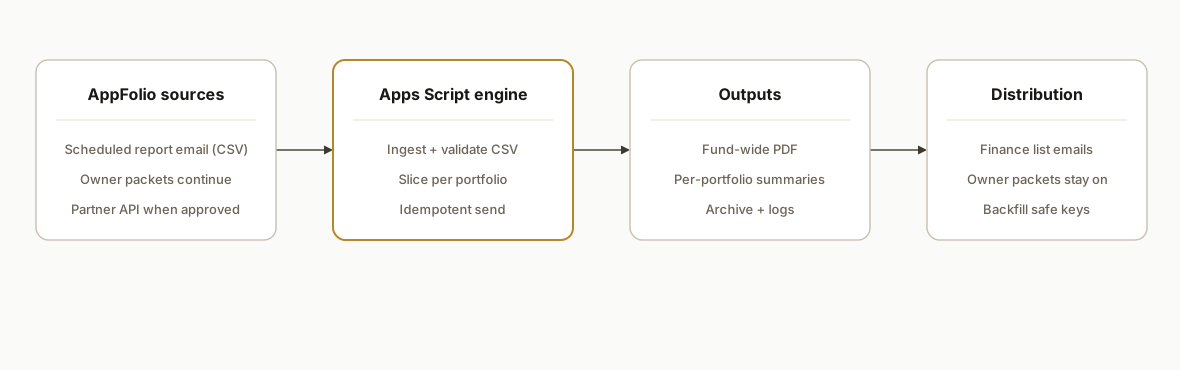
At month-end, AppFolio outputs arrive one of two ways: a scheduled report email with CSV attachments or a partner-gated API pull. A Google Apps Script runner ingests the file, validates columns, and builds a fund-wide Income Statement packet plus any per-portfolio summaries you maintain. If your Income Statement source cannot be filtered per property, the slicer computes per-portfolio summaries from the full export instead of relying on a filter.
- Report source: Use Scheduled Reports or Owner Report Packets to deliver CSVs by email or portal. If your account has partner API access, you can fetch programmatically. AppFolio does not offer a native Zapier or Make app, so email and HTTP are the practical paths.
- Ingestion runner: A Google Apps Script bound to a Drive folder watches month-end mail, saves CSVs, and logs inputs. This avoids UI clicks and preserves raw files for audit.
- Portfolio mapper: A maintained mapping of portfolios or owners to property identifiers drives per-recipient slicing when the Income Statement does not arrive pre-filtered.
- Packet builder: Renders a fund-wide PDF and optional per-portfolio summaries, with consistent headers, period labeling, and footers.
- Distributor: Sends emails and posts to owner portals. It is idempotent per period so reruns do not spam recipients.
Step-by-step: how to build it
1) Schedule the Income Statement delivery from AppFolio
Set up a Scheduled Report in AppFolio for the Income Statement in CSV format and deliver it to a service inbox you control. If you use Owner Report Packets, include the statement in the packet so your owners still receive their view while your automation ingests the CSV copy for internal distribution. If your organization has partner API access, you can fetch programmatically; otherwise email CSV is reliable.
Checklist:
- Income Statement: CSV, monthly cadence, deliver to service inbox
- Subject prefix: "Income Statement" + period label (e.g., 2026-06)
- Owner Report Packets: unchanged, owners continue to receive their packets
Key gotcha: exports are report by report. Expect multiple CSVs across entities when you expand scope.
2) Capture and store the CSV automatically
Bind a Google Apps Script to a Drive folder. Create a Gmail search for the subject prefix and current period, then save the attachment and log a content hash so reruns do not re-ingest the same file.
function ingestIncomeStatementEmail() {
  const period = Utilities.formatDate(new Date(), Session.getScriptTimeZone(), 'yyyy-MM');
  const query = 'subject:"Income Statement ' + period + '" has:attachment newer_than:14d';
  const threads = GmailApp.search(query, 0, 10);
  const folder = DriveApp.getFolderById(getConfig().inboxFolderId);
  threads.forEach(t => t.getMessages().forEach(m => {
    m.getAttachments({includeInlineImages: false, includeAttachments: true})
     .filter(a => a.getName().toLowerCase().endsWith('.csv'))
     .forEach(a => {
       const hash = Utilities.base64Encode(Utilities.computeDigest(Utilities.DigestAlgorithm.SHA_256, a.getBytes()));
       if (alreadySeen(hash, period)) return;
       const file = folder.createFile(a.copyBlob()).setName('income_statement_' + period + '.csv');
       logIngest(hash, period, file.getId());
     });
  }));
}
function alreadySeen(hash, period){
  const sheet = getLogSheet();
  const vals = sheet.getRange(2,1,sheet.getLastRow()-1,3).getValues();
  return vals.some(r => r[0] === period && r[1] === hash);
}
function logIngest(hash, period, fileId){
  const sheet = getLogSheet();
  sheet.appendRow([period, hash, fileId, new Date(), 'INGEST_OK']);
}
3) Normalize and validate the CSV
Parse the CSV, trim headers, coerce currency to numbers, and verify the minimum expected columns before any math. Keep a schema version in your config so you can detect drift.
function parseIncomeCsv(fileId){
  const csv = DriveApp.getFileById(fileId).getBlob().getDataAsString();
  const rows = Utilities.parseCsv(csv);
  const headers = rows.shift().map(h => h.trim());
  const idx = {
    property: headers.indexOf('Property'),
    account: headers.indexOf('Account'),
    amount: headers.indexOf('Amount')
  };
  if (idx.property < 0 || idx.account < 0 || idx.amount < 0) {
    throw new Error('Income Statement CSV missing required columns.');
  }
  return rows.map(r => ({
    property: r[idx.property].trim(),
    account: r[idx.account].trim(),
    amount: Number(String(r[idx.amount]).replace(/[$,]/g, ''))
  }));
}
4) Slice per portfolio when filters are not applied upstream
If your Income Statement source does not provide per-property filters, compute per-portfolio summaries from the full dataset using your maintained mapping of portfolios to properties. This avoids relying on a filter that does not take effect on the Income Statement.
function portfolioSummaries(lines, portfolios){
  // portfolios: { name: string, properties: string[] }[]
  return portfolios.map(p => {
    const set = new Set(p.properties.map(s => s.trim()));
    const subset = lines.filter(l => set.has(l.property));
    const totals = subset.reduce((acc, l) => {
      acc[l.account] = (acc[l.account] || 0) + l.amount;
      return acc;
    }, {});
    const grand = Object.values(totals).reduce((a,b) => a+b, 0);
    return { name: p.name, totals, grand };
  });
}
5) Render PDFs and distribute with idempotency
Build a simple HTML template for the fund-wide statement and for each portfolio summary. Render to PDF using HtmlService, then send with Gmail. Use a unique key per period and recipient to prevent double sends if you rerun.
function sendPackets(period, fundPdfId, perPortfolio){
  const sent = getSentRegistry();
  // Fund-wide packet
  maybeSend(period, 'FUND', getConfig().financeList, fundPdfId, sent);
  // Per-portfolio summaries
  perPortfolio.forEach(p => {
    const pdfBlob = renderPortfolioPdf(period, p);
    maybeSend(period, p.name, getEmailsForPortfolio(p.name), pdfBlob, sent);
  });
}
function maybeSend(period, key, recipients, pdfBlobOrId, sent){
  const idKey = period + '::' + key;
  if (sent.has(idKey)) return;
  const blob = typeof pdfBlobOrId === 'string' ? DriveApp.getFileById(pdfBlobOrId).getBlob() : pdfBlobOrId;
  GmailApp.sendEmail(recipients.join(','), 'Income Statement ' + period, 'Attached: ' + key + ' statement for ' + period + '.', {
    attachments: [blob],
    name: getConfig().fromName
  });
  markSent(idKey);
}
6) Add a safe backfill and a dashboard
A backfill tool that accepts a period input and replays the flow against the archived CSV is essential. Surface a small Next.js dashboard or a simple Apps Script web app to show last run, files ingested, packets sent, and a Run Now button. Keep backfills locked to named recipients to avoid broad re-sends.
function backfillPeriod(period){
  const row = findLogByPeriod(period);
  if (!row) throw new Error('No archived CSV for period ' + period);
  const lines = parseIncomeCsv(row.fileId);
  const portfolios = getPortfolios();
  const summaries = portfolioSummaries(lines, portfolios);
  const fundPdfId = renderFundPdf(period, lines);
  sendPackets(period, fundPdfId, summaries);
}
7) Optional: unify with partner API when available
If your organization obtains access through the AppFolio partner program, add an HTTP fetch path and normalize the payload into the same internal shape your CSV parser returns. Keep both paths so you can fall back to email CSV if credentials lapse. There is no official AppFolio app in Zapier or Make, so HTTP modules or a serverless fetch are the way to automate programmatic pulls.
Pattern:
- Try API pull
- If unavailable or fails, ingest latest CSV email
- Normalize to { property, account, amount }
- Continue pipeline unchanged
Where it gets complicated
- Per-property filtering on Income Statement: Teams often expect per-property filters to apply to the Income Statement. In many real-world setups the export behaves like a portfolio-wide view. Bridge it by computing per-portfolio summaries from the full export or by using alternative reports for owner-level packets.
- No native Zapier or Make app: AppFolio is not in Zapier or Make. Use Scheduled Reports by email or a partner-gated API with HTTP modules. This keeps the build reliable without waiting for a connector.
- Schema drift and currency parsing: Header names and currency formatting can drift. Always address fields by header lookup and strip currency symbols and thousands separators before math.
- Backfill hazards: A naive backfill will resend packets to everyone for every past period. Use a period + recipient key and require explicit recipient selection for backfills.
- Owner portals vs internal finance: Owners still expect their packets. Your automation should not replace portal delivery. It should augment it with consistent internal packets for finance and partners.
What this actually changes
In production this removed the most error-prone 90 minutes of month-end: exporting, slicing, formatting, and emailing. It delivered a single fund-wide packet internally and consistent per-portfolio summaries without a spreadsheet ceremony. The value is structural: one source of truth, one button for backfill, no late-night CSV juggling.
McKinsey estimates that automating well-defined tasks can raise productivity in many roles, with at least 30 percent of activities in most occupations being automatable. Month-end reporting is squarely in that category. Source: https://www.mckinsey.com/featured-insights/employment-and-growth/a-future-that-works-automation-employment-and-productivity
Frequently asked questions
Does AppFolio have an official API?
AppFolio advertises APIs through its Stack partner program with access gated by an application process. Base URL and authentication details are not publicly documented. Many teams mix partner access where approved with CSV report emails to cover everything.
Is there a native AppFolio app for Zapier or Make?
No. AppFolio is not listed in Zapier or Make directories. When you need automation today, use Scheduled Reports by email plus a script to ingest CSVs, or use HTTP modules against a partner API if your account has access.
Can I filter the Income Statement by property or group?
If your Income Statement source does not apply per-property filters as expected, treat the export as portfolio-wide and compute per-portfolio summaries from the full file. For owner-level packets, many teams rely on owner packet features or alternative reports that support filtering.
Can this run fully hands-off every month?
Yes. With a scheduled email ingest or an approved partner API pull, an Apps Script runner can parse, slice, render PDFs, and send emails automatically. Keep idempotency keys and a backfill control to prevent accidental re-sends.
How long does this take to implement?
The CSV path ships in days: schedule the report, build the Apps Script ingest and parser, wire the mapper, and template the PDFs. Partner API integration adds time for credentialing, normalization, and fallbacks. Most property managers start with the CSV path, then add API pulls later.
What does this cost monthly?
Apps Script and Drive are effectively zero infrastructure cost for typical volumes. Your main expenses are engineering time to build and maintain the pipeline and any optional PDF rendering or email delivery add-ons you choose to use.
If you want month-end to close itself while owners keep their packets, we have shipped this Income Statement pattern and its safe per-portfolio slicing in production. See how we structure multi-report investor comms in our related post, How to Automate AppFolio Investor Reporting, then explore our document automation services. When you are ready, book a 15-minute call and we will map your exact setup.
- Related service: /services#document-automation
- Related post: /blog/automate-appfolio-investor-reporting
- Book a call: /book
Want us to build this for you?
Nine questions, about 90 seconds. You see the hours it is costing you, then pick a time. No pitch.
Get your free assessment