
We built a maintenance digest that turns AppFolio work-order and labor-summary reports into a scheduled email per property and vendor. In production it runs off AppFolio scheduled CSV exports, computes hours and costs, highlights overdue items, and delivers a clean weekly digest to maintenance coordinators and owners.
AppFolio work-order automation is: a scheduled pipeline that ingests AppFolio work-order and labor CSVs, normalizes and groups them, and outputs an email or Slack digest per property and vendor on a set cadence.
This guide shows exactly how we wired it using Report Builder scheduled emails, an ingestion endpoint, a parser with versioned column maps, and a rollup engine. It also covers where AppFolio's integration surface is gated and how we bridge that safely.
The problem it solves
Most teams were logging into AppFolio weekly, exporting Work Orders and Labor Summary, filtering by property and vendor, summing hours and costs, then pasting highlights into an email. The steps were repeatable but brittle: layouts change, staff forget a filter, and totals drift.
| Task | Manual workflow | Automated workflow |
|---|---|---|
| Data access | Log in, run Work Orders and Labor exports | Scheduled CSV emails from Report Builder land in an integration inbox |
| Filtering | Apply property and vendor filters by hand | Parser maps rows to property and vendor using a maintained lookup |
| Totals | Sum labor hours and costs in Excel | Rollup engine computes hours, materials and totals with idempotent logic |
| Exceptions | Scan for overdue or high-cost orders | Rules flag overdue, re-opened, or over-threshold orders automatically |
| Delivery | Paste into email, risk stale numbers | HTML digest sent to coordinators, owners, and optional Slack channels on schedule |
How the automation works
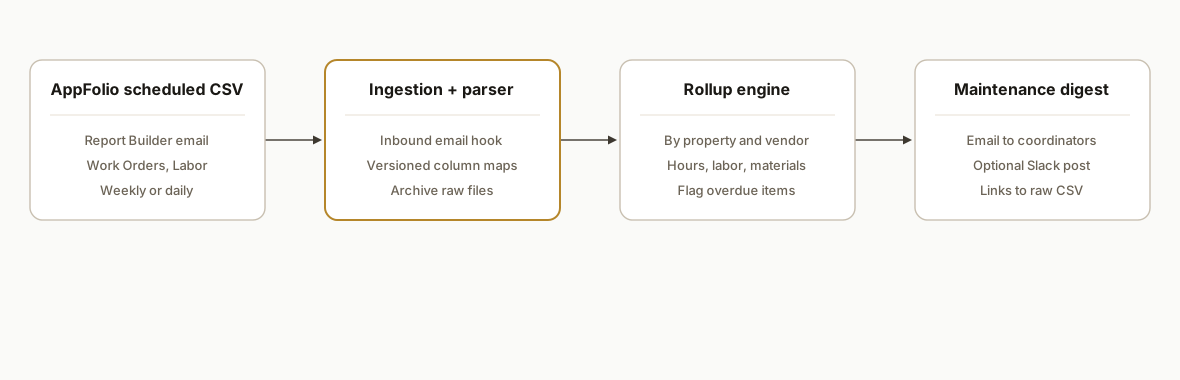
AppFolio's most reliable integration surface for this use case today is scheduled CSV exports from Report Builder sent by email. We receive those emails at a controlled address, parse the attachments, normalize columns against a versioned map, compute rollups per property and vendor, and deliver a digest. If a client is in the AppFolio Stack partner program, we can optionally source work orders through the partner API as an alternative. AppFolio's public Stack details exist, but technical docs are gated behind the partner program and typical access requires OAuth 2.0 credentials issued by AppFolio.
- Scheduled AppFolio exports: Report Builder can email CSV or Excel on a schedule. Several AppFolio partners publicly document scheduled export setups for ingestion, which is why we standardize on this path first while API access is provisioned.
- Ingestion endpoint: We use a dedicated inbound email hook (CloudMailin or a Gmail label watcher) to accept attachments, validate sender, and enqueue files. Attachments are stored verbatim for audit.
- Parser with column-map versions: CSV column order can change. We keep a versioned column map keyed by the AppFolio layout name and add a lightweight checksum so parser updates are deliberate.
- Rollup engine: We group by property and vendor, compute labor hours, materials and total cost, and tag exceptions: overdue, re-opened, and over-threshold orders. Idempotency uses the work order ID.
- Delivery: We render an HTML digest and send by email, with optional Slack posting. Raw and normalized rows are archived for traceability.
Step-by-step: how to build it
1) Schedule the AppFolio reports to email your integration
Answer: create a saved layout for Work Orders and a layout for Labor Summary, then schedule each to email a controlled address your integration owns. Keep one layout per digest to stabilize columns. Partners like EliseAI and Swiftlane document similar scheduled-export setups.
Gotcha: put a unique keyword in the subject so your ingestion filter is exact and future-proof when staff change settings.
Report Builder
- Layout: Work Orders Digest (Columns: ID, Property, Vendor, Status, Opened, Due, Completed, Materials, Notes)
- Layout: Labor Summary Digest (Columns: WorkOrderID, Tech, Hours, Rate, Cost)
Schedule: Weekly Monday 6:00 AM → maintenance-digests@yourdomain.com
Subject: [AppFolio] Work Orders Digest
2) Receive and queue attachments safely
Answer: use a webhook-based inbound email service or a Gmail Apps Script watcher to save attachments and enqueue processing.
Gotcha: enforce sender allowlists and subject filters so only AppFolio exports enter the queue.
// Vercel serverless example for CloudMailin JSON payloads
export default async function handler(req, res) {
  const { headers, attachments } = req.body;
  if (!headers.subject.includes("[AppFolio] Work Orders")) return res.status(202).end();
  for (const a of attachments || []) {
    const buf = Buffer.from(a.content, 'base64');
    await saveRawAttachment(a.fileName, buf); // S3, Drive, or Supabase storage
    await enqueue({ type: 'csv', fileName: a.fileName, storageKey: await keyFor(a.fileName) });
  }
  res.status(201).json({ ok: true });
}
3) Parse CSVs with a versioned column map
Answer: parse to a normalized schema so downstream code is stable even if AppFolio column order changes.
Gotcha: keep a per-layout checksum and fail closed if an unknown layout appears.
import { parse } from 'csv-parse/sync';

const MAPS = {
  workOrders_v1: {
    id: 'ID', property: 'Property', vendor: 'Vendor', status: 'Status',
    opened: 'Opened', due: 'Due', completed: 'Completed', materials: 'Materials'
  },
  labor_v1: { workOrderId: 'WorkOrderID', tech: 'Tech', hours: 'Hours', rate: 'Rate', cost: 'Cost' }
};

export function parseCsv(buf, map) {
  const rows = parse(buf, { columns: true, skip_empty_lines: true });
  return rows.map(r => Object.fromEntries(Object.entries(map).map(([k, col]) => [k, r[col]])));
}
4) Roll up by property and vendor with idempotency
Answer: group rows, sum hours and costs, and tag exceptions. Use work order ID as the idempotency key so overlapping exports do not double count.
Gotcha: re-opened orders will appear with updated status dates. Keep the latest by completed date per ID.
export function rollup(workOrders, labor) {
  const laborByWO = new Map();
  for (const l of labor) {
    const k = l.workOrderId;
    const acc = laborByWO.get(k) || { hours: 0, cost: 0 };
    acc.hours += Number(l.hours || 0);
    acc.cost += Number(l.cost || 0);
    laborByWO.set(k, acc);
  }
  const latest = new Map();
  for (const w of workOrders) {
    const prev = latest.get(w.id);
    if (!prev || new Date(w.completed || w.due || w.opened) > new Date(prev.completed || prev.due || prev.opened)) {
      latest.set(w.id, w);
    }
  }
  const groups = {};
  for (const w of latest.values()) {
    const l = laborByWO.get(w.id) || { hours: 0, cost: 0 };
    const key = `${w.property}::${w.vendor || 'Unassigned'}`;
    const g = groups[key] || { property: w.property, vendor: w.vendor || 'Unassigned', orders: 0, hours: 0, laborCost: 0, materials: 0, overdue: 0 };
    g.orders += 1; g.hours += l.hours; g.laborCost += l.cost; g.materials += Number(w.materials || 0);
    const overdue = w.status === 'Open' && w.due && new Date(w.due) < new Date();
    if (overdue) g.overdue += 1;
    groups[key] = g;
  }
  return Object.values(groups);
}
5) Render and send the digest
Answer: generate an HTML table grouped by property and vendor, then email it to coordinators and owners. Add Slack delivery if helpful.
Gotcha: include a footer link to the archived CSV and the normalized rows for audit.
import nodemailer from 'nodemailer';

export async function sendDigest(groups, to) {
  const rows = groups
    .sort((a,b) => a.property.localeCompare(b.property) || a.vendor.localeCompare(b.vendor))
    .map(g => `<tr><td>${g.property}</td><td>${g.vendor}</td><td>${g.orders}</td><td>${g.hours.toFixed(1)}</td><td>$${g.laborCost.toFixed(2)}</td><td>$${g.materials.toFixed(2)}</td><td>${g.overdue}</td></tr>`)
    .join('');
  const html = `
    <h3>Weekly Maintenance Digest</h3>
    <table border="1" cellpadding="6" cellspacing="0">
      <tr><th>Property</th><th>Vendor</th><th>Orders</th><th>Hours</th><th>Labor</th><th>Materials</th><th>Overdue</th></tr>
      ${rows}
    </table>
    <p>Source: AppFolio scheduled exports. Raw files archived.</p>`;
  const tx = nodemailer.createTransport({ sendmail: true });
  await tx.sendMail({ from: 'Maintenance Digest <ops@yourdomain.com>', to, subject: 'Weekly Maintenance Digest', html });
}
6) Store normalized rows and guard for drift
Answer: keep raw and normalized tables with a schema version column so you can compare runs, rebuild rollups, and catch layout drift.
Gotcha: fire an alert when a new, unknown layout checksum arrives.
create table work_order_raw (
  id bigserial primary key,
  file_name text not null,
  received_at timestamptz not null default now(),
  body bytea not null
);

create table work_order_norm (
  work_order_id text not null,
  property text not null,
  vendor text,
  status text,
  opened date,
  due date,
  completed date,
  materials numeric,
  schema_version text not null,
  unique(work_order_id, schema_version)
);
Where it gets complicated
API access is gated: AppFolio Stack partner APIs exist for resources like Vendors and Properties, and integrators document OAuth 2.0. Access typically requires the Stack partner program, which is not self-serve for every customer. We use scheduled CSV exports while partner access is provisioned.
CSV column drift breaks naive parsers: Report layouts change over time. Integrations that rely on column order fail silently. We version column maps per layout and checksum the header row before parsing. Unknown checksums raise alerts.
Vendor names are messy: A vendor might appear under multiple display names. We maintain a vendor-lookup table and consolidate to a canonical name to avoid double-counting.
Overlapping windows create duplicates: Weekly exports can overlap date ranges. We compute idempotency on the work-order ID and keep the latest status by completed date, not the first seen row.
Labor vs materials semantics differ by setup: Some teams record material costs on the work order, others as separate bills. We expose labor, materials and combined totals separately in the digest to avoid confusion.
Email ingestion needs guardrails: Only accept from AppFolio sender patterns. Lock down the inbound address and archive raw attachments for audit.
What this actually changes
For a property management team, this eliminated the weekly copy, filter and sum routine and replaced it with a scheduled, per-property and per-vendor digest. Exceptions surfaced themselves so coordinators focused on overdue or high-cost orders instead of wrangling CSVs.
Two pragmatic points matter. First, AppFolio does not have a native Zapier or Make app listed publicly, so scheduled CSV exports are a stable and partner-documented path for integrations. Second, AppFolio's Stack partner APIs are real but access is provisioned through the partner program, so planning a CSV-first build avoids waiting on credentials while keeping an API path open later.
Sources: AppFolio Stack partner program and OAuth 2.0 notes (appfolio.com/stack), Zapier community threads noting no native AppFolio app, and partner docs describing scheduled AppFolio exports by email.
Frequently asked questions
Does AppFolio have an official API for work orders?
Yes: AppFolio Stack partner APIs exist and integrators document OAuth 2.0 client authentication. Access is through AppFolio's partner program and technical docs are not publicly open. For most teams the fastest path is scheduled CSV exports while partner access is arranged.
Can I do this without any API access?
Yes. We built and shipped this with AppFolio Report Builder scheduled CSV emails. The ingestion endpoint receives attachments, the parser normalizes rows, and the rollup engine generates the digest. This route is common among AppFolio partners that ingest reports by email.
Is there a native AppFolio app on Zapier or Make?
No public native app is listed as of this writing. Zapier community threads describe AppFolio as not directly supported and suggest webhooks or an email parser as workarounds. Our approach uses a dedicated inbound email hook with stricter controls and audit.
How do you prevent duplicates across overlapping exports?
We key on the work order ID and keep the latest status by date. Overlapping weekly ranges do not double count because we upsert by ID, not by row position. A layout checksum also guards against subtle header changes.
Can it run daily or near real time?
Yes. The cadence follows your scheduled exports. Daily first thing in the morning is typical. If you later receive Stack partner API access, we can move to a pull model on a cron for tighter windows.
What does this cost monthly?
The CSV-first path uses commodity hosting and an inbound email service, so infrastructure is modest. The primary cost is the initial build and light maintenance when layouts evolve. If you later add partner API access, the runtime remains similar while you gain fewer email moving parts.
If you want a maintenance digest that shows hours, costs and overdue work without manual exports, we have shipped this exact system. See how we approached investor notes in our related AppFolio post, then let us map your maintenance reporting to the same pattern. Read next: How to Automate AppFolio Investor Reporting. See our automation services. Or book a 15-minute call.
Want us to build this for you?
Nine questions, about 90 seconds. You see the hours it is costing you, then pick a time. No pitch.
Get your free assessment