
We built an AppFolio to BigQuery sync that runs on a schedule: it ingests AppFolio data via scheduled CSV report emails or a partner API where enabled, lands it in Cloud Storage, and loads clean tables to BigQuery for portfolio dashboards. In production it removed manual exports and gave the leadership team same-day visibility.
AppFolio to BigQuery sync is a scheduled pipeline that extracts AppFolio reports, stages them in cloud storage, and loads normalized tables into BigQuery for analytics and dashboards.
If you run AppFolio and need portfolio reporting in Looker Studio, Power BI, or your own SQL, this guide shows the architecture we shipped, how to build it, and the edge cases that matter when AppFolio's API surface is partner-gated.
The problem it solves
A property manager exports AppFolio reports, cleans columns, merges tabs, and emails spreadsheets to stakeholders. It takes hours and breaks when report layouts change or when someone is on vacation. Analytics across properties and entities stall because data lives in scattered CSVs.
| Manual process | Automated AppFolio to BigQuery |
|---|---|
| Log in weekly, export multiple reports, save files with dates, email around | Scheduled pipeline lands data in BigQuery every morning |
| VLOOKUPs and header cleanups per report | Versioned schema maps and drift checksums prevent silent breakage |
| No aggregate view across portfolios | SQL models power portfolio and entity dashboards in minutes |
| Rework after reschedules or missed exports | Idempotent loads keyed by report period prevent duplicates |
What it is worth: portfolio numbers your team trusts, every morning
When reports are rebuilt from fresh exports each week, every meeting starts with "which version is right". A scheduled load into BigQuery gives everyone the same current numbers, and the hours spent rebuilding reports go back into running the portfolio.
- Growth on the same team: hours spent rebuilding reports cover new doors instead.
- One version of the truth: every dashboard reads the same table.
- Current every morning: the load runs on a schedule.
We run this pattern on live AppFolio data for Iron Age Investments, a real estate investment firm, where a weekly Apps Script composes each investor's notes from AppFolio reports with no exports. Their founder: "Jacky shipped exactly what was scoped, on time, and then proactively suggested the next three things we should automate."
What automating your AppFolio reporting is worth
Move the sliders to your own numbers. The defaults are only an example portfolio, not client data.
Management fees from the doors the same team could take on
$62,400
(6 hrs × 52 ÷ 12) ÷ 0.5 hrs per door × $100 × 12 months
- Doors the freed hours could cover
- 52
- 26 hrs a month ÷ 0.5 hrs per door
- Staff cost of doing it by hand each year
- $10,920
- 6 hrs a week × $35/hr × 52 weeks
- Hours handed to the system each month
- 26 hrs
- 6 hrs a week × 52 ÷ 12
How the automation works
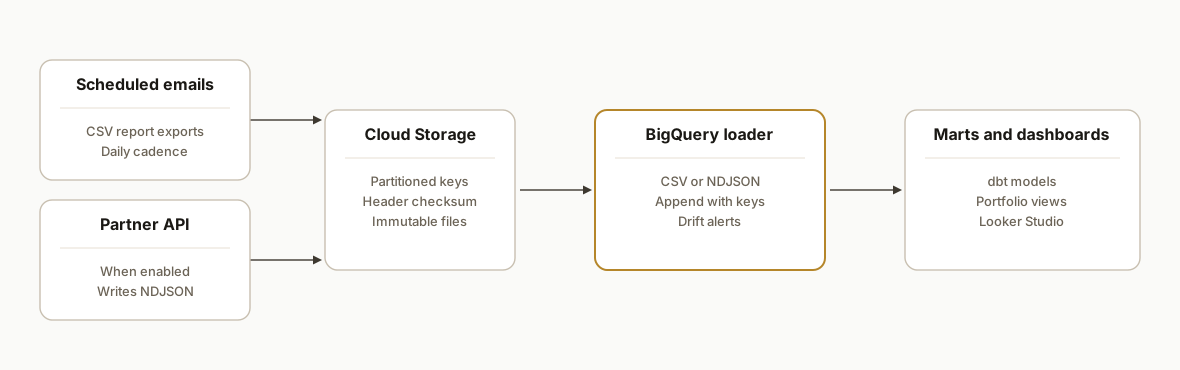
The pipeline has two ingress paths: scheduled report emails and, where your account allows it, a partner API feed. Both land files in Cloud Storage. A loader writes to BigQuery with schema controls and deduping, then dashboard models present unified views.
- Ingress A: Scheduled report emails: AppFolio can email CSV exports on a schedule to an ingestion address. We accept the attachment at a Cloud Run endpoint and write it to Cloud Storage. This path ships fast and does not require partner onboarding.
- Ingress B: Partner API feed: Some accounts get partner API or Database API access through AppFolio programs. We fetch the permitted objects on a schedule and write newline-delimited JSON to Cloud Storage. Partner enablement is required and details live behind the Developer Portal.
- Storage and lineage: Objects are written to GCS with partitioned keys by report type and date, plus a header checksum object for drift monitoring.
- BigQuery loader: A Cloud Function triggers on finalize, loads CSV or JSON to staging tables with autodetect plus explicit type overrides, and appends a load_audit row for observability.
- Transform and serve: dbt or scheduled SQL builds clean mart tables. Looker Studio connects directly to BigQuery for portfolio and entity dashboards.
Step-by-step: how to build it
1) Set up the ingestion address and schedule the exports
Create an ingestion email endpoint and point AppFolio's scheduled CSV exports to it. Partner documentation shows how to set up scheduled exports when API access is not available. Use one address per environment and add unique report-type tokens in the subject for routing.
Subject: AF_EXPORT rent_roll 2026-07-24
To: af-ingest@your-domain.example
Attachment: rent_roll_2026-07-24.csv
Key gotcha: keep a controlled subject grammar so routing and period parsing are deterministic.
2) Accept attachments and land them in Cloud Storage
We use Cloud Run to receive multipart posts from the ingestion email gateway and store CSVs under a dated key. This keeps storage cheap and traceable.
# main.py (Cloud Run, Python 3.11)
import os, datetime
from flask import Flask, request
from google.cloud import storage
from werkzeug.utils import secure_filename

app = Flask(__name__)
storage_client = storage.Client()
bucket = storage_client.bucket(os.environ["GCS_BUCKET"])  # e.g. pm-data-prod

@app.post("/inbound")
def inbound():
    tag = request.headers.get("X-Report-Type", "unknown")
    for f in request.files.values():
        if f.filename.lower().endswith((".csv", ".txt")):
            ts = datetime.datetime.utcnow().strftime("%Y%m%d-%H%M%S")
            key = f"appfolio/{tag}/{ts}/{secure_filename(f.filename)}"
            blob = bucket.blob(key)
            blob.upload_from_file(f.stream, content_type="text/csv")
    return ("ok", 200)
Deploy with a least-privileged service account that can only write objects to the bucket.
3) Load to BigQuery on object finalize
A Cloud Function triggers on new objects and appends to a staging table. We lean on autodetect for fast delivery but set write and schema update controls deliberately.
# function: gcs_to_bq
import os
from google.cloud import bigquery

def gcs_to_bq(event, context):
    uri = f"gs://{event['bucket']}/{event['name']}"
    table_id = os.environ["BQ_TABLE"]  # e.g. pm_raw.appfolio_rent_roll_stg
    client = bigquery.Client()
    job_config = bigquery.LoadJobConfig(
        source_format=bigquery.SourceFormat.CSV,
        skip_leading_rows=1,
        write_disposition=bigquery.WriteDisposition.WRITE_APPEND,
        schema_update_options=[bigquery.SchemaUpdateOption.ALLOW_FIELD_ADDITION],
        autodetect=True,
        field_delimiter=",",
        encoding="UTF-8",
    )
    job = client.load_table_from_uri(uri, table_id, job_config=job_config)
    job.result()
Set one loader per report family when columns differ meaningfully.
4) Track header checksums to catch layout drift
AppFolio CSVs can change column order or names. We compute a checksum of the header row and log it to a small audit table. A changed checksum alerts before broken dashboards.
-- BigQuery: create a header audit table
CREATE TABLE IF NOT EXISTS pm_raw.header_audit (
  report_type STRING,
  object_name STRING,
  header_sha256 STRING,
  loaded_at TIMESTAMP DEFAULT CURRENT_TIMESTAMP()
);
Compute and insert the checksum in the loader by reading the first line before the load and writing to pm_raw.header_audit.
5) Build clean marts with dbt or scheduled SQL
Keep staging 1:1 with source, then model to analysis-ready marts. Add a natural key and a load_period key for idempotency.
-- models/mart_rent_roll.sql (dbt)
WITH s AS (
  SELECT *, PARSE_DATE('%Y%m%d', _FILE_DATE) AS load_date
  FROM pm_raw.appfolio_rent_roll_stg
)
, de_duped AS (
  SELECT AS VALUE ANY_VALUE(t)
  FROM (
    SELECT TO_JSON_STRING(s) t,
           FARM_FINGERPRINT(CONCAT(COALESCE(property_id,''), '|', COALESCE(unit_id,''), '|', COALESCE(as_of_date,''))) AS nk,
           load_date
    FROM s
  )
  GROUP BY nk, load_date
)
SELECT * FROM de_duped;
The FARM_FINGERPRINT key prevents duplicates on replays of the same period.
6) Wire dashboards and schedule refresh
Connect Looker Studio or your BI tool to the mart tables. Use a date partitioned view or parameterized date filter for snappy loads. Schedule dbt or SQL transforms after the loader to keep dashboards current.
Refresh order: Ingestion email → GCS object → Loader → dbt run → Dashboards
Window: Daily at 05:00 in the portfolio timezone
7) Optional: Partner API ingress when enabled
When AppFolio enables API access on your account through their programs, we add a scheduled fetch job that writes NDJSON to Cloud Storage, then reuse the same BigQuery loader pattern. Technical docs and authentication details are gated to partners, so plan for a short enablement period with AppFolio support.
# placeholder: schedule a fetch job that writes gs://pm-data-prod/appfolio/api/leads/2026-07-24.ndjson
# loader uses SourceFormat.NEWLINE_DELIMITED_JSON with explicit schema
This keeps the architecture consistent regardless of ingress path.
Where it gets complicated
- Tier-gated API access: AppFolio's Database API is advertised for enterprise tiers. Technical details are not publicly documented. Expect a partner onboarding step and endpoint enablement coordination before any direct API pulls.
- CSV layout drift: Report columns change over time. Without header checksums and schema versioning, a silent column rename breaks transforms. We version maps and alert on drift before it hits dashboards.
- Idempotency by period: Replays are common when resending exports. Without a natural key and period scoping, loads duplicate rows. We key by property or unit identifiers plus the as-of period to make loads safe to rerun.
- Timezone and cutoffs: Daily exports should align to the portfolio timezone and business day. A UTC-based schedule can backdate period labeling if not handled.
- Attachment limits: Gmail caps attachments at 25 MB. If a report regularly exceeds that, split exports by property group or switch to the API path once enabled. Source: Google Help center.
- Governance and PII: Some reports include tenant details. Lock buckets to a data service account and restrict BigQuery datasets to analytics roles. Audit access in the BI tool as well.
Frequently asked questions
Does AppFolio have an API we can use for BigQuery?
AppFolio exposes partner and enterprise access paths, and a Database API is advertised for higher tiers. Technical docs and auth details are gated to partners, so you typically coordinate enablement first. When API access is not available, scheduled CSV exports by email are a reliable bridge.
What AppFolio plan do we need for direct API pulls?
API access is tier-gated. Enterprise offerings advertise a Database API and partner programs provide additional endpoints, but specifics are not publicly documented. We confirm plan eligibility with AppFolio during scoping and start with scheduled exports while enablement is in progress.
Can this run in near real time?
Report exports are naturally batch. Daily cadence is standard. Some webhook topics such as leads exist in partner setups, but portfolio reporting typically benefits more from a clean daily batch with deterministic cutoffs than from minute-by-minute updates.
What does this cost monthly to run?
Cloud Run, Cloud Functions, Cloud Storage, and BigQuery are pay-as-you-go. BigQuery lists 5 dollars per terabyte scanned for analysis and low storage rates per GB per month. The main cost is initial implementation. Ongoing cloud charges for a daily portfolio pipeline are usually modest.
Can a non-developer set this up?
Not end to end. You can schedule AppFolio exports, but reliably ingesting, validating, and modeling the data into BigQuery is engineering work. Once built, operations are hands-off and changes are driven through configuration, not code.
If you want the same AppFolio to BigQuery pipeline, we have already shipped it alongside our AppFolio to Postgres and AppFolio to Power BI builds. See our related post on AppFolio to Postgres and our services for custom integrations. When you are ready, book a short call and we will scope your exact data path.
- Services: /services#custom-ai-integration
- Related: /blog/appfolio-to-postgres-database-sync
- Book a call: /book
Want us to build this for you?
Nine questions, about 90 seconds. You see the revenue it is costing you, then pick a time. No pitch.
See your options