
Buildium report automation works in production when you keep it server-to-server: authenticate with Buildium's API keys, receive webhooks for near real time changes, and batch safe pull jobs to stay under 10 requests per second. We ship it as a pipeline that lands clean rows in Google Sheets and prepares QuickBooks friendly CSVs when native sync is limited.
Buildium report automation is: a server-side integration that uses Buildium's REST API and webhooks to export reports and operational data into downstream systems like Google Sheets and QuickBooks on a schedule or on change.
If you run Buildium and want scheduled owner packets, daily KPIs in Sheets, or a QuickBooks import you can trust, this guide shows the architecture we built, the exact steps, and the gotchas to avoid.
The problem it solves
Most teams export Buildium reports manually. Someone signs in, downloads CSV or XLS, cleans columns, pastes into a master Sheet, then emails owners. That breaks the first time a column moves or a person is out. It also blocks near real time views and any automated accounting handoff.
| Task | Manual | Automated |
|---|---|---|
| Data collection | Log in, download CSVs, re-run per property | Webhooks push changes, scheduled pulls backfill gaps |
| Frequency | Weekly or monthly when someone remembers | Hourly or daily with backoff and retries |
| Cleaning | Copy paste, fix headers, dedupe by eye | Deterministic transforms, idempotent keys, schema checks |
| Owner packets | Assemble PDFs and emails | Prebuilt packet per owner, scheduled delivery |
| Delivery | Attachments in email threads | Sheets dashboards, CSVs for import, emails where needed |
| Error handling | None until someone notices | Logged, retried, alerted with safe fallbacks |
A reliable pipeline removes the human bottleneck and makes reports a data product you can trust.
How the automation works
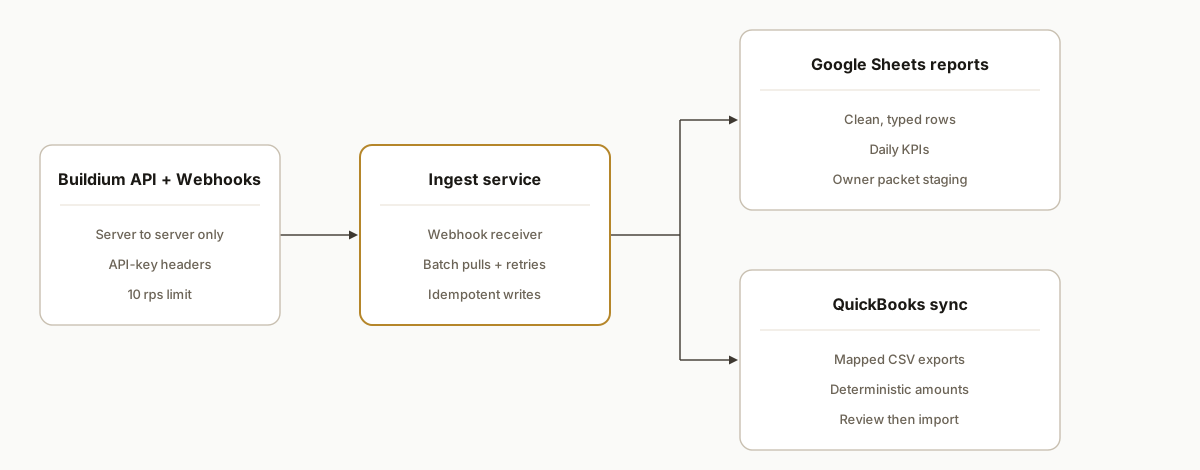
The integration is server-to-server. Buildium exposes a REST API on api.buildium.com and a sandbox on apisandbox.buildium.com with API-key headers. We register webhooks to get notified of changes, use a pull job for backfills, and write normalized rows into Google Sheets and a QuickBooks ready export folder. No browser calls: Buildium disables CORS, so everything runs in your backend.
- Buildium API and webhooks: Authentication uses x-buildium-client-id and x-buildium-client-secret headers. Webhooks notify our endpoint so we do not poll more than needed. Pull jobs run with batching to respect the 10 requests per second limit.
- Ingest service: A small Node service receives webhooks, queues pulls, and runs transforms. It owns idempotency keys so replays do not create duplicates.
- Google Sheets sink: A Sheets tab per report holds clean, typed rows. It is the fastest way to expose KPIs to operations without adding a BI tool.
- QuickBooks bridge: We generate mapped CSVs that mirror QuickBooks import screens, or post through your existing QuickBooks integration if you have one. The mapping lives in code, not in a spreadsheet macro.
- Scheduler and backfill: A safe backfill job runs nightly to reconcile anything missed. Webhook first for freshness, scheduled pulls for completeness.
- Monitoring: We log rate limit hits, retries, and row counts so you can see yesterday vs today without opening Buildium.
Step-by-step: how to build it
1) Create API keys and prove server-to-server access
Buildium's REST API uses API keys in headers. Sandbox base URL: https://apisandbox.buildium.com. Production base URL: https://api.buildium.com. No CORS means you must call from a backend.
# Example: Node fetch with Buildium API-key headers
# Configure BUILD_TENANT_BASE and BUILD_RESOURCE_PATH in env
node -e "
const fetch = require('node-fetch');
const base = process.env.BUILD_TENANT_BASE; // e.g. https://apisandbox.buildium.com
const path = process.env.BUILD_RESOURCE_PATH; // e.g. /v1/<your-resource> (set per docs)
fetch(base + path, {
  headers: {
    'x-buildium-client-id': process.env.BUILD_CLIENT_ID,
    'x-buildium-client-secret': process.env.BUILD_CLIENT_SECRET,
    'accept': 'application/json'
  }
}).then(r => console.log(r.status)).catch(console.error)
"
Key gotcha: batch and backoff. Buildium notes 10 requests per second. Start with 5 to leave headroom for retries.
2) Stand up a webhook receiver and a pull queue
Register a webhook URL in Buildium so events hit your server. Use the webhook only as a nudge. The receiver enqueues a pull job that fetches authoritative data in batches.
// server/webhooks.js
import crypto from "crypto";
import express from "express";
const app = express();
app.use(express.json({ limit: "1mb" }));

// Minimal webhook receiver: validate, enqueue, 200 fast
app.post("/webhooks/buildium", async (req, res) => {
  const event = req.body; // validate per your config
  // Compute a stable idempotency key from event essentials
  const key = crypto.createHash("sha256").update(JSON.stringify({t: event.type, id: event.id})).digest("hex");
  await queue.add({ key, hint: event });
  res.status(200).send("ok");
});

app.listen(process.env.PORT || 8080);
Key gotcha: do not process heavy work inside the webhook request. Acknowledge quickly, then pull.
3) Implement a rate-limit safe Buildium fetcher
Throttle to 10 requests per second or lower. Add exponential backoff on 429s.
// lib/buildium.js
import fetch from "node-fetch";
import Bottleneck from "bottleneck";
const limiter = new Bottleneck({ minTime: 120, maxConcurrent: 2 }); // ~8 rps ceiling

export async function bFetch(path) {
  const url = `${process.env.BUILD_TENANT_BASE}${path}`; // path comes from config
  const headers = {
    "x-buildium-client-id": process.env.BUILD_CLIENT_ID,
    "x-buildium-client-secret": process.env.BUILD_CLIENT_SECRET,
    "accept": "application/json"
  };
  return limiter.schedule(async () => {
    for (let i = 0; i < 5; i++) {
      const resp = await fetch(url, { headers });
      if (resp.status === 429) { await new Promise(r => setTimeout(r, 2 ** i * 250)); continue; }
      if (!resp.ok) throw new Error(`Buildium error ${resp.status}`);
      return resp.json();
    }
    throw new Error("Buildium throttled after retries");
  });
}
Key gotcha: keep the resource paths in config so you can target sandbox first and swap to production later.
4) Land rows in Google Sheets
Write normalized rows into a Sheet for ops visibility. Use the Google Sheets API to append to a tab named after the report.
// lib/sheets.js
import { google } from "googleapis";
export async function appendRows({ spreadsheetId, range, rows }) {
  const auth = new google.auth.GoogleAuth({ scopes: ["https://www.googleapis.com/auth/spreadsheets"] });
  const sheets = google.sheets({ version: "v4", auth: await auth.getClient() });
  await sheets.spreadsheets.values.append({
    spreadsheetId,
    range, // e.g. 'RentRoll!A1'
    valueInputOption: "RAW",
    requestBody: { values: rows }
  });
}
Key gotcha: enforce a schema. Convert dates and amounts to ISO strings and cents consistently before writing.
5) Prepare QuickBooks friendly CSV exports
When native sync is limited, create CSVs shaped for QuickBooks import screens. Keep mapping code in version control.
// lib/qboCsv.js
import { stringify } from "csv-stringify/sync";
export function toQboTransactions(rows) {
  const header = ["Date", "Description", "Amount"]; // map to QBO import
  const data = rows.map(r => [r.dateISO, r.memo, (r.amountCents/100).toFixed(2)]);
  return stringify([header, ...data]);
}
Key gotcha: round once, in one place. Store cents as integers internally to avoid drift.
6) Add a CSV email fallback for scheduled reports
Buildium supports scheduled owner report delivery via email. If a report is not in your API surface yet, parse CSV attachments and feed the same transforms.
// lib/csvIngest.js
import { parse } from "csv-parse/sync";
export function parseCsv(buffer) {
  return parse(buffer, { columns: true, skip_empty_lines: true });
}
Key gotcha: columns drift. Guard every header lookup and log unknown columns so you catch template changes fast.
7) Make it idempotent and observable
Deduplicate by a stable key and keep simple run logs.
// lib/idempotency.js
import crypto from "crypto";
export function makeKey(obj) {
  return crypto.createHash("sha256").update([obj.report, obj.entityId, obj.asOfDate].join("|")).digest("hex");
}
Key gotcha: store processed keys for at least 30 days so replays and retries do not duplicate writes.
Where it gets complicated
- No browser calls: Buildium disables CORS. All API and webhook work must be server-to-server. If you try to fetch from a dashboard frontend, the browser will be blocked.
- API keys, not OAuth: Authentication uses x-buildium-client-id and x-buildium-client-secret headers. Many off the shelf connectors expect OAuth. Plan for a thin custom middleware instead of a drop in Zapier app.
- Throughput limits: Buildium notes 10 requests per second. Bulk extraction without batching or backoff will throttle. We settled on single digit rps plus retries to keep runs smooth.
- Zapier or Make: A public Buildium Zapier app was not visible when we checked. Teams connect via Webhooks or HTTP modules instead. Treat it as an API project, not a point and click zaps exercise.
- CSV drift: Report downloads as CSV or XLS are useful fallbacks, but a column rename breaks naive importers. Guard headers and alert on unknowns.
- Webhook shape and retries: Webhooks are near real time but not a database. Use them to trigger a pull. Keep a nightly backfill so gaps do not accumulate.
What this actually changes
We shipped this integration pattern for a midsize property manager. In production it runs unattended: Buildium webhooks nudge pulls, clean rows land in Google Sheets every day, owner packets go on schedule, and accounting receives a mapped CSV when a native sync is not available. The structural win: reporting is now a data product, not a weekly chore.
One external benchmark: knowledge workers spend about 19 percent of their time searching for and gathering information according to McKinsey Global Institute. Turning Buildium data into always fresh Sheets and ready to import CSVs cuts that search time on every reporting cycle. Source: https://www.mckinsey.com/industries/technology-media-and-telecommunications/our-insights/the-social-economy
Frequently asked questions
Does Buildium have an official API?
Yes. Buildium exposes a REST API over HTTPS with JSON responses. Production base URL is https://api.buildium.com and sandbox is https://apisandbox.buildium.com. Authentication uses API keys in headers: x-buildium-client-id and x-buildium-client-secret.
Can I use Zapier or Make to automate Buildium?
A public Buildium Zapier app was not visible in the directory when we checked. Treat Zapier and Make as HTTP wrappers: call Buildium's API with Webhooks or HTTP modules from a server you control. We prefer a thin Node middleware so we can handle auth, retries, and rate limits correctly.
Can this push to Google Sheets in real time?
Yes. Use Buildium webhooks to trigger a pull, transform rows, then append to Google Sheets. Buildium disables CORS, so keep all API calls on the server and only send cleaned data to the browser or Sheets API.
How do you avoid Buildium rate limits?
Batch requests, throttle to single digit requests per second, and back off on 429 responses. We also use webhooks to reduce unnecessary polling and a nightly reconciliation pull to fill gaps.
Can it sync to QuickBooks directly?
When native sync is limited, generate CSVs shaped for QuickBooks import or post through an existing QuickBooks integration you already use. Keep the mapping in code so accountants can review and version changes.
How long does this take to implement?
A narrow reporting pipeline that lands in Google Sheets can be delivered quickly once access is provisioned. Multi entity owner packets and accounting handoffs add scope. We start in sandbox, then flip production once backfills verify clean.
If you want Buildium data flowing into Sheets and QuickBooks without weekly exports, we have built this exact pipeline. See our related AppFolio API guide for adjacent patterns in property software and book a working session. Read next: AppFolio API Integration Guide and Limits. Explore our custom AI integration services. When you are ready, book a 15 minute call.
Want us to build this for you?
Nine questions, about 90 seconds. You see the hours it is costing you, then pick a time. No pitch.
Get your free assessment