
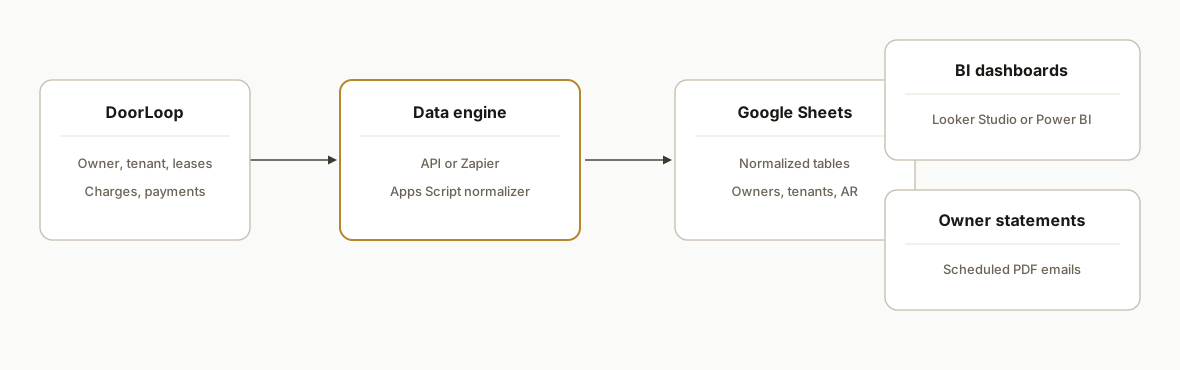
DoorLoop reporting automation works by streaming owner and tenant data into Google Sheets, shaping it into BI-ready tables, and auto-generating owner statements when the native UI cannot schedule emails. We shipped this pattern for a DoorLoop-based property manager: Zapier or the DoorLoop API feeds Sheets, Apps Script normalizes and schedules, and Looker Studio or Power BI reads it.
Definition: DoorLoop reporting automation is a workflow that extracts owner and tenant data from DoorLoop into a structured store like Google Sheets for scheduled statements and dashboards.
The problem it solves
Native DoorLoop reports are useful in the UI but fall short for unattended distribution. The Owner Statement exports to XLSX and can be emailed manually only. Tenant reports are printable or exportable to an Excel-compatible file, but there is no confirmed scheduler. That forces monthly click-export-send routines and limits BI.
| Task | Manual in DoorLoop | Automated with our build |
|---|---|---|
| Owner statements | Export XLSX, email manually each month | Nightly data sync to Sheets. Per-owner statements compiled and emailed on a schedule |
| Tenant roll | Run printable or Excel-compatible export | Always-fresh tenant roll in Sheets with owner and property joins |
| BI dashboards | Rebuild from ad hoc exports | Live Looker Studio or Power BI reading normalized Sheets |
| Data joins | Hard to join across reports | One normalized model: tenants, leases, charges, payments, ownership map |
What automating your property reporting is worth
Move the sliders to your own numbers. The defaults are only an example portfolio, not client data.
Management fees from the doors the same team could take on
$62,400
(6 hrs × 52 ÷ 12) ÷ 0.5 hrs per door × $100 × 12 months
- Doors the freed hours could cover
- 52
- 26 hrs a month ÷ 0.5 hrs per door
- Staff cost of doing it by hand each year
- $10,920
- 6 hrs a week × $35/hr × 52 weeks
- Hours handed to the system each month
- 26 hrs
- 6 hrs a week × 52 ÷ 12
How the automation works
We keep it simple: use Zapier's official DoorLoop app where it covers what you need or call the DoorLoop API if your account has access. Data lands in Google Sheets, an Apps Script shapes it for owner statements and dashboards, and scheduled emails or BI refreshes do the rest.
- DoorLoop data source: We either use Zapier's official DoorLoop app for supported actions or call the DoorLoop API at api.doorloop.com. DoorLoop publicly documents the API and refers to standard HTTP authentication. Auth specifics and webhook availability require account-level confirmation.
- Data engine (Apps Script): A container-bound Google Apps Script normalizes tenants, leases, charges, payments, and owner mappings into tidy tables and schedules nightly runs.
- Google Sheets model: Sheets act as the operational data store and reporting surface. Looker Studio or Power BI can connect directly for live dashboards. For a parallel pattern in another platform, see our guide on syncing AppFolio to Google Sheets and our AppFolio to Power BI integration.
- Owner statement assembler: A script groups activity by owner and property to produce readable statements, then emails PDFs on schedule to each owner.
- BI layer: Looker Studio reads Sheets natively. Power BI pulls Sheets or a CSV export for refreshable visuals.
Step-by-step: how to build it
1) Create the Google Sheets schema
Stand up one spreadsheet with tabs for Owners, Properties, Units, Tenants, Leases, Charges, Payments, and OwnershipMap. Keep keys and dates explicit.
Owners: owner_id, owner_name, email
Properties: property_id, property_name, owner_id
Units: unit_id, property_id, unit_label
Tenants: tenant_id, full_name, email, phone
Leases: lease_id, tenant_id, unit_id, start_date, end_date, status
Charges: charge_id, lease_id, date, amount, type
Payments: payment_id, lease_id, date, amount, method
OwnershipMap: property_id, owner_id, split_pct
Gotcha: model owner splits up front. Many portfolios are not one-to-one owner to property.
2) Fetch DoorLoop data via API when available
If your account grants API access, call the DoorLoop API and write into the tabs. DoorLoop's help center cites api.doorloop.com and standard HTTP authentication. Implement auth per your account's API instructions.
// Apps Script
function fetchDoorLoop(endpoint) {
  const url = `https://api.doorloop.com/${endpoint}`; // shape confirmed in docs, auth specifics vary
  const resp = UrlFetchApp.fetch(url, {
    method: 'get',
    headers: {
      // Implement per your DoorLoop API setup
      // Example placeholder: 'Authorization': 'YOUR_DOORLOOP_AUTH_HEADER'
    },
    muteHttpExceptions: true,
  });
  if (resp.getResponseCode() >= 300) throw new Error(resp.getContentText());
  return JSON.parse(resp.getContentText());
}

function upsertSheet(sheetName, rows, keyCols) {
  const ss = SpreadsheetApp.getActive().getSheetByName(sheetName);
  const header = ss.getRange(1,1,1,ss.getLastColumn()).getValues()[0];
  const index = Object.fromEntries(ss.getRange(2,1,ss.getLastRow()-1,ss.getLastColumn()).getValues()
    .map((r,i) => [keyCols.map(k => r[header.indexOf(k)]).join('::'), i+2]));
  rows.forEach(obj => {
    const key = keyCols.map(k => obj[k]).join('::');
    const rowArr = header.map(h => obj[h] ?? '');
    const rowIdx = index[key];
    if (rowIdx) ss.getRange(rowIdx,1,1,header.length).setValues([rowArr]);
    else ss.appendRow(rowArr);
  });
}
Gotcha: do not assume endpoint names or auth patterns. Confirm with DoorLoop's API reference and your account manager before coding.
3) Or use Zapier to bridge into Sheets when API access is limited
DoorLoop has an official Zapier app with actions and searches. For reporting pulls, we often run a "Schedule by Zapier" step hourly, then use either the official DoorLoop actions where they fit or a "Webhooks by Zapier" Custom Request to call the API, and finally "Google Sheets: Create or Update Row".
Zap: Hourly sync to Sheets
- Trigger: Schedule by Zapier (Every hour)
- Action A: DoorLoop app (action or search your account exposes), OR Webhooks by Zapier (Custom Request to api.doorloop.com)
- Action B: Google Sheets (Create Row or Update Row with lookup key)
Gotcha: Make's DoorLoop connector is community-maintained. Treat it as third-party for reliability and coverage. We default to Zapier or the API.
4) Build the owner statement assembler in Apps Script
Group charges and payments by owner and property, then render a per-owner sheet and a PDF for email. This replaces manual Owner Statement sending, which DoorLoop's help center notes is not auto-schedulable.
function buildOwnerStatements() {
  const ss = SpreadsheetApp.getActive();
  const charges = objectRows(ss.getSheetByName('Charges'));
  const payments = objectRows(ss.getSheetByName('Payments'));
  const props = indexBy(objectRows(ss.getSheetByName('Properties')), 'property_id');
  const owners = indexBy(objectRows(ss.getSheetByName('Owners')), 'owner_id');

  const byOwner = {};
  charges.forEach(c => {
    const ownerId = props[c.property_id]?.owner_id;
    if (!ownerId) return;
    byOwner[ownerId] = byOwner[ownerId] || {lines: []};
    byOwner[ownerId].lines.push({ kind: 'charge', ...c });
  });
  payments.forEach(p => {
    const ownerId = props[p.property_id]?.owner_id;
    if (!ownerId) return;
    byOwner[ownerId] = byOwner[ownerId] || {lines: []};
    byOwner[ownerId].lines.push({ kind: 'payment', ...p });
  });

  Object.keys(byOwner).forEach(ownerId => {
    const sh = ss.getSheetByName(`Owner_${ownerId}`) || ss.insertSheet(`Owner_${ownerId}`);
    sh.clear();
    sh.getRange(1,1,1,6).setValues([[
      'date','property_id','lease_id','type','amount','note'
    ]]);
    const rows = byOwner[ownerId].lines
      .sort((a,b) => new Date(a.date) - new Date(b.date))
      .map(l => [l.date, l.property_id, l.lease_id, l.kind, l.amount, l.type || '' ]);
    if (rows.length) sh.getRange(2,1,rows.length,6).setValues(rows);
  });
}

function objectRows(sheet){
  const v = sheet.getDataRange().getValues();
  const h = v.shift();
  return v.filter(r => r.join('') !== '').map(r => Object.fromEntries(h.map((k,i)=>[k,r[i]])));
}
function indexBy(arr, key){
  const out = {}; arr.forEach(o => out[o[key]] = o); return out;
}
Gotcha: keep statement generation separate from data sync so owners still receive emails even if an upstream call is delayed.
5) Email statements on a schedule
Use a time-based trigger to email PDFs to each owner using the compiled sheet. This bypasses the lack of automatic Owner Statement emailing in the native UI.
function emailOwnerStatements() {
  const ss = SpreadsheetApp.getActive();
  const owners = objectRows(ss.getSheetByName('Owners'));
  owners.forEach(o => {
    const sh = ss.getSheetByName(`Owner_${o.owner_id}`);
    if (!sh) return;
    const pdf = Utilities.newBlob(sh.getParent().getAs(MimeType.PDF).getBytes(), MimeType.PDF, `${o.owner_name}-statement.pdf`);
    GmailApp.sendEmail(o.email, 'Monthly Owner Statement', 'Attached is your statement.', {attachments: [pdf]});
  });
}
Gotcha: PDF generation on whole-spreadsheet can be heavy. Consider exporting only the owner sheet in larger portfolios.
6) Wire BI dashboards and refresh
Connect Looker Studio directly to Sheets for owner, delinquency, and leasing dashboards. For Power BI, point to the Sheets export or a CSV download URL and set a refresh schedule that fits your cadence.
Looker Studio steps
- Data source: Google Sheets → select your spreadsheet and tabs
- Blends: Owners  Properties  Charges/Payments
- Filters: owner_id, property_id, date range
- Refresh: set per dashboard needs
Gotcha: Google Sheets supports up to 10 million cells per spreadsheet per Google documentation. Plan table sizes and history windows accordingly so dashboards remain responsive. Source: https://support.google.com/drive/answer/37603
DoorLoop API: where to find documentation and how we use it
Here is the buyer path we follow on real builds:
- Ask DoorLoop support for API access and current developer documentation. DoorLoop publicly references api.doorloop.com and standard HTTP authentication. Details vary by account.
- Confirm the data model you need: tenants, leases, charges, payments, ownership mappings. Align field names and paging rules from the docs you receive.
- Validate available webhooks. If webhooks are not available for your plan, schedule pulls on an hourly or nightly cadence.
- Decide the bridge: direct API to Apps Script for control, or Zapier's DoorLoop app for faster coverage. For larger portfolios that want centralized reporting across systems, see our RentManager API integration pattern for how we structure multi-entity syncs.
We keep all auth code and endpoint paths configurable so your team can rotate credentials without code changes once DoorLoop confirms your scheme.
DoorLoop API or Zapier: which should you use for reporting
- Use the API if you need full control, list-style pulls, and predictable paging into a normalized model. This is how we ship BI-grade datasets.
- Use Zapier if you want speed and the official app covers the objects you need. Pair it with Webhooks by Zapier for any gaps and land everything in Sheets with lookup-key upserts.
- For portfolios that grow into Power BI and multi-year history, start with the API path. You can still keep Zapier for operational alerts and one-off tasks.
If your team is already standardizing on AppFolio or has mixed stacks, our AppFolio posts show the same playbook running at scale: AppFolio to Google Sheets automation and AppFolio to Power BI.
Where it gets complicated
- Owner Statement scheduling is manual in DoorLoop: The help center notes no automatic monthly emailing. We replace that with a scheduled Apps Script mailer fed by normalized data.
- API authentication details are not publicly explicit: DoorLoop references standard HTTP authentication but does not publicly document specifics. Coordinate with your DoorLoop rep before you build an API path.
- Community Make connector: The Make DoorLoop connector is community-maintained. For production reporting we avoid relying on it as a primary sync.
- Excel-compatible exports, not guaranteed CSV: Tenant reports export to an Excel-compatible file. If you ingest files, include an XLSX to CSV converter step before loading to Sheets or BI.
- BI refresh quotas: Looker Studio and Power BI have refresh and size limits. Size your history tables and schedule refreshes to fit.
What this actually changes
For a DoorLoop-based property manager, this removed monthly export-and-email labor and gave stakeholders a live tenant roll and owner view without waiting on manual runs. Structurally, the normalized model keeps the door open to new dashboards without touching the source system. Google Sheets handles sizable datasets for this use case, and Google documents a 10 million cell limit per spreadsheet, which is ample for most property portfolios. Source: https://support.google.com/drive/answer/37603
Frequently asked questions
Does DoorLoop have an official API?
Yes. DoorLoop publicly references its API at api.doorloop.com and describes standard HTTP authentication. Specific auth schemes and available endpoints vary by account and should be confirmed with DoorLoop support before implementation.
Where can I find DoorLoop API documentation?
Request developer documentation and API access from DoorLoop support. The company references api.doorloop.com publicly. Full endpoint lists, auth scheme, and webhook availability are provided to customers per account.
Is doorloop.com the API base domain?
doorloop.com is the main website. The API base is referenced as api.doorloop.com. Confirm the exact base URL and auth headers with DoorLoop support before you connect your automation.
Can DoorLoop automatically email Owner Statements monthly?
DoorLoop's Owner Statement report supports export to XLSX and manual email from the report UI. The help center notes automatic monthly emailing is not supported. We replace that gap with a scheduled Apps Script mailer.
Zapier or Make: which should I use for this?
DoorLoop has an official Zapier app with actions and searches. The Make connector is community-maintained. For production reporting we prefer Zapier or direct API calls. If you need list-style pulls, combine "Schedule by Zapier" with "Webhooks by Zapier".
Can this run in near real time?
Yes within practical limits. With API access, Apps Script or Zapier can run on frequent schedules. Without API access, rely on scheduled pulls and normal BI refresh windows. Owner emails typically run daily or monthly per your cadence.
What does it cost monthly to run?
Infrastructure is light. Google Sheets and Apps Script are effectively free within generous limits. Zapier costs depend on task volume. The primary cost is the initial build, plus minor maintenance as schemas evolve.
Can a non-developer set this up?
Parts of it. A Zapier to Sheets bridge is approachable. The API path, normalizer, and owner-statement assembler benefit from an engineer. We built and shipped this pattern so you do not have to piece it together.
If you are on DoorLoop and want unattended owner statements and dashboards without monthly export chores, we have already built this system. See how we handle similar report automation in our post on automate AppFolio Owner Statements, explore our workflow automation services, and when you are ready to scope your exact setup, book a 20-minute call.
Sources
- 1.Files you can store in Google Drivesupport.google.com
Want us to build this for you?
Nine questions, about 90 seconds. You see the revenue it is costing you, then pick a time. No pitch.
See your options