
Fathom meeting automation works by taking the transcript Fathom drops after a call and running it through AI to produce the things you actually do next: a scope-of-work document, a personalized follow-up email draft, and an updated CRM record with tasks. We run this exact pipeline at Rex Automaton, our AI automation and marketing practice, and it took the 30 to 45 minutes of after-call admin behind every discovery call down to under 5. Case study: this is the production workflow we run for Rex Automaton on every discovery call. If you take sales or discovery calls, record them with Fathom, and then spend the rest of the day writing them up, this guide covers how the automation is built.
The problem it solves
Fathom is excellent at one job: it records the call, transcribes it, and gives you a clean summary. That is genuinely useful, and it is also where most people stop, because Fathom hands you a transcript, not the work that comes after the call.
The work after the call is the expensive part. At Rex Automaton we used to spend 30 to 45 minutes writing a follow-up email, drafting a scope-of-work document, and updating the CRM with what was said and what happens next. None of it is hard. All of it is necessary. And across back-to-back calls, it does not fit. You finish a call, the next one starts, and the write-up from the first one never gets done properly. The founder ends up spending more time documenting calls than taking them.
A transcript does not solve that. Reading a transcript to write a scope doc is barely faster than writing it from memory. What actually closes the gap is turning the transcript into the finished artifacts, which is exactly what Fathom does not do and what the automation does.
What keeping your systems in sync is worth
Move the sliders to your own numbers. The defaults are only an example business, not client data.
Revenue from deals that stop slipping each year
$100,800
80 a month × 12 × 5% × 70% × $3000
- Deals kept a year
- 34
- 80 × 12 × 5% × 70%
- Staff cost of doing it by hand each year
- $9,100
- 5 hrs a week × $35/hr × 52 weeks
- Hours handed to the system each month
- 22 hrs
- 5 hrs a week × 52 ÷ 12
How to turn Fathom meeting notes into automated follow-ups
The low-effort starting point uses Fathom's own integrations. Fathom has a native Zapier integration that can fire on a new recording or a new AI summary, and a native HubSpot integration that logs the call and its summary onto the contact automatically. If all you want is the summary pushed into a CRM or a Zap that pings Slack, turn those on first and stop there.
The pipeline in this guide is the deeper option, for when you want the transcript turned into finished work: a branded scope-of-work document, a personalized follow-up email draft, and owner-assigned CRM tasks, all from a single AI analysis pass. The native integrations move the notes; this moves the work that comes after the notes.
| After-call task | With Fathom alone | With the automation |
|---|---|---|
| Follow-up email | Write it from scratch or the summary | Personalized draft, ready to review |
| Scope-of-work doc | Draft it manually | Branded doc generated from the call |
| CRM update | Type up notes and tasks later | Notes and next steps written automatically |
| Time per call | 30 to 45 minutes | Under 5 minutes of review |
| Back-to-back calls | Write-ups pile up undone | Each one is ready before the next call ends |
The automation replaces the after-call write-up, not the call.
How the automation works
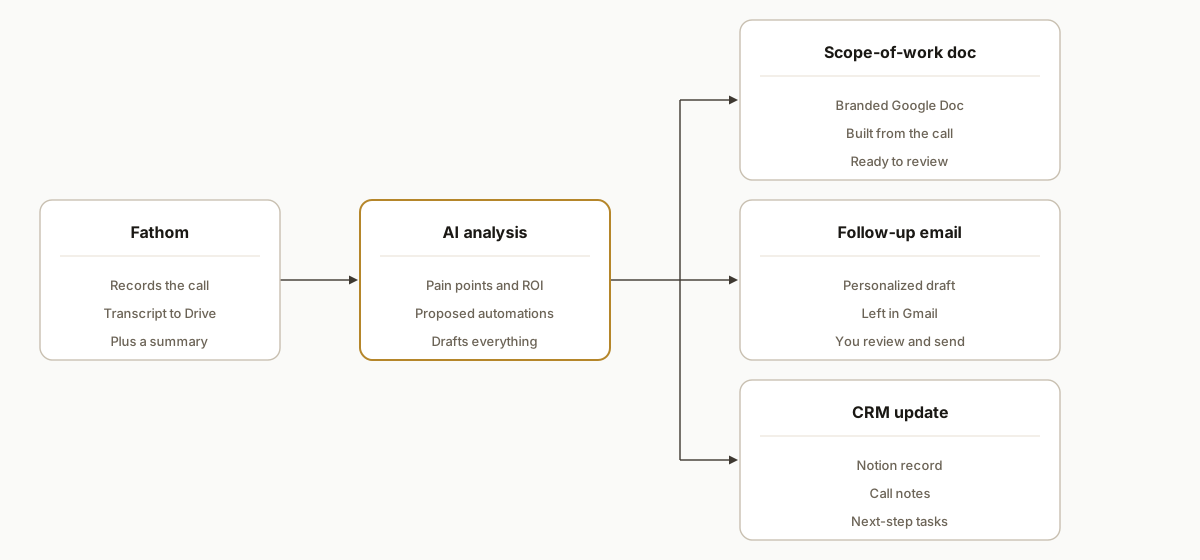
Fathom drops the transcript, and the pipeline turns it into the three things you do next, with you reviewing the drafts before anything goes out. Nothing is sent to a client without a human approving it.
- Fathom. The capture. It records and transcribes the call and drops the transcript into Google Drive automatically.
- AI analysis. The brain. It reads the transcript and extracts the pain points, the automations worth proposing, and rough ROI numbers, then drafts everything downstream.
- Scope-of-work document. A branded Google Doc generated from what the call actually covered, not a generic template.
- Follow-up email draft. A personalized email written from the call, left as a draft in Gmail for the founder to review and send.
- CRM update. A Notion record with the call notes and the next-step tasks, so the pipeline reflects reality without anyone typing it up.
Step-by-step: how to build it
Step 1: Get the transcript out of Fathom automatically
Fathom can drop each call's transcript into Google Drive. Point it at a dedicated folder so a watcher can pick up new transcripts as they land, with no manual export. This is the trigger for everything else.
Step 2: Watch the folder and pick up new transcripts
A scenario (Make.com, n8n, or a small service) watches the folder, reads each new transcript, and passes the text to the analysis step. Track which transcripts you have already processed so a re-sync never double-drafts.
Step 3: Run the analysis once, extract everything
This is the step that earns the time back. Send the transcript to an AI model with a structured prompt that pulls out everything the downstream artifacts need in one pass.
const analysis = await claude.extract(transcript, {
  painPoints: "what the prospect is struggling with, in their words",
  proposedAutomations: "the systems worth building for them",
  roughRoi: "time or money the automations could save",
  nextSteps: "what was agreed, who owns each",
});
Step 4: Generate the scope-of-work document
Feed the analysis into a branded Google Doc template so the scope reads like your document, not a wall of AI text. The pain points and proposed automations from Step 3 become the body, with your formatting and boilerplate around them.
Step 5: Draft the follow-up email, do not send it
Write a personalized follow-up email from the same analysis and leave it as a draft in Gmail. The rule here is firm: it is a draft. The founder reads it, adjusts the tone, and sends it. A client follow-up is never auto-sent, because the one place this should not be fully automated is the message that goes to a customer.
Step 6: Update the CRM
Write the call notes and the next-step tasks into the CRM record (we use Notion) so the pipeline reflects what just happened. The deal moves, the tasks exist, and nobody had to remember to type them. If you run HubSpot, Pipedrive, or GoHighLevel, the same pattern applies: transcript in, structured analysis, then task creation via your CRM's official connectors or built-in email-to-task features. We cover a HubSpot variant in our build notes: create HubSpot tasks directly from Fathom calls and a GoHighLevel approach here: automate GoHighLevel with Make.com safely.
Step 7: Review and ship
The founder opens the draft email, glances at the scope doc, confirms the tasks, and moves on. Under five minutes, versus the better part of an hour, and it actually happens after every call instead of in a guilty batch on Friday.
Where it gets complicated
The scope doc has to read like yours. The failure mode is a document that is obviously AI-generated. The analysis has to drop into a real branded template with your structure and boilerplate, and the prompt has to produce specifics from the call, or the output reads generic and you end up rewriting it, which defeats the point.
Never auto-send the client email. The follow-up is the one artifact that touches a customer, so it stays a draft a human approves. The time saved is in the drafting, not in skipping the review. Auto-sending an AI email to a prospect is exactly the kind of corner that turns a time-saver into an apology.
One analysis pass, many outputs. It is tempting to call the model separately for the email, the doc, and the CRM notes. That triples the cost and lets the three artifacts drift out of sync. Extract everything once into a structured object, then format that object into each output, so the email and the scope doc tell the same story.
Transcript quality and call structure vary. A rambling call, a no-show that became a chat, or a call with three people on the prospect side all produce messier transcripts. The prompt needs to handle a transcript that does not follow a tidy discovery script, and to fail gracefully (a thinner draft) rather than inventing details that were never said.
Matching the transcript to the right deal. The pipeline has to connect each transcript to the correct CRM record, usually by the attendee email or the meeting title. Get this wrong and the notes land on the wrong deal, which is worse than no notes. It is worth a deliberate matching step rather than a hopeful guess.
Which CRM can turn call transcripts into follow-up tasks?
Short answer: none of the popular CRMs do this end to end on their own. The workable pattern is to let your meeting recorder produce a transcript, run a single AI analysis pass, then create tasks in your CRM. We have shipped it four ways:
- Notion as CRM. Store the deal. Create tasks in a related Tasks database. Link the call URL and due dates. This is what we run at Rex Automaton.
- HubSpot. Create a task on the contact or deal after analysis. We document the approach here: create HubSpot tasks from Fathom calls.
- Pipedrive. Create an activity tied to the person or deal. The content comes from the same analysis payload.
- GoHighLevel. Create tasks or pipeline actions via Make.com. We cover connection and field mapping risks here: GoHighLevel automation with Make.com.
If your goal is better follow-through, also see our playbook on automating CRM lead follow-up without sounding robotic and the failure patterns in the 68k follow-up problem.
Field mapping: from transcript to a usable CRM task
The important part is agreeing a stable schema that your CRM can consume. We extract once, then fan it out.
{
  "taskTitle": "Send proposal: AI call notes automation",
  "dueDate": "2026-07-03",
  "ownerEmail": "founder@yourco.com",
  "priority": "high",
  "nextSteps": [
    "Email summary and confirm scope",
    "Attach branded scope doc",
    "Schedule technical deep-dive"
  ],
  "relatedContactEmails": ["prospect@client.com"],
  "sourceCallUrl": "https://fathom.video/call/ABC123",
  "notes": "Prospect pain: manual write-ups. Proposed: transcript-to-scope pipeline."
}
Map that schema to: a Task in Notion with relation to Deal. A Task on a HubSpot deal. An Activity in Pipedrive. A Task in GoHighLevel. The same payload populates the draft email and the scope doc so everything stays consistent.
What this actually changes
We built this for Rex Automaton first, and still run it on every discovery call. The honest result is the one in our post-meeting pipeline case study: 30 to 45 minutes of after-call admin became under 5 minutes of review. The same pattern is what we ship to clients as a pre-meeting and post-meeting system.
The structural change is that back-to-back calls became viable. When the write-up after a call takes 40 minutes, you cannot stack three discovery calls in a morning, because the documentation debt buries you. When it takes five minutes of review, you can. The automation did not just save time per call, it changed how many calls are possible, which for a sales motion is the whole game.
The reason it holds up is that a human still owns the one thing that matters: the message that goes to the client. The AI drafts, the founder approves and sends. Everything else, the doc, the CRM, the tasks, is internal and safe to automate fully.
Frequently asked questions
Does Fathom integrate with a CRM or email automatically?
Fathom records, transcribes, and summarizes, and it can drop the transcript into storage like Google Drive, but it does not generate your scope docs, write your follow-up emails, or update your CRM with tasks on its own. To get those, you build a pipeline that takes the Fathom transcript and runs it through AI into each of those artifacts, which is what turns a transcript into finished after-call work.
How do you turn a Fathom transcript into a follow-up email?
Have Fathom drop the transcript into a watched folder, run the transcript through an AI model that extracts the pain points and next steps, and use that to draft a personalized email. Leave it as a draft for a human to review and send, rather than auto-sending. The draft is written from what was actually said on the call, so it is specific rather than a generic template.
Can this write a scope of work or proposal from the call?
Yes, and it is the highest-value piece. The same analysis that drafts the email feeds a branded scope-of-work document, so the proposed work and rough ROI from the conversation land in your real template with your formatting. The founder reviews it instead of writing it from scratch, which is the difference between sending a scope the same day and sending it three days later.
What does it cost to run per month?
The main cost is the AI analysis per call, which is a few cents to a few dollars depending on transcript length and model, plus whatever automation tool watches the folder. Fathom, Google Drive, and the CRM you already pay for. Against 30 to 45 minutes of founder time saved per call, the run cost is trivial.
Is it safe to automate, given it touches clients?
Yes, because the one client-facing artifact, the follow-up email, stays a draft a human approves before sending. The internal artifacts (the scope doc, the CRM notes, the tasks) are automated fully. Keeping the human on the send is what makes the rest safe to run on autopilot.
Is there a CRM that automatically converts transcripts to tasks without custom work?
Not in a reliable, end-to-end way. Some tools summarize calls or let you log notes, but converting a raw transcript into a prioritized, owner-assigned task list that ties to the deal still needs a small automation. We use one analysis step, then create tasks in your CRM through its standard interfaces.
Does it work with tools other than Fathom and Notion?
Yes. Fathom is the capture and Notion is the CRM in our build, but the pattern is transcript in, structured analysis, artifacts out. The same pipeline runs with other meeting recorders and other CRMs (HubSpot, Pipedrive, GoHighLevel). The valuable part is the analysis-and-generation middle, not the specific apps on either end.
If Fathom is giving you transcripts but you are still writing up every call by hand, this is the pattern that closes the gap between the recording and the work. See how we approach workflow automation, read the full post-meeting pipeline case study, or book a 20-minute call and we will tell you in the first five minutes whether your post-call process is worth automating.
Want us to build this for you?
Nine questions, about 90 seconds. You see the revenue it is costing you, then pick a time. No pitch.
See your options