
We built a production Fathom AI HubSpot integration that listens to Fathom webhooks, parses AI summaries and action items, and creates routed HubSpot tasks and a linked call note automatically. It is for sales and success teams that want next steps logged in the CRM without manual data entry; if your team runs on Salesforce, see how to auto-create Salesforce tasks from Fathom calls, for Pipedrive users see Pipedrive follow-up tasks, for Service Hub teams see creating HubSpot tickets, for contact and deal linking in HubSpot see contact and deal linking, and for ClickUp teams see creating ClickUp tasks. This guide shows the exact architecture, code patterns, and the gotchas we hit.
Fathom to HubSpot automation is: using Fathom's webhooks and public API to convert meeting data into structured HubSpot tasks and notes so follow-ups land in the pipeline without manual logging.
The problem it solves
Most teams leave next steps in meeting notes or email threads. Someone has to remember to open the CRM, create a task, set due dates, and paste the context. That manual hop is why action items fall through the cracks and why managers see incomplete timelines in HubSpot.
| Manual workflow | Automated with Fathom to HubSpot |
|---|---|
| Reps copy action items from Fathom and hand-create tasks in HubSpot after each call | Tasks are created instantly when Fathom posts a webhook. Due dates, owners, and links to the recording are set by rules |
| Notes pasted inconsistently into the CRM | Clean call note stored with summary, key moments, and a link back to Fathom |
| Backfilling past calls requires hours of copy-paste | One backfill job pulls past meetings from the Fathom API and seeds tasks |
| High variance in what gets logged | Deterministic mapping rules turn action items into consistent task titles and properties |
According to Asana's Anatomy of Work 2023, knowledge workers spend an estimated 58 percent of their time on work about work like searching, switching tools, and manual status updates. Source: https://asana.com/resources/anatomy-of-work-2023
How the automation works
The system has four pieces: a Fathom webhook sender, a small server that validates and maps payloads, the HubSpot task and note creators, and an optional backfill job that uses the Fathom API.
- Fathom webhooks: Fathom sends meeting payloads that can include AI summary, transcript, and action items. We register our endpoint in Fathom settings and include a secret in the URL so only our server processes legitimate traffic.
- Orchestrator: A lightweight server parses the payload, normalizes action items, computes owners and due dates, and deduplicates by meeting plus action hash.
- HubSpot writers: One function creates a CRM task and another records a call note that links to the Fathom recording. Authentication uses the client's standard server-side method for HubSpot.
- Backfill via API: For older meetings, we pull from Fathom's public API at https://api.fathom.ai/external/v1 with an X-Api-Key and replay the same mapping to seed tasks.
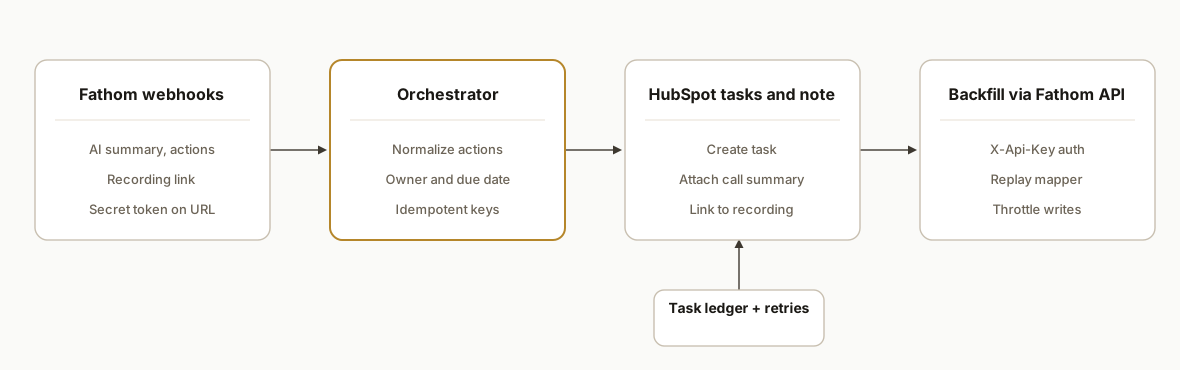
Fathom AI HubSpot integration: native vs custom
- Native sync covers external calls on a user's main calendar. It does not handle internal only meetings and it does not apply your custom owner routing or backfill at scale.
- Our custom integration handles owner routing, safe dedupe, and backfill so every action item becomes a task with a due date and a link to the recording.
- If you also want deal or company associations, use the same rules here and pair it with our walkthrough on associating contacts and deals in HubSpot.
- If your support team works tickets, use this pattern to create HubSpot tickets from calls instead of tasks.
For teams that need meeting outputs in docs or SOWs, see how we turn Fathom meeting notes into a Google Doc and our broader playbook to automate Fathom meeting notes.
Quick start: Fathom AI HubSpot integration in Make
You can validate the workflow in Make first, then graduate to a small service:
- Trigger: Fathom new meeting summary or action items.
- Mapper: format action text, compute due dates, add meeting id and recording URL.
- HubSpot: create task with title and due date. Then create a note that links to the recording.
- Dedupe: add a Make data store keyed by meeting id plus action text to skip repeats.
- Test: run for one team for two weeks, then promote to code for deeper controls and backfill.
If your pipeline also captures follow-up emails, pair this with our guide on syncing Gmail to HubSpot automatically or multi-CRM options in sync Gmail to HubSpot, GoHighLevel, and Pipedrive.
Who should own the HubSpot task?
Owner routing is what makes this useful. In production we applied a simple, auditable set of rules: prefer the single internal teammate on the call, fall back to the meeting organizer, then a round-robin pool for shared inbox demos. This kept handoffs clear and removed the triage step.
// lib/owner-routing.js
export function resolveOwner(participants = [], organizerEmail, pool = []) {
  const teammates = participants.filter(p => p?.is_internal === true && p?.email);
  if (teammates.length === 1) return { ownerEmail: teammates[0].email, reason: "single teammate" };
  if (organizerEmail) return { ownerEmail: organizerEmail, reason: "organizer" };
  if (pool.length) {
    const pick = pool[Math.floor(Date.now() / 60000) % pool.length];
    return { ownerEmail: pick, reason: "round-robin" };
  }
  return { ownerEmail: null, reason: "unassigned" };
}
Tip: if your routing logic is evolving, label tasks with a source and routing reason so managers can spot misroutes fast. For broader playbooks on post-call follow-up patterns, see our field guide on how to automate CRM follow-up from calls: Automate CRM lead follow-up.
Backfill: import past Fathom calls into HubSpot safely
You can seed tasks for prior meetings without polluting the pipeline:
- Page and throttle: iterate by date windows and space writes. Reuse the same mapper so webhook and backfill behave identically.
- Keep a ledger: store a key per action item so retries are safe and duplicates are skipped.
- Tag backfilled items: add a property like backfill: true for easy reporting and cleanup later.
The backfill script below uses the public API with an X-Api-Key and replays the exact mapping used in the webhook path. See the backfill example in the steps section and keep it on a separate worker to avoid timeouts. If you prefer to do this with a no-code tool first, read our comparison: Make vs n8n vs Apps Script and our overview of connector options: Tools to connect your apps.
Zapier or Make vs a small service for Fathom to HubSpot
- Simple one-off: use Zapier or Make to create a HubSpot task, or a ClickUp task, or a HubSpot ticket from calls from a Fathom trigger. Good for trials and single teams.
- Ongoing production: a tiny service gives you real dedupe, owner routing, and a backfill path with versioned code and logs.
- Hybrid: start on Make for 2 weeks, measure outcomes, then swap the trigger to your service while keeping the same mapping rules.
For tradeoffs and build speed benchmarks see: Make vs n8n vs Apps Script, and for a Salesforce-specific walkthrough see creating Salesforce tasks and notes. For connector patterns across your stack see: Tools to connect your apps.
Step-by-step: how to build it
1) Register the Fathom webhook and include a shared secret
Create a webhook in Fathom settings that fires on meeting completion. Append a secret token in the URL and reject requests that do not include the token. Fathom documents first-party webhooks and public API access with X-Api-Key.
# Example webhook target we register inside Fathom settings
https://your-domain.example/api/fathom/webhook?token=${FATHOM_WEBHOOK_TOKEN}
Key point: do not assume payloads are trustworthy. Gate everything behind your own secret and log IPs for incident reviews.
2) Parse the payload and normalize action items
We accept JSON, validate the token, and map action items into a deterministic structure that later becomes HubSpot tasks. We stamp a stable dedupe key using the meeting id and action text.
// api/fathom/webhook.js
import crypto from "node:crypto";

export default async function handler(req, res) {
  const token = req.query.token;
  if (token !== process.env.FATHOM_WEBHOOK_TOKEN) return res.status(401).end();

  const body = req.body; // Express/Next body parser enabled
  const meetingId = body?.meeting?.id;
  const summary = body?.ai_summary || "";
  const recordingUrl = body?.recording_url || "";
  const actions = Array.isArray(body?.action_items) ? body.action_items : [];

  const normalized = actions.map((a, idx) => {
    const title = a.title?.trim() || a.text?.trim() || "Follow up";
    const hash = crypto
      .createHash("sha1")
      .update(`${meetingId}:${title}`)
      .digest("hex")
      .slice(0, 16);
    return {
      key: `${meetingId}:${hash}`,
      title,
      // simple rule: due in 2 business days unless a date was detected
      dueDate: pickDueDate(a?.due_date, 2),
      ownerHint: inferOwnerFromParticipants(body?.participants),
      context: { meetingId, summary, recordingUrl }
    };
  });

  // enqueue for writing to HubSpot
  await queueTasks(normalized);
  return res.status(202).json({ accepted: normalized.length });
}

function pickDueDate(raw, fallbackBusinessDays) {
  if (raw) return new Date(raw).toISOString();
  const d = new Date();
  let added = 0;
  while (added < fallbackBusinessDays) {
    d.setDate(d.getDate() + 1);
    const day = d.getDay();
    if (day !== 0 && day !== 6) added++;
  }
  return d.toISOString();
}

function inferOwnerFromParticipants(participants = []) {
  // simple heuristic: if exactly one teammate joined, assign to them
  const teammates = participants.filter(p => p?.is_internal === true);
  return teammates.length === 1 ? teammates[0].email : null;
}
Gotcha: do not trust free-text due dates in action items. Always coerce to ISO and fall back to a business-days rule.
3) Create the HubSpot task safely and idempotently
We hide HubSpot specifics behind a helper so the mapping is testable and idempotent. The helper looks for an existing task with our dedupe key and creates one only if none exists.
// lib/hubspot.js
export async function createCrmTask(task) {
  // task: { key, title, dueDate, ownerHint, context }
  if (await existsByKey(task.key)) return { status: "skipped", reason: "duplicate" };

  const payload = {
    title: task.title,
    dueAt: task.dueDate,
    ownerEmail: task.ownerHint,
    properties: {
      source: "fathom",
      meeting_id: task.context.meetingId
    }
  };

  await hubspotPostTask(payload); // wraps HubSpot auth and request
  await rememberKey(task.key);
  return { status: "created" };
}
Key point: idempotency belongs to you. Compute and persist a dedupe key so retries cannot create duplicates.
4) Attach a call note with the AI summary and recording link
We also write a call note so the task has context. Keep the note concise and include a link back to Fathom.
// lib/hubspot-notes.js
export async function attachCallNote(contactId, context) {
  const note = [
    `Call summary:`,
    context.summary?.slice(0, 1200),
    "",
    `Recording: ${context.recordingUrl}`
  ].join("\n");

  await hubspotPostNote({ contactId, body: note });
}
Gotcha: avoid pasting full transcripts. Use the AI summary and keep the link to the source of truth.
5) Backfill older meetings with the Fathom API
For initial seeding or recoveries, pull meetings from the Fathom API and replay the same mapping. Auth uses an X-Api-Key header as documented.
// scripts/backfill-fathom.js
import fetch from "node-fetch";

const BASE = "https://api.fathom.ai/external/v1";

async function listMeetings(sinceIso) {
  const resp = await fetch(`${BASE}/meetings?since=${encodeURIComponent(sinceIso)}`, {
    headers: { "X-Api-Key": process.env.FATHOM_API_KEY }
  });
  if (!resp.ok) throw new Error(`Fathom list failed ${resp.status}`);
  return resp.json();
}

(async () => {
  const data = await listMeetings(process.env.BACKFILL_SINCE_ISO);
  for (const m of data?.meetings || []) {
    const actions = m.action_items || [];
    for (const a of actions) {
      // build the same normalized task object as the webhook path
      // then call createCrmTask(normalized)
    }
  }
})();
Note: for large backfills, page through results and throttle your writes. Fathom recommends the public API for retroactive automation.
6) Store a small ledger for diagnostics and retries
Keep a lightweight table to record every write and its outcome. It makes retries and audits simple.
-- postgres table
create table if not exists fathom_task_ledger (
  key text primary key,
  meeting_id text not null,
  created_at timestamptz default now(),
  status text not null,
  error text
);
Gotcha: do not couple retries to your incoming webhook thread. Put tasks on a queue and have a worker perform CRM writes.
7) Test against real calls, then enable for the team
Run two weeks in shadow first: write tasks to a test pipeline or with a test label and compare to human entries. Turn on for the first team once dedupe, routing, and due dates look right.
Where it gets complicated
- Email matching in Fathom: Fathom matches external contacts by primary email only. Secondary emails are not matched. If a contact uses an alias, your HubSpot association may miss without a fallback match strategy. To handle these cases, use our guide on creating contacts and linking deals.
- Internal calls do not sync: The native sync is designed for external calls. Internal only meetings are out of scope. Plan your routing rules accordingly.
- Calendar source constraints: Sync works for scheduled calls on your main calendar. Secondary calendars are not picked up, which can explain missing webhooks for some users.
- Disconnects and historical gaps: If Fathom disconnects from HubSpot, future calls stop syncing. Historical edits require manual re-sync per call. Keep a health check that alerts on disconnect so you can avoid gaps.
- Retroactive automation at scale: Zapier style backfills are reviewed and limited. For bulk or ongoing exports, use Fathom's public API. We use the same mapper for webhooks and backfill to stay consistent.
- CRM write safety: Treat HubSpot writes as non-idempotent unless you add your own key. We compute a meeting plus action hash and skip when present to prevent duplicates on retries.
What this actually changes
In production this removed the after-call admin step. Reps stopped hand-creating tasks and managers saw complete timelines in HubSpot without chasing screenshots. The value is structural: every external call that Fathom hears becomes a task with a due date and a link to the recording. That reduces context loss and removes a class of misses that only show up at quarter end.
Industry context: Asana's Anatomy of Work 2023 estimates knowledge workers spend 58 percent of their time on work about work like status updates and tool switching. Automating call follow-up removes a slice of that overhead. Source: https://asana.com/resources/anatomy-of-work-2023
Which HubSpot object should this write to?
We defaulted to tasks plus a concise note because sales managers live in task views. If your frontline team triages support issues, write tickets instead and include the recording link in the ticket body. For deal-heavy orgs, associate the task to the active deal and the primary contact so pipeline views reflect real work.
- Sales-led teams: Task on the contact, associate to the active deal. See patterns in associating contacts and deals.
- Support-led teams: Create a HubSpot ticket from Fathom with owner routing and SLA due dates.
- Post-sales or onboarding: Same task pattern, but tag the task type so it rolls up in success dashboards.
What fields do we set on the task and note?
We kept the fields minimal to stay reliable across accounts: title, due date, owner, and a few auditable properties. Priority and type are derived from simple keyword rules so they can be tuned without code changes.
// lib/mapping.js
export function mapToHubSpot(task) {
  return {
    title: prefix(task.title), // e.g., "Follow up: pricing"
    dueAt: task.dueDate,
    ownerEmail: task.ownerHint,
    properties: {
      source: "fathom",
      meeting_id: task.context.meetingId,
      priority: computePriority(task.title), // low | normal | high
      task_type: inferType(task.title) // call | email | todo
    }
  };
}

function prefix(title) {
  return title.toLowerCase().includes("follow") ? title : `Follow up: ${title}`;
}

function computePriority(title) {
  if (/contract|signature|close|renew/i.test(title)) return "high";
  if (/pricing|proposal|demo/i.test(title)) return "normal";
  return "low";
}

function inferType(title) {
  if (/email|send|intro/i.test(title)) return "email";
  if (/call|schedule|book/i.test(title)) return "call";
  return "todo";
}
Notes carry only the AI summary and the recording link. We purposely avoid long transcripts and keep total size well under typical CRM note body limits.
Troubleshooting: why are HubSpot tasks not being created?
Run these checks in order. This is the checklist we use in production incidents.
- Webhook secret mismatch: ensure the token in Fathom matches your server's expected value. Reject anything else.
- Calendar scope: only main-calendar external calls fire for native sync. For internal only or secondary calendars, rely on your webhook plus API path.
- Dedupe skip: confirm the ledger does not already contain the meeting plus action key. Duplicates are intentionally skipped.
- HubSpot auth: refresh the private app token or OAuth grant and retry from the queue worker, not the webhook thread.
- Owner resolution: if no owner is computed, allow unassigned or set a safe default queue. Do not fail the write.
- Backpressure: queue CRM writes. If HubSpot or your infra slows, the queue will drain once healthy.
If you also need email context to appear on the timeline, pair this with our guide to sync Gmail to HubSpot automatically. For a broader pattern on post-call workflows, see Automate CRM lead follow-up.
Frequently asked questions
Does Fathom have an API for this?
Yes. Fathom offers a public API and first-party webhooks. The API uses an X-Api-Key header and the documented base URL is https://api.fathom.ai/external/v1. Webhooks can include summaries, transcripts, and action items.
Can I do this with Zapier or Make instead of code?
Yes. Fathom has native Zapier and Make apps with triggers for new AI summaries and recordings. For simple flows they work well. For large backfills or stricter dedupe and routing rules, we prefer the public API plus a small service.
What about internal meetings or secondary calendars?
Fathom's HubSpot sync scope is external calls on your main calendar. Internal only calls are not synced and secondary calendars are not picked up. If you need coverage beyond that, run the webhook plus API approach and apply your own routing rules.
How do you prevent duplicate tasks in HubSpot?
We compute a stable key from the Fathom meeting id and the action text, store it in a small ledger, and skip writes when the key exists. Retries and backfills use the same dedupe so the pipeline stays clean.
Can tasks be associated to deals or tickets instead of contacts?
Yes in practice. We route tasks based on your rules and then associate to the right record type in the same write step. For details and patterns, see our guide on associating contacts and deals in HubSpot and the service variant for creating HubSpot tickets from calls.
What does this cost each month?
The server and API costs are minimal for most teams. The main cost is the initial build. If you run this through Zapier or Make you will pay per task. A small custom service keeps unit costs close to zero and gives you better control over dedupe and backfills.
If you want this wired into your pipeline without guesswork, we have already shipped it. See our comparison on Make vs n8n vs Apps Script, tactical playbooks in Automate CRM lead follow-up, our broader CRM automation services, and when you are ready to scope your version, book a 15-minute call.
Want us to build this for you?
Nine questions, about 90 seconds. You see the hours it is costing you, then pick a time. No pitch.
Get your free assessment