
Follow Up Boss lead-calling automation works by pulling a target stage of leads out of Follow Up Boss through the Follow Up Boss API and webhooks, dialing each one with an AI voice agent on a paced schedule, then classifying the call and writing the result back onto the lead. A live system can work an entire backlog of aged leads (thousands of them), reach every callable lead at least once, and log a clean disposition on each, with no human placing a single call. If you run a real estate team on Follow Up Boss and you have a pile of older leads nobody has the hours to call, this guide covers the exact system we built for Jason Ifraimov, a real estate outbound lead conversion operator.
This is a production deployment we built and run for Jason Ifraimov, and the same approach applies to real estate teams on Follow Up Boss.
AI calling options for Follow Up Boss leads
Most tools that dial Follow Up Boss leads are power dialers built for a human to talk. A true AI voice agent is the only option that works the call itself. Here is the honest landscape.
| Option | Per-call cost | What it can't do |
|---|---|---|
| Kixie | Per-seat monthly plus per-minute usage | Needs a human on every call, it speeds up dialing but does not talk to the lead |
| CallAction | Monthly plan with usage tiers | Automates texts and call routing, but the conversation still falls to a person |
| Aircall | Per-seat monthly | A cloud phone system for human agents, no autonomous calling of a backlog |
| Custom AI voice agent (ours) | A small per-call charge for voice and telephony, no seat fee | Requires a real build: pacing, disposition classification, booking validation, and compliance guardrails |
The first three are good tools for a team that has people to make calls. They do not clear a pile of 3,000 aged leads on their own, because a human still has to be on the line. The AI voice agent is the only one of the four that dials and holds the conversation without a person. If you are weighing the phone layer, see Aircall vs JustCall vs Twilio for how each fits an AI-first workflow, and read scope, cost, and timeline to plan the build.
A note on compliance
Because this dials leads, it lives under real rules, and the design has to respect them. Automated calls generally require prior express consent from the person being called, so this works best as re-engagement of leads the brokerage already owns and who opted in, not net-new cold calls to purchased lists. Honor Do Not Call status on every lead, both the national registry and any internal DNC flag, and scrub it on each sync; see our TCPA and DNC guardrails for practical details. Keep dialing inside permitted time-of-day windows for the lead's local time zone. None of this is legal advice, and the specifics vary by jurisdiction, so confirm your obligations (federal TCPA rules and any state equivalents) before you run a campaign.
The problem it solves
Follow Up Boss is a great CRM. It is a system of record, not a dialer. It will remind a human to call, but it will not make the call. So the leads that age out of active follow-up just sit there.
Every team has this pile. Leads that were worked for a week or two, never converted, and got moved to a holding stage (we used a stage called WATCH). They are not dead, they are dormant. But calling 3,000 dormant leads by hand is nobody's job, because it competes with calling this week's fresh leads, and fresh always wins. So the aged pile grows and the money in it never gets recovered.
Hiring an inside sales agent to grind the backlog is expensive, and a human still only dials so many numbers an hour, only during the day, and only logs the outcome if they remember to. The work is repetitive, the reject rate is high, and it burns people out fast, which is why the backlog never actually gets cleared.
| Task | Manual SDR on Follow Up Boss | AI voice agent on Follow Up Boss |
|---|---|---|
| Who dials the aged pile | A person, if you can spare one | The system, every callable lead |
| Coverage of the backlog | Whatever a human gets through | 100 percent dialed at least once |
| Outcome logged to FUB | If they remember to | Every call, automatically |
| Time of day | Business hours | Within set windows, including evenings |
| Cost per dial | Loaded hourly wage | A small per-call cost |
| What it competes with | This week's fresh leads | Nothing, it runs on its own |
The automation replaces the inside-sales grind of dialing a backlog nobody has time for.
What calling your old leads is worth
Move the sliders to your own numbers. The defaults are only an example business, not client data.
Revenue from one pass through the list
$75,000
3000 leads × 25% reached × 8% booked × 25% closed × $5000
- Closed deals from one pass
- 15
- 3000 × 25% × 8% × 25%
- Staff cost of dialing the same list by hand
- $5,250
- 3000 leads × 3 min × $35/hr
- Hours of dialing handed to the system
- 150 hrs
- 3000 × 3 min ÷ 60
How the automation works
The system is a small always-on service that syncs leads from Follow Up Boss, dials them on a schedule, and writes every outcome back. Follow Up Boss stays the source of truth.
- Follow Up Boss. The lead source. The system reads the chosen stage (the aged-lead holding pen) and pulls only leads with a phone number that are not marked Do Not Call.
- Sync and filter. A daily sync copies those leads into a local database to dial from, and just as importantly removes any lead that has since been trashed or marked Do Not Call, so the call list never drifts out of agreement with the CRM.
- The orchestrator. The brain. It dials only inside set calling windows, paces calls so it never hammers the line, caps the daily and monthly volume, and retries a lead a set number of times before it rests it.
- The AI voice agent. The caller. It re-engages the lead in a natural conversation, and tries to book or qualify with bookings with owner routing where appropriate, and handles voicemail.
- Classify and write back. A second AI pass reads each call and scores the outcome (booked, callback, not interested, voicemail, bad number), then writes that disposition back onto the lead in Follow Up Boss, with a retry if the write fails.
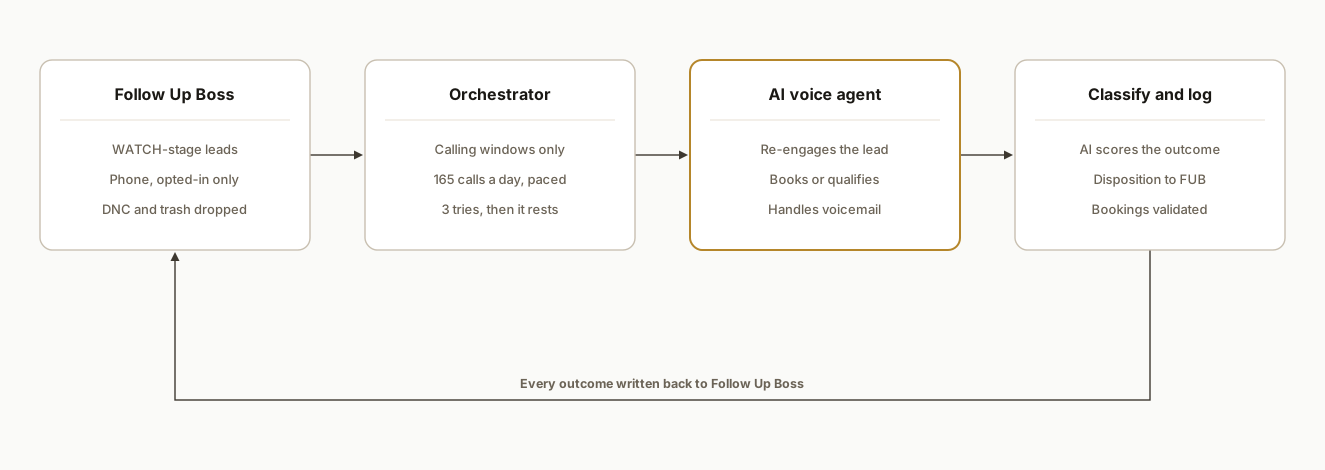
Step-by-step: how to build it
Step 1: Pull the right stage out of Follow Up Boss
Use the Follow Up Boss API to read leads, filtered to the stage you want to work and to people who actually have a phone number. Do not pull your whole database. The point is to work a specific, defined pile (the aged holding stage), not to cold-call everyone.
GET https://api.followupboss.com/v1/people?stage=WATCH&fields=phones,name,id
Only leads with a valid phone and no Do Not Call flag move forward. This filter is the first line of compliance.
Step 2: Sync into a local call list, and evict the dropouts
Copy the filtered leads into a small local database the dialer works from. The non-obvious half of this step is eviction: on every sync, any lead that has been trashed or marked Do Not Call in Follow Up Boss since the last run must be deactivated locally so it is never dialed again.
function syncLeads(fubLeads) {
  const liveIds = new Set(fubLeads.map((l) => String(l.id)));
  upsertActive(fubLeads);            // add or refresh current WATCH leads
  deactivateMissing(liveIds);        // anything no longer in WATCH stops dialing
}
Skip eviction and you will eventually dial a number the CRM already retired. We learned this the hard way, covered below.
Step 3: Dial only inside calling windows, paced
The orchestrator ticks on a timer but only places calls inside the windows you set (for example mid-day and early evening), one call at a time, with a daily cap. Pacing is not optional. It keeps the campaign inside sane calling hours and keeps your number from looking like a robodialer.
CALL_WINDOWS = "10:00-12:00,17:00-20:30"; // local time
DAILY_CALL_LIMIT = 165;
MAX_CONCURRENT_CALLS = 1;
Step 4: Let the AI voice agent work the call
Inside a window, the agent calls the lead, has the conversation, and tries to book or qualify. It is re-engaging a lead the brokerage already owns, not cold-calling a stranger, which is both the compliant use case and the one that actually converts.
Step 5: Classify every call with a second AI pass
The voice agent produces a transcript. A separate AI pass reads it and assigns a disposition, with server-side guards so an ambiguous call does not get scored as a win. Treat any "booked" outcome as a claim to be verified, not trusted, which we will come back to.
Step 6: Write the disposition back to Follow Up Boss
Every outcome is written back onto the lead in Follow Up Boss (see syncing outcomes and recordings), so the CRM reflects reality the next morning. Failed writes go to an error log and retry, so a transient API hiccup never silently loses an outcome.
async function writeDisposition(leadId, outcome) {
  try {
    await fubPost(`/people/${leadId}/notes`, { body: outcome.summary });
    await fubUpdateStage(leadId, outcome.nextStage);
  } catch (err) {
    logFubWriteError(leadId, outcome, err); // retried on the next pass
  }
}
Step 7: Add the guardrails
Cap daily and monthly volume, retry a lead a fixed number of times then rest it, maintain an excluded-numbers list, and watch spend. A usage-billed voice vendor can quietly run past its plan, so a spend check that pauses the campaign when it crosses the line is what keeps a runaway loop from becoming a runaway bill.
Where it gets complicated
Keeping the call list in sync with the CRM. This is the one that bites. A lead that was trashed or marked Do Not Call in Follow Up Boss must stop being dialable immediately. Early on, a retired test lead that was never evicted from the local database got re-queued and dialed a number it never should have. The fix was the eviction step in Step 2, plus a hard excluded-numbers guard at the dial loop. If you build this, build eviction on day one.
Booking validation. The most dangerous failure is a call that gets scored as a booked appointment when it was not. That pollutes the CRM and sends the team chasing ghosts. The classifier needs server-side guards and a validation pass on any positive outcome, and we route confirmed times via bookings with owner routing, so a polite "maybe later" never becomes a fake appointment on someone's calendar.
Disposition accuracy in general. Voicemail, a quick hang-up, a wrong number, and a real conversation all need to be told apart reliably, because the disposition is what decides whether a lead gets retried, rested, or handed to a human. A single AI pass is not enough on its own, which is why a second classification layer with thresholds does the scoring.
Compliance and calling hours. You are working leads the business already owns, dropping Do Not Call, and dialing inside set windows. That framing matters. This is re-engagement of existing CRM contacts, not net-new cold outreach, and the system is built to keep it that way, with a detailed compliance checklist you can follow.
Spend on usage-billed vendors. Voice and telephony bill by the minute or character, and the choice of provider matters; see choosing your dialer stack for tradeoffs that affect cost and reliability. Without a live spend check, a campaign can run past its budget and keep succeeding, because going over the plan often does not throw an error. A quota check that pauses the run when it crosses the threshold is essential.
Real-world results
Jason Ifraimov's team had thousands of aged leads sitting in a holding stage that no one had the hours to call. In the first campaign pass the system dialed every callable lead at least once, more than 3,000 of them, placed close to 5,000 calls in total, and wrote a clean disposition back onto every one.
The headline is not the handful of appointments it booked from leads the team had written off, though those were real money Jason Ifraimov's team would never have recovered by hand. The headline is the hundreds of definitive outcomes. The team now knows which aged leads are genuinely dead, which are bad numbers, and which are worth a human follow-up, instead of staring at an undifferentiated pile of 3,000. The backlog went from a guilt-inducing blob to a sorted, dispositioned list, with zero inside-sales hours spent.
The reason it holds up is the writeback loop details. Because every outcome lands back on the lead in Follow Up Boss, the CRM stays the single source of truth, and a human can pick up any warm result the next morning in the tool they already use.
Frequently asked questions
Does Follow Up Boss have an API for calling automation?
Follow Up Boss has a REST API that lets you read leads by stage, read phone numbers, and write notes and stage changes back. It does not place calls itself. To automate calling you read the target leads through the API, dial them with a separate AI voice system, then write each outcome back through the same API so the CRM stays current.
Can an AI actually call my Follow Up Boss leads?
Yes. An AI voice agent can dial leads pulled from Follow Up Boss, hold a natural re-engagement conversation, book or qualify, and handle voicemail. The important design choice is to work a defined stage of leads the business already owns, drop anyone marked Do Not Call, and dial only inside set windows, so it is compliant re-engagement rather than indiscriminate cold calling.
How many leads can it call, and how fast?
It runs on a pace you set, not flat out. A typical configuration dials one call at a time inside chosen windows with a daily cap (for this brokerage, in the mid-hundreds per day), which clears a backlog of several thousand leads over a few weeks while staying inside sane calling hours. Pacing protects your phone number's reputation and keeps the system from looking like a robodialer.
What does AI lead calling cost compared to an SDR?
The cost is a small per-call charge for the voice and phone time, plus the AI classification, with no salary, benefits, or ramp time; see pricing and timeline details. An inside sales agent is a loaded hourly wage whether or not the leads convert. For a one-time backlog of aged leads, the AI system clears the whole pile for a fraction of what one month of an SDR would cost, and it logs every outcome, which a tired human often does not.
How do you stop it from calling the wrong people?
Three layers. You only sync leads from the chosen stage that have a phone and no Do Not Call flag, you evict any lead that gets trashed or flagged in the CRM so it stops being dialable, and you keep a hard excluded-numbers list at the dial loop. The eviction step is the one most builds miss, and it is the one that prevents dialing a number the CRM has already retired.
Can a non-technical team set this up?
The Follow Up Boss side (stages, Do Not Call flags) is manageable in-house, but the dialer itself (the sync-and-evict logic, the pacing and windows, the second-layer disposition classifier, booking validation, and the spend guardrails) is real engineering with real failure modes. Most teams are better off having it built once, correctly, than discovering the eviction and false-booking problems live on their own leads.
If you run on Follow Up Boss and you are sitting on a backlog of aged leads nobody has the hours to call, this is the system that works the whole pile and hands you back a sorted, dispositioned list. See how we build AI voice agents, read the AI voice agent case study, or book a 20-minute call and we will tell you in the first five minutes whether your Follow Up Boss backlog is worth working this way.
Integration we have built
Follow Up Boss to AI voice agent: the build at a glance
Want us to build this for you?
Nine questions, about 90 seconds. You see the revenue it is costing you, then pick a time. No pitch.
See your options