
Receipts to QuickBooks Online automation works by splitting each scanned stack into single pages, reading every page twice with AI, and posting only the documents both reads agree on straight into the client's QuickBooks as an Expense, with the right vendor, account and currency and the scanned page attached. We built it for a bookkeeping firm in the Caribbean with about 70 clients on QuickBooks Online, and on a year the bookkeeper had already closed by hand it landed on her exact figures for turnover tax, telephone, hardware and auto parts. If your clients hand you a shoebox, or one PDF with 30 different papers in it, this guide walks through every step of the build.
Definition: receipts to QuickBooks automation is a pipeline that turns scanned paper (supplier invoices, till slips, handwritten receipts, petty cash vouchers) into finished QuickBooks transactions, without a spreadsheet or an import file in between.
The problem it solves
The answer: a bookkeeping firm's revenue is capped by how many clients each bookkeeper can close every month, and keying paper by hand is what fills that capacity. Mixed, messy paper is also exactly what most "receipt OCR" tools are not built for.
Here is what actually arrives every month. A client scans a pile into one PDF: 20 to 30 pages of supplier invoices, till slips, handwritten carbon copy receipts, petty cash vouchers, bank deposit slips, the client's own sales receipts and daily sales sheets, all mixed together, some rotated, some faint. On the island where this firm works, two currencies (US dollars and Caribbean guilders) circulate side by side, and many slips print no currency at all, or carry a scribbled "ang" in front of the amount, or have no date.
Most tools that promise to fix this produce a spreadsheet, and the spreadsheet route breaks in three predictable places. It writes one row per PDF, when the PDF holds 30 documents. The QuickBooks bill import then rejects rows with "Line Account invalid" because the tool guessed account names that do not exist in that client's chart. And a single bill number ends up with several suppliers or dates attached, which the import also refuses. The bookkeeper fixes the file, tries again, and eventually goes back to typing. What the automation below replaces is the typing and the import, not just the reading.
| Step | Manual or spreadsheet import | This pipeline |
|---|---|---|
| Splitting the stack | Bookkeeper sorts 30 papers by hand | Every page is split and classified on its own |
| Reading | One person, one read | Two independent reads per page, compared field by field |
| Accounts | Typed from memory, or guessed by a tool and rejected on import | Picked only from that client's live QuickBooks chart |
| Deposits, own sales, tax forms | Have to be spotted and set aside | Recognised and kept out of expenses |
| Posting | CSV import, then fix the errors | Posted through the QuickBooks Online API as an Expense |
| Proof | Paper in a folder | The scanned page attached to the transaction |
| Running it twice | Double entries | Duplicates caught, nothing posted twice |
What automating one manual process is worth
Move the sliders to your own numbers. The defaults are only an example business, not client data.
Revenue the freed hours could earn each year
$41,600
8 hrs a week × 52 × $100
- Cost of errors and rework each year
- $6,000
- $500 a month × 12
- Staff cost of doing it by hand each year
- $14,560
- 8 hrs a week × $35/hr × 52 weeks
- Hours handed to the system each month
- 35 hrs
- 8 hrs a week × 52 ÷ 12
How does the automation work?
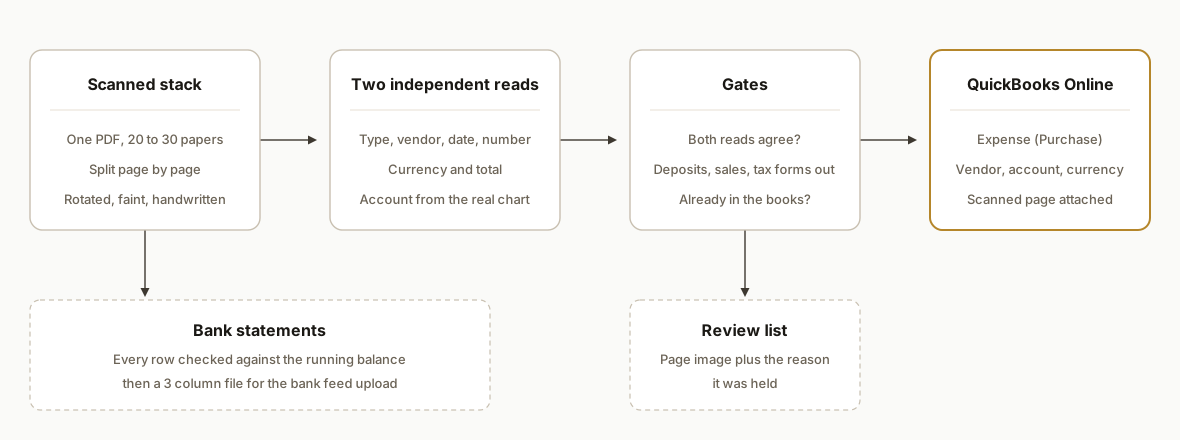
The answer: five parts in a row, from the scanned file to a finished Expense, with a review list catching anything the system is not sure about.
- Page splitter. Every upload is cut into single page images at a fixed resolution. A 30 page PDF becomes 30 separate jobs, and a page holding two receipts can return two documents.
- Two independent reads. AI reads each page twice, separately, into a strict structure: document type, vendor, number, date, currency, total, lines, and an account chosen from the client's real chart. The two results are compared field by field.
- Gates. Plain code, not AI, decides whether each document posts, gets skipped (deposits, the client's own sales, tax forms, the proof of payment for an invoice that is already there) or goes to review with a written reason.
- QuickBooks Online poster. Safe documents become a Purchase (an Expense in the QuickBooks screens) with the vendor, account, currency and exchange rate set, then the page image is uploaded and linked to it.
- Bank statement route. Statements take a separate path: every row is checked against the printed running balance, and only a statement that adds up to the cent becomes an upload file for the bank feed.
Step by step: how to build it
Step 1: Connect to each client's QuickBooks Online company
The answer: register one app on the Intuit Developer portal, have each client company authorize it once through OAuth 2.0, and store a refresh token per company. Everything after that is plain REST calls against that company's ID.
Per Intuit's OAuth FAQ, access tokens last one hour and refresh tokens last 100 days on a rolling basis, and the refresh token value changes as you use it. So save the new refresh token every time you refresh, not just the access token, or the connection dies quietly a few months later. When the refresh call returns invalid_grant, stop and flag the client for a reconnect rather than retrying.
def access_token(self):
    if time.time() > self.tok["obtained_at"] + int(self.tok["expires_in"]) - 300:
        r = requests.post(TOKEN_URL, auth=(CLIENT_ID, CLIENT_SECRET),
                          headers={"Accept": "application/json"},
                          data={"grant_type": "refresh_token",
                                "refresh_token": self.tok["refresh_token"]})
        if r.status_code != 200:
            raise ReconnectNeeded(r.text) if "invalid_grant" in r.text else QBOError(r.text)
        self.tok.update(r.json(), obtained_at=int(time.time()))
        save_tokens(self.tok)  # the refresh token rotates, keep the new one
    return self.tok["access_token"]
Gotcha: an accounting firm user who is only on the firm's team is not an admin of the client company, and the authorization screen refuses with "You're not a listed admin for this company". Someone with admin rights on the client company has to authorize the app, or add the firm user as a company admin first.
Step 2: Load the client's chart, vendors and currencies before reading anything
The answer: pull the client's own lists first, so every later decision is made against what actually exists in that company. This is the step that makes "Line Account invalid" impossible.
The query endpoint uses a SQL style syntax and, per Intuit's data query docs, returns at most 1,000 entities per response, so page with STARTPOSITION and MAXRESULTS.
accts = qbo.query("select Id, Name, FullyQualifiedName, AccountType, Active from Account")
expense_accounts = [a for a in accts
    if a["AccountType"] in ("Expense", "Cost of Goods Sold", "Other Expense") and a.get("Active", True)]
paid_from = [a for a in accts if a["AccountType"] in ("Bank", "Credit Card") and a.get("Active", True)]
vendors = qbo.query("select * from Vendor")
currencies = {c["Code"] for c in qbo.query("select * from CompanyCurrency")}  # when multicurrency is on
Also read the company preferences for the home currency and whether multicurrency is switched on. Intuit's multicurrency guide is clear on two rules that shape the rest of the build: income and expense accounts always use the home currency, and a vendor's currency is set when the vendor is created and cannot be changed afterwards.
Step 3: Split the stack into pages
The answer: never treat one file as one receipt. Render every page to an image at a size where handwriting stays legible, and pass phone photos through as a single page.
import fitz  # PyMuPDF

def split_pages(path, out_dir):
    pages = list(fitz.open(path))
    paths = []
    for i, page in enumerate(pages, 1):
        zoom = 1600 / max(page.rect.width, page.rect.height)  # about 1600px on the long side
        p = out_dir / f"p{i:03d}.jpg"
        page.get_pixmap(matrix=fitz.Matrix(zoom, zoom)).save(p, jpg_quality=80)
        paths.append(p)
    return paths
Name the output folder after a hash of the file, so a rerun of the same upload reuses the same pages and the same reads, and costs nothing.
Step 4: Read every page twice, into a fixed structure
The answer: ask for a strict structure, not free text, and make the account field a closed list of the client's real account IDs. Then read the same page a second time, independently, and compare.
Each page returns a list of documents, because one page can hold a petty cash voucher and the shop receipt it covers. The document types that matter are: supplier invoice, expense receipt, petty cash voucher, payment receipt (proof the client paid an invoice), deposit slip, sales receipt (the client's own income), internal record (sales sheets, cash counts, tax forms) and bank statement.
line = {"type": "object", "additionalProperties": False,
        "required": ["description", "amount", "account_id"],
        "properties": {
            "description": {"type": "string"},
            "amount": {"type": ["number", "null"]},
            "account_id": {"type": "string", "enum": real_account_ids + ["NONE"]}}}
Rules worth writing down for the reader, because they are where mixed paper goes wrong:
- Who received the money decides the type. A receipt book page that says "Received from" a customer is the client's own sale, never an expense.
- The currency is the one the total is in. Many invoices print a dollar total and a guilder equivalent; a column labelled in guilders does not make the document a guilder document. A scribbled "ang" or "Cg" in front of a handwritten amount means guilders.
- Dates are written differently by different suppliers. Keep the raw date as printed plus the reasoning (a day above 12, a printed month name, a PAID stamp date) so a reviewer can see why it was read that way.
- Never invent a document number. Empty is fine, a guess is not.
Then compare the two reads. A different vendor, date, currency, total, document number or document family is exactly the kind of mistake that must not post on its own.
def compare(doc, second_read):
    twin = next((o for o in second_read if amt(o) == amt(doc)), None)
    if not twin:
        return ["second read did not find this document with the same total"]
    diffs = []
    if family(doc["doc_type"]) != family(twin["doc_type"]):   # expense vs sale vs deposit
        diffs.append(f"doc_type: {doc['doc_type']} vs {twin['doc_type']}")
    for f in ("currency", "txn_date"):
        if doc[f] != twin[f]:
            diffs.append(f"{f}: {doc[f]} vs {twin[f]}")
    if vendor_similarity(doc, twin) < 0.75:
        diffs.append(f"vendor: {doc['vendor_name']} vs {twin['vendor_name']}")
    a, b = digits(doc["doc_number"]), digits(twin["doc_number"])  # "TRN#1010786" == "TRAN#1010786"
    if a and b and a not in b and b not in a:
        diffs.append(f"number: {doc['doc_number']} vs {twin['doc_number']}")
    return diffs
Gotcha: invoice versus till receipt versus petty cash slip all post the same way, so do not count that split as a disagreement. Expense versus sales receipt is a disagreement, because it decides whether money is going out or coming in.
Step 5: Gate every document: post, skip or review
The answer: a short list of plain rules, run in code, decides each document's fate. Anything that fails a rule goes to review with the reason written out, so the bookkeeper sees the page and the reason side by side.
| Rule | Result |
|---|---|
| Deposit slip, the client's own sales receipt, sales sheet, cash count, tax form | Skip (income or internal, it reconciles through the bank feed) |
| Proof of payment for an invoice that is in the same upload | Skip, keep the invoice |
| Petty cash voucher for a shop receipt on the same page | Skip the voucher, keep the receipt |
| The two reads disagree on anything | Review |
| No readable date, no total, no supplier name | Review |
| Date outside the year being booked | Review |
| Lines do not add up to the total | Review |
| No currency printed and no client rule for it | Review |
| Everything above passes | Post |
Two client level settings carry the bookkeeper's own judgment. One is the year being booked: a handwritten 2025 often reads as 2023, and both reads can agree on the wrong year, so anything outside the year waits. The other is what to do with a slip that prints no currency: some bookkeepers book those as US dollars by rule, and the pipeline applies that rule only when the two reads do not dispute the currency, and writes it on the entry's memo.
Step 6: Post into QuickBooks Online as an Expense, with the page attached
The answer: create a Purchase, then upload the page image linked to it. In Intuit's API reference the Purchase entity represents an expense, requires PaymentType (Cash, Check or CreditCard), an AccountRef for the account it was paid from, and at least one line.
{
  "TxnDate": "2025-09-13",
  "PaymentType": "Cash",
  "AccountRef": { "value": "35" },
  "EntityRef": { "value": "58", "type": "Vendor" },
  "DocNumber": "10482",
  "PrivateNote": "Auto entered from expenses.pdf page 2.",
  "CurrencyRef": { "value": "XCG" },
  "ExchangeRate": 0.5587,
  "Line": [{
    "DetailType": "AccountBasedExpenseLineDetail",
    "Amount": 72.00,
    "Description": "Fuel",
    "AccountBasedExpenseLineDetail": { "AccountRef": { "value": "81" } }
  }]
}
(The IDs and the rate above are illustrative.) Before creating, find or create the vendor. Because a vendor is locked to one currency, the vendor match has to filter by currency, and a new vendor gets a display name that is unique per currency. ExchangeRate is the number of home currency units per one unit of the document's currency; you can take it from a fixed peg or from QuickBooks' own rate table with GET /exchangerate?sourcecurrencycode=XCG&asofdate=2025-09-13. Use whichever rate the bookkeeper uses, or her totals will be a few cents off on every foreign slip.
Then attach the scan. The upload endpoint takes a multipart request: one part with the Attachable metadata that points at the transaction, one part with the file. Intuit caps the whole request at 100 MB.
meta = {"AttachableRef": [{"EntityRef": {"type": "Purchase", "value": purchase_id}}],
        "FileName": "p002.jpg", "ContentType": "image/jpeg"}
files = {
    "file_metadata_01": (None, json.dumps(meta), "application/json"),
    "file_content_01": ("p002.jpg", open(page_path, "rb").read(), "image/jpeg"),
}
requests.post(f"{BASE}/v3/company/{realm}/upload", files=files,
              headers={"Authorization": f"Bearer {token}", "Accept": "application/json"})
Gotcha: Intuit's docs note that for Cash and CreditCard purchases a duplicate DocNumber throws an error when custom transaction numbers are on. Do not lean on that as your duplicate check. Check first (next step), and keep the document number to 21 characters, the field's limit.
Step 7: Catch duplicates before posting, so reruns are safe
The answer: before every create, query the books for the same purchase, as a Bill or an Expense, three ways. Rerunning a whole month then posts nothing twice.
- Same vendor record and same document number.
- Same date and same amount from a vendor with a similar name, in any currency or vendor record (one misread currency must not create a second vendor and a second entry).
- A payment receipt that names an invoice already in the books.
for entity, ref in (("Bill", "VendorRef"), ("Purchase", "EntityRef")):
    for t in qbo.query(f"select * from {entity} where TxnDate = '{doc['txn_date']}'"):
        if abs(float(t["TotalAmt"]) - doc["total"]) < 0.01 and similar(t[ref].get("name"), doc["vendor_name"]):
            return t  # already in the books
Step 8: Bank statements: prove every line, then upload to the bank feed
The answer: read the statement rows, then let arithmetic, not AI, decide whether the read is complete. Opening balance plus every row must land on each printed balance and on the closing balance, to the cent.
def reconcile(st):
    problems, bal = [], round(st["opening_balance"], 2)
    for i, row in enumerate(st["rows"], 1):
        bal = round(bal + row["amount"], 2)
        if row["balance_after"] is not None and abs(bal - row["balance_after"]) > 0.005:
            problems.append(f"row {i}: running {bal:.2f} vs printed {row['balance_after']:.2f}")
            bal = round(row["balance_after"], 2)
    if abs(round(st["opening_balance"] + sum(r["amount"] for r in st["rows"]), 2) - st["closing_balance"]) > 0.005:
        problems.append("opening plus rows does not equal closing")
    return problems
A statement that fails is read again more carefully, and if it still does not balance it goes to review instead of the books. A statement that passes is written as the file QuickBooks Online accepts under Bank transactions, Link account, Upload from file. Intuit's help article specifies 3 columns (Date, Description, Amount) or 4 (Date, Description, Credit, Debit), recommends dd/mm/yyyy dates, and caps each file at 350 KB and 1,000 lines. The lines then sit in the bank feed's For review list, where the posted Expenses match against them.
Where does it get complicated?
The same payment shows up three times. An invoice, the supplier's payment receipt for it, and the bank line that paid it are one purchase. Post the invoice, skip the payment receipt as paired, and let the bank line match in the bank feed. Without pairing, the expense is counted twice.
Handwriting fools both reads the same way. In our runs both reads once agreed on a receipt number with one wrong digit, and both read a handwritten 2025 as 2023. Agreement catches most misreads, not all, which is why the year gate and the review list exist and why the page image travels with every entry.
Currency is a judgment call, not a field. Slips with no currency printed, invoices with two currencies, and the old and new guilder codes (ANG and XCG) all need rules from the bookkeeper. When the two reads disagree on currency, no default rule is applied and the document waits.
Not everything in the stack is an expense. Tax returns are internal records, but the government receipt for paying that tax is a real expense. The client's own receipt book looks like a supplier receipt until you check who received the money. These are classification rules, and they belong in the gates, where a bookkeeper can read and change them.
Accounts are the bookkeeper's call. In the answer key test below, two auto parts receipts came to her exact figure but landed in a different account than the one she used. A per client memory of "this vendor goes to that account" closes most of that gap after the first month.
Real world results
We tested the pipeline the strictest way we could: the bookkeeper gave us a company whose 2025 year she had already closed by hand, and we ran its paper and compared our numbers to her finished books, without touching her QuickBooks. The stack was 43 pages and held 44 documents. The pipeline kept out the client's own sales receipts and tax forms, posted 20 expenses on its own and held 18 documents for her approval, mostly faint handwritten fuel slips plus a few papers it could not place.
| Account | Our run | Her finished books |
|---|---|---|
| Turnover tax | 115.65 | 115.65 |
| Telephone | 20.00 | 20.00 |
| Hardware (two invoices) | 91.25 | 91.25 |
| Auto parts (two receipts) | 88.17 | 88.17, booked to a different account |
| Office supplies | 7.63 | 7.58 |
On the first full run against a sandbox company, three real stacks totalling 65 pages produced 135 separate documents. Seven posted on their own as finished entries with the scan attached, 59 were correctly kept out (deposit slips, the client's own sales receipts and sales sheets, petty cash slips paired to their receipt, a proof of payment paired to its invoice) and 69 went to review, each with its reason. Running the same files again created no double entries: six documents were recognised as already in the books. Five bank statements went through the balance check and all five reconciled to the cent. Reading costs roughly 20 to 30 US cents a page, so a 30 page monthly stack is a few dollars.
The money is in capacity. A firm that bills each client monthly can only take on as many clients as its bookkeepers can close, and the hours spent sorting and keying paper are hours that cannot be billed to a new client. When the paper turns into finished entries and a short review list, the same team carries more books.
Frequently asked questions
Why not just use a receipt scanning app?
Most receipt apps assume one receipt per photo and hand you a row to check or import. A 30 page scan of mixed paper needs splitting first, then a decision on what each page is (expense, deposit, the client's own sale, a tax form), then the bookkeeper's currency and account rules per client. That is a pipeline in front of QuickBooks that posts through the API.
Does QuickBooks Online have an API for posting expenses and attaching receipts?
Yes. The QuickBooks Online Accounting API creates expenses through the Purchase entity (PaymentType Cash, Check or CreditCard, the paid from account, and expense lines) and attaches files through the upload endpoint, linking each file to the transaction with an Attachable record. Each client company authorizes the app once through OAuth 2.0.
How do you stop the same receipt from being entered twice?
Before every post, the pipeline searches the books for the same purchase as a Bill or an Expense: same vendor and document number, or same date and amount from a similar vendor in any currency. It also pairs payment receipts with the invoices they settle inside each upload. In our sandbox rerun of the same files, six documents were caught as already entered and nothing posted twice.
What does it cost to run receipts to QuickBooks automation?
Reading runs roughly 20 to 30 US cents a page in our build, with every page read twice. A 30 page monthly stack is a few dollars per client. The bigger cost is the build and the per client setup of rules, which is a one time job.
Can it handle handwritten receipts and two currencies?
Yes, with limits. Handwritten slips are read like any other page, and a scribbled currency mark is understood. When the two reads disagree on the amount, date, number or currency, the slip waits for review instead of posting. Each document posts in its own currency with an exchange rate, and vendors are kept per currency as QuickBooks requires.
How long does it take to set up for a bookkeeping firm with many clients?
The pipeline is built once and shared by every client. Each client then needs a one time QuickBooks connection, their account and paid from settings, and the bookkeeper's rules (which year is being booked, how to treat a slip with no currency). We start with one client, check the output against books she already closed, then add clients.
If your firm closes books for many small clients and the paper still arrives as a shoebox, this is the pattern we build. For the bank side on its own, see how to automate QuickBooks bank transaction imports, or look at our document automation services. Book a 20 minute call and we will tell you in the first five minutes whether your clients' paper maps to this pattern.
Sources
- 1.Purchase entity, QuickBooks Online Accounting API (Intuit Developer)developer.intuit.com
- 2.Attachable and upload, QuickBooks Online Accounting API (Intuit Developer)developer.intuit.com
- 3.Data queries, QuickBooks Online Accounting API (Intuit Developer)developer.intuit.com
- 4.Manage multiple currencies, QuickBooks Online Accounting API (Intuit Developer)developer.intuit.com
- 5.ExchangeRate entity, QuickBooks Online Accounting API (Intuit Developer)developer.intuit.com
- 6.OAuth 2.0 FAQ, QuickBooks Online (Intuit Developer)developer.intuit.com
- 7.Manually upload transactions into QuickBooks Online (Intuit)quickbooks.intuit.com
Want us to build this for you?
Nine questions, about 90 seconds. You see the revenue it is costing you, then pick a time. No pitch.
See your options