
Social posting automation is a queued workflow that turns planned content into on-brand drafts, schedules them, and posts them reliably without duplicates or garbled captions. We built and shipped this for our own daily LinkedIn drip and for client social pipelines. This guide shows how the production system works and how to build yours step by step.
If you publish content regularly and want consistent social distribution without babysitting each post, this covers the queue design, AI drafting, scheduler, posting harness, and the guardrails that prevent duplicates and broken formatting.
The problem it solves
An editor publishes a blog or a video. Someone copies the title into a social draft, trims a summary, adds a link in the right place, pastes to multiple platforms, and remembers to avoid double posting. Sometimes line breaks vanish. Sometimes it posts twice. Sometimes it skips the day entirely when a laptop sleeps.
Here is the before and after of the workflow we replaced.
| Step | Manual process | Automated pipeline |
|---|---|---|
| Content selection | Pick a piece from a spreadsheet | Queue file is the source of truth with one next-up entry |
| Drafting | Human writes from scratch, variable tone | AI drafts on-brand from a brief and style guide |
| Formatting | Hand tweaks line breaks and links | Sanitizer fixes line breaks and wraps risky HTML |
| Scheduling | Calendar reminders and tool logins | Scheduler assigns time slots and respects caps |
| Posting | Paste into each platform by hand | Posting harness publishes and logs post IDs |
| Duplicate prevention | Remember what shipped | Content hash and ledger block repeats |
What a content pipeline is worth
Move the sliders to your own numbers. The defaults are only an example business, not client data.
Your own estimate from the pieces you already publish.
Revenue from the extra pieces each year
$38,400
8 pieces × 12 months × 2 leads × 10% × $2000
- Staff cost of your current pieces by hand each year
- $6,720
- 4 pieces × 4 hrs × $35/hr × 12 months
- Hours your current pieces take each month
- 16 hrs
- 4 pieces × 4 hrs
How the automation works
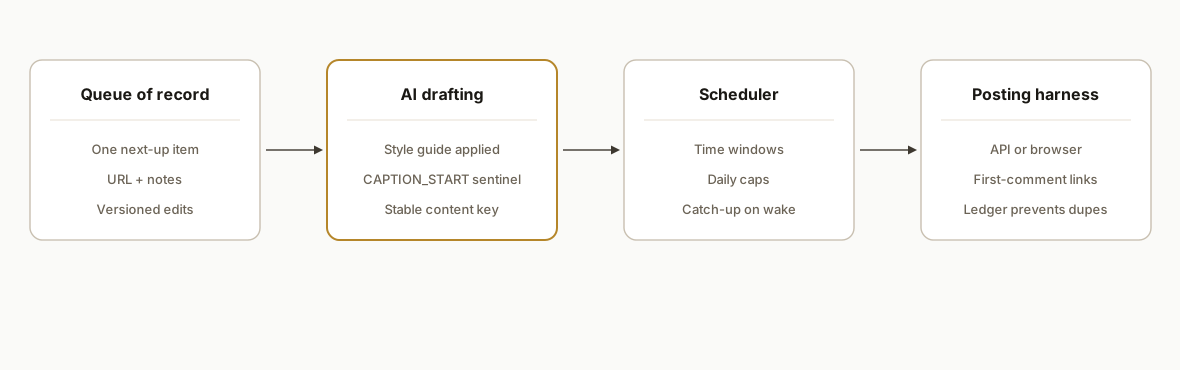
A single queue file is the source of truth. A daemon reads the next eligible item, generates an on-brand draft, passes it through a sanitizer, assigns a time slot, and posts through adapters or a browser harness depending on the platform rules. A ledger records a stable dedupe key so the same idea never ships twice.
- Queue of record: One markdown or JSON queue that holds the next-up post, the canonical URL, and optional topic notes. The queue is commit-versioned so edits are auditable.
- AI drafting engine: A prompt tuned with your style guide produces the post body and two alternates. It never writes the final URL position rules, those are enforced by the sanitizer layer.
- Sanitizer and dedupe: A normalizer fixes line breaks, wraps risky inline HTML that some platforms strip, and computes a stable hash that ignores tracking params so reshared links do not collide.
- Scheduler: Assigns time slots, respects daily caps, and recovers missed runs. Time windows and per-platform cadence live in config.
- Posting harness: Uses API adapters where safe. Falls back to a logged-in browser harness for platforms that require the link in the first comment or Page context rules.
- Ledger and monitor: Stores post keys and provider message IDs to prevent duplicates and support retries or deletions when needed.
Step-by-step: how to build it
Step 1: Define a single source-of-truth queue
Use a lightweight text format that non-engineers can edit. We use a markdown file with frontmatter per item and an explicit status field. The runner picks the first status: queued entry.
---
slug: optimize-for-ai-search-geo-playbook
status: queued
platforms: [linkedin, twitter]
link: https://rexautomaton.com/blog/optimize-for-ai-search-geo-playbook
notes: |
  Angle: answer-first capsule + comparison table excerpts
  CTA: /services#ai-search-optimization
---
Title: Optimize for AI Search: The GEO Playbook
Summary bullets:
- Why answer-first passages get cited
- Diagram requirement and examples
- One hard stat per 150, 200 words
Key detail: the queue is the only source of truth. If a post is not in the queue with queued status, the system never publishes it.
Step 2: Generate on-brand drafts from your style guide
Keep brand choices out of the model's head and in your own rules. The prompt includes your tone, forbidden phrases, link-placement policy, and a few positive and negative examples.
// draft.ts
import { readFileSync } from "node:fs";
import { createHash } from "node:crypto";

export async function draftFromBrief(brief: {
  title: string;
  bullets: string[];
  url: string;
  persona: string;
}) {
  const style = readFileSync("./style_guide.txt", "utf8");
  const prompt = [
    `You are the social voice for ${brief.persona}.`,
    `Follow the style guide exactly. No emojis. No hype.`,
    `Write one 80, 140 word post. Use short sentences.`,
    `Do not place the URL in the body. Write CAPTION_START ... CAPTION_END.`,
    `Style guide:\n${style}`,
    `Brief:\nTitle: ${brief.title}\nBullets:\n- ${brief.bullets.join("\n- ")}`,
  ].join("\n\n");

  const { text } = await callAI({ prompt }); // your model wrapper
  const body = extractBetween(text, "CAPTION_START", "CAPTION_END");
  const key = createHash("sha256").update(normalize(body)).digest("hex");
  return { body, key };
}
Gotcha: enforce CAPTION_START and CAPTION_END or a similar sentinel so you never ship system chatter or stray analysis.
Step 3: Sanitize and compute a stable dedupe key
Different platforms treat line breaks differently. Some sanitizers drop bare br tags and collapse paragraphs. Sanitize once before you ever schedule.
// sanitize.ts
export function sanitizeCaption(raw: string) {
  const trimmed = raw.trim().replace(/[ \t]+$/gm, "");
  const safe = trimmed
    .split(/\n{2,}/g)            // paragraphs
    .map(p => `<div>${escapeHtml(p)}</div>`) // wrap to survive sanitizers
    .join("\n");
  return safe;
}

export function normalize(text: string) {
  return text
    .toLowerCase()
    .replace(/https?:\/\/[^\s]+/g, "<url>") // ignore tracking
    .replace(/\s+/g, " ")
    .trim();
}
Key detail: compute your dedupe key from a normalized version that replaces URLs with a placeholder. A UTM change should not trick your system into thinking a post is new.
Step 4: Assign time slots with a simple scheduler
We keep a small JSON calendar with preferred time windows per platform and a daily cap. The scheduler fills the next open slot and writes a plan row.
// schedule.ts
import { zonedTimeToUtc } from "date-fns-tz";

type Slot = { at: string; platform: string; reserved: boolean };

export function planNext(slots: Slot[], platform: string, tz: string) {
  const next = slots.find(s => s.platform === platform && !s.reserved);
  if (!next) throw new Error("No available slot");
  next.reserved = true;
  const when = zonedTimeToUtc(next.at, tz).toISOString();
  return { when, platform };
}
Gotcha: build recovery into the runner. If a machine sleeps or a cron misses a window, pick the next slot and continue. Do not try to backfill missed posts unless you explicitly enable it.
Step 5: Post with adapters, or a browser harness where required
Use official APIs when they exist and fit your rules. When a platform or policy requires special handling, a logged-in browser harness under a dedicated profile is reliable and observable.
// post.ts
export async function publish(plan, captionHtml, link) {
  if (plan.platform === "linkedin") {
    // Policy: link goes in first comment under a Page identity
    const urn = await postViaBrowser({
      profileDir: ".profiles/automation",
      compose: { textHtml: captionHtml },
      commentAsPage: true,
      firstComment: link,
    });
    return { id: urn };
  }
  // Example adapter pattern for platforms with stable APIs
  if (plan.platform === "x") {
    return await postViaApi({ text: stripHtml(captionHtml) });
  }
}
Gotcha: contenteditable editors can double insert when you send synthetic key events. Prefer a direct text insertion method from your browser automation library rather than per-character keypresses.
Step 6: Write the ledger and prevent duplicates everywhere
A single write closes the loop: the content key, the platform, the provider ID, and a timestamp. Every run checks the ledger before drafting or scheduling.
-- posts.sql
create table if not exists posts (
  id serial primary key,
  content_key text not null,
  platform text not null,
  provider_id text not null,
  published_at timestamptz not null default now(),
  unique (content_key, platform)
);
// ledger.ts
export async function alreadyPosted(db, key: string, platform: string) {
const row = await db.oneOrNone(
"select 1 from posts where content_key=$1 and platform=$2",
[key, platform]
);
return !!row;
}Gotcha: check the ledger before you spend model tokens. If you detect a duplicate, mark the queue item as skipped and move on.
Step 7: Monitor runs and fail safe
Record a compact status after each run: success with IDs, or a structured error that tells you where to look first. Surface a small status UI or a daily email that shows which queue item shipped and which is next.
// status.ts
export function formatStatus(evt) {
  return [
    `Post: ${evt.slug}`,
    `Platform: ${evt.platform}`,
    `Result: ${evt.ok ? "OK" : "ERROR"}`,
    evt.ok ? `Provider ID: ${evt.id}` : `Reason: ${evt.reason}`,
  ].join("\n");
}
Gotcha: keep credentials client owned and environment isolated. Dedicated browser profiles and per-tenant API keys avoid cross-account surprises.
Where it gets complicated
Contenteditable quirks. Some composers double insert characters when you type too fast. We solved this by switching from per-key events to a direct text insertion method and adding small random delays between operations.
Sanitizers drop lines. We saw bodies lose paragraphs when a provider stripped bare br tags. Wrapping paragraphs in lightweight div blocks preserved the intended breaks across providers that sanitize aggressively.
First comment and identity rules. Some teams want the URL in the first comment and require that the comment come from the company Page rather than an admin's personal profile. The harness must explicitly flip the author context before submitting the first comment.
Task scheduler gaps. On Windows, scheduled tasks can silently skip when a laptop sleeps. Enabling catch-up on wake and allowing battery starts prevented misses. On servers, keep a small job queue rather than relying solely on cron so a single delayed run does not block the next day.
Dedupe that ignores link variants. Unique keys that include full URLs will diverge on UTM changes and shortenings. We normalize all URLs to a <url> token before hashing to ensure logical duplicates are treated as the same post.
Connection ownership. During handoff, swap any shared connections to client-owned accounts. Browsers, Pages, and API keys should not live on an agency engineer's personal account.
What this actually changes
In production our own daily LinkedIn drip ran hands free once we shipped the queue, sanitizer, and browser harness. After the first fully autonomous run, the only work left was adding the next post to the queue. The system has published reliably even across machine restarts because the scheduler recovers and the harness uses a dedicated profile.
The structural value is consistency without vigilance. The queue holds the plan. The engine maintains tone. The harness obeys platform rules. And the ledger prevents repeats. Independent of platform choice, automation recovers time. McKinsey estimated that existing technologies could automate about 45 percent of the activities people are paid to perform (McKinsey Global Institute, A future that works). https://www.mckinsey.com/featured-insights/employment-and-growth/automation-jobs-and-the-future-of-work
Frequently asked questions
Can this run across multiple platforms at once?
Yes. Keep one queue and branch by platform at the posting stage. Use platform adapters where they exist and a browser harness for places that require special handling. The dedupe key is computed per platform so you can ship a tailored version without collisions.
How do you prevent duplicates if someone edits the queue?
We compute a stable content key from a normalized caption that ignores URLs and whitespace. Even if a title changes or a UTM parameter is added, the normalized body stays the same and the unique constraint blocks a repeat.
Can a non-developer operate this day to day?
Yes. Editors change only the queue file. The runner reads the next queued entry, drafts, sanitizes, schedules, and posts. A small status panel or daily email shows what shipped and what is next. Engineering is needed only to change rules or add a new platform.
What does it cost monthly to run?
Infrastructure is light: a small database, a runner, and optional headless browser hosting. AI drafting costs scale with volume and length. For most teams, monthly costs stay in the tens of dollars. The main expense is the initial build and hardening.
Will the AI drift off brand over time?
Not if you treat brand as rules, not vibes. We keep a style guide file in the repo, embed it in every prompt, and include negative examples. We also run a simple lint pass that flags banned phrases before scheduling.
Do I need APIs, or can this work if my platform has none?
It works either way. Where APIs fit the job, use them. Where policy or missing features get in the way, a logged-in browser harness under a dedicated profile posts reliably and can enforce rules like first-comment links and Page identity.
If you want this running on your site and channels, we already built and shipped it. See how we use a queue and a browser harness in our own distribution, then let us wire yours. Read our related piece on LinkedIn systems in production at /blog/automate-linkedin-outreach, see our broader workflow automation services, and when you are ready to hand this off, book a 20 minute call.
Sources
- 1.Automation jobs and the future of workmckinsey.com
Want us to build this for you?
Nine questions, about 90 seconds. You see the revenue it is costing you, then pick a time. No pitch.
See your options