
We built a Bold Manitou integration that routes monitoring events into a modern ticketing system and CRM. Operators keep using Manitou. Our sidecar handles parsing scheduled reports and URL Launch calls, auto-opens tickets with the right priority and runbook, and triggers customer communications when warranted.
Manitou integration for ticketing is: a bridge that converts Manitou outputs into structured events you can act on in your service desk and CRM when native workflows fall short.
The problem it solves
Most central stations want alarms and escalations to generate tickets, update the CRM, and notify customers with clean context. Out of the box you rely on operator notes and manual copy to downstream tools. Scheduled reports land in an inbox. Follow-ups slip.
| Manual process | Automated with our Manitou bridge |
|---|---|
| Operator copies event details into a service desk and emails the customer | Event auto-routed to ticketing with templated summary and on-call assignee |
| Reports sit as PDF attachments in a shared mailbox | Parser extracts structured rows, dedupes, and enqueues actionable events |
| Tribal rules determine who gets paged | A rules engine maps accounts and codes to teams, SLAs, and comms templates |
| Double entry into CRM notes later | CRM note created in the same transaction as the ticket |
How the automation works
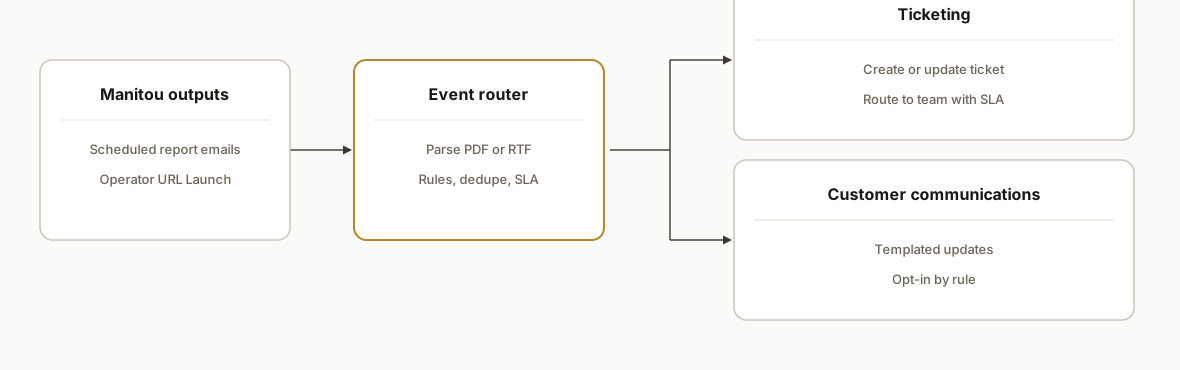
We keep Manitou as the source of truth and bolt on two outbound paths Manitou already supports in the field: scheduled report emails and operator-driven URL Launch. Our router normalizes those inputs, dedupes events, and fans out to ticketing and customer communications.
- Manitou outputs: We use scheduled reports emailed on a cadence and operator actions that trigger Manitou URL Launch. Public self-serve REST or generic webhooks are not documented, so we avoid relying on them.
- Inbound parser: A mail gateway posts raw MIME to our webhook. We parse PDF or RTF attachments and extract account, code, timestamp, and free-text details from the report body.
- Event router (rules engine): The engine maps source signals to playbooks: queue, priority, SLA, and who to notify. Idempotency prevents duplicates.
- Ticketing connector: Creates or updates a ticket in your chosen tool and writes a synchronized CRM note.
- Customer communications: Sends templated updates only when the rule calls for it. Positive clears and false alarms can be suppressed or aggregated.
Step-by-step: how to build it
1) Receive scheduled report emails into a webhook
Set Manitou to email Entity or Activity reports to a dedicated mailbox. Forward that mailbox to a webhook that accepts raw MIME and attachments.
// server/email-inbound.js
import express from "express";
import { simpleParser } from "mailparser";

const app = express();
app.post("/inbound/email", express.raw({ type: "application/octet-stream", limit: "25mb" }), async (req, res) => {
  try {
    const mail = await simpleParser(req.body);
    const attachments = (mail.attachments || []).map(a => ({ filename: a.filename, content: a.content }));
    await enqueue("email.received", { subject: mail.subject || "", text: mail.text || "", html: mail.html || "", attachments });
    res.status(204).end();
  } catch (err) {
    console.error("email parse error", err);
    res.status(500).json({ error: "parse_failed" });
  }
});

app.listen(3000);

async function enqueue(type, payload) {
  // push to your queue or directly to the parser
}
Key gotcha: Manitou's scheduled reports can be PDF or RTF. CSV is not documented publicly, so plan for document parsing.
2) Extract event rows from PDF or RTF
Parse PDF first. If RTF, convert to text and apply the same extractors.
// server/parse-report.js
import pdf from "pdf-parse";
import crypto from "crypto";
import { RtfConverter } from "rtf-converter-node"; // alternative: call a small Python worker

export async function extractEvents(attachment) {
  let text = "";
  if (/\.pdf$/i.test(attachment.filename)) {
    const data = await pdf(attachment.content);
    text = data.text;
  } else if (/\.rtf$/i.test(attachment.filename)) {
    const conv = new RtfConverter();
    text = await conv.toText(attachment.content.toString("utf8"));
  } else {
    return [];
  }
  return parseTextToEvents(text);
}

function parseTextToEvents(text) {
  const lines = text.split(/\r?\n/).map(l => l.trim()).filter(Boolean);
  const events = [];
  for (const line of lines) {
    // naive example: 2026-06-24 14:03 ACC1234 E130 Panic Button Main Lobby
    const m = line.match(/^(\d{4}-\d{2}-\d{2} \d{2}:\d{2})\s+(\w+)\s+(\w+)\s+(.+)$/);
    if (!m) continue;
    const [_, ts, account, code, message] = m;
    const key = crypto.createHash("sha256").update([account, code, ts, message].join("|")).digest("hex");
    events.push({ ts, account, code, message, key, source: "report" });
  }
  return events;
}
3) Normalize, dedupe, and map to playbooks
Keep a dedup ledger to ensure idempotent creates. Then map events to queues, priorities, and comms using a JSON ruleset.
// server/router.js
import { getLedger, putLedger } from "./store.js";
import rules from "./rules.json" assert { type: "json" };

export async function route(events) {
  const out = [];
  for (const ev of events) {
    if (await getLedger(ev.key)) continue; // duplicate
    const rule = matchRule(ev, rules);
    if (!rule) continue; // ignore uninteresting signals
    out.push({ ...ev, ticket: { queue: rule.queue, priority: rule.priority, template: rule.template }, notify: rule.notify || [] });
    await putLedger(ev.key, { seenAt: Date.now() });
  }
  return out;
}

function matchRule(ev, rules) {
  return rules.find(r => (!r.accounts || r.accounts.includes(ev.account)) && (!r.codes || r.codes.includes(ev.code)) ) || null;
}
Example rules.json snippet:
[
  { "accounts": ["ACC1234"], "codes": ["E130"], "queue": "critical-incidents", "priority": "p1", "template": "panic_button", "notify": ["ops@company.com"] },
  { "codes": ["R401","R402"], "queue": "resets", "priority": "p4", "template": "reset_notice" }
]
4) Create or update tickets and write CRM notes
Use your ticketing and CRM APIs in the same transaction so context never splits.
// server/dispatch.js
import fetch from "node-fetch";

export async function createTicketAndCrm(ev) {
  const ticketResp = await fetch(process.env.TICKETING_API_URL + "/tickets", {
    method: "POST",
    headers: { "Content-Type": "application/json", Authorization: `Bearer ${process.env.TICKETING_API_KEY}` },
    body: JSON.stringify({
      queue: ev.ticket.queue,
      priority: ev.ticket.priority,
      subject: `[${ev.account}] ${ev.code} ${ev.message.substring(0, 60)}`,
      body: renderTemplate(ev.ticket.template, ev)
    })
  });
  const ticket = await ticketResp.json();

  await fetch(process.env.CRM_API_URL + "/notes", {
    method: "POST",
    headers: { "Content-Type": "application/json", Authorization: `Bearer ${process.env.CRM_API_KEY}` },
    body: JSON.stringify({ account: ev.account, note: `Ticket ${ticket.id} opened for ${ev.code} at ${ev.ts}\n${ev.message}` })
  });

  return ticket.id;
}

function renderTemplate(t, ev) {
  if (t === "panic_button") return `Panic alarm received. Account: ${ev.account}. Code: ${ev.code}. Time: ${ev.ts}. Details: ${ev.message}.`;
  if (t === "reset_notice") return `Restore received for ${ev.account} at ${ev.ts}. Code ${ev.code}.`;
  return `${ev.message}`;
}
5) Send customer updates when the rule calls for it
Only notify when needed. Use SMTP or your provider of choice.
// server/notify.js
import nodemailer from "nodemailer";

const transport = nodemailer.createTransport({
  host: process.env.SMTP_HOST,
  port: 587,
  secure: false,
  auth: { user: process.env.SMTP_USER, pass: process.env.SMTP_PASS }
});

export async function notify(ev, recipients) {
  if (!recipients.length) return;
  await transport.sendMail({
    from: `Monitoring Desk <alerts@company.com>`,
    to: recipients.join(","),
    subject: `[${ev.account}] ${ev.code} update`,
    text: renderCustomerText(ev)
  });
}

function renderCustomerText(ev) {
  return `We registered an event on your system at ${ev.ts}. Code: ${ev.code}. Details: ${ev.message}. Our team opened a ticket and is responding.`;
}
6) Add an operator-driven URL Launch handler
Use Manitou URL Launch so an operator can push context on a live event directly into the router without waiting for a report run.
// server/url-launch.js
import express from "express";
import crypto from "crypto";

const app = express();
app.get("/manitou/url-launch", async (req, res) => {
  const { account, code, ts, message } = req.query; // fields available depend on your Manitou URL Launch configuration
  const key = crypto.createHash("sha256").update([account, code, ts, message].join("|")).digest("hex");
  await handleEvent({ account, code, ts, message, key, source: "url_launch" });
  res.status(204).end();
});

async function handleEvent(ev) {
  // call route(), createTicketAndCrm(), notify()
}

app.listen(3001);
Operator path yields near real time. Report path provides batched coverage and an audit trail.
Where it gets complicated
No public webhooks or REST details. Public documentation does not confirm a generic outbound webhook or self-serve REST interface, so the safe pattern is email scheduling and URL Launch. We avoided inventing endpoints and built around proven field methods.
Licensing prerequisites. Certain integrations require Manitou modules or licensing tiers, such as Media Gateway for video partners. Confirm entitlements before planning event or media flows.
Strict alarm ingest on device integrations. Some third-party device paths refuse alarms unless fields like GPS are present. If you fan events into Manitou from devices, validate mandatory fields early to prevent silent drops.
PDF or RTF, not CSV. Scheduled reports can be emailed and downloaded. CSV is not documented in public KB materials. We hardened PDF and RTF parsing and left an OCR fallback for scanned exports.
Operator workflow preservation. Changing the console is a non-starter for many stations. URL Launch gives operators a one-click bridge without altering their screens or training significantly.
What this actually changes
For a monitoring provider, tickets now open themselves with the right queue and SLA. CRM notes land in lockstep. Customer notifications follow runbooks instead of ad hoc emails. The noisy majority of events can be suppressed or aggregated, while true incidents page the right team.
One industry reality drives this design: an estimated 94 to 98 percent of burglar alarms are false, which makes triage and routing rules essential for service quality and cost control. Source: Center for Problem-Oriented Policing, False Burglar Alarms guide, Arizona State University Police Foundation, https://popcenter.asu.edu/content/false-burglar-alarms-0
Frequently asked questions
Does Bold Manitou have an API or webhooks we can use?
Vendor-facing interfaces exist for receivers and integrations, but public self-serve REST docs, base URLs, and a generic webhook are not confirmed. We bridge using scheduled report emails and Manitou URL Launch, which are documented in field guides and partner setups.
Do we need extra Manitou modules for this to work?
Often yes. Some integrations require specific Manitou licensing or modules, for example Media Gateway for video partner features. We confirm entitlements during scoping so the bridge only relies on what your account supports.
How close to real time is it?
Operator URL Launch is near real time. Scheduled reports are as fast as you schedule them. Many stations run high-frequency activity reports for batched capture and reserve URL Launch for operator-confirmed incidents.
Which ticketing and CRM systems can you connect?
Any platform with an API. We have created tickets and notes against common service desks and CRMs by posting structured JSON. The router keeps the connector swappable so you can change tools later without touching Manitou.
How do you prevent duplicate tickets?
We compute a stable event key from account, code, timestamp, and message, store it in a ledger, and treat replays as idempotent. That lets reports and operator pushes coexist without fan-out duplication.
What does it cost to run monthly?
Infrastructure is light. An email gateway, a small webhook service, and API calls to your ticketing and CRM. The primary cost is the initial build. Ongoing costs are modest and scale with volume.
If you need Manitou to drive tickets and customer updates without changing operator habits, we have shipped this bridge in production. See our related guard-operations post on TrackTik integration and guard billing, browse our workflow automation services, and when you are ready to map your station's setup, book a call.
Want us to build this for you?
Nine questions, about 90 seconds. You see the hours it is costing you, then pick a time. No pitch.
Get your free assessment