
McLeod Software API integration works by calling its REST-style services to create and update orders, then fanning those events to accounting and CRM. We built this for a regional carrier that needed automated load entry from web leads and a clean bridge to QuickBooks and sales. This guide shows the exact API patterns we used, the orchestration around them, and what tripped us up in production.
McLeod Software API integration is the practice of using McLeod's documented REST-style services to automate order entry and synchronize operations data to tools like accounting and CRM when native connectors are not enabled.
The problem it solves
Carriers lose hours every week to double entry: sales or a web form creates a quote, dispatch re-keys it into McLeod as a load, accounting re-keys it again into QuickBooks, and sales never sees status without asking dispatch. Manual steps cause delays and small but costly mistakes.
| Process | Manual workflow | Automated workflow |
|---|---|---|
| Load capture | Sales or web form emails ops. Dispatcher re-keys into TMS later. | Intake posts to McLeod OrderService instantly. Validation mirrors desktop roles. |
| Status to CRM | Sales DMs ops for updates, or never updates CRM. | Orchestrator polls McLeod orders and writes stage changes to the CRM timeline. |
| Invoicing | AR re-enters order data into accounting. | Accounting worker consumes order events and creates invoices in QuickBooks Online. |
| Documents | Staff hunts for PODs and emails PDFs. | Reporting service renders templated PDFs and attaches where needed. |
How the automation works
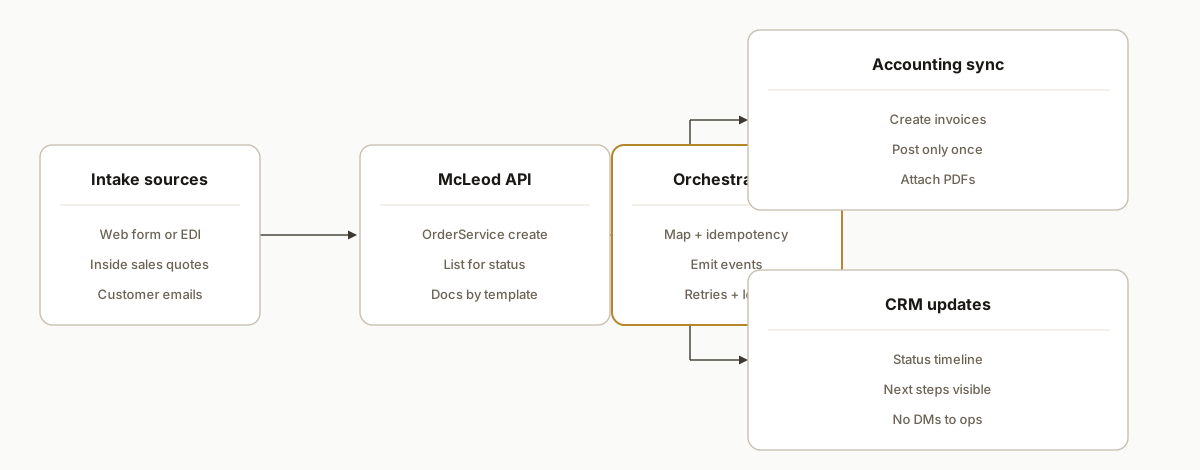
We keep McLeod as the source of truth. A thin orchestrator talks to McLeod's REST-style API for order create and updates, writes idempotent events to a queue, and downstream workers post to accounting and CRM. When native accounting connectors are not enabled or are out of scope, this bridge fills the gap without changing dispatch habits.
- McLeod REST-style API: Authenticated via HTTP Basic or McLeod bearer tokens. We use OrderService to create and list orders. The service mirrors desktop validation by role.
- Orchestrator service: A small Node service that handles auth, polling, mapping, and idempotency. It emits normalized events for accounting and CRM.
- Accounting worker: Listens for invoiced or delivered loads and posts invoice data into QuickBooks Online when the client has not enabled McLeod's official accounting connector.
- CRM worker: Pushes ship dates, delivered status, and milestones into the sales system so reps see movement without pinging dispatch.
- Document renderer: Calls the reporting service to generate PDFs from templates for proof-of-delivery packets.
Step-by-step: how to build it
1) Authenticate to McLeod with Basic or token
Answer: obtain a McLeod bearer token via a login call or send Basic on each request. We use a short-lived token and rotate proactively.
# Exchange Basic for a bearer token (instance URL is client-specific)
curl -s -X POST \
  -H "Authorization: Basic <base64(clientId:clientSecret)>" \
  "https://<your-mcleod-instance>/ws/users/login"

# Response includes a bearer token to pass as Authorization: Bearer <token>
Gotcha: API access is role and permission gated. If your service user lacks the right roles or the client has not licensed a required module, calls will be blocked.
2) Create loads with OrderService
Answer: post new orders through OrderService. We map web-intake and quote data to McLeod's schema and let McLeod own IDs.
# Create an order (payload fields per your McLeod schema)
curl -s -X PUT \
  -H "Authorization: Bearer <token>" \
  -H "Content-Type: application/json" \
  -d '{ "externalRef": "WEB-REQ-7842", "customerId": "CUST123", "origin": "Dallas, TX", "destination": "Phoenix, AZ" }' \
  "https://<your-mcleod-instance>/ws/orders/create"
Gotcha: OrderService exposes an updateRow path that can bypass some validation. We avoided it except for surgical fixes and kept all normal updates on validated calls.
3) Read orders for status changes
Answer: poll OrderService and filter by last-seen timestamp in your orchestrator. Emit only new or changed loads to keep downstream idempotent.
# List orders, then filter client-side by lastSync
curl -s -X GET \
  -H "Authorization: Bearer <token>" \
  "https://<your-mcleod-instance>/ws/orders"
Gotcha: Base URLs are instance specific and not standardized in public docs. Confirm the exact path during enablement with the client's McLeod team.
4) Normalize and enqueue for accounting and CRM
Answer: convert McLeod orders into a stable event shape. Use a ledger key to ensure you never post duplicates.
// app/events/mapOrder.js
export function toEvent(row) {
  return {
    source: "mcleod",
    orderId: row.orderId,
    externalRef: row.externalRef || null,
    status: row.status,         // e.g., CREATED, DISPATCHED, DELIVERED, INVOICED
    customerCode: row.customerId,
    pickupAt: row.pickupAt,
    deliverAt: row.deliverAt,
    amounts: { freight: row.freightTotal, accessorials: row.accessorialTotal },
    updatedAt: row.updatedAt
  };
}

// app/queue/publish.js
import crypto from "crypto";
export function dedupeKey(evt) {
  return crypto.createHash("sha1").update(`${evt.source}:${evt.orderId}:${evt.status}`).digest("hex");
}
Gotcha: Make.com has no native McLeod app publicly listed, but its HTTP module can call the API. We used a service for control over idempotency and permissions.
5) Post invoices only once
Answer: the accounting worker reads INVOICED events and creates or updates invoices in the client's accounting system. We enforce a unique ledger key so reruns are safe.
-- Idempotency ledger enforces one post per orderId+status
create table if not exists idempotency_ledger (
  key text primary key,
  first_seen timestamptz default now(),
  last_seen  timestamptz default now(),
  sink       text not null,
  meta       jsonb
);
Gotcha: McLeod lists QuickBooks Online as an accounting integration. When that connector is not enabled or mapping is out of scope, this worker fills the gap.
6) Render documents from templates
Answer: when customers need PDFs like POD packets, call the reporting service with the template name the client uses.
# Render a document from a server-side template
curl -s -X GET \
  -H "Authorization: Bearer <token>" \
  "https://<your-mcleod-instance>/ws/documents/reportRunner/<type>/<template>?orderId=12345" \
  -o pod-12345.pdf
Gotcha: Keep templates and type names in config. Treat the PDF as source of truth for attachments and emails.
Where it gets complicated
Enablement and coordination. Some integrations require McLeod involvement or professional services. Plan time to align roles, modules, and instance access before you write code.
Role-gated validations. The API mirrors desktop validation by role. A service user that can read orders may still be blocked from creating them. Confirm privileges early.
Base URL and instance specifics. Public docs use relative paths. Instance URLs are client specific. Do not hardcode assumptions. Discover and store them per tenant.
OrderService updateRow caution. Docs flag updateRow as bypassing some validation. We used it rarely and preferred validated update paths to keep business rules intact.
No native Zapier or Make app. There is no public Zapier or Make listing for McLeod. You can call the API via an HTTP module, but long-term reliability is better in a small service with retries and a ledger.
Webhooks are not a given. We did not rely on webhooks. A polling loop with an idempotent ledger proved predictable. Remote notification docs exist but we treated them as out of scope until verified in the client's instance.
What this actually changes
For a regional carrier, intake-to-dispatch stopped being a copy-paste relay. New requests turned into McLeod orders immediately. Sales saw status changes in the CRM without asking ops. AR did not re-key invoices. The value was structural: one system of record for loads, automated downstream mirrors for finance and sales.
As context for the stakes, trucks move the majority of U.S. freight by tonnage. The American Trucking Associations reports that trucks haul roughly 72 percent of domestic freight by tonnage. Source: https://www.trucking.org/economics-and-industry-data
Frequently asked questions
Does McLeod have an official API?
Yes. McLeod exposes REST-style services with XML or JSON. Auth supports HTTP Basic and McLeod bearer tokens that you can create in SysAdmin or by logging in via the API. OrderService covers core order operations among many others.
Do I need McLeod to enable API access?
Often yes. Access and partner integrations can require McLeod coordination, and your service user needs the right roles and licensed modules. We plan an enablement window with the client's McLeod team before building.
Can this run in near real time?
Yes. We poll OrderService on a tight cadence and publish idempotent events. If remote notifications are available in your instance, we can adapt. Our production builds use polling plus a ledger because it is predictable and easy to recover.
How do you connect it to QuickBooks or a CRM?
Two ways. If the client has McLeod's official accounting connector enabled, we defer to it. If not, our accounting and CRM workers consume the normalized events and post to the target systems. We keep mappings in code and config, and we enforce idempotency so replays are safe.
What does this cost monthly?
Infrastructure is light: one small service, a queue, and workers. The main cost is the initial build and enablement time with McLeod. Ongoing costs depend on volume and hosting, typically modest for mid-sized carriers. We quote after a short discovery since roles and mappings differ per tenant.
Can a non-technical owner set this up?
The orchestration is real engineering. Owners can manage configuration once it is live, but initial enablement, role setup, and building a safe ledgered sync are developer tasks. We ship with logs, replay tools, and clear runbooks so ops can own day two.
If you run McLeod and want order entry, accounting, and sales to stay in sync without double entry, we have shipped this exact pattern. See how we bridge legacy platforms to accounting in our related post on SedonaOffice to QuickBooks, or explore our CRM automation services. When you are ready to scope your tenant and roles, book a 15-minute call.
Want us to build this for you?
Nine questions, about 90 seconds. You see the hours it is costing you, then pick a time. No pitch.
Get your free assessment