
Cliniko automation is a phased approach that connects intake, enquiry handling, booking rules, and lab-result checks into one flow so staff spend time on care, not admin. We built a demo case study for The Child Centre in the UK that shows how to do this safely under UK GDPR. This guide explains the architecture, the build steps, and the gotchas.
If you run a therapy clinic on Cliniko and need smarter intake, consistent enquiry replies, guardrailed scheduling, and light-touch lab monitoring, this is the field manual we wish we had on day one.
The problem it solves
Clinics on Cliniko manage a lot of manual steps: long intake forms re-keyed into records, WhatsApp or email enquiries that sit in an inbox, scheduling rules Cliniko cannot express natively, and lab partners without an API that still need tracking. Each piece works in isolation. Together they create bottlenecks and missed expectations.
A phased automation solves it by scoping clear wins per phase. Intake becomes structured and validated. Enquiries are answered consistently with safe deflection for clinical questions. Scheduling respects custom rules. Lab results are monitored with assisted browser automation where no API exists.
| Workflow step | Manual today | Automated with our demo |
|---|---|---|
| Intake validation | Staff reads every submission and re-keys into Cliniko | Form-level checks and controlled ingestion. Failures route back to the family |
| Enquiry replies | Ad hoc answers. Long delays in busy weeks | WhatsApp assistant answers FAQs, captures details, hands off edge cases |
| Scheduling rules | Calendars checked by hand. Back-to-back conflicts happen | Policy engine filters slots and proposes only valid times |
| Lab status checks | Staff logs into portals and polls results | Assisted browser automation pings status and prompts human review |
Definition: Cliniko automation is a set of integrations and guardrails around Cliniko that remove re-keying, standardize replies, enforce booking rules, and monitor external lab workflows where a public API is not available.
UK context matters. WhatsApp is widely adopted for communication and appointment coordination in the UK, so meeting families in-channel reduces friction. Ofcom reports roughly three-quarters of UK adults use WhatsApp regularly (Online Nation 2023: https://www.ofcom.org.uk). Missed appointments are a known drag on outcomes, and NHS data regularly shows non-attendance rates in the mid single digits, which is why reschedule-aware reminders and clear pre-visit expectations matter (NHS England Appointments data hub: https://www.england.nhs.uk/statistics).
How the automation works
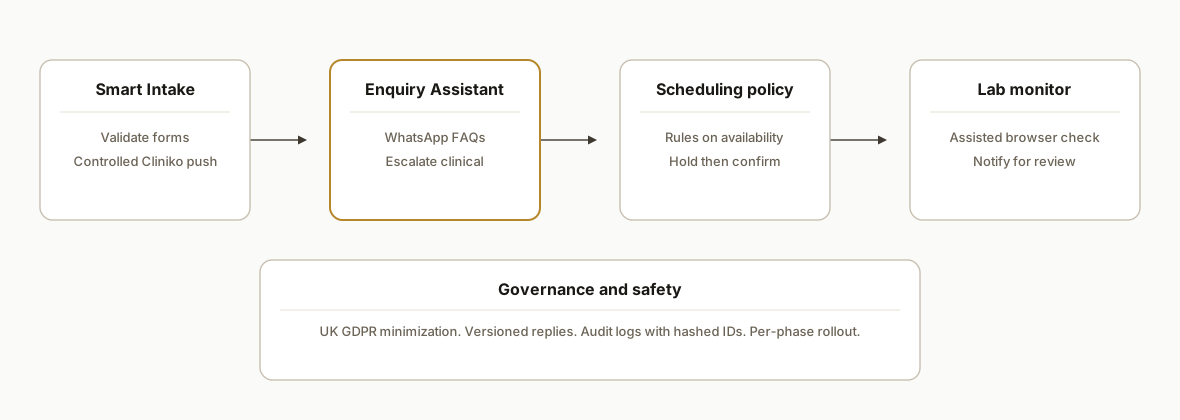
The demo architecture has four components that you can ship independently, then connect as a spine.
- Smart Intake: A hosted form with validation rules. On pass it writes to a secure intake store and posts to Cliniko through a controlled adapter. On fail it returns specific guidance without storing sensitive payloads unnecessarily.
- Enquiry Assistant: A WhatsApp-based responder that answers pre-approved FAQs, captures contact details, and escalates anything clinical to staff. Everything it says is templated and versioned.
- Scheduling Orchestrator: A small service that reads availability and applies policy rules the native schedule cannot express. It suggests valid windows, holds a slot briefly, and confirms after payment or approval depending on clinic policy.
- Lab Monitor: Assisted browser automation that logs into the partner portal on a fixed cadence and notifies staff when new results appear. No raw lab data is stored in the automation. The goal is to reduce forgotten follow-ups, not to replace clinical systems.
Step-by-step: how to build it
1) Ship Smart Intake with validation and safe ingestion
Start with a form that validates required fields and normalizes key data before anything touches Cliniko. We keep secrets in environment variables and do not hardcode endpoints.
// apps/intake/src/ingest.ts
import express from "express";
import fetch from "node-fetch";

const app = express();
app.use(express.json());

function validate(payload: any) {
  const errors: string[] = [];
  if (!payload.child_name) errors.push("Missing child_name");
  if (!payload.guardian_email?.includes("@")) errors.push("Invalid guardian_email");
  if (!payload.consent === true) errors.push("Consent required");
  return errors;
}

app.post("/intake", async (req, res) => {
  const errors = validate(req.body);
  if (errors.length) return res.status(422).json({ ok: false, errors });

  // Write to intake store first
  // e.g., insert into Postgres with parameterized query (omitted here for brevity)

  // Controlled push into Cliniko through an adapter service
  const r = await fetch(process.env.CLINIC_ADAPTER_URL as string, {
    method: "POST",
    headers: { "Content-Type": "application/json", Authorization: `Bearer ${process.env.CLINIC_ADAPTER_TOKEN}` },
    body: JSON.stringify({ kind: "intake:create", payload: req.body })
  });

  if (!r.ok) return res.status(502).json({ ok: false, reason: "clinic_adapter_error" });
  return res.json({ ok: true });
});

export default app;
Key gotcha: do not store more than you need. Intake is special-category data under UK GDPR. Minimize fields at rest and restrict staff access.
2) Add a WhatsApp enquiry assistant with safe deflection
We route FAQs through a responder that only answers pre-approved topics and deflects clinical advice. It captures contact details and proposes next steps.
// apps/enquiry/src/server.ts
import express from "express";
import fetch from "node-fetch";

const app = express();
app.use(express.json());

const APPROVED_TOPICS = ["fees", "waiting times", "clinic location", "how to book"] as const;

async function draftReply(message: string) {
  const prompt = `You are a clinic enquiry assistant. Only answer if the question is one of: ${APPROVED_TOPICS.join(", ")}. If clinical, reply: 'A clinician will contact you.' Keep replies under 80 words.`;
  const r = await fetch(process.env.AI_URL as string, {
    method: "POST",
    headers: { "Content-Type": "application/json", Authorization: `Bearer ${process.env.AI_TOKEN}` },
    body: JSON.stringify({ prompt, input: message })
  });
  const data = await r.json();
  return data.text as string;
}

app.post("/webhooks/whatsapp", async (req, res) => {
  const inbound = req.body; // provider-specific shape
  const text: string = inbound.text || "";
  const reply = await draftReply(text);

  // Send reply through your WhatsApp provider
  await fetch(process.env.WHATSAPP_SEND_URL as string, {
    method: "POST",
    headers: { "Content-Type": "application/json", Authorization: `Bearer ${process.env.WHATSAPP_TOKEN}` },
    body: JSON.stringify({ to: inbound.from, text: reply })
  });

  res.json({ ok: true });
});

export default app;
Key gotcha: template and version responses. Keep an audit log of what the assistant said and why. Anything clinical must be escalated.
3) Enforce custom scheduling rules with a policy engine
Cliniko holds availability. The policy engine filters it using rules your team defines. Examples: no three initial consultations back-to-back. Do not place 30 minute sessions inside a 2 hour diagnostic block. Respect buffer times.
// apps/scheduling/src/policy.ts
export type Slot = { start: string; end: string; type: "initial" | "followup" | "assessment" };

export function applyRules(slots: Slot[]): Slot[] {
  const byDay = new Map<string, Slot[]>();
  for (const s of slots) {
    const day = s.start.slice(0, 10);
    byDay.set(day, [...(byDay.get(day) || []), s]);
  }

  const filtered: Slot[] = [];
  for (const [day, daySlots] of byDay) {
    const sorted = daySlots.sort((a, b) => a.start.localeCompare(b.start));
    let consecutiveInitial = 0;
    for (const s of sorted) {
      if (s.type === "initial") consecutiveInitial += 1; else consecutiveInitial = 0;
      if (consecutiveInitial > 2) continue; // block the third back-to-back initial

      // 30 inside 120 minute block check: simplistic example using minutes diff
      const minutes = (new Date(s.end).getTime() - new Date(s.start).getTime()) / 60000;
      const insideLongBlock = minutes === 30 && sorted.some(t => t !== s && ((new Date(t.end).getTime() - new Date(t.start).getTime()) / 60000) === 120 && new Date(s.start) > new Date(t.start) && new Date(s.end) < new Date(t.end));
      if (insideLongBlock) continue;

      filtered.push(s);
    }
  }
  return filtered;
}
Key gotcha: reserve holds briefly. Confirm the booking only after payment or staff approval to avoid ghost reservations.
4) Make reminders reschedule-aware using T-minus offsets
Design reminders relative to the live appointment time and recompute on reschedule. Use a unique constraint so each step sends once.
-- db/migrations/20260831_warmups.sql
create table warmups (
  booking_uid text not null,
  step text not null,
  scheduled_for timestamptz not null,
  status text not null default 'pending',
  primary key (booking_uid, step)
);
// apps/warmup/src/scheduler.ts
export function recompute(plan: { step: string; offsetMinutes: number }[], start: Date) {
return plan.map(p => ({ step: p.step, scheduled_for: new Date(start.getTime() + p.offsetMinutes * 60000) }));
}Key gotcha: on reschedule, cancel pending steps and write the new plan. Do not re-send already sent steps.
5) Monitor lab results with assisted browser automation
Where a lab partner does not expose a public API, use a hardened browser script to check status and alert staff. Do not scrape or store PHI. Only notify that a result is ready for manual review.
// ops/lab-monitor/src/check.ts
import { chromium } from "playwright";

export async function checkLab() {
  const browser = await chromium.launch({ headless: true });
  const page = await browser.newPage();
  await page.goto(process.env.LAB_PORTAL_URL as string);
  await page.fill("input[name=username]", process.env.LAB_USER as string);
  await page.fill("input[name=password]", process.env.LAB_PASS as string);
  await page.click("text=Sign in");

  // Navigate to results list, then look for new statuses
  await page.waitForSelector("text=Results");
  const hasNew = await page.locator(".result-row.new").count();

  if (hasNew > 0) {
    // Send a lightweight alert. No PHI in payloads.
    await fetch(process.env.ALERT_URL as string, {
      method: "POST",
      headers: { "Content-Type": "application/json", Authorization: `Bearer ${process.env.ALERT_TOKEN}` },
      body: JSON.stringify({ kind: "lab:new_results", count: hasNew })
    });
  }

  await browser.close();
}
Key gotcha: expect captchas or MFA on some portals. Build a manual fallback and keep the polling low frequency to reduce lockouts.
6) Log safely and hash identifiers
Protect children's data. Hash identifiers in logs, encrypt secrets, and limit access.
import crypto from "crypto";
export const hash = (s: string) => crypto.createHash("sha256").update(s).digest("hex");
Key gotcha: align with UK GDPR and the Data Protection Act 2018. Document your data map and retention policy.
Where it gets complicated
- Cliniko slot controls: Some scheduling rules are not expressible natively. You need a policy engine to pre-filter and validate holds.
- No lab API: Assisted browser automation reduces tab-checking, but some manual steps remain. Build alerts that prompt a human to review and record the outcome.
- Clinical boundaries: The enquiry assistant must not give clinical advice. Keep a strict allowlist of topics and an escalation path.
- Reschedule math: Reminder timing must recompute on reschedule and cancel pending sends. A unique key on booking_uid plus step prevents duplicates.
- UK GDPR: Intake is special-category data. Minimize at rest, encrypt in transit and at rest, and restrict logs to non-identifying events. Publish a retention policy.
- Trust-building: We offered per-phase refund guarantees and clinic-led testing before go-live. The sequence re-established trust after prior vendor misses.
What this actually changes
For The Child Centre this was a demo we built, not a live deployment. The pattern holds for UK therapy clinics on Cliniko: you remove re-keying from intake, answer enquiries quickly without stepping into clinical advice, enforce booking rules that reduce staff juggling, and stop missing lab follow-ups because someone forgot to check a portal.
Two external realities make the approach pay. WhatsApp is used by a large majority of UK adults, so enquiry handling there reduces friction (Ofcom Online Nation 2023: https://www.ofcom.org.uk). Missed appointments persist as a mid single digit share of activity in NHS data, so reschedule-aware reminders and clear pre-visit instructions matter (NHS England Appointments data hub: https://www.england.nhs.uk/statistics).
Frequently asked questions
Does Cliniko have an official API for this?
Cliniko supports integrations and exports. Where native options are limited, we bridge via controlled adapters or safe assisted browser automation. We do not rely on undocumented behavior and we scope each phase so it can run on its own if a downstream system changes.
Can you enforce complex scheduling rules Cliniko does not support?
Yes. We read availability, apply a clinic-defined policy engine, and only offer compliant slots. Rules like limiting back-to-back initial consultations or keeping short sessions out of long blocks are enforced before a hold is placed.
How do you handle lab partners with no public API?
We use assisted browser automation to check for new results and alert staff. No raw lab data is stored in automation systems. The point is to reduce missed follow-ups, not to replace clinical review.
Is this GDPR compliant for a UK children's clinic?
We design for UK GDPR and the Data Protection Act 2018. Data minimization, explicit consent, encryption, access controls, and documented retention are non-negotiable. We keep logs non-identifying and hash any necessary references.
What does this cost to run monthly?
The runtime footprint is small: a form host, a small service for enquiries and scheduling, and a low-frequency lab check. Third-party costs remain on your accounts. The primary investment is the initial build per phase and light upkeep.
How long to pilot Phase 1 and 2?
Phase 1 Smart Intake and Phase 2 Enquiry Assistant typically stand up in one to two weeks each. We ship them independently so you see value as soon as each phase clears testing.
We built this as a demo for The Child Centre and have a clear path to production. If you want the same phased rollout on your stack, see our workflow automations at /services#workflow-automation, read how we approach channel assistants in /blog/whatsapp-ai-bot-for-business, and book a working session at /book.
Sources
- 1.Ofcomofcom.org.uk
- 2.NHS England statisticsengland.nhs.uk
Want us to build this for you?
Nine questions, about 90 seconds. You see the revenue it is costing you, then pick a time. No pitch.
See your options