
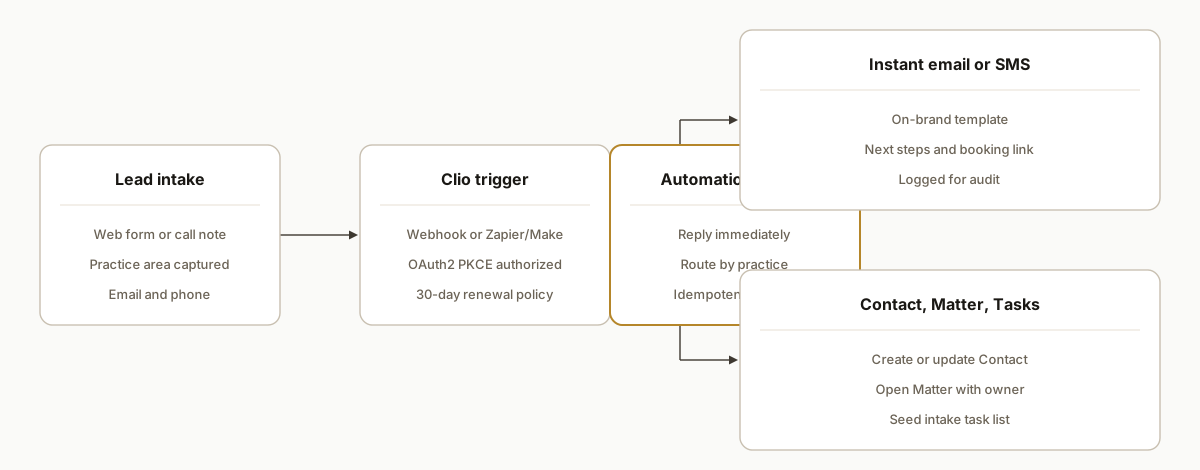
Clio intake automation works by listening in real time for new leads, replying immediately with a tailored email or SMS, then creating or updating a Contact, opening a Matter, and seeding first tasks in Clio Manage. We built this for a midsize firm so every qualified inquiry received a same-minute response and landed in the right workflow with zero re-keying. This guide shows the exact pattern we shipped.
Definition: Clio intake automation is a workflow that connects your lead sources to Clio Manage via the v4 API and native connectors so new inquiries get an instant reply and a fully prepared Matter without manual data entry.
The problem it solves
Most firms still route web forms and phone call notes into an inbox. Someone replies, someone else creates a contact, then a paralegal opens a matter and assigns intake tasks. That bounce costs hours weekly and creates gaps when replies slip.
| Step | Manual process | Automated with Clio API |
|---|---|---|
| First reply | Staff drafts a response, often hours later | Autoresponder sends a branded, practice-specific reply in seconds |
| Contact creation | Paralegal re-keys name, email, phone | API upsert creates or updates Contact from the lead payload |
| Matter setup | Staff picks a template and fills fields | Pre-mapped fields open a Matter and attach the contact |
| Tasks | Intake tasks are typed from a checklist | A task list is auto-created with owners and due dates |
| Routing | Someone forwards to the right attorney | Practice-area rules assign owner and notify the team |
How the automation works
We wire Clio Manage v4 to your intake sources using OAuth 2.0 PKCE, webhooks or connectors, and a small middleware that replies instantly and enforces routing rules. The moving parts are standard and hardened in production.
- Clio Manage API v4: The system of record. REST base is https://app.clio.com/api/v4/. Auth uses OAuth 2.0 with PKCE via https://auth.api.clio.com/oauth/authorize.
- Triggers: Clio webhooks or native Zapier or Make.com triggers. Webhooks enable push speed. Zapier and Make support Clio Manage events and actions.
- Instant responder: A serverless function drafts and sends the first reply and logs outcomes.
- Matter creation: Create or update the Contact, open a Matter, and add tasks using Clio Manage actions in Zapier/Make or an API call module.
- Renewal and field selection: Webhooks expire every 30 days. API responses default to minimal fields, so requests specify the fields needed for routing.
Step-by-step: how to build it
1) Register OAuth and generate PKCE values
Set up a Clio OAuth app and use PKCE for a secure, browser-based authorization. The authorization endpoint is https://auth.api.clio.com/oauth/authorize. Store tokens server-side.
// pkce.js
import crypto from "node:crypto";

export function generateVerifier(len = 64) {
  const chars = "abcdefghijklmnopqrstuvwxyzABCDEFGHIJKLMNOPQRSTUVWXYZ0123456789-._~";
  let v = ""; for (let i = 0; i < len; i++) v += chars[Math.floor(Math.random()*chars.length)];
  return v;
}

export function challengeFromVerifier(verifier) {
  const hash = crypto.createHash("sha256").update(verifier).digest();
  return hash.toString("base64").replace(/\+/g, "-").replace(/\//g, "_").replace(/=+$/, "");
}

// usage: redirect to https://auth.api.clio.com/oauth/authorize with code_challenge + method=S256
Gotcha: keep the verifier in a secure session store so you can redeem the authorization code after consent.
2) Subscribe to events or use a connector
For instant intake, we either subscribe to webhooks or use Zapier or Make.com triggers. Webhooks must be renewed periodically.
# Inspect existing Clio webhooks (expires every 30 days)
curl -sS https://app.clio.com/api/v4/webhooks.json \
  -H "Authorization: Bearer $CLIO_ACCESS_TOKEN" | jq ".items | length, .[0]"
Gotcha: webhooks expire in 30 days. Schedule a renewal job before day 25 so you never lose real-time delivery.
3) Send the instant, on-brand reply
We reply immediately from middleware as soon as the lead arrives. Keep practice-area templates ready and include next actions.
// responder.js
import express from "express";
import nodemailer from "nodemailer";

const app = express();
app.use(express.json());
const mailer = nodemailer.createTransport({
  host: process.env.SMTP_HOST,
  port: 587,
  auth: { user: process.env.SMTP_USER, pass: process.env.SMTP_PASS }
});

app.post("/intake", async (req, res) => {
  const { name, email, phone, practice } = req.body;
  const subject = `Thanks ${name}, here is what happens next`;
  const body = selectTemplate(practice, { name });
  await mailer.sendMail({ from: "Intake <intake@yourfirm.com>", to: email, subject, text: body });
  res.json({ ok: true });
});

function selectTemplate(area, ctx){
  const t = {
    injury: `Hi ${ctx.name}, thanks for reaching out. Here is the 3-step process...`,
    family: `Hi ${ctx.name}, we can help. Here is what we need before the consult...`
  };
  return t[area] || `Hi ${ctx.name}, thanks for contacting us. We will reach out shortly.`;
}

app.listen(3000);
Gotcha: keep reply content deterministic. Use templates with variables, not free-form AI for the first response.
4) Create or update the Contact and open the Matter
We use the native Clio Manage actions in Zapier or Make.com to avoid reinventing their schema. A typical Make scenario looks like this.
{
  "modules": [
    { "app": "clio-manage", "name": "Search Contacts", "keys": { "email": "{{1.email}}" } },
    { "app": "clio-manage", "name": "Create or Update Contact", "map": { "first_name": "{{1.first_name}}", "last_name": "{{1.last_name}}", "email": "{{1.email}}", "phone": "{{1.phone}}" } },
    { "app": "clio-manage", "name": "Create Matter", "map": { "description": "{{1.practice}} Intake", "client_id": "{{2.id}}" } },
    { "app": "clio-manage", "name": "Create Task", "map": { "name": "Conflict check", "matter_id": "{{3.id}}", "assignee": "{{env.INTAKE_USER_ID}}" } }
  ]
}
Gotcha: if you later switch to API calls, request explicit fields because many endpoints return only id and etag by default.
5) Route by practice area and assign owners
Add a lightweight rules layer so family, personal injury, and business matters land with the right teams.
# routing.yml
rules:
  - when: practice == "family"
    owner: "attorney_hannah"
    tasks:
      - name: "Send fee agreement"
      - name: "Collect documents"
  - when: practice == "injury"
    owner: "attorney_michael"
    tasks:
      - name: "Request incident report"
      - name: "Verify coverage"
Gotcha: keep routing data-driven. You can evolve the YAML without touching scenario logic.
6) Renew webhooks and verify deliveries
Because Clio webhooks expire every 30 days, schedule a renewal and a delivery audit.
// renew.js
import cron from "node-cron";
import fetch from "node-fetch";

cron.schedule("0 3 * * 0", async () => { // Sundays 03:00
  const r = await fetch("https://app.clio.com/api/v4/webhooks.json", {
    headers: { Authorization: `Bearer ${process.env.CLIO_ACCESS_TOKEN}` }
  });
  const json = await r.json();
  // Inspect items and recreate any nearing expiration using your stored config
  console.log(`Webhooks listed: ${json.items?.length ?? 0}`);
});
Gotcha: treat missing or stale webhooks as incidents. Alert on zero items or repeated delivery failures.
Where it gets complicated
- Webhook expiry every 30 days: Clio requires renewal. We ship a scheduled job to re-subscribe before day 25 and alert on missing subscriptions so instant intake never silently stops.
- Minimal default fields: Many v4 responses are sparse by default. Always request the fields you need for routing, or your rules will run on partial data.
- Clio Manage vs Clio Grow: Zapier and Make cover Clio Manage. If your intake happens in Grow, bridge it to Manage through connectors or your middleware first.
- CSV exports are link-driven: Clio emails links when you schedule CSV report presets. Do not assume direct file attachments. Plan a link fetch step if you operationalize scheduled reports.
- Idempotency and dedup: Search by email before creating contacts and keep a hash ledger, so double-submissions never create duplicates.
What this actually changes
For the firm we implemented, the system replied to every qualified inquiry within seconds and opened matters with the correct owner and first tasks without staff touching a keyboard. The value is structural: consistent speed-to-lead and zero re-keying. Independent research found that responding within an hour made organizations nearly seven times more likely to qualify a lead than waiting two hours. Source: Harvard Business Review, The Short Life of Online Sales Leads, https://hbr.org/2011/03/the-short-life-of-online-sales-leads
Frequently asked questions
Does Clio have an official API?
Yes. Clio Manage exposes a public REST API v4. The base pattern is https://app.clio.com/api/v4/ and it uses OAuth 2.0 with PKCE for authorization via https://auth.api.clio.com/oauth/authorize. We build on that to automate contact and matter workflows safely.
Can this be done without writing code?
Yes, to a point. Zapier and Make both have Clio Manage connectors for triggers and actions. We often pair them with a small middleware for instant replies, routing rules, and idempotency. Note that these connectors do not cover Clio Grow.
How do you keep it real time?
We prefer push delivery: Clio webhooks or connector triggers. Webhooks expire every 30 days, so we renew proactively. When push is not available, we poll at a safe cadence and log drift until push is restored.
How do you prevent duplicate contacts and matters?
Search by email or phone first, use an upsert pattern in the connector, and maintain a hash ledger in middleware. We also attach a consistent external reference to the Matter so replays are no-ops.
What does this cost monthly?
Zapier or Make subscription plus a light serverless function for replies. There is no additional fee from Clio to use webhooks and the public API beyond your Clio plan. The primary expense is the one-time build and small monthly ops.
Can a non-developer set this up?
A motivated operator can assemble a basic flow with Zapier or Make. OAuth app registration, webhook renewal, idempotency, and error handling are engineering tasks. We handle those pieces so your team does not have to learn them.
If you want intake to reply instantly and have every qualified inquiry land as a ready-to-work Matter, we already built this pattern. See our related post on automate CRM lead follow-up and our CRM automation services. When you are ready to scope your setup, book a 20-minute call.
Sources
- 1.The Short Life of Online Sales Leadshbr.org
Want us to build this for you?
Nine questions, about 90 seconds. You see the revenue it is costing you, then pick a time. No pitch.
See your options