
We built and shipped an Elementor Forms to Google Sheets pipeline that also saves uploaded files to Google Drive. In production it captures every submission with clean field mappings, deduplicates retries, and keeps a JSON audit trail you can trust. This guide shows how we implement it safely using Elementor's webhook action or Make.com's trigger. If you run other form plugins, see our related walkthroughs for Contact Form 7 to Google Sheets with uploads and Gravity Forms to Google Sheets with uploads.
Elementor Forms to Google Sheets automation is the server-side capture of each form submission into a structured spreadsheet row, with file uploads stored and linked, plus deduplication and an audit log.
The problem it solves
You want Elementor Forms data in Google Sheets with the file uploads preserved, not stuck in email or lost when labels change. Copy-paste breaks, CSV exports are manual, and renaming a field label can silently corrupt your mappings. You also need a tamper-evident log for compliance and a way to prevent duplicates when a webhook retries.
| Step | Manual process | Automated flow |
|---|---|---|
| Capture | Download CSV periodically and copy into a master Sheet | Each submission appends a row to the Sheet instantly |
| Files | Attachments live in inbox threads | Files are saved to Drive, and Drive links are written to the row |
| Mapping | Column assignment redone whenever labels change | Stable field map enforces names and order |
| Dedupe | None, duplicate rows pile up | Hash-based dedupe blocks replays and retries |
| Audit | Scattered emails as proof | JSON audit log per submission with timestamps |
How the automation works
At the core, Elementor Pro posts each submission to a webhook endpoint. We receive it in Apps Script or via Make's watch trigger, normalize labels into stable keys, write a row into Google Sheets, and for any file fields we download the file to Drive then store the Drive URL in the row. A hash of the payload prevents duplicates and a Raw tab stores the original JSON for auditing.
- Elementor has no public REST API for reading submissions: we use the built-in Webhook action or Make's Watch Forms trigger to stream each submission server-side. Elementor documents PHP hooks for form events inside WordPress, but not a public submissions endpoint.
- Field labels drive the webhook keys: we freeze mappings so renaming a label does not break the Sheet.
- Upload handling respects Elementor settings: if files are only emailed, they are not visible in the Submissions page. We default to storing uploads so Drive can fetch by URL and persist them.
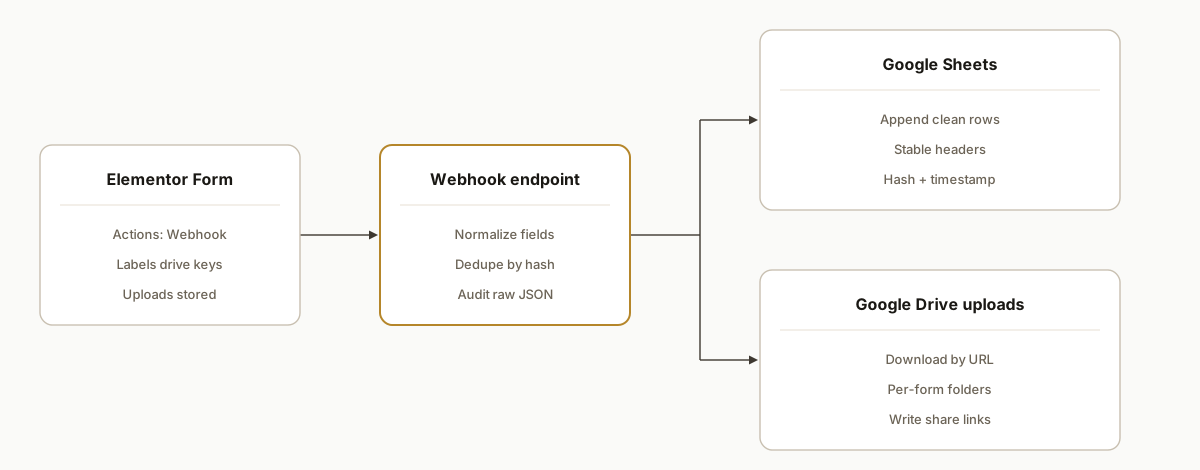
Step-by-step: how to build it
1) Configure Elementor Forms to post to a webhook
Set up your form in Elementor Pro and add Actions after submit: Webhook. Paste your endpoint URL. Keep field labels stable because Elementor uses labels in its webhook payload. If you toggle Advanced Data, the payload structure changes to an array shape, so decide that up front and keep it consistent.
Elementor Form
Actions after submit: Webhook
Webhook URL: https://script.google.com/macros/s/AKfycb.../exec?token=YOUR_SHARED_SECRET
Store Submissions: On (so file URLs exist)
Email attachments: Off if you want files visible in Submissions
Answer first: Elementor's Webhook action is the reliable push path. There is no documented public REST endpoint for reading submissions later, so push on submit rather than trying to pull.
2) Deploy an Apps Script Web App receiver
Publish a container-bound Apps Script as a Web App. It accepts JSON, validates a shared secret, computes a dedupe hash, and appends to a Sheet. We keep a Raw tab for the unmodified payload.
// Code.gs
const CONFIG = {
  SHEET_NAME: 'Submissions',
  RAW_NAME: 'Raw',
  DRIVE_PARENT: 'YOUR_DRIVE_FOLDER_ID', // create per-form subfolders
  TOKEN: 'YOUR_SHARED_SECRET'
};

function doPost(e) {
  if (!e || !e.postData) return _resp(400, 'Bad Request');
  const token = (e.parameter && e.parameter.token) || '';
  if (token !== CONFIG.TOKEN) return _resp(401, 'Unauthorized');

  const bodyText = e.postData.contents || '{}';
  const payload = JSON.parse(bodyText);

  // Compute a stable hash for dedupe from the raw JSON text
  const hash = Utilities.base64EncodeWebSafe(Utilities.computeDigest(Utilities.DigestAlgorithm.SHA_256, bodyText))
                  .slice(0, 22);

  const ss = SpreadsheetApp.getActive();
  const sheet = ss.getSheetByName(CONFIG.SHEET_NAME);
  const raw = ss.getSheetByName(CONFIG.RAW_NAME);

  // Stop if we have seen this hash recently
  if (_seen(hash, sheet)) return _resp(200, JSON.stringify({ status: 'duplicate', hash }));

  // Normalize fields: flatten object or array-of-fields into key:value map
  const map = _normalize(payload);

  // Handle file-like fields: download to Drive and replace with Drive URL
  const files = _extractFileUrls(map);
  const driveLinks = files.map(f => _saveToDrive(f.url, f.name));
  driveLinks.forEach(link => map[link.key] = link.url);

  // Append header-safe row
  const headers = _ensureHeaders(sheet, Object.keys(map).concat(['_hash', '_ts']));
  const row = headers.map(h => h === '_hash' ? hash : h === '_ts' ? new Date() : (map[h] ?? ''));
  sheet.appendRow(row);

  // Raw log for audit
  raw.appendRow([new Date(), hash, bodyText]);

  return _resp(200, JSON.stringify({ status: 'ok', hash }));
}

function _normalize(payload) {
  // If Advanced Data is off: keys are labels; if on: often an array of fields
  if (Array.isArray(payload)) {
    const out = {};
    payload.forEach(item => {
      const key = (item.label || item.id || 'field_' + Math.random()).trim();
      out[key] = item.value != null ? String(item.value) : '';
    });
    return out;
  }
  if (payload && payload.fields && Array.isArray(payload.fields)) {
    const out = {};
    payload.fields.forEach(f => out[(f.label || f.id).trim()] = String(f.value ?? ''));
    return out;
  }
  return Object.keys(payload || {}).reduce((m, k) => (m[k] = String(payload[k] ?? ''), m), {});
}

function _extractFileUrls(map) {
  const urls = [];
  Object.keys(map).forEach(k => {
    const v = map[k];
    if (typeof v === 'string' && /^https?:\/\//i.test(v) && /\.(pdf|png|jpe?g|docx?|xlsx?)($|\?)/i.test(v)) {
      urls.push({ key: k, url: v, name: k });
    }
  });
  return urls;
}

function _saveToDrive(url, name) {
  try {
    const resp = UrlFetchApp.fetch(url, { followRedirects: true, muteHttpExceptions: true });
    const blob = resp.getBlob();
    const folder = DriveApp.getFolderById(CONFIG.DRIVE_PARENT);
    const file = folder.createFile(blob).setName(name + ' ' + Utilities.formatDate(new Date(), Session.getScriptTimeZone(), 'yyyy-MM-dd_HH.mm.ss'));
    // Optional: control link access
    // file.setSharing(DriveApp.Access.ANYONE_WITH_LINK, DriveApp.Permission.VIEW); // or keep private and share by group
    return { key: name + ' File', url: file.getUrl() };
  } catch (e) {
    return { key: name + ' File', url: url }; // fall back to original URL
  }
}

function _ensureHeaders(sheet, keys) {
  const headers = sheet.getLastRow() >= 1 ? sheet.getRange(1, 1, 1, sheet.getLastColumn()).getValues()[0] : [];
  const set = new Set(headers.filter(Boolean));
  keys.forEach(k => set.add(k));
  const arr = Array.from(set);
  sheet.getRange(1, 1, 1, arr.length).setValues([arr]);
  return arr;
}

function _seen(hash, sheet) {
  const data = sheet.getDataRange().getValues();
  const idx = data[0].indexOf('_hash');
  if (idx === -1) return false;
  for (let i = 1; i < data.length; i++) {
    if (data[i][idx] === hash) return true;
  }
  return false;
}

function _resp(code, body) {
  return ContentService.createTextOutput(body).setMimeType(ContentService.MimeType.JSON);
}
Key gotcha: Apps Script deployments do not auto-update on push. Create a new deployment version after edits so the live /exec URL picks up changes.
3) Freeze a stable field map
We avoid depending on human-friendly labels by creating a map from form labels to canonical keys. This keeps your Sheet columns stable when a label changes for copy edits.
// Optional mapping layer
const FIELD_MAP = {
  'Full Name': 'name',
  'Email Address': 'email',
  'Company': 'company',
  'Resume Upload': 'resume_url'
};

function _normalizeWithMap(payload) {
  const raw = _normalize(payload);
  const out = {};
  Object.keys(raw).forEach(k => {
    const key = FIELD_MAP[k] || k;
    out[key] = raw[k];
  });
  return out;
}
Answer first: treat labels as unstable. Map them to canonical keys so your Sheet is not hostage to copy changes.
4) Save uploads to Drive and link them in the row
Elementor can email uploads or store them. If you only email files, they will not be accessible from the Submissions page. For reliable archiving we store uploads, fetch via URL, write the Drive link in the Sheet, and keep the original URL if a download fails.
// Already shown in _saveToDrive. Consider per-form subfolders and a YYYY/MM structureAnswer first: do not pipe binary through Sheets. Store files in Drive and write links in your data row.
5) Make.com alternative: Elementor Watch Forms to Sheets
If you prefer no code, Make offers a Watch Forms trigger for Elementor. Use it to add a row in Google Sheets and, for files, call HTTP to fetch the file then use Google Drive: Upload a file module to persist it. Note that Make's field names follow Elementor's labels, so a future label change will break your mapping unless you insert a mapping filter layer. For broader platform tradeoffs, see our comparison of Make vs n8n vs Apps Script and the tooling roundup in Tools to connect your apps.
Answer first: Make works fine for this flow. Plan for label drift and retry behavior when webhooks replay.
6) Backfill and replays
Use Elementor Submissions to Export All to CSV for historical data and import into the Sheet. We also write the raw JSON and the dedupe hash so webhook retries and admin re-sends do not create duplicate rows. If you re-import, leave the _hash column populated. For scheduled catch-ups across tools, see our playbook for Typeform backfill and continuous sync.
Elementor: Submissions -> Export All to CSV
Google Sheets: File -> Import -> Insert new sheet(s)
Then vlookup/match into your master tab by email + timestamp or by _hash
Answer first: rely on CSV export for backfill. Use your hash to keep imports idempotent.
7) Add a lightweight audit trail
We append the raw JSON and a timestamp to a Raw tab. This gives you a simple, tamper-evident record for compliance reviews. If you need more, create a second Google Sheet as an append-only log and write audit rows there in parallel.
// Already in doPost: raw.appendRow([new Date(), hash, bodyText])Answer first: keep the raw payload. It is your proof when a contact disputes what they submitted.
Quick start: Elementor to Google Sheets without Zapier
If you want the free route, this is the shortest path we ship when time is tight.
- Create a Google Sheet with two tabs: Submissions and Raw.
- Open Extensions: Apps Script. Paste the receiver code above. Set TOKEN and DRIVE_PARENT, then Deploy as Web App. Copy the /exec URL.
- In Elementor: add Webhook in Actions after submit. Paste the /exec URL and add token as a query parameter.
- Submit a test form. Confirm a new row in Submissions and a JSON line in Raw. Post the same payload again to see status: duplicate.
If you later need branching or team notifications, you can graduate this exact mapping into Make. For dedupe patterns in other form stacks, see Typeform to Sheets update without duplicates.
Fix: Elementor to Google Sheets not working
Nine checks that have resolved real-world failures for us.
- Webhook URL: confirm it is the deployed /exec endpoint and not the /dev URL.
- Token: verify the token query parameter and server-side check match exactly. Return 401 on mismatch.
- Content type: Elementor should post JSON. If a plugin forces form-encoded bodies, parse that path too.
- Store Submissions: must be On or file URLs can be missing or temporary.
- Advanced Data: do not toggle midstream. Your receiver must handle the current shape.
- Drive folder id: ensure the folder exists and your account has write access.
- Apps Script deployment: create a new version after edits. Old deployments do not auto-refresh.
- Sheet headers: ensure _hash and _ts exist, or call _ensureHeaders before append.
- CDN or WAF: allowlist your receiver and set a descriptive user agent for file fetches.
At scale, document and version your mapping so site editors do not break columns. For fleet maintenance in no-code stacks, see Patching 200 Make scenarios safely.
Which Elementor settings should be on for file uploads to sync
We ship the same preflight for every Elementor to Sheets build. It prevents missing files and mapping drift.
- Actions after submit: include Webhook.
- Store Submissions: On. This ensures the webhook payload includes accessible file URLs.
- Email attachments: Off if you want files visible under Submissions for server-side fetching.
- Allowed file types and max size: align with your business needs before launch to avoid rejects.
- Advanced Data: pick On or Off once and keep it consistent. Changing it later alters the payload shape.
Elementor -> Form -> Content:
  Actions after submit: Webhook, Email (optional)
  Additional Options:
    Store Submissions: On
    Advanced Data: Off (or On, but keep it fixed)
Default vs Advanced Data: what payload you get and how to parse it
We harden the receiver to accept either shape, then lock to one in production.
Default style: keys are the field labels.
{
  "Full Name": "Jamie Fox",
  "Email Address": "jamie@example.com",
  "Resume Upload": "https://your-site.com/wp-content/uploads/2026/08/resume.pdf"
}
Advanced Data style: an array or object with fields, each item carries label and value.
{
  "fields": [
    { "id": "name", "label": "Full Name", "value": "Jamie Fox" },
    { "id": "email", "label": "Email Address", "value": "jamie@example.com" },
    { "id": "resume", "label": "Resume Upload", "value": "https://.../resume.pdf" }
  ]
}
Pick one early. If you must switch, deploy mapping versioning and keep both parsers live for a deprecation window.
Multiple forms to one Sheet: patterns we use
You can route many Elementor forms into one master Sheet without chaos. We add a form key to each row, segment uploads in Drive, and keep per-form column maps.
// Example: add form meta into the row
const FORM_KEY = 'careers_form'; // set per deployment or via query param

// After map normalization
map._form = FORM_KEY;

// Ensure headers include the marker
const headers = _ensureHeaders(sheet, Object.keys(map).concat(['_hash', '_ts']));
Operational tips:
- Per-form Drive subfolders: careers, contact, quote. This keeps retention clean.
- Columns: maintain a FIELD_MAP per form so edits on one form do not disturb others.
- Views: build filtered views or pivot tabs per form for teams that only need their slice.
How to handle multiple file uploads in one field
Elementor can allow multiple files in one upload field. Normalize those into distinct Drive links so your Sheet remains readable.
function _extractFileUrlsMultiAware(map) {
  const items = [];
  Object.keys(map).forEach(k => {
    let v = map[k];
    if (!v) return;
    // Try JSON array first, then comma or newline list, then single URL
    try {
      const arr = JSON.parse(v);
      if (Array.isArray(arr)) {
        arr.forEach((u, i) => items.push({ key: `${k} ${i + 1}`, url: String(u), name: `${k} ${i + 1}` }));
        return;
      }
    } catch (e) {}
    if (typeof v === 'string' && /[,\n]/.test(v)) {
      v.split(/[\n,]/).map(s => s.trim()).filter(Boolean)
        .forEach((u, i) => items.push({ key: `${k} ${i + 1}`, url: u, name: `${k} ${i + 1}` }));
      return;
    }
    if (typeof v === 'string' && /^https?:\/\//i.test(v)) {
      items.push({ key: k, url: v, name: k });
    }
  });
  return items;
}
Answer first: split arrays or delimited lists into separate Drive links. It keeps each file queryable and avoids unwieldy blob strings in a single cell.
Drive permissions and retention: making links work for your team
Decide who should be able to open file links directly from the Sheet.
- Private by default: keep files private in Drive and grant access to a shared Google Group. Safer for PII or HR uploads.
- Anyone with link: useful for cross-domain vendors who do not use Google accounts. Set sharing on create and avoid public indexing.
- Domain with link: if you use Google Workspace, restrict to your domain so staff can open without requests.
- Retention: move files into year and month subfolders, and apply folder-level retention or manual archives.
// Example: set team-only sharing policy where appropriate
function _saveToDriveWithSharing(url, name) {
  const resp = UrlFetchApp.fetch(url, { followRedirects: true, muteHttpExceptions: true });
  const file = DriveApp.getFolderById(CONFIG.DRIVE_PARENT)
    .createFile(resp.getBlob())
    .setName(name + ' ' + Utilities.formatDate(new Date(), Session.getScriptTimeZone(), 'yyyy-MM-dd_HH.mm.ss'));
  // Choose one sharing model for your org
  // file.setSharing(DriveApp.Access.DOMAIN_WITH_LINK, DriveApp.Permission.VIEW);
  // file.setSharing(DriveApp.Access.ANYONE_WITH_LINK, DriveApp.Permission.VIEW);
  return { key: name + ' File', url: file.getUrl() };
}
Answer first: set sharing intentionally. Do not rely on default Drive behavior if external stakeholders need to open links.
Elementor to Google Sheets without Zapier: free and low-cost paths
There is no native Elementor to Google Sheets action. You have three practical routes.
- Google Apps Script: free and flexible. Best when you need dedupe, audit, and custom Drive handling. We used this pattern above.
- Make.com: no-code, native Elementor trigger, branching, and Google Drive modules. Add an HTTP step to fetch files. See our platform guide: Make vs n8n vs Apps Script.
- Zapier: simple for single-row captures with a Catch Hook, but file handling and mapping control are limited compared to the two options above. For connector options across stacks, skim Tools to connect your apps.
Answer first: pick Apps Script when you want control, Make when you want speed, Zapier for simplest forms without files.
Troubleshooting missing or blocked files
If Drive uploads are missing or links return 403, start here.
- Store Submissions was Off: enable it so file URLs exist in the payload.
- Media permissions: some sites block direct file fetches. Allowlist your receiver or use a signed URL pattern.
- WAF and CDN: Cloudflare or host firewalls can block headless fetches. Add a bypass rule for your webhook IP range or user agent.
- Large or uncommon file types: tighten the Elementor allowed types list and confirm your receiver can fetch without timeouts.
- Temporary upload paths: confirm URLs point to permanent uploads, not transient temp locations.
How to test the webhook end to end
We validate mapping, dedupe, and Drive links before go-live with a simple replayable test.
// sample-payload.json (default style)
{
  "Full Name": "Jamie Fox",
  "Email Address": "jamie@example.com",
  "Message": "Test submission",
  "Resume Upload": "https://example.com/wp-content/uploads/2026/08/resume.pdf"
}
# Post once, then post again to confirm dedupe status: duplicate
curl -X POST \
-H "Content-Type: application/json" \
-d @sample-payload.json \
"https://script.google.com/macros/s/AKfycb.../exec?token=YOUR_SHARED_SECRET"What to check:
- A new row appears in Submissions tab with Drive link columns populated.
- A Raw tab row exists with the JSON body and the returned hash.
- A second post of the same body returns status: duplicate and does not append a new row.
If you use Make, trigger a manual run and hit the Custom webhook URL from curl to validate the mapping and Drive step before switching to the native Watch Forms trigger.
Secure the webhook and handle host firewalls
Security and deliverability matter in production.
- Shared token: include a token query parameter in the Webhook URL and verify it server-side. Return 401 on mismatch.
- Origin tag: add a form key in the URL or payload so you can route multiple forms cleanly and ignore unexpected origins.
- User agent for file fetches: some hosts block generic fetchers. Set a descriptive user agent when downloading files.
- WAF and CDN bypass: add an allow rule in Cloudflare or your host for the receiver endpoint and Drive fetches where needed.
// Example: custom user agent when fetching files
function _saveToDrive(url, name) {
  try {
    const resp = UrlFetchApp.fetch(url, {
      followRedirects: true,
      muteHttpExceptions: true,
      headers: { 'User-Agent': 'Elementor-Sheets-Receiver/1.0' }
    });
    const blob = resp.getBlob();
    const folder = DriveApp.getFolderById(CONFIG.DRIVE_PARENT);
    const file = folder.createFile(blob).setName(name + ' ' + Utilities.formatDate(new Date(), Session.getScriptTimeZone(), 'yyyy-MM-dd_HH.mm.ss'));
    return { key: name + ' File', url: file.getUrl() };
  } catch (e) {
    return { key: name + ' File', url: url };
  }
}
Answer first: verify a secret on every request, tag the origin, and be explicit about how your server fetches files so CDNs do not block you.
New: capture form name, page URL, and a stable submission ID
Buyers often ask how to get context fields like form name and page URL into Sheets. We do this two ways: add hidden fields in Elementor for context, and generate a server-side UUID as a stable submission id if one is not provided.
Implementation pattern:
- In Elementor: add Hidden fields for _form and _page_url. Set _form to a short key you control. Set _page_url to the current page using a dynamic tag.
- In the receiver: enrich the normalized map with fallbacks and a server-side UUID.
// Add after _normalize and before append
function _enrichMeta(map, params) {
  const out = { ...map };
  const FORM_KEY = 'contact_form'; // set per deployment, or pass as ?form=...
  out._form = out._form || (params && params.form) || FORM_KEY;
  out._page_url = out._page_url || (params && params.page) || '';
  out._submission_id = out._submission_id || Utilities.getUuid();
  return out;
}

// Usage in doPost
let map = _normalize(payload);
map = _enrichMeta(map, e.parameter);
Answer first: make context explicit. Hidden fields plus a server-generated UUID give you reliable joins and per-page analytics later. For edit-sync patterns across tools, see Gravity Forms edit sync to Sheets.
New: checkboxes, multi-select, and repeaters flattened into columns
Checkboxes and multi-selects often arrive as arrays or delimited strings. Repeater fields may serialize as arrays of objects. Flatten them into predictable columns before writing the row.
function _toList(v) {
  if (!v) return null;
  if (Array.isArray(v)) return v.map(String);
  if (typeof v === 'string') {
    try {
      const arr = JSON.parse(v);
      if (Array.isArray(arr)) return arr.map(String);
    } catch (e) {}
    if (/[\n,;]/.test(v)) return v.split(/[\n,;]/).map(s => s.trim()).filter(Boolean);
  }
  return null;
}

function _flattenSpecials(map) {
  const out = { ...map };
  Object.keys(map).forEach(k => {
    const v = map[k];
    // 1) Multi-value fields
    const list = _toList(v);
    if (list) {
      delete out[k];
      list.forEach((item, i) => out[`${k} ${i + 1}`] = item);
      return;
    }
    // 2) Repeater-like: JSON array of objects
    if (typeof v === 'string') {
      try {
        const arr = JSON.parse(v);
        if (Array.isArray(arr) && arr.length && typeof arr[0] === 'object') {
          delete out[k];
          arr.forEach((row, i) => {
            Object.keys(row).forEach(col => {
              out[`${k} ${i + 1} ${col}`] = String(row[col] ?? '');
            });
          });
        }
      } catch (e) {}
    }
  });
  return out;
}

// Usage in doPost, after _normalize or _normalizeWithMap
let map = _normalize(payload);
map = _flattenSpecials(map);
Answer first: convert arrays into numbered columns and expand repeater rows into key parts. This keeps your Sheet queryable without post-processing. For uploads in other stacks, see Typeform to Google Sheets with uploads.
New: spam control without reCAPTCHA using a honeypot and rate limits
If you cannot verify reCAPTCHA server-side, add a honeypot and a short cooldown. Both reduce obvious bot floods without external dependencies.
- Honeypot: add a Hidden field named hp in Elementor. Real users leave it blank. If hp is present, drop the submission.
- Cooldown: rate limit by a stable key like email for 15 seconds to prevent bursts.
function _isSpam(map) {
  // Honeypot field present or filled
  if (map.hp && String(map.hp).trim() !== '') return true;
  return false;
}

function _tooFast(key, seconds) {
  if (!key) return false;
  const c = CacheService.getScriptCache();
  const cacheKey = `rate:${key.toLowerCase()}`;
  const hit = c.get(cacheKey);
  if (hit) return true;
  c.put(cacheKey, '1', seconds);
  return false;
}

// Usage in doPost
let map = _normalize(payload);
if (_isSpam(map)) return _resp(202, JSON.stringify({ status: 'ignored_spam' }));
const emailKey = map.email || map['Email'] || '';
if (_tooFast(emailKey, 15)) return _resp(202, JSON.stringify({ status: 'throttled' }));
Answer first: a honeypot plus a short cooldown blocks most low-effort spam. For teams that need downstream triage, pair this with Automate CRM lead follow-up.
Where it gets complicated
- Field label drift: Elementor uses labels in its webhook keys. Renaming a label breaks downstream mappings. We fix this with a canonical key map and by versioning our mapping file.
- Advanced Data shape differences: Enabling Advanced Data changes the payload to an array-like structure. Commit to one shape and code to it.
- Upload storage choice: If uploads are configured to be emailed rather than stored, those files will not be accessible from the Submissions page. Decide storage and retention before go-live.
- No official submissions REST API: There is no documented public REST endpoint for submissions. Programmatic reads rely on CSV export, PHP hooks inside WordPress, or third-party connectors like Make.
- Webhook security: Add a shared token parameter and verify it. Also rate-limit your receiver and log unexpected shapes so retries do not flood your Sheet. For scale maintenance patterns, we documented how we handle large scenario fleets in Patching 200 Make scenarios safely.
What this actually changes
For WordPress sites that rely on email and occasional CSV exports, the production pipeline removed copy-paste work and stopped lost uploads. Sales teams get a live Sheet and a file link per row, ops gets an audit trail, and retries no longer create duplicates. Fast capture matters: one Harvard Business Review analysis found firms that responded to web leads within five minutes were much more likely to qualify prospects than those that waited longer. Source: https://hbr.org/2011/03/the-short-life-of-online-sales-leads
Frequently asked questions
Does Elementor Forms have an API to pull submissions?
Elementor Pro documents PHP hooks you can use inside WordPress. There is no documented public REST API for fetching submissions. Use the built-in Webhook action, Make's Watch Forms trigger, or export CSV from the Submissions screen when you need a backfill.
Can this include file uploads in Google Sheets?
Yes. Store uploads in Elementor so the webhook includes accessible URLs. The receiver downloads each file to a Drive folder, then writes the Drive link into your row. If uploads are only emailed, they will not appear in Submissions and cannot be fetched the same way.
Zapier, Make, or custom code: which should I use?
All three work. Zapier uses a Catch Hook URL and is easy for simple rows. Make has a native Watch Forms trigger and rich branching. Custom code gives you full control over dedupe, auditing, and file handling. We pick based on label stability, volume, and whether you need an audit trail.
How do you prevent duplicates from webhook retries?
We compute a hash from the raw JSON body and write it to a _hash column. Before appending a row, we check if the hash already exists and skip if it does. This makes the pipeline idempotent across retries and replays. For a deeper pattern, see Typeform to Sheets update without duplicates.
What breaks most Elementor to Sheets builds?
Label renames, toggling Advanced Data midstream, emailing uploads instead of storing them, and not versioning the webhook mapping. We address those with a canonical key map, a fixed payload shape, stored uploads, and an audit-first design.
Is there a free way to connect Elementor to Google Sheets?
Yes. Apps Script is free and handles webhooks, dedupe, and Drive uploads if you run it inside your Google account. If you want a managed no-code option with native modules, use Make. For another uploads-first pattern, see Typeform to Google Sheets with uploads.
Can updates in Google Sheets sync back to Elementor?
Not directly. There is no documented public REST API for updating Elementor submissions. If you need two-way workflows, route new submissions to your CRM and manage updates there. For CRM-first flows, see Gmail to CRM: auto-sync leads and emails and Automate CRM lead follow-up.
If you want this deployed without surprises, we have built this exact pipeline for WordPress sites that needed reliable Sheets and Drive capture. See our service overview at /services#workflow-automation, read our related how-to on Jotform to Google Sheets with attachments and our comparison of Make vs n8n vs Apps Script, and when you are ready, book a 15-minute call.
Want us to build this for you?
Nine questions, about 90 seconds. You see the hours it is costing you, then pick a time. No pitch.
Get your free assessment