
We connect Cornerstone data to CRM and client communications by using reliable exports and a small sync service that normalizes, dedupes, and triggers email or SMS reminders. In production this pattern kept reminders accurate, avoided double-messaging, and gave front desks a clean view of who to call next. This guide shows how the bridge works and where the gotchas are.
Definition: Cornerstone integration automation is the process of extracting patient and client records from Cornerstone on a schedule, standardizing them, and syncing them into a modern CRM and messaging stack with opt-in and idempotency controls.
The problem it solves
Cornerstone runs the medical record and schedule, but it does not run your follow-up, recall, or marketing CRM. Staff end up exporting reports, copying rows into a CRM, and sending one-off reminders. That creates delays, duplicate messages, missed callbacks, and no reliable audit trail.
| Workflow | Manual process | Automated bridge |
|---|---|---|
| Daily recall and reminders | Staff export a report, paste into a list, mail merge, then mark who replied | Scheduled export lands in a folder. Sync service upserts to CRM and starts templated SMS or email reminders with opt-out controls |
| New client onboarding | Intake forms printed or emailed, then retyped into CRM | Intake captured once. Mapping writes the same data to CRM and tags the client for a welcome sequence |
| Call lists | Whiteboard or spreadsheet that drifts out of date | CRM smart list that refreshes hourly with last-visit, vaccines-due, and balance status |
A practical effect worth anchoring: SMS reminders reduce missed appointments in healthcare contexts by roughly a third according to multiple trials (Cochrane Review: https://www.cochranelibrary.com/cdsr/doi/10.1002/14651858.CD007458.pub3/full). Clinics see similar behavior when reminders are timed correctly and honor opt-ins.
How the automation works
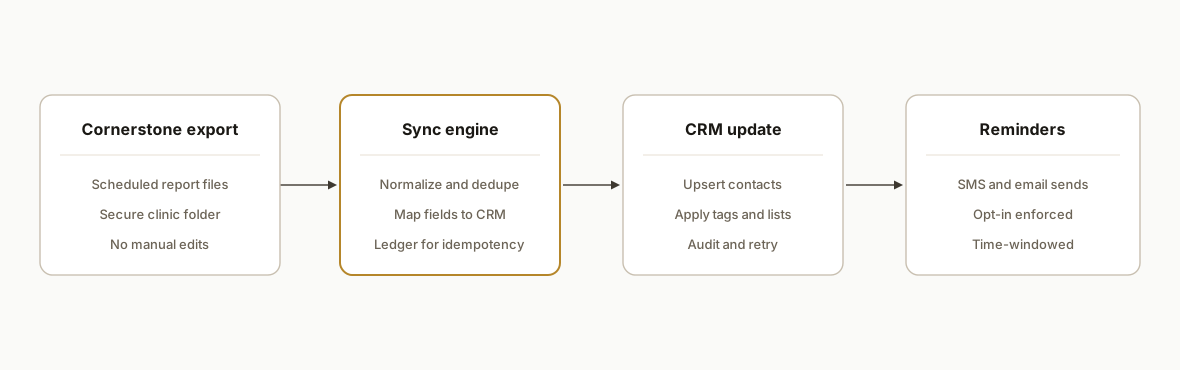
The bridge lives beside Cornerstone rather than inside it. Cornerstone continues to be the system of record. We schedule exports or use a vendor-supported data handoff, then a stateless sync service transforms and upserts records into your CRM and messaging tools. It runs safely on-prem or hybrid and leaves a ledger so re-runs do not double-message.
- Export capture: Cornerstone outputs scheduled reports to a secure folder on the clinic server or a shared location. We avoid editing these files manually. A tiny agent picks up new files and moves them to processing.
- Normalization and dedupe: A worker parses CSV or TSV, fixes encodings, standardizes phone and email formats, and drops rows that collide with the last known fingerprint.
- Field mapping to CRM: A declarative map turns Cornerstone column names into CRM fields and tags. The map lives in YAML so front-office changes do not require code.
- Messaging engine: CRM tags trigger SMS and email reminders with templates that include due items and location details. Opt-in and opt-out flags are enforced before any send.
- Ledger and retries: An append-only table stores fingerprints of rows we have processed and the destination IDs, so replays are safe and idempotent.
Step-by-step: how to build it
1) Capture Cornerstone exports safely
Set Cornerstone to drop a scheduled report to a secure folder that only the automation account can read. A lightweight watcher moves each file into an intake directory and records a checksum so the same file is never processed twice.
# windows task scheduler calls a script hourly
powershell -ExecutionPolicy Bypass -File .\run-sync.ps1

# run-sync.ps1
$src = "C:\\Cornerstone\\Exports"
$dst = "C:\\Sync\\intake"
Get-ChildItem $src -Filter *.csv | ForEach-Object {
  $hash = (Get-FileHash $_.FullName -Algorithm SHA256).Hash
  if (-not (Select-String -Path "C:\\Sync\\ledger.log" -Pattern $hash -Quiet)) {
    Copy-Item $_.FullName $dst
    Add-Content -Path "C:\\Sync\\ledger.log" -Value $hash
  }
}
Key detail: never let staff open and save the export in Excel before the sync. That can change encodings and date formats.
2) Normalize and dedupe the data
Use a small Node.js worker to parse the CSV with strict options, fix Windows-1252 characters, and normalize phone and email. We write a hash per logical record to a ledger table to prevent duplicates.
import fs from "fs";
import { parse } from "csv-parse/sync";
import axios from "axios";
import crypto from "crypto";

function fingerprint(row) {
  const key = `${row.ClientID}|${row.PetID}|${row.NextDue}|${row.Email?.toLowerCase()||""}|${row.Phone||""}`;
  return crypto.createHash("sha256").update(key).digest("hex");
}

export async function processFile(path) {
  const raw = fs.readFileSync(path);
  const text = raw.toString("utf8");
  const recs = parse(text, { columns: true, skip_empty_lines: true, bom: true });
  for (const r of recs) {
    r.Email = r.Email?.trim().toLowerCase();
    r.Phone = r.Phone?.replace(/[^0-9]/g, "");
    r._fp = fingerprint(r);
  }
  return recs;
}
Gotcha: exports from some Windows environments carry a BOM or smart quotes; parse with bom: true and normalize quotes before hashing.
3) Map fields to your CRM
Keep mapping out of code. A YAML file lists how each Cornerstone column maps to CRM fields and tags. The worker reads this map and constructs the payload. This makes it safe to rename a column in the report template later.
# mapping.yml
identify:
  - ClientID
  - PetID
fields:
  email: Email
  phone: Phone
  first_name: OwnerFirst
  last_name: OwnerLast
  pet_name: PetName
  location: Location
  next_due: NextDue
  vaccine_due: VaccineName
  last_visit: LastVisit
  opt_in_sms: SMSConsent
  opt_in_email: EmailConsent
  tags:
    - "recall-due"
    - "cs-location:${Location}"
Key detail: include explicit consent fields in the map so the send layer can enforce opt-in before messaging.
4) Upsert to CRM through a webhook
Avoid tight coupling. Most CRMs support a webhook or generic contact ingest. Post one clean payload per client and attach tags for routing and sequences. Handle non-200 responses with exponential backoff.
async function upsertToCRM(rec, map) {
  const payload = {
    email: rec[map.fields.email],
    phone: rec[map.fields.phone],
    first_name: rec[map.fields.first_name],
    last_name: rec[map.fields.last_name],
    custom: {
      pet_name: rec[map.fields.pet_name],
      location: rec[map.fields.location],
      next_due: rec[map.fields.next_due],
      vaccine_due: rec[map.fields.vaccine_due],
      last_visit: rec[map.fields.last_visit]
    },
    tags: map.fields.tags.map(t => t.replace("${Location}", rec[map.fields.location]))
  };
  await axios.post(process.env.CRM_WEBHOOK_URL, payload, { timeout: 15000 });
}
Gotcha: do not assume email is present. Identify the record with a compound key when possible and fall back to phone plus name.
5) Trigger reminders with opt-in and idempotency
Attach a reminder tag only once per due window. The ledger stores when each client last received a recall tag. The send engine checks SMS consent before any message and uses time windows per location.
-- simple ledger table
create table if not exists recall_ledger (
  fp text primary key,
  client_id text,
  pet_id text,
  sent_at timestamptz not null default now()
);
Key detail: keep an allowlist of send windows per clinic timezone to avoid messages at odd hours.
6) Monitor, alert, and reconcile
Expose a small dashboard: last 10 runs, processed counts, error counts, last CRM response, and a reconcile view that shows differences between the latest export and the CRM state. Alert when an expected export is missing.
A useful benchmark: pet ownership is widespread, which raises reminder volume. The American Pet Products Association reports 66 percent of U.S. households own a pet (APPA 2023, 2024: https://www.americanpetproducts.org/research). Higher volume makes idempotency and consent logic non-negotiable.
Where it gets complicated
- Gated or limited API surface: Treat Cornerstone as the source of truth and integrate at the export boundary. Rely on scheduled files or vendor-supported handoffs rather than assuming direct, real-time programmatic access.
- Column drift and encodings: Report templates change over time and Windows-1252 characters creep in. Parse with BOM handling, normalize quotes, and keep mappings in config so fixes do not require code changes.
- Compound identity: Many clients share names, and email is sometimes absent. Use a compound identity strategy (client ID plus pet ID plus location) to avoid accidental merges.
- Consent and messaging law: Distinguish transactional reminders from marketing. Enforce explicit opt-in flags before SMS and honor STOP replies. Keep timestamps for audit.
- On-prem realities: The export folder often lives on a clinic server. The watcher must tolerate network shares, scheduled reboots, and antivirus delays without duplicating sends.
What this actually changes
In production, clinics stopped juggling spreadsheets and one-off mail merges. Front desks worked from a live call list in the CRM, reminders fired on schedule with opt-in honored, and duplicate messages disappeared because the ledger prevented re-sends on re-imports. Clients replied more often on channels they prefer: Twilio's consumer survey found most consumers want to message with businesses for service updates and reminders (Twilio Messaging Consumer Report: https://www.twilio.com/en-us/resources/communications-trends).
The structural win is repeatability: once exports and mappings stabilize, new locations come online by adding a folder path and a mapping row. The same bridge supports recalls, post-visit follow-ups, estimates ready, and balance-due nudges without new plumbing.
Frequently asked questions
Does Cornerstone have an official API I can use directly?
Public access is limited or gated. Our production approach treats Cornerstone as the system of record and integrates at the export boundary or through vendor-supported handoffs. That keeps the clinic stable while still unlocking CRM and messaging automations.
Can this run in real time or only on a schedule?
It typically runs on a schedule, from hourly to daily. Near real time is possible if your IT team can provide a safe handoff mechanism. We design the sync as idempotent so running more frequently is safe and does not double-message clients.
What CRMs and messaging tools does this work with?
Any CRM or messaging platform that accepts a webhook or contact ingest works. We map Cornerstone fields to the destination's schema and let the downstream tool handle sequences and templates. The integration avoids tight coupling so vendors can change without a rebuild.
How do you prevent duplicates and wrong merges?
We compute a fingerprint per logical record and store it in a ledger table. The sync checks the ledger before upserting and before attaching reminder tags. Identity uses a compound key so two different Smith households do not merge by accident.
What does this cost monthly?
There is no per-message fee from us. You pay your normal CRM and SMS provider costs. Our part is a one-time build plus optional support. Ongoing costs are mostly your messaging vendor and light hosting for the sync.
Can a non-technical owner set this up?
We set it up end-to-end. After go-live, staff can adjust templates and timing in the CRM and we expose a small settings file for field mappings. No code edits are required for normal changes like adding a location or a new tag.
If you run Cornerstone and want your recalls, post-visit follow-ups, and call lists to manage themselves, we have shipped this pattern for vet clinics. See our related post on ezyVet API integration and recall automation, our broader CRM automation services, and if you want to map your exact setup to this pattern, book a 20-minute call.
Want us to build this for you?
Nine questions, about 90 seconds. You see the hours it is costing you, then pick a time. No pitch.
Get your free assessment