
ezyVet recall automation works by connecting ezyVet's OAuth 2.0 REST API and webhooks to a rules engine that segments clients due for care, then writes to your CRM and sends email or SMS follow-ups. In production it runs daily recalls and same-day post-visit messages without staff time. This guide is for veterinary clinics that want recalls and marketing follow-up their PMS does not handle.
Veterinary recall automation is: a real-time bridge from ezyVet data to compliant, deduped client outreach in your CRM and messaging tools.
The problem it solves
Most clinics export lists from ezyVet and hand-load them into a mailer. Someone checks due dates, removes recent visitors, labels bad numbers, and chases no-shows. That manual loop breaks under volume and it often double-sends when reports overlap.
| Task | Manual workflow | Automated with ezyVet API |
|---|---|---|
| Data source | CSV export from ezyVet, ad hoc | Webhooks for new events and scheduled reports as a backstop |
| Trigger timing | Weekly batch, delayed | Real time for eligible events, daily catch-up scan |
| Segmentation | Spreadsheet filters | Rules engine: care due windows, exclusions, clinic rules |
| Personalization | Hand-edited merge tags | On-brand templates with pet, service, location context |
| Compliance | List hygiene done by hand | Consent checks, opt-outs, quiet hours enforced |
| Duplicates | Common on overlapping lists | Idempotent keys per pet, service, date |
| Staff time | Hours per week | Near zero ongoing |
How the automation works
We built a thin integration layer that speaks ezyVet on one side and your CRM or messaging tools on the other. It listens to webhooks, ingests scheduled CSV reports as a fallback, applies clinic rules to decide who should hear from you and when, then writes contacts and tasks into your CRM and triggers messaging.
- ezyVet OAuth client: We obtain credentials and fetch short-lived access tokens using OAuth 2.0 Client Credentials. Tokens are cached server side and refreshed automatically.
- Event intake: We subscribe to ezyVet webhooks for events like appointment created to trigger same-day follow-up. When webhooks are not yet approved, we use scheduled reports by email as a backstop.
- Rules and dedupe: A rules engine computes recall eligibility windows, skips recent visits, and prevents duplicates with a deterministic key per pet, service, and due date.
- CRM and segments: Contacts are upserted into your CRM with tags like Recall: Canine DHPP due in 14d and Post-visit: Dental, then added to the right campaign or task queue.
- Delivery and audit: Email or SMS is sent via your provider. Every send is logged with consent snapshot, template version, and the dedupe key for traceability.
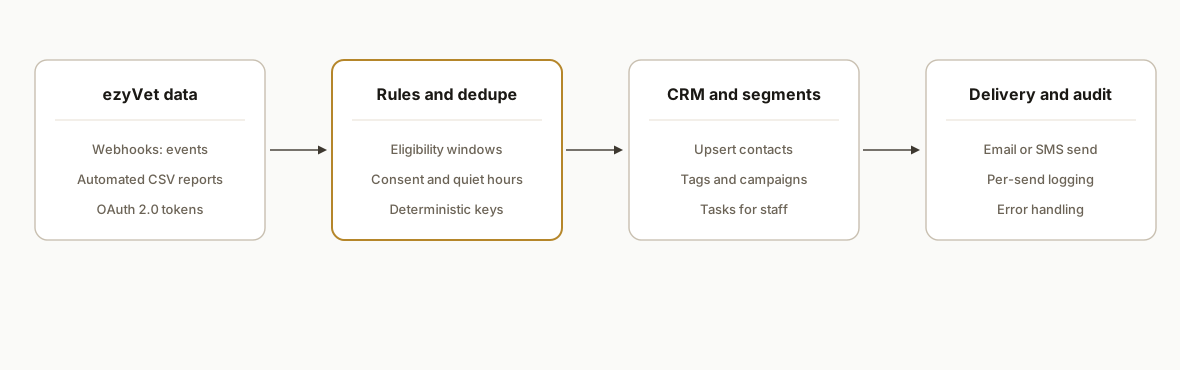
Step-by-step: how to build it
1) Create an OAuth client and fetch a token
You apply for partner access and obtain Client Credentials. Tokens are issued from ezyVet's OAuth endpoint and used as a Bearer token on API calls.
# 1) Fetch an access token (Client Credentials)
curl -s -X POST \
  https://api.ezyvet.com/v1/oauth/access_token \
  -H 'Content-Type: application/x-www-form-urlencoded' \
  -d 'grant_type=client_credentials' \
  -d 'client_id=YOUR_CLIENT_ID' \
  -d 'client_secret=YOUR_CLIENT_SECRET' \
  -d 'scope=read write'

# 2) Use the token on subsequent API requests
# Note: use documented ezyVet endpoints for your tenant and scope
curl -s -H "Authorization: Bearer YOUR_ACCESS_TOKEN" \
  https://api.ezyvet.com/your-endpoint
Key point: cache the token with its expires_in value and refresh proactively.
2) Stand up a secure webhook receiver
Webhooks let ezyVet push events to your URL. We verify the request, parse the payload, and enqueue work for your rules engine. If webhooks are not yet enabled, skip to step 3 and use scheduled reports.
// server/webhook.js
import express from "express";
import crypto from "crypto";

const app = express();
app.use(express.json({ limit: "1mb" }));

function verifySignature(req) {
  const sig = req.header("X-Signature") || ""; // confirm header name per your config
  const hmac = crypto
    .createHmac("sha256", process.env.WEBHOOK_SECRET)
    .update(JSON.stringify(req.body))
    .digest("hex");
  return crypto.timingSafeEqual(Buffer.from(sig), Buffer.from(hmac));
}

app.post("/webhooks/ezyvet", async (req, res) => {
  if (!verifySignature(req)) return res.status(401).end();
  const event = req.body; // appointment_created, client_updated, etc.
  await queue.enqueue({ type: event.type, payload: event });
  res.status(202).json({ ok: true });
});

app.listen(3000);
Gotcha: confirm the actual header and signing method configured for your webhook subscription and reject unsigned requests.
3) Backstop with scheduled CSV reports
ezyVet supports automated reports that send by email on a schedule. We ingest a due-care CSV into a staging table, then diff it against yesterday to prevent fan-out on unchanged lists.
# scripts/import_due_csv.py
import csv, sqlite3, sys
con = sqlite3.connect("data.db")
cur = con.cursor()
cur.execute("""
CREATE TABLE IF NOT EXISTS due_staging (
  run_id TEXT,
  client_id TEXT,
  patient_id TEXT,
  due_code TEXT,
  due_date TEXT
)
""")

with open(sys.argv[1], newline="") as f:
    for row in csv.DictReader(f):
        cur.execute(
          "INSERT INTO due_staging VALUES (?,?,?,?,?)",
          (sys.argv[2], row["ClientID"], row["PatientID"], row["DueCode"], row["DueDate"])
        )
con.commit()
Tip: keep a small changelog table to drive only new or changed recalls.
4) Encode clinic rules and dedupe
We compute eligibility and a deterministic dedupe key per pet, service, and date. This prevents double-sends when a webhook and a CSV cover the same patient.
-- rules.sql
CREATE TABLE IF NOT EXISTS outreach_queue (
  dedupe_key TEXT PRIMARY KEY,
  client_id TEXT,
  patient_id TEXT,
  reason TEXT,
  scheduled_for TEXT,
  channel TEXT,
  status TEXT DEFAULT 'pending'
);

-- Example: enqueue 14-day pre-due canine vaccine, skip recent visits
INSERT OR IGNORE INTO outreach_queue
SELECT
  printf('%s:%s:%s', s.patient_id, s.due_code, s.due_date) AS dedupe_key,
  s.client_id,
  s.patient_id,
  'Recall ' || s.due_code AS reason,
  date(s.due_date, '-14 days') AS scheduled_for,
  'email' AS channel,
  'pending'
FROM due_staging s
LEFT JOIN recent_visits v
  ON v.patient_id = s.patient_id AND v.visit_date >= date('now','-7 days')
WHERE v.patient_id IS NULL;
Guardrail: store consent at evaluation time and enforce quiet hours before enqueue.
5) Upsert into your CRM and add to the right campaign
We map pet and owner fields and tag the record for the correct campaign. Use your CRM's API to upsert contacts and add them to lists or sequences.
// lib/crm.js
import fetch from "node-fetch";

export async function upsertContact(contact) {
  const r = await fetch(process.env.CRM_URL + "/contacts", {
    method: "PUT",
    headers: { "Content-Type": "application/json", Authorization: `Bearer ${process.env.CRM_TOKEN}` },
    body: JSON.stringify(contact)
  });
  if (!r.ok) throw new Error(`CRM upsert failed: ${r.status}`);
}

export async function addToCampaign(contactId, campaignKey) {
  const r = await fetch(`${process.env.CRM_URL}/campaigns/${campaignKey}/members`, {
    method: "POST",
    headers: { "Content-Type": "application/json", Authorization: `Bearer ${process.env.CRM_TOKEN}` },
    body: JSON.stringify({ contactId })
  });
  if (!r.ok) throw new Error(`Campaign add failed: ${r.status}`);
}
Note: if your CRM lacks a native ezyVet app, use HTTP APIs with service credentials.
6) Send the message and write the audit log
We render on-brand templates and send via your email or SMS provider, then record the outcome and template version.
// workers/send.js
import { render } from "./templates.js";
import { sendEmail } from "./mailer.js";
import db from "./db.js";

export async function processJob(job) {
  const html = render(job.reason, job.client_id, job.patient_id);
  const res = await sendEmail({ to: job.to, subject: job.subject, html });
  await db.run(
    `INSERT INTO audit (dedupe_key, sent_at, provider_id, template) VALUES (?,?,?,?)`,
    [job.dedupe_key, new Date().toISOString(), res.id, job.template]
  );
}
Keep the audit immutable. It is your source of truth when a client asks why they received a message.
Where it gets complicated
- API access is gated: You must apply or be approved to obtain credentials. The end clinic typically creates an integration and grants permissions. Plan this into timelines.
- Version churn exists: ezyVet maintains multiple versions and publishes deprecation notices. Build a swappable client and pin your calls per tenant to avoid surprise breaks.
- Rate limiting is real: Throttling exists but numeric limits are not exposed publicly. Implement backoff and retries and prefer event-driven intake over high-frequency polling.
- Consent and quiet hours: Store consent states and enforce local time windows. SMS rules vary by carrier. Email should honor unsubscribes immediately.
- CSV shapes drift: Report columns can change when clinic admins edit a saved report. Use header-name mapping and reject files that fail schema checks.
- Dedup across channels: A client can be reachable by both email and SMS. Use a single dedupe key and a channel-priority policy so you do not double-contact.
What this actually changes
We shipped this pattern for a small-animal clinic that wanted reliable vaccine and dental recalls plus same-day post-visit check-ins. After go-live, staff stopped exporting lists, front-desk calls focused on edge cases, and duplicate messages disappeared because every outreach ran behind a dedupe key and consent snapshot. The value was structural: real time when webhooks fire and daily safety scans when they do not.
If email is your primary channel, one useful benchmark: according to Mailchimp's 2024 industry benchmarks, Healthcare Services saw a median open rate of about 41 percent. Source: https://mailchimp.com/resources/email-marketing-benchmarks/
Frequently asked questions
Does ezyVet have an official API?
Yes. ezyVet exposes a REST API that uses OAuth 2.0 Client Credentials. The production base is https://api.ezyvet.com and the token endpoint is https://api.ezyvet.com/v1/oauth/access_token. Trial environments use https://api.trial.ezyvet.com.
Can I connect ezyVet to Zapier or Make directly?
There is no official app listed in the Zapier or Make catalogs as of July 7, 2026. You can still use their HTTP modules once you have ezyVet API access. That pattern is reliable for clinics that prefer low-code orchestration with vetted credentials.
Can this run in real time or only on a schedule?
Both. Webhooks let ezyVet push events like appointment created to your URL for same-day follow-ups. Scheduled automated reports by email provide a daily backstop. We use both so the system is resilient if either path fails.
How do you prevent duplicate or conflicting messages?
We compute a deterministic dedupe key per pet, service, and due date and store it in an outreach queue with a unique constraint. The sender picks a single channel per key based on consent and preferences, so email and SMS do not both fire.
What does this cost monthly?
The integration layer is light: a small database, a serverless or container service, and your CRM or messaging provider. The primary cost is the initial build and partner approval. Ongoing costs are usually limited to hosting and your existing email or SMS plan.
Can a non-technical clinic owner set this up?
You can manage templates and schedules, but the initial setup requires developer time: partner approval, OAuth flows, webhook security, and CRM field mapping. After go-live, the front desk runs it by adjusting templates and campaigns.
If you want recalls and follow-ups running without list exports, we have built this exact bridge and run it in production. See our broader view of CRM automation and how we bridge closed platforms like iClassPro in our related post on Automating iClassPro to GoHighLevel. When you are ready, book a 15-minute call.
Want us to build this for you?
Nine questions, about 90 seconds. You see the hours it is costing you, then pick a time. No pitch.
Get your free assessment