
Fathom to Google Docs SOW automation listens for a finished call, pulls the transcript and key moments, then passes it through an AI templating engine that fills a Google Docs Statement of Work with scope, assumptions, timeline, pricing placeholders, and next steps. We built this for our own sales ops and for a consulting firm: 30, 45 minute proposal drafts dropped to about 5, 7 minutes end to end. This guide shows the exact architecture, code patterns, and the gotchas we hit shipping it to production.
SOW automation is the conversion of raw discovery notes or transcripts into a formal, versioned Statement of Work document with deterministic sections and tracked assumptions.
The problem it solves
Manually turning a discovery call into a proposal is slow. Someone replays timestamps, retypes requirements, translates them into scope, and finds a past SOW as a starting point. Then formatting. Then share permissions. It is the same chore after every call.
| Step | Manual workflow | Automated workflow |
|---|---|---|
| Capture | Rewatch segments, copy quotes | Transcript ingested automatically after call |
| Structure | Start from an old SOW, delete sections | Deterministic template: Scope, Out of Scope, Assumptions, Deliverables, Timeline, Milestones, Acceptance Criteria, Pricing placeholders, Next Steps |
| Drafting | Free-write from memory, easy to miss details | AI summarizes from transcript with quote-backed bullets, no invented scope |
| Formatting | Fix headings, tables, page breaks | Pre-styled Google Doc created in the right folder with title, headers, and tables |
| Share | Manually set access, paste link into CRM | Auto-share with the selling team and log URL to the deal record or a Sheet |
Sales reps spend a minority of their week actually selling. Salesforce's State of Sales reports have found reps spend roughly 28 percent of their time selling, with the rest on admin and preparation (Salesforce, State of Sales, 5th Ed: https://www.salesforce.com/resources/research-reports/state-of-sales/). Moving proposal drafting off the critical path is one of the highest leverage admin reductions we have shipped.
How the automation works
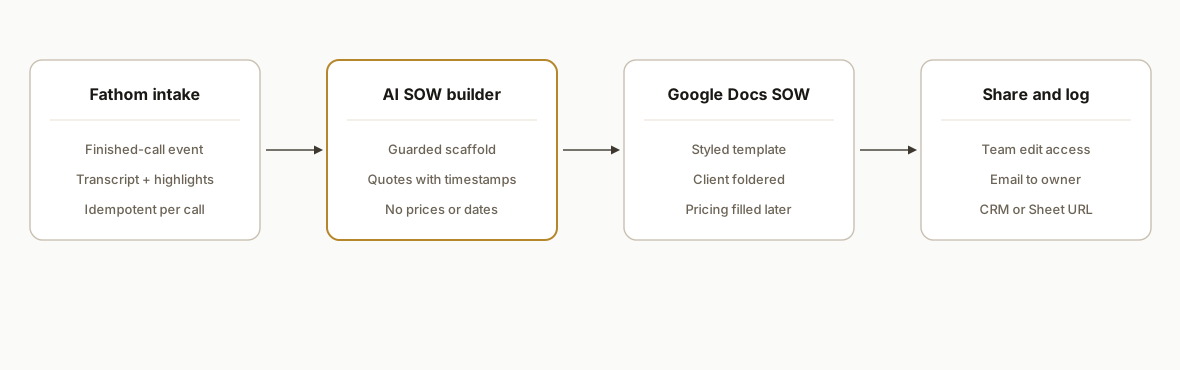
The system waits for a completed Fathom call, pulls the transcript and highlights, normalizes the text, then runs an AI pass that only fills a fixed SOW scaffold. We keep pricing math and dates deterministic and off-LLM. Finally it creates a Google Doc in a client-specific folder, shares it to the seller, and writes a log row with the doc URL and version.
- Intake listener: Receives a payload when a call is done or reads a scheduled export. Stores a normalized transcript with speaker labels and timestamps. We keep an idempotency key per call so retries do not double-create docs.
- Normalizer: Cleans filler words, merges rapid interruptions, and segments by topic. We carry forward exact quotes with timestamps so scope bullets can cite the call.
- AI SOW builder (guarded): Fills only allowed sections in a locked scaffold. Prompts forbid new promises and require quoting any client requirement. We use sentinel tags so we can parse and validate section completeness before writing.
- Doc generator: Creates a Google Doc from a style template. Inserts headings, tables, and acceptance criteria. Writes footer with call date and a back-link to the recording.
- Share and log: Gives edit to the seller group, comment to internal reviewers, and writes the doc URL to a CRM field or Google Sheet with deal metadata.
Step-by-step: how to build it
1) Capture the finished call and store a normalized transcript
We used a small Google Apps Script web app as our intake. It accepts a JSON payload with an external call identifier, transcript segments, and metadata, then stores a normalized record and a log row. If your stack prefers Node, the same shape applies.
// Code: Google Apps Script (Web App)
function doPost(e) {
  const body = JSON.parse(e.postData.contents);
  const callId = body.external_id; // stable per-call id from your source system
  const sheet = SpreadsheetApp.openById(PropertiesService.getScriptProperties().getProperty('LOG_SHEET_ID')).getSheetByName('Calls');

  // Idempotency: skip if we already processed this call
  const existing = sheet.createTextFinder(callId).matchEntireCell(true).findNext();
  if (existing) return ContentService.createTextOutput(JSON.stringify({ status: 'duplicate' })).setMimeType(ContentService.MimeType.JSON);

  const normalized = normalizeTranscript(body.transcript || []);
  const cacheId = 'tx-' + callId;
  CacheService.getScriptCache().put(cacheId, JSON.stringify(normalized), 21600); // 6 hours

  sheet.appendRow([new Date(), callId, body.title || '', body.meeting_url || '', cacheId, 'RECEIVED']);
  return ContentService.createTextOutput(JSON.stringify({ status: 'ok', callId })).setMimeType(ContentService.MimeType.JSON);
}

function normalizeTranscript(segments) {
  // segments: [{ speaker: 'Client', text: '...', start: 123.4 }, ...]
  const merged = [];
  for (const seg of segments) {
    const text = seg.text.replace(/\b(um|uh|you know|like)\b/gi, '').replace(/\s{2,}/g, ' ').trim();
    const last = merged[merged.length - 1];
    if (last && last.speaker === seg.speaker && Math.abs(seg.start - last.end) < 2) {
      last.text += ' ' + text;
      last.end = seg.end || seg.start;
    } else {
      merged.push({ speaker: seg.speaker, text, start: seg.start || 0, end: seg.end || seg.start || 0 });
    }
  }
  return merged.filter(s => s.text.length > 0);
}
Key gotcha: treat retries as normal. A missed 200 will result in a resend. The idempotency check prevents duplicated docs.
2) Build a strict SOW scaffold and prompts that forbid invention
We keep the SOW structure deterministic and ask the model to only write inside those guardrails. The prompts require quoting the call whenever a client requirement is stated.
// Code: Google Apps Script, AI call (OpenAI shown; any model works)
function draftSOW(callId) {
  const cacheId = 'tx-' + callId;
  const tx = JSON.parse(CacheService.getScriptCache().get(cacheId) || '[]');
  const scaffold = [
    'Title', 'Summary', 'Scope', 'Out of Scope', 'Assumptions', 'Deliverables',
    'Timeline', 'Milestones', 'Acceptance Criteria', 'Pricing Placeholders', 'Risks', 'Next Steps'
  ];
  const sys = 'You convert discovery-call transcripts into SOW text. Never invent features, dates, or prices. When you state a client requirement, include a short quote with timestamp in parentheses.';
  const user = JSON.stringify({ transcript: tx, sections: scaffold });

  const apiKey = PropertiesService.getScriptProperties().getProperty('OPENAI_KEY');
  const resp = UrlFetchApp.fetch('https://api.openai.com/v1/chat/completions', {
    method: 'post',
    contentType: 'application/json',
    headers: { Authorization: 'Bearer ' + apiKey },
    payload: JSON.stringify({
      model: 'gpt-4o-mini',
      messages: [
        { role: 'system', content: sys },
        { role: 'user', content: 'Return JSON with keys exactly ' + JSON.stringify(scaffold) + ' and values as markdown paragraphs and lists. Input: ' + user }
      ],
      temperature: 0.2
    })
  });
  const out = JSON.parse(resp.getContentText());
  const content = out.choices[0].message.content || '{}';
  const parsed = JSON.parse(content);
  // Minimal validation
  scaffold.forEach(k => { if (!(k in parsed)) parsed[k] = ''; });
  return parsed;
}
What tripped us up was letting the model write dates or prices. Keep those as placeholders. We fill them deterministically later.
3) Create a styled Google Doc and inject the sections
We generate the SOW as a new Doc with consistent styles and a naming convention: Client, Opportunity, SOW, YYYY-MM-DD.
// Code: Google Apps Script, Google Docs generation
function createSOWDoc(meta, sow) {
  const folderId = PropertiesService.getScriptProperties().getProperty('SOW_FOLDER_ID');
  const folder = DriveApp.getFolderById(folderId);
  const title = `${meta.client}, ${meta.opportunity}, SOW, ${Utilities.formatDate(new Date(), Session.getScriptTimeZone(), 'yyyy-MM-dd')}`;
  const doc = DocumentApp.create(title);
  folder.addFile(DriveApp.getFileById(doc.getId()));
  DriveApp.getRootFolder().removeFile(DriveApp.getFileById(doc.getId())); // keep only in folder

  const body = doc.getBody();
  body.clear();
  function h(txt) { body.appendParagraph(txt).setHeading(DocumentApp.ParagraphHeading.HEADING1); }
  function p(txt) { body.appendParagraph(txt).setHeading(DocumentApp.ParagraphHeading.NORMAL); }

  h('Summary'); p(sow['Summary']);
  h('Scope'); p(sow['Scope']);
  h('Out of Scope'); p(sow['Out of Scope']);
  h('Assumptions'); p(sow['Assumptions']);
  h('Deliverables'); p(sow['Deliverables']);
  h('Timeline'); p(sow['Timeline']);
  h('Milestones'); p(sow['Milestones']);
  h('Acceptance Criteria'); p(sow['Acceptance Criteria']);
  h('Pricing'); p('TBD per pricing matrix. Do not send until filled.');
  h('Risks'); p(sow['Risks']);
  h('Next Steps'); p(sow['Next Steps']);

  body.appendHorizontalRule();
  p(`Source: ${meta.meeting_url || 'link-on-file'}  |  Call date: ${meta.call_date}`);
  doc.saveAndClose();
  return doc.getId();
}
The key is to populate only the approved sections and to keep a clear "TBD" tag where a human must review.
4) Fill pricing and dates from a deterministic matrix
We keep a simple Config sheet that maps packages to price ranges and typical timelines. The Doc is updated after a human selects the package.
// Code: Google Apps Script, deterministic pricing fill
function fillPricing(docId, pkgKey) {
  const ss = SpreadsheetApp.openById(PropertiesService.getScriptProperties().getProperty('CONFIG_SHEET_ID'));
  const cfg = ss.getSheetByName('Pricing').getDataRange().getValues().slice(1);
  const row = cfg.find(r => r[0] === pkgKey);
  if (!row) throw new Error('Unknown package');
  const [_, label, price, timeline] = row;

  const doc = DocumentApp.openById(docId);
  const body = doc.getBody();
  const text = `Package: ${label}\nPrice: ${price}\nEstimated Timeline: ${timeline}`;
  body.appendParagraph(text).setHeading(DocumentApp.ParagraphHeading.HEADING2);
  doc.saveAndClose();
}
This avoids model-made prices and keeps finance rules centralized.
5) Share the SOW and log it to your deal system or sheet
We share to the seller group and write a log entry with the URL, status, and who owns next action.
// Code: Google Apps Script, share + log
function shareAndLog(docId, meta) {
  const file = DriveApp.getFileById(docId);
  const sellerGroup = PropertiesService.getScriptProperties().getProperty('SELLER_GROUP_EMAIL');
  file.addEditor(sellerGroup);

  const url = `https://docs.google.com/document/d/${docId}/edit`;
  const sheet = SpreadsheetApp.openById(PropertiesService.getScriptProperties().getProperty('LOG_SHEET_ID')).getSheetByName('Docs');
  sheet.appendRow([new Date(), meta.external_id, meta.client, meta.opportunity, url, 'DRAFTED']);

  GmailApp.sendEmail(meta.owner_email, `Draft SOW ready: ${meta.client}`, `Link: ${url}\n\nReview pricing section before sending.`);
  return url;
}
We have also pushed the URL into a CRM custom field when available. The pattern is the same: one idempotent write keyed by the call id or opportunity id.
6) Schedule it: run on finished calls, not just on a cron
We run on call-finished events to keep speed. If you cannot listen for events, a 15 minute poll for recent transcripts works, but event-driven is materially faster.
Harvard Business Review found companies that respond to leads within 5 minutes are about 10 times more likely to make contact than those that respond after 30 minutes (HBR: https://hbr.org/2011/03/the-short-life-of-online-sales-leads). Proposals are part of the same speed equation, so we bias for immediate drafts after the call ends.
Where it gets complicated
- Speaker diarization and overlaps: Real conversations have cross-talk. We merged short adjacent segments by speaker and tolerated small timestamp gaps to avoid broken bullets.
- No invented scope, ever: The fastest way to lose trust is an invented promise. We forced quotes with timestamps for any client requirement, kept pricing off-LLM, and validated section keys before write.
- Template discipline: Sellers love to free-type. We locked the skeleton and only exposed safe edit areas. It kept everything consistent across proposals and saved later legal review time.
- Foldering and permissions: Docs belong in the right client folder with predictable names. We removed files from Drive root and added explicit editor groups to avoid private drafts stuck in one inbox.
- Idempotency and retries: Completed-call events can retry. We keyed everything to a stable call id and skipped duplicates. This prevented two SOWs with the same title.
- Edge audio and accents: Some terms mis-transcribe. We kept a glossary and a post-pass to correct brand and product words before prompting.
What this actually changes
For our own sales ops and a consulting firm running multi-scope projects, this automation cut proposal drafting from 30, 45 minutes down to roughly 5, 7 minutes while improving consistency. The value is structural: call happens, SOW draft exists within minutes, the seller only fills pricing and edits two sections.
This also moves time back to selling. Salesforce's State of Sales has long reported that only about 28 percent of rep time is spent selling (https://www.salesforce.com/resources/research-reports/state-of-sales/). Shifting proposal drafting to a generated draft materially raises the available selling time without adding headcount.
Frequently asked questions
Does Fathom have an API for this?
Fathom exposes multiple ways to get transcripts and key moments. In our builds we either listen for a completed-call event or read a scheduled export, then normalize locally. If your plan or tenant restrictions block events, a short poll-plus-export bridge works the same.
What plan do I need to run this?
You need access to finished-call transcripts and recording links. If your plan does not allow event delivery, you can still batch-export and run the same pipeline on a timer. The Google Docs and Apps Script pieces work regardless of your conferencing vendor.
How do you prevent AI hallucinations in the SOW?
We never let the model invent scope or price. The scaffold is fixed, we require short quotes with timestamps for any client requirement, and we keep pricing and dates as deterministic fill-ins from a Config sheet. Any missing section fails validation and is surfaced for human review.
Can this run in real time during the call?
We trigger on call completion so the transcript is stable. In practice the SOW draft appears within a few minutes of hang-up. If you must draft mid-call, you can run a rolling pre-draft, but we have found post-call accuracy wins.
What does this cost to run monthly?
Google Apps Script and Google Docs are effectively zero-cost within generous limits. The AI step is usage-based and typically small for a few SOWs per day. The primary cost is the one-time build and the occasional template tweak.
Can a non-technical owner set this up?
The initial build is engineering work: intake listener, idempotency, AI guardrails, and Doc generation. After that, operations live in a Sheet: pricing matrix, folder IDs, and template text. Sellers only choose a package and hit send.
If you want a production SOW generator tied to your discovery calls, we have already shipped this pattern. See our broader custom AI integration capability, our adjacent post on automate-fathom-meeting-notes, and when you are ready to scope yours, book a 20-minute call.
Want us to build this for you?
Nine questions, about 90 seconds. You see the hours it is costing you, then pick a time. No pitch.
Get your free assessment