
An AI phone agent for Follow Up Boss listens for new or reactivated leads, calls them, offers times, books directly to your calendar, writes the result back to FUB, and keeps routing and ownership correct when a lead reschedules or no-shows. This is for teams that want booking outcomes, not just call attempts. Below is how we architect it with the real FUB integration surface.
AI calling for Follow Up Boss is: an event-driven workflow that uses FUB webhooks and API to upsert people and log outcomes, an AI voice engine to converse and confirm appointments, and a calendar layer that creates, updates, and cancels bookings while keeping owner-based routing intact.
The problem it solves
You want more booked appointments from Follow Up Boss without manual dialing or calendar ping-pong. A single build should call quickly, hold a real conversation, book on your calendar, attribute the appointment to the correct agent or owner, and recover gracefully from reschedules and no-shows.
| Manual workflow | Automated with FUB + AI calling |
|---|---|
| Agents sift new leads, click-to-call, leave voicemails, then DM for times. | Webhook triggers the AI call within minutes of lead creation. |
| Back-and-forth to find a time, double-booking risk. | The agent offers live availability and confirms a slot. |
| Calendar invites get misattributed, owner gets lost on reschedule. | Appointment is created with owner context and survives reschedules. |
| Notes and outcomes entered late or inconsistently. | Outcomes and notes post to FUB immediately via API and automations. |
Speed still matters. Firms that attempted contact within one hour were nearly seven times more likely to qualify a lead than those who waited longer, according to Harvard Business Review. Source: https://hbr.org/2011/03/the-short-life-of-online-sales-leads
How the automation works
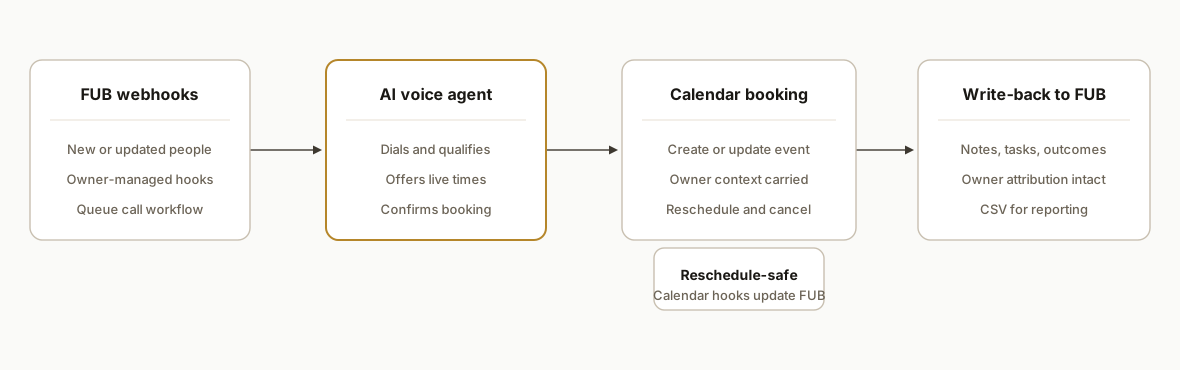
At a high level: Follow Up Boss webhooks fire on new or updated people. A router decides whether to call, an AI voice agent places the call and books using your calendar layer, and the system writes results back to FUB with owner attribution and safe retries. CSV exports and scheduled snapshots support reporting where call assets are not API-exportable.
- Follow Up Boss webhooks: FUB posts JSON events to your endpoint when a person is created or updated. Only the account owner can manage webhooks, so plan deployment access accordingly.
- Lead upsert and routing: The service checks for existing people and assignment, then sets or preserves owner. If newly created, queue brief retries because new people can be briefly inaccessible from other endpoints right after creation.
- AI voice engine: The agent dials, qualifies, proposes times, and captures booking intent. You can run booking via a calendar API or a scheduler link that encodes agent ownership.
- Calendar layer: Creates calendar events, updates or cancels on reschedule or no-show, and emits its own webhooks back to the service to keep FUB in sync.
- Write-back to FUB: Use the public API at https://api.followupboss.com/v1 with HTTP Basic API key or OAuth 2.0 Bearer to post notes, events, or tasks tied to the person so agents see outcomes.
- Reporting and exports: FUB exports support contacts and reports to CSV, but not emails or call recordings. Use CSV plus your own call store for QA and analytics.
Step-by-step: how to build it
1) Subscribe to Follow Up Boss webhooks
Create a secure HTTPS endpoint that accepts FUB webhook JSON and authenticates requests at the edge. The account owner manages webhooks in FUB. Webhooks are the real-time trigger for AI calling and booking.
// server/webhooks/fub.js
import express from "express";
const app = express();
app.use(express.json());

app.post("/webhooks/fub", async (req, res) => {
  // Minimal validation: require expected headers and JSON body
  const eventType = req.headers["x-fub-event"] || "unknown";
  const payload = req.body || {};

  // Queue work: new or updated person triggers call flow
  if (eventType.includes("person")) {
    await queue.enqueue("fub.person.changed", { personId: payload?.id || null });
  }

  res.status(202).json({ ok: true });
});

export default app;
Gotcha: only owners can create or update FUB webhooks. Coordinate deployments so an owner authorizes them.
2) Upsert the person and preserve owner attribution
Use the FUB API to fetch or create a person and to set initial context. Authentication supports API Key via HTTP Basic or OAuth 2.0 Bearer. New people created via API can be briefly inaccessible from other endpoints, so include retries.
# Example: create or update a person using API Key via HTTP Basic
curl -u "${FUB_API_KEY}:" \
  -H "Content-Type: application/json" \
  -X POST \
  https://api.followupboss.com/v1/people \
  -d '{
    "firstName": "Alex",
    "lastName": "Buyer",
    "emails": [{"value": "alex@example.com"}],
    "phones": [{"value": "+15551234567"}],
    "tags": ["ai-calling"],
    "assignedTo": "owner-or-agent-id"
  }'
Tip: before creating, search by normalized email and E.164 phone to prevent duplicates. If you just created the person, wait and retry reads to avoid the short-lived accessibility gap.
3) Orchestrate the AI call with a booking fallback
Drive the agent with a simple state machine: attempt voice, offer times, confirm, then fall back to a scheduler link if needed. Keep the selected slot in transient state until the calendar confirms.
// pseudo-state for a single lead attempt
export type CallState =
  | { step: "dialing" }
  | { step: "qualifying", answers: Record<string,string> }
  | { step: "offerTimes", slots: string[] }
  | { step: "confirming", picked: string }
  | { step: "booked", eventId: string }
  | { step: "fallback-link", url: string };

async function onUserPicks(slotIso: string) {
  state = { step: "confirming", picked: slotIso };
  const evt = await calendar.createEvent({ slotIso, title: "Consult: Alex Buyer" });
  state = { step: "booked", eventId: evt.id };
}
Design for failure: if the call ends before confirmation, text or email a scheduler link that includes owner context to keep routing intact.
4) Create calendar events and ICS reliably
You can book via a calendar API or generate an ICS invite. ICS is simple and portable. Use a deterministic UID and include owner metadata in the description for reconciliation.
// lib/ics.js
import { createEvent } from "ics";

export async function makeInvite({ title, startIso, durationMins, attendee }) {
  const start = new Date(startIso);
  const event = {
    uid: `fub-${attendee.email}-${start.getTime()}@yourdomain.com`,
    start: [start.getFullYear(), start.getMonth() + 1, start.getDate(), start.getHours(), start.getMinutes()],
    duration: { minutes: durationMins },
    title,
    description: "Owner: {{ownerId}}. Booked via AI call.",
    attendees: [{ name: attendee.name, email: attendee.email, rsvp: true }],
    method: "REQUEST"
  };
  return new Promise((resolve, reject) =>
    createEvent(event, (err, value) => (err ? reject(err) : resolve(value)))
  );
}
On reschedule or cancel, emit calendar webhooks back to your service so you can update FUB immediately.
5) Write outcomes back to Follow Up Boss
Post a structured note or event so agents see what happened without leaving FUB. If you also create tasks for handoffs, use the official Zapier or Make apps to apply action plans or tasks when an appointment is booked.
# Example: log an outcome note on the person
curl -u "${FUB_API_KEY}:" \
  -H "Content-Type: application/json" \
  -X POST \
  https://api.followupboss.com/v1/events \
  -d '{
    "type": "Note",
    "source": "AI Calling",
    "description": "Booked consult for 2026-10-02 10:30. Owner: 12345.",
    "personId": "{{PERSON_ID}}"
  }'
Note: some call data is not available via API and remains visible only in the app. Keep your own call QA store for recordings and transcriptions.
6) Make it reschedule and no-show safe
Calendar webhooks should drive updates to FUB. When a reschedule arrives, update the event and add a new note. When a no-show is detected, create a follow-up task and optionally re-queue the AI call.
// server/webhooks/calendar.js
app.post("/webhooks/calendar", async (req, res) => {
  const { type, eventId, when, personId } = req.body;
  if (type === "rescheduled") {
    await fub.postEvent({
      personId,
      type: "Note",
      source: "AI Calling",
      description: `Rescheduled to ${when}`
    });
  }
  if (type === "no_show") {
    await tasks.create({ personId, title: "No-show: call to rebook" });
  }
  res.sendStatus(204);
});
Pair this with FUB automations through Zapier or Make: apply an Action Plan on booked, another on no-show. Both platforms have verified Follow Up Boss apps.
Where it gets complicated
Owner-only webhook management. Only the FUB account owner can create or change webhooks. Bake this into your deployment checklist and CI.
New people brief inaccessibility. People created via API can be briefly inaccessible from other endpoints. Use a retry with backoff before making dependent calls.
Partial call data via API. Some call artifacts are visible only inside FUB. Plan an external QA store for recordings and transcriptions, and do not rely on exports for those assets.
Exports are bounded. CSV contact exports include selected columns and a recent slice of calls, texts, and notes per contact. Emails and call recordings do not export. Design reporting that combines FUB CSV with your own call data.
Unknown hard rate limits. Limits exist and are queryable, but specific values vary. Do not hard-code assumptions. Implement backoff and idempotency on all write paths.
What this actually changes
Real estate teams get faster speed-to-lead, more consistent bookings, and reliable attribution. The structural win is that the calendar is the source of truth and FUB remains the operational system of record: every appointment has an owner, every reschedule updates the CRM, and no-show recovery is automatic. The Harvard Business Review finding on contact speed makes the economic case clear: faster first contact correlates with much higher qualification odds. Source: https://hbr.org/2011/03/the-short-life-of-online-sales-leads
Frequently asked questions
Does Follow Up Boss have an API for this?
Yes. Follow Up Boss exposes a documented v1 API at https://api.followupboss.com/v1 with API Key via HTTP Basic and OAuth 2.0 Bearer authentication. You also get webhooks to drive real-time automations.
How do I automate Follow Up Boss without writing code?
Use the official Zapier or Make apps. Both provide triggers and actions like Create Contact, Apply Action Plan, and Create Task. Pair those with your AI caller and calendar to apply plans on booked or no-show events.
Can this replace the Follow Up Boss dialer?
It is a different tool. The FUB dialer is a power-dialing workflow for humans. An AI phone agent automates the conversation and booking. Many teams keep the dialer for reps and add the AI agent for instant response and after-hours coverage.
Will it book on the right agent's calendar?
Yes, if you carry owner context through. Read or set the person's owner in FUB, then book on the linked calendar or include the owner in the scheduler link. On reschedule, update both the calendar and FUB so attribution stays correct.
Can this sync in real time?
Yes. Use FUB webhooks to trigger calls and write-backs, and use your calendar webhooks to push reschedules and cancellations back to FUB. Remember: only the account owner can manage FUB webhooks.
How do you prevent duplicate contacts?
Normalize and check by email and E.164 phone before creating a person. If you create first and then enrich, add a retry on reads because brand-new people can be briefly inaccessible from other endpoints.
If you want an AI caller that books to your calendar and keeps Follow Up Boss clean and attributed, we scope the first workflow on a short call. See our AI voice agents service at /services#ai-voice-agents, read the related guide /blog/follow-up-boss-ai-calling-compliance-guide, and when you are ready to evaluate your stack, /book.
Want us to build this for you?
Nine questions, about 90 seconds. You see the hours it is costing you, then pick a time. No pitch.
Get your free assessment