
We built and shipped a Gravity Forms to Google Sheets integration that maps into an existing sheet without touching your header row, prevents duplicate rows, and keeps edits in sync. It suits WordPress sites that need clean, live Sheets data for ops, reporting, and downstream tools like Gmail, ActiveCampaign, or Google Docs.
Form-to-Sheets automation is: Gravity Forms submissions flowing to a Google Sheet where columns match your form fields, with a stable unique key to upsert rows on new entries or edits.
The problem it solves
Gravity Forms offers exports and add-ons, but mapping to an existing Google Sheet usually breaks when headers drift, duplicates appear, or checkbox arrays write unpredictably. Teams fall back to CSV exports and copy paste, then lose audit trails and create conflicting rows when submissions are edited later.
| Task | Manual spreadsheet work | Automated Gravity Forms to Sheets |
|---|---|---|
| Mapping columns | Paste and hope headers align after new questions | Fixed mapping to an existing header row, safe to add new fields later |
| Duplicates | Easy to paste the same CSV twice | Lookup row by a unique key, update in place, or create if not found |
| Edits | Hard to trace what changed and where | Entry edits trigger an Update Row so history stays consistent |
| Checkbox fields | Arrays land oddly in a single cell | Deterministic join to consistent text values per cell |
| Sidecar actions | Manually notify sales or add to CRM | Gmail notify, ActiveCampaign add, Google Docs generation in the same run |
How the automation works
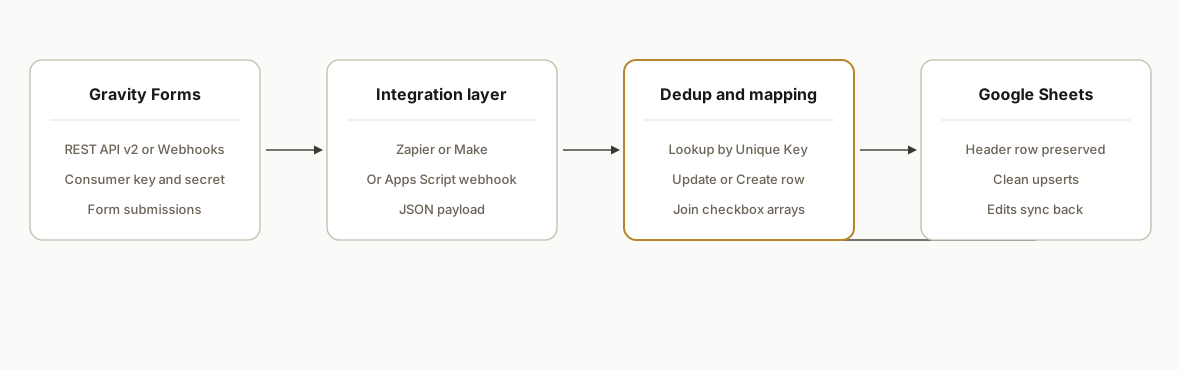
We run one of three patterns depending on license and team preference: Zapier with the official Gravity Forms Add-On, Make.com with the native Gravity Forms app, or a lightweight webhook receiver in Apps Script. All three share the same core: a stable unique key, header-safe mapping, and an upsert step that updates instead of creating duplicates.
- Gravity Forms as the source: Either enable the REST API v2 and authenticate with a consumer key and secret, or use the official Webhooks Add-On to POST submissions. Both are supported. (docs: REST API v2 and Webhooks Add-On)
- Integration engine: Zapier uses the Gravity Forms Add-On and Google Sheets actions. Make.com connects with the Gravity Forms app and includes a Make an API call module. Both handle find-or-create patterns cleanly.
- Dedup and mapping layer: We choose a stable unique key per submission. In Zapier that is Lookup Spreadsheet Row then Update Spreadsheet Row. In Make, Search Rows then Update Row, else Add Row. Checkbox arrays are normalized to a joined string.
- Google Sheets as the sink: A header row is required for mapping. Adding columns later does not break upstream as long as names are preserved and the first row remains the header.
- Optional sidecars: Gmail notifications, ActiveCampaign subscribe, Google Docs merge, or Slack alerts run from the same trigger.
Step-by-step: how to build it
1) Prepare the Google Sheet headers and a unique key column
Add a header row in row 1 that matches the fields you plan to store. Freeze row 1. Add one column named Unique Key you will use to look up rows for updates.
A: Unique Key | B: Submitted At | C: Name | D: Email | E: Company | F: Services | G: NotesKey tip: keep header names stable. If you must rename, update the mapping in Zapier or Make the same day to avoid mismatches.
2) Enable a Gravity Forms trigger
Pick one of two safe sources:
- Zapier Gravity Forms Add-On: authenticate with REST API v2 consumer key and secret created in Forms Settings. Choose your form as the trigger.
- Webhooks Add-On: add a POST webhook to your form and point it at your integration URL. Keep it JSON.
Gravity Forms REST API v2 lives under yoursite/wp-json/gf/v2 and supports Basic Auth with the consumer key and secret. See the Gravity Forms REST API docs.
3) Zapier upsert: Lookup then Update (or Create if not found)
- Trigger: Gravity Forms New Form Submission
- Action: Formatter by Zapier, Utilities: Line-item to Text for any checkbox fields, delimiter: ", "
- Action: Google Sheets Lookup Spreadsheet Row, search column: Unique Key, search value: a stable per-entry key (for example, the platform's entry identifier)
- Paths:
- If found: Google Sheets Update Spreadsheet Row: map all fields, including the checkbox text from Formatter
- If not found: Google Sheets Create Spreadsheet Row with the same mapped fields
This pattern prevents duplicates and handles edits by updating the existing row. Zapier's own docs recommend Lookup then Update to avoid duplicates.
4) Make.com upsert: Search, Router, Update or Add
- Trigger: Gravity Forms Watch Entries (or Make an API call to gf/v2 forms submissions)
- Tools: Array aggregator or Text aggregator to join checkbox arrays with ", "
- Action: Google Sheets Search Rows, query by Unique Key = your per-entry key
- Router:
- Found branch: Google Sheets Update a Row
- Not found branch: Google Sheets Add a Row
Note: Make's Google Sheets modules expect the header row to exist and match your mapped keys.
5) Checkbox handling: normalize arrays to a single cell
Checkbox fields in Gravity Forms can arrive as arrays or line items. Normalize them before writing to Sheets.
- Zapier: Formatter Utilities Line-item to Text, separator ", "
- Make.com: Array aggregator to Text with ", "
Refer to the Gravity Forms checkbox field docs when you add or reorder choices so your mapping remains stable.
6) Webhook receiver alternative: Apps Script upsert into Sheets
If you prefer owning the whole flow, a simple Google Apps Script web app can receive posts and upsert directly. This avoids third-party platform limits while preserving header mapping.
/**
 * Deploy as a web app: Execute as me, Anyone with the link. Point GF Webhooks here.
 * Sheet: first row headers including a Unique Key column.
 */
function doPost(e) {
  const sheet = SpreadsheetApp.getActive().getSheetByName('Submissions');
  const headers = sheet.getRange(1,1,1,sheet.getLastColumn()).getValues()[0];
  const body = e.postData && e.postData.contents ? JSON.parse(e.postData.contents) : {};

  // Flatten arrays for checkbox-like fields: join with ", "
  const flat = Object.fromEntries(Object.entries(body).map(([k,v]) => {
    if (Array.isArray(v)) return [k, v.join(', ')];
    if (v && typeof v === 'object') return [k, JSON.stringify(v)];
    return [k, v];
  }));

  // Build a stable unique key: prefer a platform entry identifier if present, else hash payload
  const rawKey = flat.entry_id || flat.id || Utilities.jsonStringify(flat);
  const uid = Utilities.base64Encode(Utilities.computeDigest(Utilities.DigestAlgorithm.SHA_256, rawKey)).slice(0,32);

  // Map columns by header name
  const rowObj = Object.fromEntries(headers.map(h => [h, h === 'Unique Key' ? uid : (flat[h] ?? '')]));
  const target = headers.map(h => rowObj[h]);

  // Find existing row by Unique Key
  const data = sheet.getRange(2,1,Math.max(sheet.getLastRow()-1,0),1).getValues();
  let rowIndex = -1;
  for (let i=0;i<data.length;i++) if (data[i][0] === uid) { rowIndex = i+2; break; }

  if (rowIndex === -1) {
    sheet.appendRow(target);
  } else {
    sheet.getRange(rowIndex,1,1,headers.length).setValues([target]);
  }
  return ContentService.createTextOutput(JSON.stringify({ok:true, uid})).setMimeType(ContentService.MimeType.JSON);
}
Gotcha: publish a new version after changes so the live URL updates. Keep the header row unchanged so mapping remains stable.
How to connect Gravity Forms, Google Sheets, and ActiveCampaign
You can add ActiveCampaign to the same upsert flow in two safe ways. We prefer the Sheet-first pattern because it guarantees that the email and name you send to ActiveCampaign already match the normalized columns you report on.
- Pattern A: Gravity Forms submission to Sheets upsert, then ActiveCampaign create or update contact using the just-written row values. This keeps Sheets the source of truth and simplifies troubleshooting. See our edit-safe pattern in the companion write up: keep Sheets rows in sync on edits.
- Pattern B: Gravity Forms submission to ActiveCampaign and Sheets in parallel. This is acceptable when you need faster marketing follow ups and your mappings are stable.
Zapier steps:
- Trigger: Gravity Forms New Form Submission.
- Sheets: Lookup Spreadsheet Row by Unique Key, Update row or Create row.
- ActiveCampaign: Create or Update Contact. Map Email to your Sheet's Email column, First name and Last name, add List and Tags. Use conditional logic to add tags based on Services or other form choices.
Make.com steps:
- Trigger: Gravity Forms Watch Entries.
- Google Sheets: Search Rows by Unique Key, Router to Update Row or Add Row.
- ActiveCampaign: Create or Update a Contact, then modules to Add Tag or Subscribe to List. Feed values from the updated or created Sheet row.
Tip: if your marketing operations team manages segments in the ESP, keep a single Tags column in Sheets and generate a stable tag set per submission. Later updates will reapply the same set consistently.
Related build notes for email tools are similar. For example, the approach we use in Drip to Google Sheets integration maps cleanly to ActiveCampaign with only connector differences.
Field mapping for ActiveCampaign: a safe template
Start with minimal required fields, then layer optional fields. This template kept client handoffs smooth:
Required
- Email: Sheet.Email

Recommended
- First Name: Sheet.Name (split if you keep First and Last separately)
- Last Name: Sheet.Last Name
- Phone: Sheet.Phone
- Company: Sheet.Company
- Tags: Sheet.Tags (comma separated)
- List: pick your primary List in the connector action

Optional
- Custom fields: map one-to-one from Sheet columns to fields created in ActiveCampaign
- Source: constant value like "Gravity Forms"
- UTM fields: utm_source, utm_medium, utm_campaign from hidden fields
Guardrails we apply in production:
- Do not infer names from email addresses. If First name is blank, leave it blank.
- Keep opt-in rules consistent. If you require confirmation, enable it at the list level and let ActiveCampaign send confirmations. Avoid sending your own confirmation from Gmail at the same time.
- Treat email address as the dedup key in the ESP. Updates should change fields and tags on the same contact instead of creating a second record.
Connect email: confirmations and team alerts from the same flow
You can send email from the same automation without sacrificing deliverability or reply handling.
- Customer confirmation: add a Gmail or SMTP step that sends a personalized confirmation to the submitter. Set Reply-To to a shared inbox like sales@ to keep follow ups centralized. If you moved marketing emails into ActiveCampaign, send only transactional confirmations from Gmail and let the ESP send marketing sequences.
- Internal alert: add a Gmail step to notify a team channel or lead owner when Services contains a sales-qualifying value. Include a deep link to the Sheet row.
If you need lead email syncing into a CRM, we use the same pattern in our guide on Gmail to CRM auto sync of leads and emails. The mechanics are compatible with the Gravity Forms to Sheets upsert you built above.
Where it gets complicated
- Header row is mandatory. Google Sheets actions require a header row. Add or refresh headers before mapping or fields will not align. If you rename a header in the Sheet, update the Zap or Make mapping the same day.
- Duplicates need a stable key. Use a stable per-entry key for lookups. In Zapier that is a Lookup Spreadsheet Row then Update Spreadsheet Row, or Create if not found. In Make, Search Rows before deciding to Update or Add.
- Checkbox arrays are not free text. Gravity Forms can output arrays. Convert them to a comma separated string before writing to a single cell so downstream filters remain predictable.
- Hidden first mapped column quirk. Gravity Wiz notes that hiding the first mapped column in some Google Sheets connectors can cause new rows to append in the wrong place. Keep your first mapped column visible to avoid odd appends. This is a plugin specific warning, not core Gravity Forms behavior.
- Auth and routing choices matter. Gravity Forms REST API v2 supports Basic Auth with a consumer key and secret in the WordPress REST namespace gf/v2. If you do not want to deal with API auth, the official Webhooks Add-On can POST submissions directly to your integration endpoint.
What this actually changes
In production we removed manual CSV export and eliminated duplicate entries for a multi-site WordPress marketing team. Submissions now upsert into one live Google Sheet used by operations and reporting, and edits to submissions land as row updates rather than new rows. As the dataset grows, this pattern respects Google's current 10 million cell limit for Sheets, which is the practical ceiling for many teams. Source: Google Workspace Help, "Files you can store in Google Drive".
Frequently asked questions
Does Gravity Forms have an official API I can use for Google Sheets?
Yes. Gravity Forms exposes a REST API v2 under the WordPress REST namespace gf/v2 and supports Basic Auth using a consumer key and secret you generate in the Gravity Forms settings. You can also use the official Webhooks Add-On to POST submissions.
How do I map Gravity Forms to an existing Google Sheet without breaking headers?
Create and freeze a clear header row first. In Zapier or Make, map each field to the matching header. If you later add a question, add a new column at the end and update the mapping. Never remove or hide the first mapped column.
How do you prevent duplicates in Google Sheets?
Use a stable unique key per submission and upsert. In Zapier: Lookup Spreadsheet Row by your key, then Update if found, or Create if not found. In Make: Search Rows, then Update or Add on a Router. The same rule applies to a custom webhook receiver.
Can it sync submission edits back to the same row?
Yes. When Gravity Forms sends an edit event, the integration performs a lookup by your unique key and updates the existing row instead of appending a new one. That keeps reports and downstream automations consistent. See our edit-safe approach in the Gravity Forms edit sync guide.
How do you handle Gravity Forms checkbox fields in Google Sheets?
Normalize arrays to a single value. In Zapier, use Formatter Line-item to Text with a comma and space. In Make, aggregate the array to text. This keeps filtering and pivot tables clean.
Can I push contacts into ActiveCampaign and Google Sheets in one flow?
Yes. Add the ActiveCampaign Create or Update Contact step after the Sheets upsert so the ESP receives normalized fields. Map Email, name fields, tags, and list. Use Sheets as the source of truth to keep marketing data aligned with reporting.
Can I connect Gmail or ActiveCampaign at the same time?
Yes. In the same Zap or Make scenario, add Gmail to notify a team inbox, or add an ActiveCampaign step to subscribe contacts. You can also generate a Google Doc from the submission data for internal handoffs.
What if I am using Typeform instead of Gravity Forms?
Use the same pattern: pick a stable unique key, normalize arrays, then Lookup plus Update in Sheets. Our approach covers "typeform to google sheets" as well. The mechanics differ slightly in each connector, but the upsert pattern is identical.
If you want us to implement this exactly once and hand it over documented, we already ship it in production. See our broader workflow automation offers at /services#workflow-automation, or read how we solved a cousin problem in our post on Elementor Forms to Google Sheets with uploads. When you are ready to connect your site, book a working session at /book.
Want us to build this for you?
Nine questions, about 90 seconds. You see the hours it is costing you, then pick a time. No pitch.
Get your free assessment