
We built a Gravity Forms to Google Sheets bridge that posts every submission into a Sheet in real time and preserves file uploads as shareable links. It suits marketing and ops teams that live in Sheets and need instant access to structured form data; if you also need to reflect entry edits, see Gmail Google Sheets Gravity Forms integrations. This guide shows the architecture we ship and the exact steps to build it.
Definition: Gravity Forms to Google Sheets automation is a webhook or API based pipeline that turns each form submission into a normalized row in a Sheet, including safe handling of file uploads and multi-value fields.
The problem it solves
Teams were exporting CSVs from WordPress weekly, then copy-pasting into a master Sheet and chasing attachments in Drive. File fields went missing, checkbox answers sprawled across columns, and response time suffered.
| Task | Manual workflow | Automated workflow |
|---|---|---|
| Get submissions into Sheets | Export CSV from WordPress. Import to Sheets. Repeat weekly. | Each submit writes a row instantly. |
| Preserve file uploads | Hunt media library links. Share one by one. | Store file URLs in a single column per submission. |
| Checkbox fields | Multiple columns per option. Easy to miss. | Flattened into one delimited cell. |
| Backfills | Manual CSV merges and dedup. | One-time CSV import then live sync. |
| Response speed | Hours to days. | Minutes from submit to row. |
What instant form intake is worth
Move the sliders to your own numbers. The defaults are only an example business, not client data.
Revenue from submissions you stop losing each year
$90,000
200 a month × 12 × 25% × 10% × $1500
- Extra customers a year
- 60
- 200 × 12 × 25% × 10%
- Staff cost of handling it by hand each year
- $5,600
- 200 × 4 min × $35/hr × 12
- Hours handed to the system each month
- 13 hrs
- 200 × 4 min ÷ 60
How the automation works
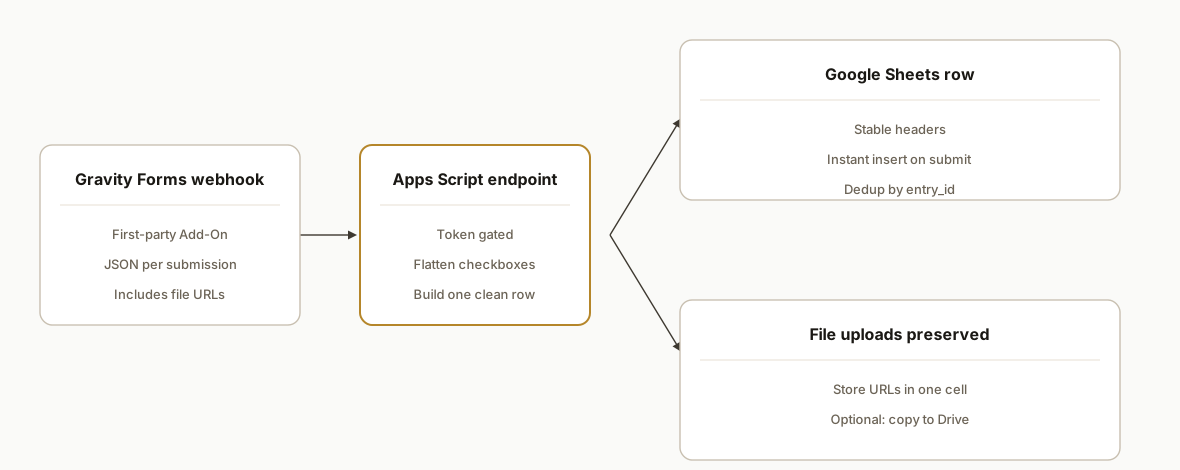
The simplest, resilient pattern uses the first-party Gravity Forms Webhooks Add-On to POST JSON to a small Google Apps Script endpoint. The script normalizes fields, flattens checkbox arrays, writes a row to Sheets, and stores file upload URLs. Zapier and Make.com are viable alternatives when teams prefer no-code routing; for the fuller answer on how to connect ActiveCampaign, Google Sheets, Gravity Forms, see our end-to-end guide.
- Gravity Forms Webhooks Add-On: Sends a JSON body to any URL on each submission.
- Google Apps Script Web App: Token-gated endpoint that parses the payload and writes to the Sheet.
- Google Sheets: Single source of truth with consistent headers and a Files column for upload links.
- Optional Zapier or Make.com: Official Gravity Forms connectors exist when you prefer a no-code path.
Step-by-step: how to build it
1) Add the Gravity Forms Webhooks Add-On and create a webhook
Install and activate the Webhooks Add-On, then add a webhook feed on your target form. Point it to a Google Apps Script Web App URL you will create in the next step. Send the full entry payload.
Example JSON body template we use in production:
{
  "entry_id": "{entry:id}",
  "form_id": "{form:id}",
  "date_created": "{date_mdy}\t{time}",
  "ip": "{ip}",
  "source_url": "{referer}",
  "fields": {
    "1": "{Field ID:1}",
    "2": "{Field ID:2}",
    "3": "{Field ID:3}",
    "4": "{Field ID:4}",
    "5": "{Field ID:5}"
  },
  "files": {
    "5": "{upload:5}"
  }
}
Key point: you control which field IDs map into the payload, which keeps your Sheet headers stable.
2) Publish a Google Apps Script Web App endpoint
Create a new Apps Script project, paste the handler below, replace SHEET_ID and SHEET_NAME, then Deploy as Web App. Set Who has access to Anyone with the link if you will gate with a token, or your Google account if you proxy through another gateway.
function doPost(e) {
  try {
    const token = e.parameter.token || "";
    if (token !== PropertiesService.getScriptProperties().getProperty('INGEST_TOKEN')) {
      return ContentService.createTextOutput(JSON.stringify({ ok: false, error: 'unauthorized' }))
        .setMimeType(ContentService.MimeType.JSON);
    }

    const payload = JSON.parse(e.postData.contents);
    const sheet = SpreadsheetApp.openById('SHEET_ID').getSheetByName('SHEET_NAME');

    // Stable headers you maintain in the Sheet
    const headers = ['submitted_at','entry_id','form_id','name','email','phone','message','checkboxes','files','ip','source_url'];

    // Map Gravity field IDs to header keys
    const FIELD_MAP = {
      '1': 'name',
      '2': 'email',
      '3': 'phone',
      '4': 'message',
      '5': 'files' // upload field id
    };

    // Flatten fields
    const fields = payload.fields || {};
    const files = payload.files || {};

    // Checkbox or multi inputs come through as arrays in many setups
    function flatten(value) {
      if (Array.isArray(value)) return value.filter(Boolean).join('; ');
      if (value && typeof value === 'object') return Object.values(value).filter(Boolean).join('; ');
      return value == null ? '' : String(value);
    }

    // Build a row that matches headers
    const row = new Array(headers.length).fill('');
    const idx = Object.fromEntries(headers.map((h, i) => [h, i]));

    row[idx.submitted_at] = payload.date_created || new Date().toISOString();
    row[idx.entry_id]     = payload.entry_id || '';
    row[idx.form_id]      = payload.form_id || '';
    row[idx.ip]           = payload.ip || '';
    row[idx.source_url]   = payload.source_url || '';

    // Map text fields
    Object.entries(FIELD_MAP).forEach(([fid, key]) => {
      if (key === 'files') return; // handled below
      const v = fields[fid];
      if (v != null && idx[key] != null) row[idx[key]] = flatten(v);
    });

    // Aggregate any checkbox-style fields into one column if desired
    const checkboxValues = Object.entries(fields)
      .filter(([fid]) => fid.startsWith('chk_')) // naming convention you set in the webhook
      .map(([, v]) => flatten(v))
      .filter(Boolean);
    if (idx.checkboxes != null) row[idx.checkboxes] = checkboxValues.join('; ');

    // File uploads: store one or many URLs in a single cell
    const fileLinks = Object.values(files).filter(Boolean);
    if (idx.files != null) row[idx.files] = fileLinks.join('\n');

    sheet.appendRow(row);

    return ContentService.createTextOutput(JSON.stringify({ ok: true }))
      .setMimeType(ContentService.MimeType.JSON);
  } catch (err) {
    return ContentService.createTextOutput(JSON.stringify({ ok: false, error: String(err) }))
      .setMimeType(ContentService.MimeType.JSON);
  }
}
Gotcha to surface in your UI: we intentionally join multiple file URLs with newlines so they are clickable inside a single cell.
3) Secure the endpoint with a token and properties
Store an ingest token in Script Properties so you are not hardcoding secrets. Add it as a query parameter on the webhook URL.
function setToken() {
  PropertiesService.getScriptProperties().setProperty('INGEST_TOKEN', 'a-long-random-string');
}
Then set the webhook URL like:
https://script.google.com/macros/s/DEPLOYMENT_ID/exec?token=a-long-random-string
4) Normalize checkboxes and multi-inputs into one column
Gravity Forms exports multi-choice fields across multiple columns when you use CSV export. In a webhook payload they often arrive as arrays or nested objects. Keep one clean column in your Sheet and flatten them in the handler as shown.
// Example: normalize a multi-select field id 7 into a single column
const multi = flatten(fields['7']);
if (idx.checkboxes != null) row[idx.checkboxes] = multi;
This avoids drifting headers as marketing adjusts options over time.
5) Preserve file uploads as links
For file fields, the webhook includes URLs that resolve to the uploaded file. Store these links in a single cell. If you later need the files in Drive, a scheduled Apps Script can fetch and copy them to a Drive folder and replace the cell with the Drive link. When posting submissions via the Gravity Forms REST API, files must be sent using multipart form data for file fields to be accepted.
// Optional: copy files to Drive nightly and replace links
function copyFilesToDrive() {
  const sheet = SpreadsheetApp.openById('SHEET_ID').getSheetByName('SHEET_NAME');
  const rows = sheet.getDataRange().getValues();
  const header = rows[0];
  const filesIdx = header.indexOf('files');
  const outFolder = DriveApp.getFolderById('DRIVE_FOLDER_ID');

  for (let r = 1; r < rows.length; r++) {
    const cell = rows[r][filesIdx];
    if (!cell || String(cell).includes('drive.google.com')) continue;
    const links = String(cell).split('\n').map(s => s.trim()).filter(Boolean);
    const driveLinks = [];
    links.forEach(url => {
      try {
        const blob = UrlFetchApp.fetch(url).getBlob();
        const file = outFolder.createFile(blob).setName('gf_' + Utilities.getUuid());
        driveLinks.push(file.getUrl());
      } catch (e) {}
    });
    if (driveLinks.length) sheet.getRange(r + 1, filesIdx + 1).setValue(driveLinks.join('\n'));
  }
}
Note: copying files requires the URLs to be reachable from Apps Script. If your site protects uploads behind authentication, store the original URLs and access them manually.
6) Backfill historical entries once, then go live
If you have past submissions, export a CSV from Forms. Import it into the Sheet and align columns with your live headers. Use a simple dedup rule in your Sheet keyed on entry_id, or follow our guide on avoiding duplicate rows, so the live webhook does not create duplicates on replays.
// Simple dedup helper keyed on entry_id
function dedup() {
  const sh = SpreadsheetApp.openById('SHEET_ID').getSheetByName('SHEET_NAME');
  const data = sh.getDataRange().getValues();
  const hdr = data[0];
  const idIdx = hdr.indexOf('entry_id');
  const seen = new Set();
  const toDelete = [];
  for (let r = 1; r < data.length; r++) {
    const id = data[r][idIdx];
    if (seen.has(id)) toDelete.push(r + 1);
    else seen.add(id);
  }
  toDelete.reverse().forEach(rowNum => sh.deleteRow(rowNum));
}
Where it gets complicated
- Authorization header stripping: When using Zapier or Make.com to call the Gravity Forms REST API directly, some hosts strip Authorization headers by default. Ensure REST API is enabled and use supported auth methods. Hosting config may need adjustment.
- OAuth array param signatures: If you use OAuth 1.0a against the REST API and pass arrays, index them like form_ids[0]=1 or signatures fail.
- File upload semantics: The REST submissions endpoint accepts files when sent with multipart form data. If you post JSON without multipart, file fields are not created.
- Checkbox mapping drift: CSV export and some integrations expand each option into its own column. Normalize to one delimited column in your pipeline to avoid header churn.
- Webhook replay and deduplication: A retry from your site or network can replay the same entry. Key dedup on entry_id in Sheets or at the endpoint, and for edits consider two-way update syncing.
- Scheduled exports: Core Gravity Forms exports are manual. Scheduled sharing typically requires a third-party add-on if you need portal-style links.
What this actually changes
In production this removed weekly CSV chores and gave sales a live sheet where every submission appears within seconds and file uploads are one click away. Faster visibility improves response time, which matters: companies that try to contact potential customers within an hour are nearly seven times as likely to qualify the lead compared to those who wait longer than an hour. Source: Harvard Business Review, The Short Life of Online Sales Leads.
Frequently asked questions
Does Gravity Forms have an API I can use instead of webhooks?
Yes. Gravity Forms exposes a REST API under the WordPress route pattern wp-json/gf/v2 on your site. It supports OAuth 1.0a or Basic Auth and standard WordPress auth methods. For push style sync to Sheets, the first-party Webhooks Add-On is usually simpler.
Will file uploads make it into Google Sheets?
Yes. The webhook payload includes the upload URLs. Store them in a single Files column. If you need the files in Drive, schedule a script to copy them and replace links. When posting entries via the API, send files using multipart form data.
Can I do this with Zapier or Make.com instead of code?
Yes. Both have official Gravity Forms apps. Use a new entry trigger and a Google Sheets add row action. If you run into REST authentication errors, confirm REST access is enabled and your keys are read write.
How do you prevent duplicate rows?
Use entry_id as the unique key, and see our tips on preventing duplicates in Sheets. In Apps Script, drop inserts when a row with the same entry_id already exists. In Sheets, add a UNIQUE filter on entry_id for dashboards.
Can it sync in real time?
Yes. The webhook posts immediately on submit and the Apps Script writes the row in seconds. CSV export is only used once for historical backfill.
What does this cost monthly?
Apps Script and Sheets have generous free tiers. Your cost is primarily build time. If you use Zapier or Make.com, plan for their subscription based on volume.
If you want this wired for you, we have shipped this exact pattern for WordPress sites that live in Sheets. See our service overview at /services#workflow-automation. If forms are your intake backbone, you may also like our post on moving Jotform data with attachments to Sheets: /blog/jotform-to-google-sheets-with-attachments. Ready to scope yours: /book.
Who would build this
Rex Automaton is an AI implementation agency with 250+ projects shipped since 2018, rated 4.9 from 33 reviews. Clients include Soft Pull Solutions, Capcon Networks, Iron Age Investments, IT360. You work directly with the people who build it.


Want this built around your systems?
Nine questions, about 90 seconds. You see the revenue it is costing you, then pick a time. No pitch.
See your optionsRather talk to a person first? Meet the team or tell us which system you run.