
Gym booking software API integration is the practice of pulling class signups, trials, and attendance data out of your booking platform and pushing it into a CRM and messaging stack so leads get contacted fast, waitlists promote themselves, and retention campaigns run without exports.
If you run a fitness studio or kids activity business, this guide shows how we connect Jackrabbit, iClassPro, Mindbody, and ClubReady to CRM, waitlists, and retention flows. It explains what each platform typically exposes and how we bridge gaps when an official API is limited or missing.
The problem it solves
A studio manager exports yesterday's trials, uploads a CSV to the CRM, checks class waitlists, moves a few kids up, and pastes no-show lists into a text tool. That cycle repeats daily and falls apart on busy days. Slow handoffs mean colder leads and missed reactivations.
- Answer first: automated data flows keep speed-to-lead under minutes, promote waitlists immediately, and schedule retention touches without manual exports.
| Workflow | Manual: what you do now | Automated: what runs daily |
|---|---|---|
| Trial leads to CRM | Export CSV. Clean columns. Upload to CRM. | Ingest signups continuously and tag by location, class, and source. |
| Speed-to-lead | Call or email hours later. | Auto-reply and task in under minutes based on consent and channel. |
| Waitlist promotion | Refresh list. Email next-in-line. Update roster. | Auto-offer next slot and update state if accepted or expired. |
| No-shows and win-back | Filter report. Paste into SMS. | Queue same-day follow-up and next-period reactivation. |
| Dupes across locations | Guess or merge by hand. | Ledger-based dedup and per-location routing. |
Harvard Business Review found companies that contacted leads within an hour were seven times more likely to qualify the lead than those that waited longer than an hour (source: https://hbr.org/2011/03/the-short-life-of-online-sales-leads). That time delta is where automation pays back.
How the automation works
We standardize one architecture across booking tools: a data-access wedge pulls new signups and attendance, a normalization layer cleans and deduplicates, and an orchestration engine routes to CRM, waitlists, and retention messages. When a platform lacks a usable API, we fall back to scheduled exports, partner connectors, or safe browser automation.
-
Answer first: pick the safest access path per platform, normalize into one schema, dedup with a ledger, then fan out to CRM and messaging with clear routing and caps.
-
Data-access wedge: Uses an official API when available. If not, uses scheduled exports or a monitored drive folder. For UI-only tools, we run a Playwright job on a fixed cadence to export reports.
-
Normalization and consent: Convert columns to a common schema, standardize time zones, and enforce consent flags so SMS and email respect opt-in state.
-
Dedup and sent-state: A small database stores seen keys and last-seen timestamps so retries are safe and replays do not duplicate contacts or messages.
-
Fan-out to CRM and messaging: Create or update contacts, set stage and tags, and trigger sequences. Waitlist promotions are time-bound and idempotent.
-
Observability and guardrails: Job logs, caps per hour, and per-location isolation prevent blasts and keep deliverability clean.
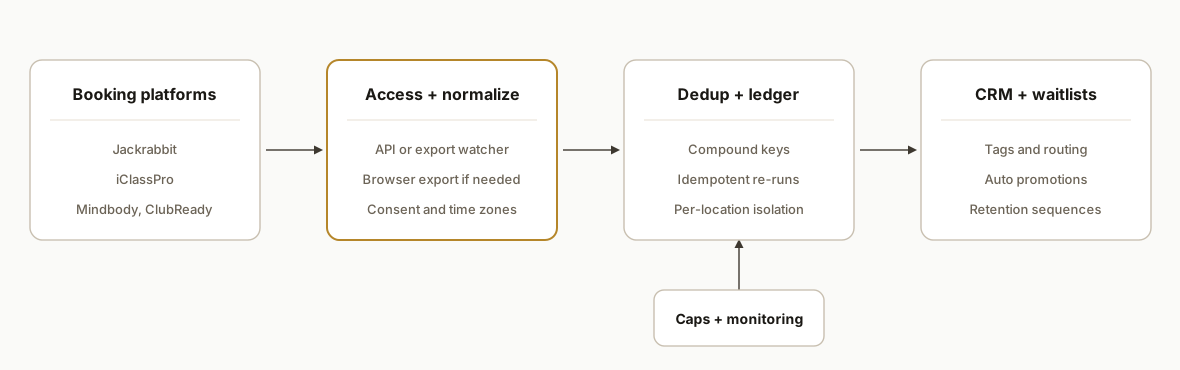
Which booking platforms have APIs and how we bridge gaps
- Answer first: plan for API variability. We connect with an official API when your plan allows it. When an API is gated or unavailable, we run a reliable export watcher or a Playwright export on a schedule and keep the downstream pipeline identical so you can switch to an API later without a rebuild.
What we have shipped in practice:
- Jackrabbit: we have moved Jackrabbit class and trial data into CRMs using export-driven ingestion with a stable schema, then routed by location and program. See a CRM-focused pattern in our write-up on Jackrabbit to HubSpot at Jackrabbit to HubSpot integration for multi-location studios (/blog/jackrabbit-class-to-hubspot-integration).
- iClassPro: we have bridged iClassPro data to GoHighLevel using scheduled exports and a normalization layer. Implementation notes and pitfalls are covered in Automate iClassPro to GoHighLevel (/blog/automate-iclasspro-to-gohighlevel) and platform specifics in iClassPro API notes and workarounds (/blog/iclasspro-api-undocumented-endpoints).
- Mindbody and ClubReady: access depends on your plan and partner program eligibility. When an official integration path is not available, we rely on exports and a safe browser export routine while preserving the same normalization and fan-out. The pipeline remains CRM agnostic and swap-friendly.
Design choice that keeps you flexible: the access wedge is a replaceable module. Whether the input is an API pull, an S3 or Drive export, or a browser-exported CSV, we emit the same normalized events into the dedup ledger and CRM fan-out.
How to connect booking data to HubSpot, GoHighLevel, or Salesforce
- Answer first: send normalized lead and attendance events to a single CRM webhook with routing tags. Map those tags to workflows and sequences per platform.
Practical mapping we ship:
- Routing tags: source, loc:code, class:slug. Optional: program:slug, channel:consented.
- Records: create-or-update by email or phone. Attach next-class time as metadata for reminders.
- Sequences: off by default in dry run. Flip on per location after review.
Example payload we post to your CRM webhook:
{
  "email": "pat@example.com",
  "phone": "15551234567",
  "first_name": "Pat",
  "last_name": "Lee",
  "tags": ["booking", "loc:oak", "class:tumbling-1"],
  "meta": { "start_at_iso": "2026-09-09T00:30:00.000Z" },
  "sms_ok": true,
  "email_ok": true
}
Reference builds with the same pattern:
- Jackrabbit to Salesforce with per-location routing and dedup at Jackrabbit to Salesforce integration pattern (/blog/jackrabbit-class-to-salesforce-integration).
- iClassPro to GoHighLevel including speed-to-lead tasks at Automate iClassPro to GoHighLevel (/blog/automate-iclasspro-to-gohighlevel).
Data privacy, consent, and quiet hours in fitness messaging
- Answer first: store and enforce consent per channel, respect quiet hours, and keep data in-region when required.
What we enforce in production:
- Separate SMS and email consent flags. Channel checks happen at send time.
- Quiet hours and local time. Reminders and promos avoid late-night windows.
- Data residency on request. We can keep data in-region and limit external processors. See our overview on residency tradeoffs at AI automation and data residency choices (/ai-automation-agency-vancouver).
- Opt-out hygiene. Every outbound carries one-click stop for SMS and standard unsubscribe for email. Reply handling updates CRM state.
Step-by-step: how to build it
1. Choose the safest access path per platform
Pick one: official API, scheduled export, partner connector, or a Playwright export job. We default to official APIs first. When a platform is UI-only, we schedule an export with a human browser profile on a workstation.
// scripts/export-report.ts
import { chromium } from 'playwright';

async function exportReport() {
  const browser = await chromium.launch({ headless: true });
  const page = await browser.newPage();
  await page.goto(process.env.BOOKING_PORTAL_URL!);
  await page.fill('#username', process.env.BOOKING_USER!);
  await page.fill('#password', process.env.BOOKING_PASS!);
  await page.click('button[type="submit"]');

  // Navigate to saved report, apply date filters, and export CSV
  await page.click('text=Reports');
  await page.click('text=Trials Last 24h');
  await page.click('text=Export CSV');
  const download = await page.waitForEvent('download');
  await download.saveAs('./inbox/trials.csv');
  await browser.close();
}

exportReport().catch(err => { console.error(err); process.exit(1); });
Key gotcha: do not hardcode selectors from a staging tenant into production. Keep report names and filters in env config.
2. Normalize columns and enforce consent
Unify incoming CSVs into one schema: email, phone, class, start time, location, source, and consent flags. Normalize time zones and phone formats.
// src/normalize.ts
import fs from 'node:fs';
import { parse } from 'csv-parse/sync';

export type Lead = {
  email?: string;
  phone?: string;
  first_name?: string;
  last_name?: string;
  class_name?: string;
  start_at_iso?: string;
  location_code?: string;
  source?: string;
  sms_ok: boolean;
  email_ok: boolean;
  raw_id?: string;
};

export function normalizeCsv(path: string): Lead[] {
  const text = fs.readFileSync(path, 'utf8');
  const rows = parse(text, { columns: true, skip_empty_lines: true });
  return rows.map((r: any) => ({
    email: r.Email?.trim() || undefined,
    phone: formatPhone(r.Phone),
    first_name: cap(r.FirstName),
    last_name: cap(r.LastName),
    class_name: r.Class?.trim(),
    start_at_iso: toIso(r.StartTime, r.Timezone || 'America/New_York'),
    location_code: r.LocationCode?.trim(),
    source: r.Source?.trim() || 'booking',
    sms_ok: yes(r.SMSConsent),
    email_ok: yes(r.EmailConsent),
    raw_id: r.RegistrationID?.trim(),
  }));
}

function yes(v: any) { return String(v).toLowerCase().startsWith('y'); }
function cap(v?: string) { return v ? v[0].toUpperCase() + v.slice(1).toLowerCase() : undefined; }
function formatPhone(v?: string) { return v ? v.replace(/[^\d]/g, '') : undefined; }
function toIso(local: string, tz: string) {
  // naive example: rely on Date parsing plus tz if your runtime supports it
  const d = new Date(local);
  return d.toISOString();
}
Key gotcha: consent is not a single flag. Preserve separate SMS and email consent and map them to downstream channel rules.
3. Deduplicate and keep a sent-state ledger
Store a compact ledger so re-runs are safe. We use SQLite for portability and better-sqlite3 for simplicity.
// src/ledger.ts
import Database from 'better-sqlite3';

const db = new Database('state.db');
db.exec(`CREATE TABLE IF NOT EXISTS ledger (
  key TEXT PRIMARY KEY,
  seen_at INTEGER NOT NULL
);`);

enum Seen { New = 0, Seen = 1 }

export function wasSeen(key: string): Seen {
  const row = db.prepare('SELECT key FROM ledger WHERE key = ?').get(key);
  return row ? Seen.Seen : Seen.New;
}

export function markSeen(key: string) {
  db.prepare('INSERT OR REPLACE INTO ledger (key, seen_at) VALUES (?, ?)')
    .run(key, Date.now());
}
Key gotcha: the dedup key should combine email or phone with the platform's registration ID and a date bucket so family accounts do not collide across siblings.
4. Push to CRM and route by location and class
Post to a CRM webhook with explicit routing metadata. Keep sequences off by default for smoke tests.
// src/push-crm.ts
import fetch from 'node-fetch';
import type { Lead } from './normalize';

const WEBHOOK = process.env.CRM_WEBHOOK_URL!;

export async function pushLead(l: Lead) {
  const payload = {
    email: l.email,
    phone: l.phone,
    first_name: l.first_name,
    last_name: l.last_name,
    tags: [l.source, `loc:${l.location_code}`, `class:${slug(l.class_name)}`].filter(Boolean),
    meta: { start_at_iso: l.start_at_iso },
    sms_ok: l.sms_ok,
    email_ok: l.email_ok,
    dry_run: process.env.DRY_RUN === 'true'
  };
  const resp = await fetch(WEBHOOK, {
    method: 'POST',
    headers: { 'Content-Type': 'application/json' },
    body: JSON.stringify(payload)
  });
  if (!resp.ok) throw new Error(`CRM push failed: ${resp.status}`);
}

function slug(v?: string) { return v ? v.toLowerCase().replace(/\s+/g, '-') : undefined; }
Key gotcha: never trigger live sequences on the first run. Seed sent-state before flipping dry_run off.
5. Automate waitlist promotion and confirmations
Offer the next spot to the first waitlisted contact, hold it for a time window, then move on. Idempotency prevents double-offers.
// src/waitlist.ts
import { wasSeen, markSeen } from './ledger';

export async function offerWaitlist(holdMinutes: number, contactKey: string, classId: string) {
  const k = `offer:${classId}:${contactKey}`;
  if (wasSeen(k)) return; // already offered
  await sendOffer(contactKey, classId, holdMinutes);
  markSeen(k);
}

async function sendOffer(contactKey: string, classId: string, hold: number) {
  // send via your messaging service of choice with a one-click accept link
  // link target should atomically confirm and update roster
}
Key gotcha: race conditions happen when two cancellations arrive together. Reserve on accept with a transaction or single-writer function.
6. Monitor deliverability and caps
Throttle sends and watch reply rates. Keep per-location caps and a dashboard for errors and last-run timings.
// src/caps.ts
let sentThisHour = 0;
const HOURLY_CAP = Number(process.env.HOURLY_CAP || 120);
export function canSend(): boolean {
  return sentThisHour < HOURLY_CAP;
}
export function onSent() { sentThisHour += 1; }
setInterval(() => { sentThisHour = 0; }, 60 * 60 * 1000);
Key gotcha: multiple workers require a shared counter. Use Redis or your database instead of in-memory caps when you scale out.
Where it gets complicated
- APIs are gated or undocumented: Some booking platforms make APIs available under certain plans or partner programs. Others rely on exports. The bridge is to design an access wedge that can swap between API, export, and browser automation without rewriting downstream code.
- UI-only exports change over time: Selectors and report names drift. Stabilize with saved reports, minimal navigation, and alarms on export failures so you can adjust before a run is missed.
- Duplicates across locations: Family accounts and multi-location attendance cause false duplicates. Use a compound dedup key and per-location routing with isolation.
- Consent and compliance: SMS requires explicit opt-in and respecting local quiet hours. Your orchestration should enforce channel rules at send time, not just at import time.
- Time zones and schedules: Class start times must be normalized. Missed conversions between local and UTC will shift reminders and frustrate families.
- Waitlist races: When two spots open simultaneously, naive logic can double-offer. Use short holds and atomic confirmation logic to serialize acceptance.
What this actually changes
In production, this approach removed daily CSV work for a multi-location kids activity business and eliminated missed-trial handoffs. In a pilot run we synced a full trial export to the CRM with 206 of 206 contacts sent and zero errors on the first scoped live batch. The studio stopped retyping, and leads received a response while they were still in decision mode.
Retention is where the compounding shows. Bain reported that increasing customer retention rates by 5 percent can increase profits by 25 to 95 percent (source: Bain & Company). When attendance and no-shows auto-drive retention touches, that lift shows up without more ads.
Frequently asked questions
Do these booking platforms have official APIs I can use?
Some do under certain plans or partner programs. Others rely on scheduled exports or partner connectors. When an official API is not available to you, we bridge via export watchers or a safe Playwright export job and keep the downstream pipeline identical so you can switch to an API later without a rebuild.
Can this run in near real time or only nightly?
Both. With webhooks or frequent exports you can run on a short cadence for speed-to-lead and same-day reminders. For UI exports that require a login, we balance cadence and reliability, for example hourly during business hours with clear logs and alarms.
How do you prevent duplicate contacts and messages?
We maintain a small ledger keyed by a compound value: email or phone plus a platform registration ID and a date bucket. Every push checks the ledger first. Re-runs and retries are safe because the pipeline is idempotent.
What CRM does this work with?
Any CRM that accepts inbound webhooks or imports. We attach routing metadata like location and class as tags or custom fields, and we keep message sequences off until you review a seeded batch. The pattern is CRM agnostic by design.
What does this cost monthly to run?
The infrastructure footprint is light: a small database, a scheduler, and a serverless function or worker. Costs depend on volume and messaging usage. The primary investment is the initial build and the first month of monitoring while you tune cadence, caps, and consent rules.
How long does it take to implement?
A focused first integration typically ships in one to two weeks. We start with one location and one class family, seed sent-state in dry run, then flip live in a narrow window before expanding across locations.
If you need this wired for your studio and prefer to skip the learning curve, we have already built and shipped this pattern across class-booking tools. See our implementation notes in the iClassPro to CRM build at Automate iClassPro to GoHighLevel (/blog/automate-iclasspro-to-gohighlevel), our API notes at iClassPro API notes and workarounds (/blog/iclasspro-api-undocumented-endpoints), or a Jackrabbit CRM path at Jackrabbit to HubSpot integration for multi-location studios (/blog/jackrabbit-class-to-hubspot-integration). Our CRM automation services (/services#crm-automation) cover the full pipeline from intake to retention. When you are ready, book a 20 minute call (/book) and we will map your flow without a sales deck.
Sources
- 1.The Short Life of Online Sales Leadshbr.org
Curious what this would actually save you?
Put real numbers to it. The ROI calculator estimates the hours and dollars an automation like this returns, in about a minute.
See your options