
A production-ready self-storage integration captures web and phone leads in real time, routes them to your CRM with the facility context attached, and triggers review requests and rent reminders off your facility software data even when the platform offers no direct connector. This guide is for operators evaluating SiteLink or storEDGE integrations and explains the gaps and how we bridge them safely.
Self-storage software integration is the process of connecting your facility platform to your CRM, messaging, and reporting tools so lead capture, tenant updates, and owner reporting happen without manual exports.
The problem it solves
A manager logs into the facility system daily, exports a CSV of recent leads or tenants, cleans it in Excel, and tries to upload it to a CRM to send follow-ups. Reviews and past-due reminders are handled manually from lists. Staff miss windows when volume spikes or a shift runs long.
| Manual workflow | Automated workflow |
|---|---|
| Export CSVs and reformat columns before every upload | A connector normalizes data and pushes to CRM on a schedule or webhook |
| Copy-paste contact details into email or SMS tools | Routing rules send the right sequence immediately with facility context |
| Build owner or regional reports by hand monthly | A job compiles and emails dashboards on a cadence |
| Hope staff reply to web leads fast enough | Instant acknowledgment and flagged handoff in under a minute |
One hard number that sets priority: companies that attempt contact within one hour of a web inquiry are nearly seven times as likely to qualify the lead as those that wait longer. Source: Harvard Business Review, The Short Life of Online Sales Leads (https://hbr.org/2011/03/the-short-life-of-online-sales-leads).
How the automation works
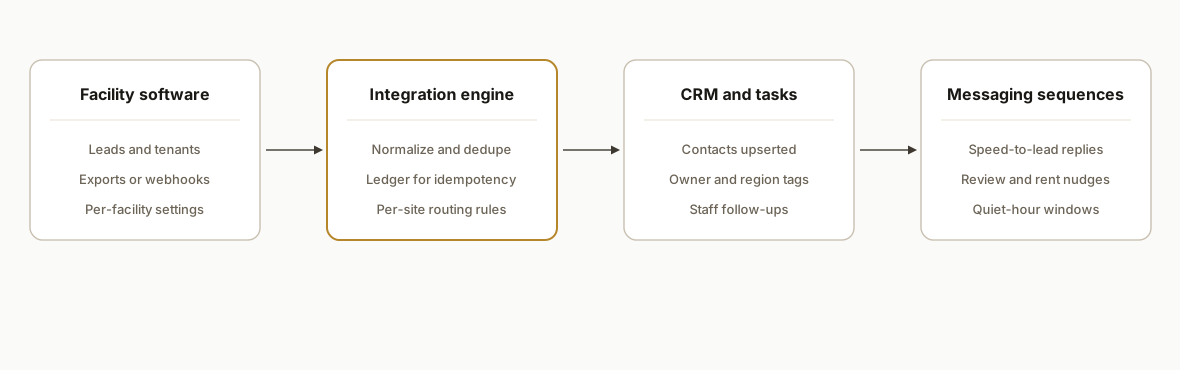
We have shipped both patterns: when a facility platform exposes data in a usable way, we subscribe or poll. When it does not, we run a safe wedge: scheduled exports, email parsing, or a supervised browser harness. The integration engine stays the same: dedupe, normalize, route, and log.
- Facility data intake: Pulls new inquiries, tenants, or events via an available export path. If an API or webhook exists in your plan, we use it. If not, we schedule exports or parse structured inbound emails from web forms.
- Normalization and deduplication: Canonicalizes phones and emails, maps facility IDs to region or property, and blocks duplicates. This prevents double-sends and duplicate CRM records.
- CRM and messaging routing: Pushes contacts and updates to your CRM and triggers sequences for speed-to-lead, appointment confirmation, review asks, and rent reminders.
- Monitoring and replay: A ledger records each push so jobs can be re-run without duplicating work. Failures are retried and surfaced in a dashboard.
Step-by-step: how to build it
Step 1: Decide your primary intake path
Pick the safest, most controllable source: an official export on a schedule, a partner connector if your plan includes it, or an inbound email parse from your website lead form. We default to a stable export first, then add realtime where possible.
# Example: nightly export dropped to a secure folder, polled by a job
0 2 * * * /usr/local/bin/node /opt/self-storage/intake.js --mode=export --facility=west-yard
Key gotcha: mix of realtime and batch requires idempotency so the same lead does not send twice.
Step 2: Normalize and dedupe before routing
Write a small normalization layer that trims whitespace, lowercases emails, formats phones to E.164, and sets a stable dedupe key. We use facility plus email or phone.
// normalize.js
import { parse } from "csv-parse/sync";
import fetch from "node-fetch";
import { readFileSync } from "fs";

function e164(phone) {
  const digits = (phone || "").replace(/\D/g, "");
  if (!digits) return null;
  return digits.startsWith("1") ? "+" + digits : "+1" + digits; // US default
}

export function normalizeCsv(path, facilityId) {
  const rows = parse(readFileSync(path), { columns: true });
  return rows.map(r => {
    const email = (r.Email || r.email || "").trim().toLowerCase() || null;
    const phone = e164(r.Phone || r.phone);
    return {
      facilityId,
      firstName: (r.First || r.first_name || "").trim(),
      lastName: (r.Last || r.last_name || "").trim(),
      email,
      phone,
      source: r.Source || r.source || "facility",
      dedupeKey: [facilityId, email || phone].filter(Boolean).join(":")
    };
  });
}
Gotcha: do not dedupe across facilities unless you intend to centralize contact ownership.
Step 3: Implement a ledger for idempotency
Store dedupe keys and last-pushed timestamps. Skip if seen, update if data changed. This lets you re-run jobs safely.
-- ledger.sql
CREATE TABLE IF NOT EXISTS push_ledger (
  dedupe_key TEXT PRIMARY KEY,
  last_hash  TEXT NOT NULL,
  pushed_at  TIMESTAMP NOT NULL DEFAULT NOW()
);
Gotcha: hash the payload you send, not the raw row, to capture real downstream changes only.
Step 4: Push to your CRM and sequences
Send normalized contacts to your CRM or marketing tool. Use a single integration function so you can switch providers without rewriting business logic.
// route.js
import crypto from "crypto";
import fetch from "node-fetch";

export async function sendToCrm(contact, secrets) {
  const body = {
    first_name: contact.firstName,
    last_name: contact.lastName,
    email: contact.email,
    phone: contact.phone,
    tags: ["self-storage", contact.facilityId, contact.source]
  };
  const hash = crypto.createHash("sha1").update(JSON.stringify(body)).digest("hex");
  // check ledger for dedupe_key + hash, then POST to your CRM's contact endpoint or webhook
  await fetch(secrets.CRM_WEBHOOK_URL, { method: "POST", headers: { "content-type": "application/json" }, body: JSON.stringify(body) });
  return hash;
}
Gotcha: keep routing config per facility in code or a config file, not scattered in the CRM UI.
Step 5: Trigger speed-to-lead and tenant comms
Attach the right follow-up: new inquiry gets an instant acknowledgment and staff task, new tenant gets a welcome plus review ask scheduled after move-in, past-due gets a gentler reminder first.
# sequences.yaml
inquiry:
  - channel: sms
    send_after: 0m
    template: "Thanks for reaching out about storage at {{facility}}. Reply YES to connect with a manager."
  - channel: task
    send_after: 0m
    template: "Call back web inquiry {{first_name}} {{last_name}} at {{phone}}."
new_tenant:
  - channel: email
    send_after: 1d
    template: "Welcome to {{facility}}. Here is your access info and hours."
  - channel: sms
    send_after: 10d
    template: "How is your unit so far. If we earned it, would you leave a quick review."
Gotcha: sequence timing must respect quiet hours and the facility time zone.
Step 6: Add monitoring and replay controls
Expose counts and failures. A dry-run mode prints what would be sent and marks records as previewed, not pushed.
node run.js --facility=west-yard --mode=dry-run
node run.js --facility=west-yard --mode=push
Gotcha: make replay explicit with a flag so staff cannot accidentally re-send last month's file.
Where it gets complicated
Plan and feature variance across facilities. Two locations on the same brand can have different plan tiers and permissions. Expect to mix intake methods and keep the routing layer consistent.
CSV and timezone drift. Date columns can lack timezone markers and day boundaries differ by branch. Normalize to a single standard and apply facility-local send windows for messaging.
Duplicate and stale leads. Website leads can enter through multiple forms or aggregator sites. Dedupe by email or phone plus facility. Add a recency cutoff on re-sends.
HTML email parsing pitfalls. If you parse inbound emails as a bridge, templates change. Write tolerant extractors and keep a test bank of real samples. Prefer structured exports when available.
Dry-run versus live runs. Dry runs do not create true sent-state in downstream tools. Seed a narrow live run before flipping fully live to avoid backfilling an entire history.
Human-in-the-loop points. Payment or sensitive notices should pause for approval. Make this a first-class route with queues, not an ad-hoc inbox rule.
What this actually changes
For multi-location operators, this removed daily CSV chores and stabilized speed-to-lead. In production we have handled both patterns: one client ran purely on scheduled exports and another on a partner connector where it existed, with the same downstream routing and logging. Qualitatively, managers stopped babysitting uploads and owners received consistent, branded communications.
One external benchmark explains the lift: responding to web inquiries within an hour makes qualification nearly seven times more likely versus later follow-up. Source: Harvard Business Review (https://hbr.org/2011/03/the-short-life-of-online-sales-leads). An automated acknowledgment and routed task reaches that window every time, across shifts and weekends.
If you want platform-specific plays, we have detailed build write-ups for each pattern: SiteLink to CRM reminders and storEDGE reporting to owner dashboards.
Frequently asked questions
Do self-storage platforms have APIs I can use.
Some plans and vendors expose partner connectors or export endpoints, and others rely on scheduled reports or email notifications. Our approach is to use the cleanest supported path you have and bridge the rest with stable exports or parsing, keeping the downstream engine identical.
Can this run in real time or only nightly.
Both are possible. Where a webhook or frequent export is available, new leads route in near real time. Otherwise we poll on a reasonable cadence and still fire instant acknowledgments the moment a lead hits the CRM.
How do you prevent duplicate contacts and double-sends.
We generate a stable dedupe key per contact, usually facility plus email or phone, and keep a ledger of what was pushed and when. If a row reappears, we skip or update instead of creating a new record or firing a second sequence.
What does this cost monthly.
The runtime footprint is small: a serverless job or a light container plus your CRM and messaging tools. The real cost is the initial build and mapping, then low ongoing hosting. We quote the build after a short discovery since intake methods vary by facility and plan.
Can a non-technical owner operate this after setup.
Yes. Intake runs on a schedule and routing is driven by a config file and your CRM. We add a small dashboard that shows counts, failures, and a one-click replay. Staff can adjust sequences in the CRM without touching code.
What happens if my vendor changes formats.
We pin tests to real samples and alert on extraction mismatches. The design keeps the intake module separate, so changing a column name or adding a field does not ripple through your routing or messaging logic.
If you run self-storage facilities and want lead capture, reminders, and reviews to run themselves, we have built this both with and without a native connector. See our CRM automation services, read the deeper dives for SiteLink and storEDGE, and book a 20-minute call to map your intake path.
Curious what this would actually save you?
Put real numbers to it. The ROI calculator estimates the hours and dollars an automation like this returns, in about a minute.
Calculate your automation ROI