
Alarm monitoring software API integration is the process of capturing events from security platforms and turning them into standardized records that drive invoices, CRM updates, and tickets without manual re-keying. We built this pattern across SedonaOffice, Bold Manitou, TrackTik or Trackforce, and Silvertrac. The guide shows how we bridge gaps when native APIs are partial, gated, or missing.
If you run an alarm or guard company and need monitoring signals, patrol incidents, or service tickets to flow into billing and CRM, this walkthrough covers the working architecture, build steps, and the real gotchas we hit in production.
The problem it solves
Most alarm and guard operators still bridge central-station or patrol platforms to back office by hand: operators acknowledge events, someone copies details into the billing system, a dispatcher opens or updates a CRM ticket, and finance reconciles at month end. It breaks on volume, causes missed invoices, and creates data drift across systems.
| Process | Manual workflow | Automated workflow |
|---|---|---|
| Event capture | Operator reads event screen, emails details to back office | Adapter ingests events on a schedule or webhook and writes to a ledger |
| Normalization | Supervisor interprets codes, picks billable vs non-billable | Rules engine maps raw codes to a canonical event type and billing policy |
| Routing | Dispatcher opens CRM task and copies text | Router posts structured payloads to CRM, ticketing, and billing sinks |
| Reconciliation | Finance exports CSVs and checks by hand | Daily rollups and invoice-ready line items generated automatically |
| Exceptions | Buried in inboxes and sticky notes | Retry queue and replay UI tag and resolve failures visibly |
According to the Center for Problem-Oriented Policing, an estimated 94 to 98 percent of burglar alarm activations are false. Source: https://popcenter.asu.edu/content/burglar-alarms-2. Automating event classification and routing reduces time wasted on non-billable noise and makes the few billable interactions reliably make it to invoices.
How the automation works
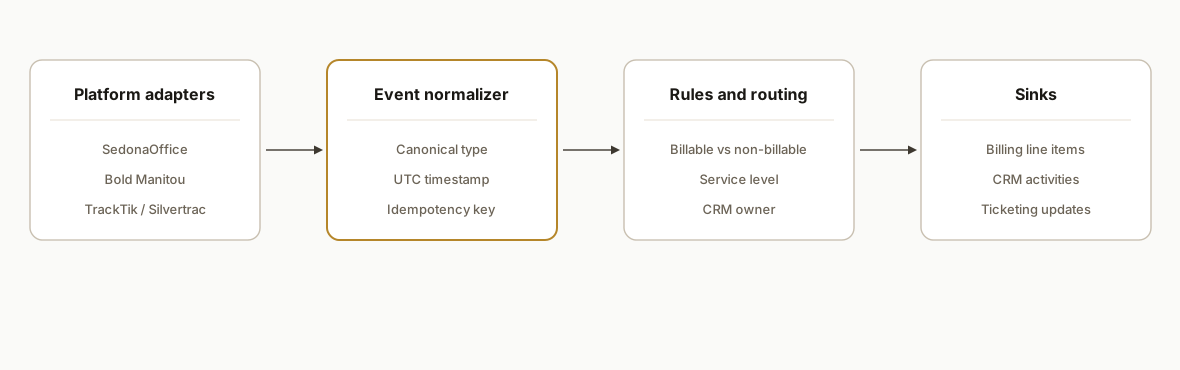
A thin integration layer sits between your alarm or guard platform and your business systems. It standardizes events, applies your billing and CRM rules, and delivers idempotent writes to downstream tools.
- Platform adapters: Lightweight connectors that pull or receive events from SedonaOffice, Bold Manitou, TrackTik or Trackforce, and Silvertrac. In deployments where APIs were gated or limited, we used exports or webhook-like email parsing as the wedge, then upgraded to native integrations when access was granted. For a Silvertrac specific path to invoice, see our incident to billing build: /blog/silvertrac-integration-incident-to-billing. For patrol workflows in TrackTik, see our focused guide: /blog/tracktik-api-integration-guard-billing.
- Event normalizer (accented engine): Turns raw signals and incident records into a canonical Event object: timestamps, site, account, type, and a unique key for idempotency. This is the contract everything downstream trusts.
- Rules and mapping: Encodes billable vs non-billable, response categorization, and CRM ownership routing. Rules are config, not code, so ops can adjust without a redeploy.
- Sinks: Billing line items, CRM activities, and ticketing updates. We keep these idempotent by writing with stable keys and a replay-safe ledger. If your receivables live in QuickBooks, our SedonaOffice to QuickBooks bridge shows the accounting side we apply here: /blog/sedonaoffice-api-integration-to-quickbooks.
- Observability: A dashboard for health, retries, and replays. When a sink is down, events sit in a retry queue and never duplicate on recovery.
Step-by-step: how to build it
1) Define the canonical event and a replay-safe ledger
Start with the contract. Downstream sinks trust this shape, and the ledger prevents duplicates across retries and replays.
-- events_ledger: one row per upstream event
create table events_ledger (
  id bigserial primary key,
  source text not null,                 -- e.g., "manitou", "sedonaoffice", "tracktik", "silvertrac"
  source_event_id text not null,        -- stable id or a hash if only a payload is available
  site_ref text not null,               -- site or customer reference from the platform
  occurred_at timestamptz not null,
  type text not null,                   -- normalized type, set after mapping
  payload jsonb not null,               -- original raw snapshot for traceability
  status text not null default 'pending',
  last_error text,
  unique (source, source_event_id)
);

-- sink_writes: dedup per sink
create table sink_writes (
  id bigserial primary key,
  ledger_id bigint not null references events_ledger(id),
  sink text not null,                   -- "billing", "crm", "ticketing"
  sink_key text not null,               -- stable external id we upsert to
  status text not null default 'pending',
  last_error text,
  unique (ledger_id, sink)
);
Gotcha: pick a deterministic source_event_id. If the platform does not expose one, derive a hash from stable fields like site, raw type code, and the upstream timestamp.
2) Build minimal adapters per platform
Keep adapters thin: fetch or receive, validate, and hand raw events to the normalizer. Do not bury business rules here.
// adapter contract
export interface RawEvent { source: string; id: string; occurredAt: string; site: string; code: string; body: unknown; }
export type EmitFn = (e: RawEvent) => Promise<void>;

export async function pollSedonaOffice(emit: EmitFn) {
  // Pull recent records via available access path: API, export, or mailbox parser
  const rows = await getSedonaOfficeSignals(); // project-specific
  for (const r of rows) {
    await emit({
      source: "sedonaoffice",
      id: r.stableId,
      occurredAt: r.when,
      site: r.account,
      code: r.rawCode,
      body: r
    });
  }
}

export async function receiveTrackTikWebhook(reqBody: unknown, emit: EmitFn) {
  const ev = coerceTrackTik(reqBody); // project-specific
  await emit({ source: "tracktik", id: ev.uuid, occurredAt: ev.ts, site: ev.site, code: ev.kind, body: ev });
}
Gotcha: when access is gated or partial, start with the reliable wedge you control today, then swap the adapter later. The normalized flow does not change.
3) Normalize and map to canonical types
Turn vendor-specific codes into business-meaningful types. Keep mappings in config so ops can tune without a release.
type CanonicalType = "alarm_dispatch" | "false_alarm" | "patrol_incident" | "maintenance" | "test_signal" | "other";

const mapTable: Record<string, CanonicalType> = {
  // examples: codes are placeholders, keep real mappings in config storage
  "S-ALM": "alarm_dispatch",
  "S-TST": "test_signal",
  "TT-INCIDENT": "patrol_incident",
};

export function normalize(e: RawEvent) {
  const type = mapTable[e.code] ?? inferFallback(e);
  return {
    source: e.source,
    sourceEventId: e.id,
    siteRef: e.site,
    occurredAt: new Date(e.occurredAt).toISOString(),
    type,
    payload: e.body
  };
}
Gotcha: timestamps arrive in mixed timezones. Normalize to UTC at the boundary and attach the original zone in metadata if finance needs local-day billing.
4) Encode billing and CRM routing rules
Separate policy from code. A small rules engine applies billable flags, service levels, and ownership routing.
interface Policy { billable: boolean; sku?: string; minUnits?: number; ownerTeam: string; }

const policyByType: Record<CanonicalType, Policy> = {
  alarm_dispatch: { billable: true, sku: "RESP-DISP", minUnits: 1, ownerTeam: "monitoring" },
  false_alarm:    { billable: false, ownerTeam: "monitoring" },
  patrol_incident:{ billable: true, sku: "PATROL-INC", ownerTeam: "field_ops" },
  maintenance:    { billable: true, sku: "SRV-MAINT", ownerTeam: "service" },
  test_signal:    { billable: false, ownerTeam: "monitoring" },
  other:          { billable: false, ownerTeam: "monitoring" },
};

export function applyPolicy(ev: ReturnType<typeof normalize>) {
  const p = policyByType[ev.type];
  return { ...ev, policy: p };
}
Gotcha: test signals and supervisory alerts often look like live signals. Put explicit test windows and schedules in policy to prevent accidental billing.
5) Write idempotent updates to Billing, CRM, and Ticketing
Upsert using stable keys per sink. If a sink is down, queue for retry and keep the ledger the source of truth.
async function writeBilling(rec: ReturnType<typeof applyPolicy>) {
  if (!rec.policy.billable) return;
  const key = `${rec.siteRef}:${rec.source}:${rec.sourceEventId}`;
  await upsertInvoiceLine({
    key,                                 // idempotent key
    sku: rec.policy.sku!,
    qty: 1,
    occurredAt: rec.occurredAt,
    memo: `${rec.type} from ${rec.source}`,
    siteRef: rec.siteRef
  });
}

async function writeCrm(rec: ReturnType<typeof applyPolicy>) {
  const key = `${rec.siteRef}:${rec.source}:${rec.sourceEventId}`;
  await upsertCrmActivity({
    key,
    ownerTeam: rec.policy.ownerTeam,
    subject: `[${rec.type}] ${rec.siteRef}`,
    body: summarize(rec),                 // short, structured text
    occurredAt: rec.occurredAt
  });
}
Gotcha: some downstream HTML bodies sanitize line breaks aggressively. Keep bodies simple text or wrap lines consistently if the sink expects HTML.
6) Add retries, replays, and daily rollups
Operations need a way to heal transient failures and reconcile daily.
// retry worker
setInterval(async () => {
  const failed = await getFailedSinkWrites({ olderThanMinutes: 5 });
  for (const w of failed) {
    try { await replayWrite(w); await markOk(w.id); }
    catch (err) { await bumpError(w.id, String(err)); }
  }
}, 30_000);

// daily billing rollup
scheduleDaily("02:10", async () => {
  const yesterday = await collectBillable("yesterday");
  await renderAndEmailCsv(yesterday, { subject: "Daily billable rollup" });
});
Gotcha: replays must be safe to run multiple times. The idempotent keys you chose in Step 5 are what make that possible.
Where it gets complicated
- Access is uneven across platforms. In some deployments we needed an account upgrade or module enablement before any integration surface appeared. We shipped a wedge first: exports, scheduled pulls, or mail-in parsing, then swapped to native access when approved.
- Webhooks are partial or absent. Not every event fires a callback. We built near-real-time polling for critical windows and fell back to daily reconciliation exports to catch stragglers.
- Clock skew breaks finance. Central-station timestamps can be device-local while back office runs on a different zone. We normalized to UTC and derived local service day for billing so month-end reports matched reality.
- Duplicate suppression needs to span systems. The same incident can appear in both a monitoring platform and a patrol app. Our ledger deduped on a composite key across sources so you do not double-bill or double-create CRM work.
- Attachments and PII handling. Photos, videos, and notes can contain sensitive details. We stored large artifacts in object storage with short-lived links and redacted sensitive fields in activity bodies.
What counts as billing software for an alarm company
You do not need to rip out accounting to get alarm billing. Three workable patterns cover most stacks:
- Industry ERP with billing inside: SedonaOffice is often the source of record for invoicing. We push invoice-ready lines into its billing workflows using the same normalized events described above, through whatever access path is available.
- General accounting as the billing system: QuickBooks, Sage Intacct, or Xero hold receivables. We deliver line items with stable external IDs, SKUs, and memos. If QuickBooks is your AR, see how we bridge security data to accounting: /blog/sedonaoffice-api-integration-to-quickbooks.
- Patrol platforms that track work but not invoices: Incident apps like Silvertrac are excellent for field capture. We turn approved incidents into invoice lines reliably. The incident to billing path is detailed here: /blog/silvertrac-integration-incident-to-billing.
The integration makes your current system behave like purpose-built alarm billing software by feeding it clean, deduped, invoice-ready data, including recurring revenue automation.
How to model RMR, dispatch fees, and patrol billing
Alarm companies usually combine recurring revenue with event-based charges. Keep the policies separate so finance is predictable.
- RMR: store contracts and price tables in your billing system; for a walkthrough on automate RMR billing, see our guide. The integration only needs to avoid generating lines for test signals and informational noise.
- Event fees: map signal or incident types to SKUs and owner teams. Enforce minimums and time windows in policy. Use idempotent keys so replays do not double-bill.
- Collections: if you handle failed autopay, run a separate dunning loop. For a proven pattern on payment failures, see our receivables recovery automation: /blog/stripe-failed-payment-automation.
Example of separating RMR from incident billing in config:
rmr:
  managed_in: billing_system
  exclude_event_types:
    - test_signal
    - supervisory
incidents:
  sku_map:
    alarm_dispatch: RESP-DISP
    patrol_incident: PATROL-INC
  min_billable_units:
    patrol_incident: 1
  local_day: account_timezone
idempotency:
  key_format: "{{siteRef}}:{{source}}:{{sourceEventId}}"
Buying checklist: alarm billing that will not block automation
When you evaluate or re-evaluate billing software, confirm these integration-friendly traits:
- Supports API or CSV upsert of invoice lines with an external ID or memo field you control.
- Accepts tax codes, classes or locations, and service dates per line.
- Offers a way to attach or link incident evidence without storing PII in the invoice body.
- Allows partial posting or draft invoices so finance can review daily rolls before finalizing.
- Exposes reports or exports for reconciliation so the ledger can verify what posted.
Billing software for alarm: quick buyer answers
- What is alarm business invoicing software: any stack that can accept invoice-ready lines and post AR consistently. We make SedonaOffice, QuickBooks, Xero, or patrol-first apps behave like alarm billing software by feeding normalized, deduped events.
- Which platform should we start with: stay on your current AR. If you capture work in TrackTik, keep TrackTik for field ops and bridge to AR. See our TrackTik billing pattern: /blog/tracktik-api-integration-guard-billing.
- Do we need a full API: not always. We have shipped wedges using exports, scheduled pulls, and mailbox parsing, then upgraded to native integrations when access was granted. The normalization and idempotent keys stay the same.
- How fast to first invoices: a 2 week pilot is common. Week 1: adapter and mapping. Week 2: policy tuning and daily rollups. We expand to direct AR upserts after finance validates drafts.
Alarm business invoicing software: compare common stacks
- SedonaOffice centered: best when you already run industry ERP and want invoices to originate there. We post invoice-ready lines using stable external IDs and reconcile daily.
- QuickBooks or Xero centered: simplest when AR already lives in general accounting. We upsert lines with SKUs and memos your team recognizes. If QuickBooks is your AR, see: /blog/sedonaoffice-api-integration-to-quickbooks.
- Patrol-first with Silvertrac or TrackTik: field apps capture rich incidents. Finance still needs invoice lines. We promote approved incidents to AR cleanly. Silvertrac example: /blog/silvertrac-integration-incident-to-billing. TrackTik guide: /blog/tracktik-api-integration-guard-billing.
What this actually changes
In production, the integration eliminated manual swivel-chair work and made billable response work visible and invoice-ready every morning. Dispatchers saw CRM activities open automatically with the right owner. Finance received daily CSVs or direct line items without chasing emails.
Why it matters structurally: a high share of alarm activations are non-billable. Research estimates 94 to 98 percent are false. Source: https://popcenter.asu.edu/content/burglar-alarms-2. Automating classification and routing keeps non-billable noise out of finance while capturing the billable minority consistently.
Frequently asked questions
Do SedonaOffice, Bold Manitou, TrackTik or Trackforce, and Silvertrac have official APIs?
Access varies by account, edition, and enabled modules. We have shipped integrations using native access where available and delivered the same outcome with exports, scheduled pulls, or mailbox parsing when direct API access was limited. The normalization layer stays the same either way.
Can this run in real time, or is it batch only?
When a platform exposes a push mechanism, we consume it and process within seconds. Where push is unavailable, we poll on a short interval for critical windows and reconcile daily to guarantee completeness. The ledger ensures no duplicates when both paths overlap.
How do you prevent duplicate billing or CRM spam?
We assign a deterministic idempotency key per event, stored in the ledger and reused for all sink writes. Upserts in billing, CRM, and ticketing use that key so retries and replays never create new records.
What happens during outages or vendor maintenance?
Events land in the ledger first, then fan out to sinks. If a sink is unreachable, writes fail closed into a retry queue. The replay worker keeps trying with backoff. Operators see the backlog and can replay manually without duplicates.
What does this cost monthly?
Infrastructure is light: a small database, a queue, and stateless workers. The main cost driver is initial build and any vendor-side access fees. Ongoing run costs are low and scale with event volume. We scope pilots to prove value before expanding.
What is the best billing software for alarm companies?
There is no single best. If your accounting already lives in SedonaOffice or QuickBooks, keep it and feed it invoice-ready lines. If your patrol app captures work but not AR, bridge it to accounting with stable external IDs. The integration makes your current stack behave like alarm billing software.
If you want this running in your stack, we have built the SedonaOffice, Bold Manitou, TrackTik or Trackforce, and Silvertrac pieces before. See our related deep dive on routing monitoring signals into ticketing in our Bold Manitou case: /blog/bold-manitou-integration-ticketing-crm. For broader CRM integration help, see our service overview at /services#crm-automation. When you are ready to scope your pilot, /book a 15 minute call.
Curious what this would actually save you?
Put real numbers to it. The ROI calculator estimates the hours and dollars an automation like this returns, in about a minute.
Calculate your automation ROI