
We built a countdown-review reel engine for JusticeBuys that turns a product list into a shoot-ready package: 3 hooks, a numbered script, a shot list, and an editing brief. It is a demo we deployed to prove voice and workflow. This post shows exactly how it works and the path buyers can commission to take it to production.
A countdown review reel engine is a small app that converts product inputs and brand voice rules into a repeatable, shoot-ready script package for short-form video.
The problem it solves
Creators and brand-led curators lose time on the same loop: pick products, write hooks, structure a countdown, plan shots, brief an editor, then repeat. Doing that by hand for 5 to 10 reels a week burns creative energy and slips schedules.
| Task | Manual workflow | Automated with the reel engine |
|---|---|---|
| Hook ideation | 10 to 20 minutes of brainstorming per reel | 3 on-voice hook options in seconds |
| Numbered script | Ad hoc, varies by writer, needs multiple passes | Consistent countdown template with timing beats |
| Shot list | Built after the script, easy to forget B-roll | Auto-derived per line with B-roll prompts |
| Editing brief | Rewritten each time | Branded, reusable brief with music and caption style |
| Versioning | Lost in docs and chats | One JSON package per reel with exports |
How the automation works
The demo kept scope tight: generate a reliable, shoot-ready package that a human can film and an editor can cut without a meeting. In production we wire this to sourcing, approvals, and a managed edit lane.
- Inputs panel: Product names or links, target audience, voice cues, and rules to avoid cliche. In the demo we used seed products by design.
- AI engine: A fast model produces a strict JSON package. It writes hooks, a numbered script, and shot directions under hard constraints so tone stays on-brand.
- Template enforcement: We validate the structure and reject outputs that violate banned phrases or style rules, then regenerate with tighter instructions.
- Exports: We render a one-page brief and a script card for editors. Teams can copy to Docs or export PDF for handoff.
- Optional managed lane: A queue hands the package to an editing pipeline for captioning, music, and delivery in your drive structure.
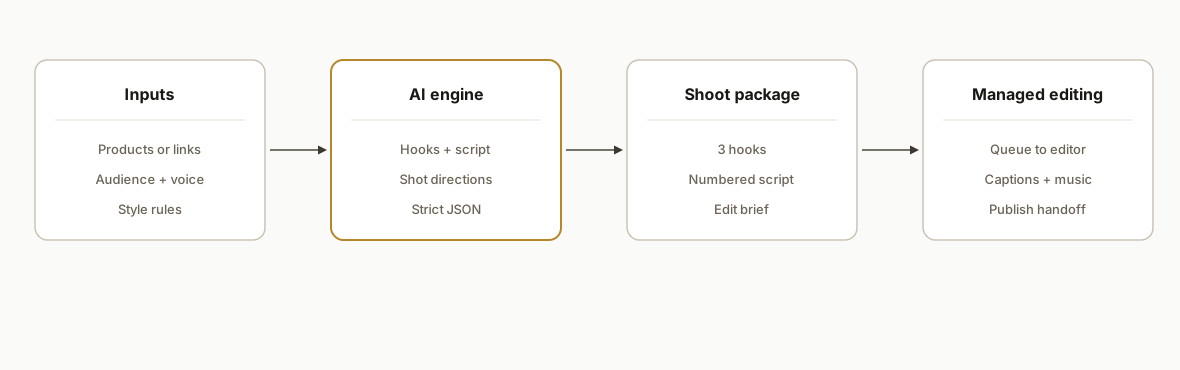
Step-by-step: how to build it
1) Define the shoot-package schema up front
A strict schema keeps outputs consistent across reels and editors.
// shoot-package.schema.js
export const ShootPackageSchema = {
  title: "string",                 // e.g., "Top 5 Everyday Carry Under $50"
  products: [                       // ordered for countdown
    { rank: "number", name: "string", keyPoint: "string" }
  ],
  hooks: ["string", "string", "string"],
  script: [                         // numbered, one beat per line
    { n: "number", text: "string", broll: "string" }
  ],
  editBrief: {
    pacing: "string", captions: "string", music: "string", disclaimers: "string"
  }
};
Key gotcha: treat this as a contract. Every downstream render depends on it being stable.
2) Prompt with hard constraints and voice anchors
We bake the schema description and house rules into the system message and include 2 to 3 brand-voice examples.
// prompt.js
export const SYSTEM = `You are a reel writer. Output ONLY valid JSON matching ShootPackageSchema.
Rules: no buzzwords like "must-have", no exaggerated claims, keep lines < 14 words, past tense in captions, second person in hooks.`;

export const USER = ({ title, products, voice }) => `
Title: ${title}
Products: ${products.map(p => `- ${p}`).join("\n")}
Voice: ${voice}
Return: JSON only, no markdown.`;
Guard against cliche by enumerating banned phrases and requiring a rewrite when they appear.
3) Call the model and enforce strict JSON
We keep vendor specifics abstract here. The pattern is: send messages, require JSON, validate, retry if parse fails.
// generate.js
import { SYSTEM, USER } from './prompt.js';
import { validatePackage } from './validate.js';

export async function generatePackage(input) {
  const resp = await fetch(process.env.LLM_URL, {
    method: 'POST',
    headers: { 'Authorization': `Bearer ${process.env.LLM_API_KEY}`, 'Content-Type': 'application/json' },
    body: JSON.stringify({ messages: [{ role: 'system', content: SYSTEM }, { role: 'user', content: USER(input) }], model: process.env.LLM_MODEL })
  });
  const text = await resp.text();
  const json = JSON.parse(text); // throws if not valid JSON
  validatePackage(json);          // throws with helpful errors
  return json;
}
Two retries with a stricter follow-up instruction cover 99 percent of parse hiccups in practice.
4) Validate tone and structure before rendering
We block generic or off-voice copy and enforce the schema.
// validate.js
const banned = [/must\s*have/i, /game\s*changer/i, /best\s*ever/i];

export function validatePackage(pkg) {
  if (!pkg?.script?.length || !Array.isArray(pkg.hooks)) throw new Error('Schema violation');
  const text = [pkg.title, ...pkg.hooks, ...pkg.script.map(s => s.text)].join(' ');
  if (banned.some(rx => rx.test(text))) throw new Error('Cliche detected');
  if (new Set(pkg.products.map(p => p.name.toLowerCase())).size !== pkg.products.length) throw new Error('Duplicate products');
}
This is where we caught and fixed cliche drift during early runs.
5) Render the brief and script exports
Keep exports simple and reproducible. HTML renders fast and converts to PDF in most stacks.
// export.js
import fs from 'node:fs/promises';

export async function renderBrief(pkg) {
  const html = `<!doctype html><meta charset="utf-8"><title>${pkg.title}</title>
  <style>body{font:14px system-ui;margin:24px}h1{font-size:20px}ol{padding-left:18px}</style>
  <h1>${pkg.title}</h1>
  <h2>Hooks</h2><ul>${pkg.hooks.map(h => `<li>${h}</li>`).join('')}</ul>
  <h2>Script</h2><ol>${pkg.script.map(s => `<li>${s.text} <em>(${s.broll})</em></li>`).join('')}</ol>
  <h2>Edit brief</h2><pre>${JSON.stringify(pkg.editBrief, null, 2)}</pre>`;
  await fs.writeFile('out/brief.html', html, 'utf8');
}
In production we also emit a CSV for captioning and a plain-text card for teleprompters.
6) Add a managed editing lane when you are ready
We model editing as a queue so humans stay in control.
// queue.js
export async function enqueueForEdit(pkg) {
  const job = { id: crypto.randomUUID(), type: 'REEL_EDIT', payload: pkg, status: 'QUEUED' };
  // write to your queue store here
  return job.id;
}
The queue ID links the package to the finished assets in your drive for clean audit.
Where it gets complicated
Voice vs verbosity: The fastest failure mode is generic copy. We fixed this by adding brand-voice exemplars, banning cliche, and enforcing line length caps. We also reviewed 10 sample scripts with the creator before touching any publish lane.
Product sourcing is the moat, not the script: The demo used seed products on purpose. In production you either integrate a sourcing feed or wire a curation step with content-safety checks and affiliate rules. Do not auto-source to publish without human eyes.
Avoid duplicates and cadence fatigue: We attach keys like product-name plus angle and keep a rolling window of used angles. The planner refuses repeats inside that window.
Latency and cost: Fast models keep ideation snappy, but longer lists push tokens. We cap list size, cache per-product blurbs, and reuse brief scaffolds to cut spend and wait time.
Demo guardrails matter: We shipped a white-background demo, no vendor names in the UI, and scoped deletions for safety. That kept the proof clean while we waited on budget for production wiring.
From script to publish: Editors want segment timestamps and caption style, not prose. If you plan to auto-pick moments from long videos, do not rely on speech-highlight models for music content. Use segment selection plus reframing, then hand to an editor.
What this actually changes
For a creator-led ecommerce brand, the engine turns ideation from a 30-minute task into a 10-second package you can film today. The output is consistent, on-voice, and portable to any editor. As a market reference, 89 percent of video marketers say video provides good ROI (Wyzowl, State of Video Marketing 2024: https://www.wyzowl.com/video-marketing-statistics/). The demo did its job: it proved style, speed, and structure so a production buyer can green-light the managed lane.
Frequently asked questions
Is this live in production or a demo?
It is a demo we built for JusticeBuys to prove voice and workflow. The production version adds product sourcing or approvals, an editor queue, brand asset management, and storage for packages and renders. The engine itself is identical: same schema, same constraints, same exports.
How long to get a production MVP?
Most buyers commission a 1 to 2 week MVP: day 1 brief and voice samples, days 2 to 4 engine and exports, days 5 to 7 editor handoff and drive structure, then a week of polish. The exact timeline depends on brand assets and whether you want sourcing integrated or human-curated.
Can this integrate with CapCut, Premiere, or Descript?
Yes. We export structured files that plug into any editing workflow. In practice teams use a watched folder in Drive or Dropbox, attach the brief, and cut in their preferred NLE. When you are ready, we add a queue and a handoff bot so everything stays tracked.
How do you keep the copy from sounding generic?
We anchor on 2 to 3 real voice samples, ban cliche phrases, cap line length, and validate tone before exporting. We also review the first 10 scripts together and lock the style rules that work. If a line trips the validator, the engine rewrites before it reaches your editor.
Can it pick products automatically from my store or affiliates?
We can integrate store feeds or affiliate datasets, but we route them through rules and a human approval step. Sourcing has brand, compliance, and safety considerations. The reliable pattern: curate first, then let the engine package and schedule.
What does it cost to run monthly?
The engine is light to run. Your main costs are the model usage per package and your editing bandwidth. We design it so hooks and briefs reuse cached pieces where possible and you only pay for what changes. The build is a one-time project and you own the stack.
If you want this engine scoped for your brand and tied to an editing lane you control, we already built the hard parts. See our broader capability under custom AI integration, read how we approach video workflows in Automate Short-Form Video, and book a 20-minute call to map your production lane.
Want us to build this for you?
Nine questions, about 90 seconds. You see the hours it is costing you, then pick a time. No pitch.
Get your free assessment