
We built and shipped an AI transcription pipeline that pulls RingCentral call recordings, transcribes them, generates meeting summaries, and writes structured records directly into FileMaker. For commodity trading ops this removed manual note-taking and made every call searchable. In production, the cutover ingested 39,222 records with zero errors.
Definition: FileMaker call transcription automation is the end-to-end process that fetches call audio, converts it to text, summarizes it into fields your team uses, and upserts that data into FileMaker on a schedule.
The problem it solves
Operators and traders spent real time hunting through call recordings or relying on partial notes. Recordings landed in a folder or vendor archive with no consistent summaries in FileMaker. Re-keying created delays. Missed details delayed follow-ups.
| Step | Manual process | Automated process |
|---|---|---|
| Capture | Download recording. Rename files. | Watcher detects finished files and queues jobs. |
| Transcription | Upload to a service. Wait. | WhisperX runs locally in Docker. Jobs parallelize safely. |
| Summary | Human writes notes. | LLM converts transcript to structured fields. |
| Filing | Copy into FileMaker screens. | Resilient writer upserts into FileMaker with 3x retry. |
| QA | Spot checks when time allows. | Partial-file guard, idempotency keys, error log, alerts. |
How the automation works
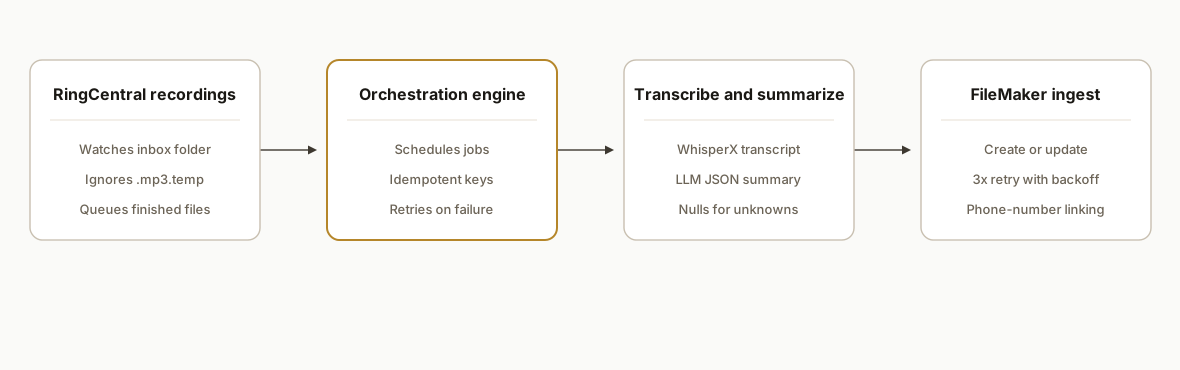
The pipeline runs on a local Docker host for speed and data control. A downloader picks up RingCentral recordings. A queue orchestrator schedules jobs. WhisperX transcribes. An LLM summarizes into structured fields. A FileMaker writer performs upserts with retries and phone-number matching. n8n coordinates the flow and we pinned versions to avoid breaking trigger changes.
- RingCentral capture: a downloader monitors the recordings path and only releases files once they are fully written. Temporary file patterns like .mp3.temp are ignored.
- Orchestration engine: n8n schedules scans, handles fan-out to transcription workers, and gates retries. Jobs are idempotent via a call-hash key.
- Transcription: WhisperX in Docker turns audio into timestamped text with speaker turns where available. This keeps costs predictable and throughput high.
- Summarization: a local LLM instance converts transcripts into meeting summaries and normalized fields like counterparty, instruments, and next actions.
- FileMaker ingest: a writer process maps the summary into FileMaker layouts and performs create-or-update with backoff and 3x retry. Phone-number matching links records to contacts.
Step-by-step: how to build it
1) Guard the recording intake and queue jobs
We only enqueue files once they are fully written to disk. RingCentral writes partial files with a temp suffix. The guard prevents broken transcripts and duplicate processing.
# watcher.sh
inotifywait -m -e close_write,create "$RC_INBOX" | while read -r dir action file; do
  if [[ "$file" =~ \.mp3$ ]] && [[ ! -f "$dir/$file.temp" ]]; then
    # wait a beat in case the writer lingers
    sleep 2
    echo "{\"path\":\"$dir/$file\"}" | jq -cM > "$QUEUE_DIR/$(date +%s)-$file.json"
  fi
done
Key gotcha: always ignore any filename that ends with .mp3.temp or similar and introduce a short post-write delay.
2) Pin orchestration and workers in Docker
We ran everything locally in containers so upgrades are controlled and compute is close to storage.
# docker-compose.yml
services:
  n8n:
    image: n8nio/n8n:1.75.0
    restart: unless-stopped
    environment:
      - N8N_LOG_LEVEL=info
    ports:
      - "5678:5678"
    volumes:
      - ./data/n8n:/home/node/.n8n

  whisperx:
    image: ghcr.io/someorg/whisperx:stable
    restart: unless-stopped
    volumes:
      - ./audio:/app/audio
      - ./out:/app/out

  ollama:
    image: ollama/ollama:0.3.12
    restart: unless-stopped
    volumes:
      - ./models:/root/.ollama
    ports:
      - "11434:11434"
Pin versions. We froze n8n until a later stable release because a trigger rename upstream could break file watchers.
3) Transcribe audio deterministically
Run transcription in a worker that reads queued jobs and writes JSON transcripts back to disk. Timestamped output helps downstream QA.
# transcribe.sh
set -euo pipefail
for job in $QUEUE_DIR/*.json; do
  AUDIO=$(jq -r .path "$job")
  BASENAME=$(basename "$AUDIO" .mp3)
  if [[ -f "$AUDIO" && ! -f "$OUT_DIR/$BASENAME.transcript.json" ]]; then
    docker exec whisperx /app/whisperx -f "/app/audio/$BASENAME.mp3" \
      --json "/app/out/$BASENAME.transcript.json"
  fi
done
Gotcha: keep a simple ledger to avoid re-processing. The presence of a .transcript.json is an easy idempotency guard.
4) Summarize to structured fields
We use a local LLM for speed and cost control. Prompting is explicit about fields we need, tone, and what to do with low-confidence items.
// summarize.js
import fetch from "node-fetch";

export async function summarize(transcript) {
  const prompt = [
    "Summarize this trading call. Return JSON with keys:",
    "counterparty, participants[], instruments[], summary, next_actions[], call_datetime, phone_e164",
    "Be factual. If unknown, use null not a guess."
  ].join("\n");

  const res = await fetch("http://localhost:11434/api/generate", {
    method: "POST",
    headers: { "Content-Type": "application/json" },
    body: JSON.stringify({ model: "llama3:instruct", prompt: `${prompt}\n\n${transcript}` })
  });
  const text = await res.text();
  return JSON.parse(text.match(/\{[\s\S]*\}/)[0]);
}
Guardrail: require null for unknowns so FileMaker fields do not fill with hallucinations.
5) Upsert into FileMaker with retries
Write a small wrapper that maps your JSON to the target layout and retries transient failures. We used 3 attempts with exponential backoff.
// filemaker-writer.js
export async function upsertToFileMaker(record, client) {
  const max = 3;
  let attempt = 0;
  while (attempt < max) {
    try {
      // map fields and call your FileMaker client
      await client.upsertRecord({
        layout: process.env.FM_LAYOUT,
        matchKey: hashKey(record), // e.g., audio filename hash or call_id
        fields: {
          call_datetime: record.call_datetime,
          phone: record.phone_e164,
          counterparty: record.counterparty,
          summary: record.summary,
          next_actions: record.next_actions?.join("; ") || null
        }
      });
      return true;
    } catch (e) {
      attempt++;
      if (attempt >= max) throw e;
      await new Promise(r => setTimeout(r, 500 * Math.pow(2, attempt)));
    }
  }
}
Two details matter: a stable match key so replays dedupe cleanly, and backoff so a busy server does not drop writes.
6) Link calls to contacts by phone number
We normalized to E.164 and matched against contact records. This keeps summaries attached to the right person without relying on filenames.
# phone_match.py
import phonenumbers

def to_e164(raw, region="US"):
    try:
        p = phonenumbers.parse(raw, region)
        if phonenumbers.is_valid_number(p):
            return phonenumbers.format_number(p, phonenumbers.PhoneNumberFormat.E164)
    except Exception:
        return None
    return None
Gotcha: mixed local formats create false negatives. Normalize every phone field going into FileMaker and during matching.
Where it gets complicated
- Partial files from RingCentral: the platform writes temporary .mp3.temp files during uploads. If you transcribe those you get corrupt text. Only enqueue finished .mp3 files and add a small post-write delay.
- FileMaker writes need retries: even healthy servers occasionally refuse a write under load. A 3x retry with backoff improved reliability in production.
- Phone number hygiene: matching on numbers only works when everything is in the same format. Normalize all numbers to E.164 on ingest and in FileMaker.
- Orchestrator churn: we froze n8n at a known-good build because a later release renamed a trigger. Pin versions until you have time to verify flows.
- Privacy and discoverability: once every call is transcribed and indexed, sensitive remarks become searchable. Set retention, access, and audit policies.
What this actually changes
For a commodity trading shop, every RingCentral call now lands in FileMaker with a transcript, summary, and next actions. At cutover the system ingested 39,222 records with zero errors reported. The value is structural: faster follow-up, fewer missed details, and searchable context for compliance and auditing.
One external anchor: knowledge workers spend on the order of 19 percent of their time searching for information and another 14 percent communicating internally. Better capture and retrieval can recapture 20 to 25 percent productivity in organizations that adopt social technologies effectively (McKinsey Global Institute, The social economy). Source: https://www.mckinsey.com/industries/technology-media-and-telecommunications/our-insights/the-social-economy
Frequently asked questions
Does FileMaker support programmatic data ingest?
Yes. FileMaker exposes a modern data interface you can write to from a server process. In our build we map summaries to a target layout and perform create-or-update operations with retries. You do not need to screen-scrape the UI to keep FileMaker in sync.
Can this run entirely on-prem for data control?
Yes. We ran the downloader, orchestrator, transcription, and summarization locally in Docker. That kept audio and transcripts on the client's network. The only outbound calls were to local services, then to the FileMaker server inside the same environment.
How do you prevent duplicates if a recording is re-downloaded?
We compute a stable match key per call, such as a hash of the audio filename and timestamp or a vendor call identifier. The FileMaker writer performs an upsert keyed on that value, so replayed jobs update the same record rather than creating a new one.
Is this real time or batch?
Our deployment ran near-real-time for new recordings, with a short delay for file-finalization and transcription. You can also schedule hourly or nightly batches if your infrastructure prefers larger windows or if compute is shared across teams.
What does this cost to operate monthly?
Transcription and summarization ran on local compute, so recurring costs were minimal. Your real cost is the server and storage you already maintain. If you choose hosted transcription or model APIs, add their usage fees on top. We designed the stack to keep those optional.
Can a non-developer maintain this after handoff?
Yes. We pinned versions, documented the flows, and added clear logs. Typical operator tasks are restarting containers, checking the queue folder, and reviewing any failed-write alerts. Changing field mappings or layouts should go through a developer.
If you want this running against your calls and FileMaker in a safe, on-prem posture, we have already built and shipped it. See our document automation services, read how we automate Fathom meeting notes, or book a 20-minute call and we will map your environment in the first five minutes.
Want us to build this for you?
Nine questions, about 90 seconds. You see the hours it is costing you, then pick a time. No pitch.
Get your free assessment