
If you need cómo exportar Typeform a Google Sheets reliably: our production pipeline backfills every historical response through the Typeform Responses API, then keeps your Sheet in sync in real time with webhooks, all without duplicates when questions change or people edit. This post is the build pattern we shipped for marketing and ops teams that need a clean, continuous feed.
Typeform to Google Sheets automation is a two-part system: an API backfill job that loads history and a webhook listener that appends new submissions in real time with idempotent keys.
The problem it solves
Teams usually start with Typeform's native Google Sheets connector and hit limits: the official backfill only pulls up to 1,000 existing responses, rate spikes can deactivate the integration, and schema drift creates blanks when questions get added mid-campaign. Partial responses can also spawn extra rows. Source: Typeform help notes the 1,000-response backfill cap and drift behavior (a Token column is added and new fields appear only after the first new answer) at their Google Sheets guide.
| Task | Manual or native connector | Our backfill + webhook sync |
|---|---|---|
| Historical load | Capped at 1,000 responses per Typeform's guide | Full backfill via GET /forms//responses with paging |
| Ongoing sync | Can deactivate on API spikes or big Sheets | Webhook POSTs with a secret, buffered writes, retries |
| Duplicates | Partial responses can create multiple rows | Idempotency by response unique ID, one row per submission |
| Schema changes | New questions add columns after first answer, old rows blank | Schema-normalizer adds columns up front, sets nulls deterministically |
| Timezones | UTC in payloads | Normalized to your timezone during write |
| Scale limits | Deactivates at Google Sheets cell limit | Rolls to a new tab or a new Sheet before the limit |
Cited limits: native Google Sheets integration backfills up to 1,000 existing responses and may deactivate at Google Sheets cell limits and API rate spikes. Sources: Typeform Google Sheets integration guide and webhooks help pages.
How the automation works
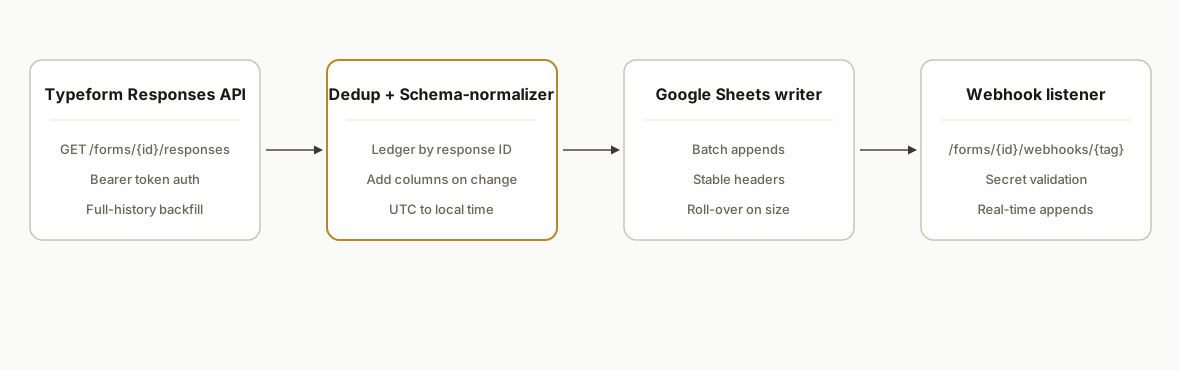
We run a one-time backfill through the Typeform Responses API, write rows with a stable column order, and store an idempotency ledger keyed by the response's unique ID. Then we register a webhook on the form that POSTs new submissions to our listener with a shared secret. The listener validates the secret, checks the ledger, normalizes fields, and appends the row. When you add a new question, the schema-normalizer adds a new column before the first answer lands so nothing breaks.
- Typeform Responses API backfill: Uses GET /forms//responses from https://api.typeform.com with a Bearer token to page through historical submissions. Source: Typeform developers Responses API.
- Idempotency ledger: We store each response unique ID so re-deliveries or partial updates never create duplicates. Native Sheets adds a Token column; our ledger relies on the response's unique identifier consistently.
- Google Sheets writer: Writes in batches to reduce API calls. We standardize column order and convert timestamps from UTC to your timezone. Typeform notes UTC times in exports; we normalize during writes.
- Form webhook for continuous sync: Registered at https://api.typeform.com/forms/{form_id}/webhooks/{tag} with a secret so each POST can be validated. Source: Typeform webhook reference.
- Schema-normalizer: Detects new Typeform questions and adds matching columns proactively, preventing the delayed-column problem documented in the native integration guide.
Step-by-step: how to build it
1) Create a destination Google Sheet with stable headers
Define your target columns once, including a response_id, submitted_at, and all current question refs. Keeping a frozen schema avoids column shuffles later.
// headers.ts
export const HEADERS = [
  "response_id",
  "submitted_at",
  "email",
  "name",
  "q1_how_did_you_hear",
  "q2_comments",
  // ...one per question ref
];
Gotcha: Typeform adds new columns in its native integration only after a first answer is received, leaving earlier rows blank for that field. Pre-adding columns prevents confusing blanks later. Source: Typeform Google Sheets guide.
2) Backfill history via Typeform Responses API
Use a personal access token in the Authorization header. US base URL is https://api.typeform.com. EU accounts use https://api.eu.typeform.com or https://api.typeform.eu. Source: Typeform developer get started.
// backfill.js
import fetch from "node-fetch";

const TF_BASE = process.env.TYPEFORM_BASE || "https://api.typeform.com";
const FORM_ID = process.env.TYPEFORM_FORM_ID;
const TOKEN = process.env.TYPEFORM_TOKEN; // Bearer token

async function* listResponses() {
  let pageToken = undefined;
  while (true) {
    const qp = new URLSearchParams({ page_size: "1000" });
    if (pageToken) qp.set("after", pageToken);
    const resp = await fetch(`${TF_BASE}/forms/${FORM_ID}/responses?${qp}`, {
      headers: { Authorization: `Bearer ${TOKEN}` },
    });
    if (!resp.ok) throw new Error(`Typeform ${resp.status}`);
    const data = await resp.json();
    for (const r of data.items || []) yield r;
    if (!data.items?.length || !data.page_count || !data.token) break;
    pageToken = data.token; // API supplies a paging token
  }
}

export async function runBackfill(writeRows) {
  const batch = [];
  for await (const r of listResponses()) {
    batch.push(mapToRow(r));
    if (batch.length >= 500) { await writeRows(batch); batch.length = 0; }
  }
  if (batch.length) await writeRows(batch);
}

function mapToRow(r) {
  const answers = Object.fromEntries((r.answers || []).map(a => [a.field?.ref, extract(a)]));
  return {
    response_id: r.response_id || r.token, // prefer response_id, fall back if present
    submitted_at: r.submitted_at,
    email: answers.email || r.hidden?.email || "",
    name: answers.name || "",
    q1_how_did_you_hear: answers.q1_ref || "",
    q2_comments: answers.q2_ref || "",
  };
}

function extract(a) {
  if (a.email) return a.email;
  if (a.text) return a.text;
  if (a.boolean !== undefined) return String(a.boolean);
  if (a.number !== undefined) return String(a.number);
  if (a.choice?.label) return a.choice.label;
  if (a.choices?.labels) return a.choices.labels.join(", ");
  return "";
}
Stat to know: Typeform's native Google Sheets backfill pulls up to 1,000 existing responses, which is why we use the Responses API for full history. Source: Typeform Google Sheets integration guide.
3) Write to Google Sheets in batches and enforce idempotency
We keep a ledger of seen response IDs to prevent duplicates. You can store this in a hidden tab or a database. Below is an Apps Script writer example.
// Code.gs (Apps Script bound to the Sheet)
const SHEET_NAME = 'Responses';
const LEDGER_NAME = 'Ledger';

function ensureTabs() {
  const ss = SpreadsheetApp.getActive();
  if (!ss.getSheetByName(SHEET_NAME)) ss.insertSheet(SHEET_NAME);
  if (!ss.getSheetByName(LEDGER_NAME)) ss.insertSheet(LEDGER_NAME);
}

function writeRows(rows) {
  ensureTabs();
  const ss = SpreadsheetApp.getActive();
  const sh = ss.getSheetByName(SHEET_NAME);
  const ledger = new Set(ss.getSheetByName(LEDGER_NAME).getRange(1,1,ss.getSheetByName(LEDGER_NAME).getLastRow()||1,1).getValues().flat());
  const out = [];
  const newIds = [];
  rows.forEach(r => {
    if (ledger.has(r.response_id)) return;
    newIds.push([r.response_id]);
    out.push([
      r.response_id,
      new Date(r.submitted_at),
      r.email,
      r.name,
      r.q1_how_did_you_hear,
      r.q2_comments
    ]);
  });
  if (out.length) sh.getRange(sh.getLastRow()+1,1,out.length,out[0].length).setValues(out);
  if (newIds.length) ss.getSheetByName(LEDGER_NAME).getRange(ss.getSheetByName(LEDGER_NAME).getLastRow()+1,1,newIds.length,1).setValues(newIds);
}
Gotcha: Google Sheets integrations can deactivate when hitting API rate limits or large Sheets. Typeform documents these risks in their connector guide, including deactivation at the platform cell limit.
4) Register a Typeform webhook for real-time sync
Register a webhook tag with a secret so you can validate incoming POSTs. Source: Typeform webhook reference.
curl -X PUT \
  -H "Authorization: Bearer $TYPEFORM_TOKEN" \
  -H "Content-Type: application/json" \
  "https://api.typeform.com/forms/$FORM_ID/webhooks/prod" \
  -d '{
    "url": "https://your-listener.example.com/typeform",
    "enabled": true,
    "secret": "replace-with-strong-shared-secret"
  }'
Typeform webhooks deliver JSON POSTs and can include a secret for validation. Source: Typeform webhooks help.
5) Build the webhook listener with secret validation and dedup
Use the same mapToRow and ledger guard so live events behave like backfill.
// listener.js
import crypto from 'crypto';

function isValid(req, secret) {
  const sig = req.headers['typeform-signature'] || '';
  const hmac = crypto.createHmac('sha256', secret).update(req.rawBody).digest('base64');
  return sig === `sha256=${hmac}`;
}

export async function handler(req, res) {
  const secret = process.env.TF_WEBHOOK_SECRET;
  if (!isValid(req, secret)) return res.status(401).end();
  const event = JSON.parse(req.body || req.rawBody);
  const r = event.form_response;
  const row = mapToRow(r);
  if (await seen(row.response_id)) return res.status(200).end();
  await writeRows([row]);
  res.status(200).end();
}
Stat to watch: native connectors run on Google Sheets and can stop when a Sheet nears the documented cell limit; rolling to a new tab or archiving older rows keeps the feed healthy. Source: Typeform Google Sheets integration guide.
6) Handle schema drift proactively
When you add a new question in Typeform, add a column now rather than waiting for the first answer.
// schema.js
import { google } from 'googleapis';

export async function ensureColumns(auth, spreadsheetId, headers) {
  const sheets = google.sheets({ version: 'v4', auth });
  const get = await sheets.spreadsheets.values.get({ spreadsheetId, range: 'Responses!1:1' });
  const current = (get.data.values?.[0] || []);
  const missing = headers.filter(h => !current.includes(h));
  if (!missing.length) return;
  const updated = current.concat(missing);
  await sheets.spreadsheets.values.update({
    spreadsheetId,
    range: 'Responses!1:1',
    valueInputOption: 'RAW',
    requestBody: { values: [updated] }
  });
}
This avoids the blank-earlier-rows artifact Typeform documents for its native Sheets connector when new questions are added midstream.
Where it gets complicated
Backfill beyond 1,000 responses. The official Google Sheets connector caps initial backfill at 1,000 existing responses. We always pull history through GET /forms//responses to avoid that ceiling. Source: Typeform Google Sheets integration guide.
EU vs US data centers. The API base can be api.typeform.com or an EU base like api.eu.typeform.com. We discover the correct base during setup so credentials do not 401 in production. Source: Typeform developer get started.
Rate spikes and Sheets stability. Native integrations can deactivate when hitting API limits or the cell limit. We batch writes and add roll-over logic to new tabs or a new Sheet to stay under the limit. Source: Typeform connector help.
Partial responses and edits. Typeform can emit partials. We key on the response unique ID and upsert the row rather than append when an edit event arrives, preventing multiple rows per person.
Schema drift mid-campaign. New questions appear only after first answer in the native connector. We detect and add columns ahead of time to keep the array shape stable. Source: Typeform Google Sheets guide.
Time normalization. Typeform exports UTC timestamps. We convert to your operating timezone during write so downstream dashboards make sense. Source: Typeform export docs note UTC times.
What this actually changes
After we shipped this, marketing and ops teams stopped exporting CSVs weekly and got a clean, single-row-per-submission feed into Sheets that backfilled all history and kept up in real time. The two structural upgrades: no 1,000-response ceiling on day one and no duplicate rows from partials or retries. Typeform documents the native 1,000-backfill cap and the Google Sheets cell-limit deactivation risk, which this design avoids by using the Responses API for history and a buffered writer for live sync. Sources: Typeform Google Sheets integration and webhooks guides.
Frequently asked questions
Does Typeform have an API I can use for backfill?
Yes. Use GET /forms//responses on https://api.typeform.com or the EU variants with a Bearer token to retrieve historical submissions. This is how we load more than the 1,000 responses that the native Google Sheets connector backfill covers. Sources: Typeform developers Responses API and Google Sheets guide.
How do I connect Typeform to Google Sheets for continuous sync?
Keep the native connector off if you need strict dedup. Register a webhook at /forms//webhooks/ with a secret, validate incoming POSTs, and append rows after checking an idempotency ledger. This mirrors the native behavior without the backfill cap or duplicate risk. Source: Typeform webhook reference.
How do you prevent duplicates when people edit or when Typeform retries?
We key every write on the response unique ID and maintain a ledger. If an incoming response already exists, we update that row instead of appending. This prevents the multiple-row artifact from partial responses the native connector can create. Source: Typeform native behavior notes in the Google Sheets guide.
Can it handle EU-hosted Typeform data?
Yes. Typeform runs EU data centers with different base URLs. We set the base to api.eu.typeform.com or api.typeform.eu where required and authenticate with the same Bearer token approach. Source: Typeform developer get started.
What does this cost monthly?
Typeform API access is included with your account. Google Sheets has usage limits and a cell limit documented in Typeform's guide. Our builds batch writes to stay well under those thresholds and roll to a new tab or Sheet when you approach the limit. Sources: Typeform Google Sheets integration and webhooks docs.
I only need a quick export. Should I use CSV?
For one-offs, Typeform supports CSV or XLSX exports and a results summary CSV. For a live dashboard, use the API backfill plus webhook sync so your Sheet stays current without manual exports. Source: Typeform export articles.
If you need a reliable Typeform to Sheets feed that backfills everything and never double-writes, we have shipped this exact system in production. See our related deep dive on avoiding duplicates in Sheets in Typeform to Sheets: Update Without Duplicates. If you prefer us to build it end to end, see our document automation services and book a 15 minute call.
Want us to build this for you?
Nine questions, about 90 seconds. You see the hours it is costing you, then pick a time. No pitch.
Get your free assessment