
Short answer: we did not find a public InTow developer API or a Zapier/Make connector. We integrated InTow by scheduling CSV exports from InTow Connect Console, ingesting them into a database, joining that data to live Samsara GPS, and driving a dispatch dashboard, alerts, and an accounting CSV for QuickBooks imports. If you run InTow today, this pattern gets you dashboards and sync without waiting on a vendor API.
Definition: InTow API integration is the practice of automating exports from InTow, normalizing them, and programmatically combining them with external systems like Samsara and accounting so dispatch can see, alert, and reconcile without manual copy paste.
The problem it solves
Most tow operators want one screen that shows active calls, trucks on map, ETAs, and the day's money. InTow Connect already pushes in-app or text notices, but there is no public API we could find and no self-serve Zapier or Make app. The Connect Console can export call data to Excel, but there is no native schedule that pushes it out automatically.
| Process | Manual InTow workflow | Automated InTow workflow |
|---|---|---|
| Dispatch visibility | Flip between InTow screens. Ask drivers for location by phone or SMS. | One dashboard: active calls from CSV export joined to live Samsara GPS, colored by SLA and status. |
| Alerts | Text chains and group chats. Easy to miss during rush. | Rules engine sends Slack or SMS alerts for aging calls, unassigned calls, or driver off-route. |
| Accounting | Re-key call data or hand-edit spreadsheets for QuickBooks. | ETL maps InTow CSV to a clean accounting CSV and drops it into an import folder. |
| Driver scorecards | Weekend spreadsheet chore with fragile formulas. | Nightly rollups compute on-time, cancel ratio, ticket value by driver. |
How the automation works
We run a three-lane architecture: export out of InTow on a reliable cadence, enrich with live GPS from Samsara, and publish two outputs: a dispatch dashboard with alerts and an accounting-ready CSV.
- InTow CSV export lane: InTow Connect Console supports exporting call data to Excel or CSV. We standardize the export layout and store each file in a watched folder. A small service ingests each file and upserts rows into Postgres with idempotency.
- GPS lane via Samsara: InTow integrates with Samsara on the InTow side. For external dashboards we read GPS from Samsara directly and join by truck identifier. The official Samsara marketplace page notes the integration is built by InTow and enabled through InTow Manager. Plan vendor coordination and a Windows service on your side for their native link.
- Publish lane: Our service computes KPIs, powers a dashboard API, sends alerts for aging or unassigned calls, and writes an accounting CSV mapped to your import template.
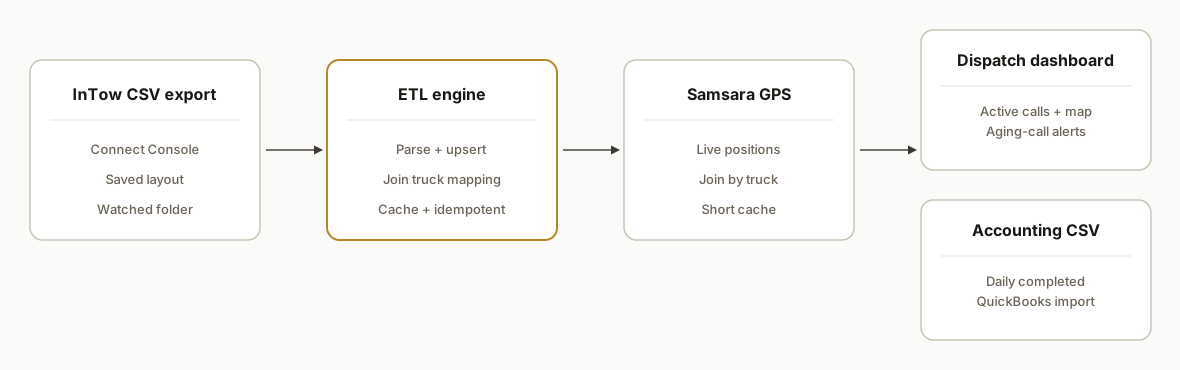
Sources we relied on while designing this: InTow Connect Console supports exporting to Excel for downstream uses like payroll. InTow's mobile app supports push or text notices for call events. Samsara's marketplace confirms an InTow-built integration that you enable through InTow and requires installing an InTow GPS Service on a Windows PC and mapping trucks to Samsara vehicles.
Step-by-step: how to build it
1) Standardize the InTow export and capture it reliably
The first move is to agree on one export layout from InTow Connect Console and drop every export file into a shared "intow_exports" folder. We keep a manifest so re-exports do not duplicate rows.
# calls_2026-07-21.csv
call_number,call_date,call_time,status,truck_id,driver_name,customer,location_to,price,notes
A12345,2026-07-21,14:36,Active,TRK-07,Garcia,AAA-123456,123 Main St -> 45 Oak Ave,185.00,
A12346,2026-07-21,14:52,Completed,TRK-02,Lee,GEICO-778899,54 Pine Rd -> 9 Port Ln,265.50,Impound
Key gotcha: exports are manual in the Console. Until InTow offers a schedule, assign a day-close step or use a desktop job to trigger the same export button reliably.
2) Ingest CSVs into Postgres with idempotency
Our ingestion service watches the folder, parses each CSV, and upserts on the stable key you choose (for example: call_number).
// ingest.js
import fs from "fs";
import path from "path";
import { parse } from "csv-parse";
import chokidar from "chokidar";
import pg from "pg";

const pool = new pg.Pool({ connectionString: process.env.DATABASE_URL });
const WATCH_DIR = process.env.WATCH_DIR || "./intow_exports";

async function upsert(row) {
  const q = `
    insert into calls(call_number, call_dt, status, truck_id, driver_name, customer, leg_to, price, notes)
    values($1, $2, $3, $4, $5, $6, $7, $8::numeric, $9)
    on conflict (call_number) do update set
      status = excluded.status,
      truck_id = excluded.truck_id,
      driver_name = excluded.driver_name,
      price = excluded.price,
      notes = excluded.notes;
  `;
  const dt = new Date(`${row.call_date}T${row.call_time}:00`);
  await pool.query(q, [row.call_number, dt, row.status, row.truck_id, row.driver_name, row.customer, row.location_to, row.price, row.notes]);
}

function ingestFile(file) {
  fs.createReadStream(file)
    .pipe(parse({ columns: true, skip_empty_lines: true }))
    .on("data", (row) => upsert(row).catch(console.error))
    .on("end", () => console.log(`Ingested ${path.basename(file)}`));
}

chokidar.watch(WATCH_DIR, { ignoreInitial: false })
  .on("add", ingestFile)
  .on("change", ingestFile);
Gotcha: Excel sometimes saves numbers like call numbers in scientific notation or strips leading zeros. Save as CSV and set sensitive columns to Text before export.
3) Create a clean schema and truck mappings
We keep trucks and driver associations explicit so joins are stable even when unit labels change on paper.
-- schema.sql
create table if not exists trucks (
  truck_id text primary key,
  samsara_vehicle_id text,
  label text
);

create table if not exists calls (
  call_number text primary key,
  call_dt timestamptz not null,
  status text not null,
  truck_id text references trucks(truck_id),
  driver_name text,
  customer text,
  leg_to text,
  price numeric,
  notes text
);

create index if not exists idx_calls_active on calls(status) where status in ('Active','Assigned');
Gotcha: keep a mapping table for any difference between InTow's truck identifiers and what drivers or Samsara call a unit. That avoids silent mismatches.
4) Join live GPS from Samsara for the map and ETAs
For external dashboards we read GPS directly from Samsara and join on trucks. Keep the fetch isolated so the rest of your system stays model and vendor agnostic.
// gps.js
export async function getTruckPositions(trucks) {
  // Input: array of { truck_id, samsara_vehicle_id }
  // Output: map of truck_id -> { lat, lon, heading, updatedAt }
  // Implement with your Samsara token in env and the official SDK or HTTPS.
  // Keep retry, backoff, and a 60s cache.
  return new Map();
}
Gotcha: Samsara's marketplace notes the InTow integration is enabled by InTow and requires a Windows InTow GPS Service. For your external dashboard, you can still read Samsara directly in parallel. Plan for vendor lead time to enable their native link inside InTow.
5) Publish a dispatch API and send alerts for aging calls
We publish a simple API for the dashboard and a rules engine that pages the team when a call sits too long without a truck.
// alerts.js
import fetch from "node-fetch";
import pg from "pg";
const pool = new pg.Pool({ connectionString: process.env.DATABASE_URL });

export async function sendAgingAlerts() {
  const q = `
    select call_number, extract(epoch from now() - call_dt)/60 as age_min
    from calls where status = 'Active' and now() - call_dt > interval '15 minutes';
  `;
  const { rows } = await pool.query(q);
  for (const r of rows) {
    const text = `Call ${r.call_number} is ${Math.round(r.age_min)} min old with no truck assigned.`;
    await fetch(process.env.SLACK_WEBHOOK_URL, {
      method: 'POST',
      headers: { 'Content-Type': 'application/json' },
      body: JSON.stringify({ text })
    });
  }
}
Gotcha: InTow Connect supports push or text notices in-app. Webhooks for external systems are not documented. Your alerting should fire from your ETL layer where you control formats and routing.
6) Generate an accounting-ready CSV for QuickBooks imports
Accounting does not need every column. We write the minimal set your bookkeeper wants and drop the file in a shared import folder.
// export-accounting.js
import fs from "fs";
import pg from "pg";
const pool = new pg.Pool({ connectionString: process.env.DATABASE_URL });

export async function writeAccountingCsv(filepath) {
  const { rows } = await pool.query(`
    select to_char(call_dt, 'YYYY-MM-DD') as date,
           call_number as reference,
           customer,
           price as amount,
           coalesce(notes, '') as memo
    from calls where status = 'Completed' and call_dt::date = current_date - 1
    order by call_dt asc;
  `);
  const header = 'Date,Reference,Customer,Amount,Memo\n';
  const body = rows.map(r => `${r.date},${r.reference},"${r.customer}",${r.amount},"${r.memo}"`).join('\n');
  fs.writeFileSync(filepath, header + body + '\n');
}
Gotcha: an official InTow to QuickBooks integration is unconfirmed. QuickBooks imports accept CSV but column names and tax handling vary by account. Have your accountant finalize the template before you automate this export.
7) Wire the front end to the API
Any dashboard stack works. We often serve one JSON route for active calls joined with GPS. Client code does the rest.
// api/active.js (Express style)
app.get('/api/active', async (req, res) => {
  const { rows } = await pool.query("select * from calls where status in ('Active','Assigned') order by call_dt asc");
  const positions = await getTruckPositions(await loadTrucks());
  const out = rows.map(r => ({
    ...r,
    gps: positions.get(r.truck_id) || null
  }));
  res.json({ data: out });
});
Gotcha: set a short-cache on GPS to avoid hammering telematics and to keep the map smooth.
Where it gets complicated
- No public API: We could not find an official InTow developer API. Plan for export-driven integration. If an API appears later, keep your ETL modular so you can swap sources without a rebuild.
- Manual export cadence: The Connect Console's export is manual. Until scheduling exists, treat day-close export as a shift task or automate the desktop with a safe, idempotent macro. Feet on the ground beats a brittle headless browser here.
- Webhooks unconfirmed: InTow Connect supports push or text notices. We did not find outbound webhooks. Build alerts from your ETL so paging is in your control.
- Samsara enablement steps: Samsara's marketplace page says the InTow integration is built by InTow. Expect vendor coordination and a Windows InTow GPS Service install where you map trucks to Samsara vehicles.
- Time zones and DST: Store call_dt in UTC and render in local time. Daylight saving transitions create apparent 59 or 61 minute gaps if you do not anchor to UTC internally.
- Excel type drift: Excel will coerce long IDs, phone numbers, and leading-zero fields. Lock columns to Text in the export layout and validate on ingest.
What this actually changes
For a towing operation running InTow, this pattern removed the need to re-key data and gave dispatch a single pane: live calls from yesterday's and today's exports, trucks from Samsara, and clear red-yellow-green rules for what needs action. Accounting receives a clean CSV at the end of day instead of a fragile workbook.
Why this matters: roadside volume is relentless. AAA reported it responded to over 32 million roadside rescues in 2023. A team that is not re-keying and screen-flipping moves faster when volume spikes. Source: https://newsroom.aaa.com (AAA newsroom reports annual roadside assistance volumes).
Frequently asked questions
Does InTow have an official API?
We did not find public developer docs or a published base URL and auth spec for an InTow API. Our production approach uses exports from InTow Connect Console as the system of record and layers automation on top.
Is there a Zapier or Make.com connector for InTow?
We found no official InTow app listings in the Zapier or Make directories. Treat integration as a light data pipeline: export CSV from InTow, watch-folder ingest, and publish to your downstream tools.
How do you build a real-time dashboard without webhooks?
You combine frequent InTow exports for call state with live GPS from Samsara. The GPS lane is real time. Call-state freshness depends on your export cadence. Many operators do day-close plus ad-hoc exports during peaks.
Can this sync to QuickBooks automatically?
An official InTow to QuickBooks integration is unconfirmed. We generate a CSV mapped to your accountant's import template and drop it where they expect it. QuickBooks Desktop and Online both accept CSV imports when the columns match the account's setup.
What does this cost monthly?
Infrastructure is light: a small database and a serverless or tiny VM process to watch files and compute alerts. Your main cost is the engineering build and light maintenance. There are no per-call platform fees in this pattern.
How long does it take to stand up?
We typically stand up the ingest, schema, and basic dashboard in one to two weeks after the export layout is locked. Samsara enablement inside InTow requires vendor coordination, so get that request in early.
If you want a single-pane dispatch dashboard and clean accounting handoff while you stay on InTow, we have shipped this exact pattern. See our towing ops write-up on moving a demo to live, then book a short call. We cover the dispatch build on our services page too. Read our related post Tow company ops dashboard: from demo to live, see our services at /services#workflow-automation, and book time at /book.
Sources
- 1.AAA Newsroom: Automotive, Travel, and Traffic Safety Informationnewsroom.aaa.com
Want us to build this for you?
Nine questions, about 90 seconds. You see the revenue it is costing you, then pick a time. No pitch.
See your options