
Towbook integration without Zapier works by pairing three bridges: Samsara webhooks for live vehicle and job signals, a headless exporter for Towbook pages that do not expose self-serve integrations, and a warehouse sync via Polytomic where Towbook access is granted by token. We shipped this pattern to power dispatch visibility and clean accounting handoffs.
Towbook API integration is the practice of moving data in or out of Towbook using partner hooks, managed connectors, or a safe headless exporter when public developer docs are scarce.
The problem it solves
Most towing operators run Towbook for calls and billing, Samsara for GPS, and QuickBooks for accounting. Without a first-party Zapier or a public API you can self-serve, teams copy-pasted job details, re-keyed invoices, and checked driver status in three places. Dispatchers lost context and accounting closed late.
| Task | Manual workflow | Automated workflow |
|---|---|---|
| Dispatch status board | Refresh Towbook. Check Samsara map. Ask drivers in chat. | Samsara webhook events normalize into a live board joined to Towbook job refs. |
| Daily job rollup | Export or read jobs by hand. Paste into a sheet. | Nightly exporter captures jobs with a dedupe ledger. |
| Accounting handoff | Re-type invoice lines into QuickBooks. | One-click CSV drop or API handoff from a cleaned staging table. |
| Reporting | Build ad hoc Excel every Friday. | Warehouse sync keeps a reporting model current. |
According to McKinsey, about 60 percent of occupations have at least 30 percent of activities that could be automated with current technology (source: https://www.mckinsey.com/capabilities/mckinsey-digital/our-insights/where-machines-could-replace-humans-and-where-they-cant-yet).
How the automation works
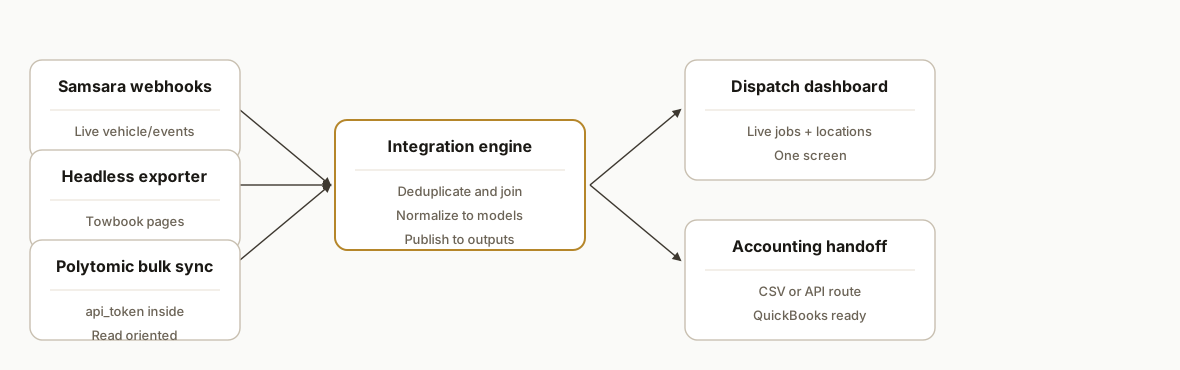
We use three proven ingress paths and one integration core: partner webhooks, a headless exporter, a warehouse sync, and a join-normalize engine.
- Samsara webhook feed: Samsara lists a Towbook integration and notes setup completes inside Towbook. We invert the pattern when we need data downstream: accept Samsara webhooks, normalize events, and key them to Towbook jobs by reference fields your team controls.
- Headless exporter: For Towbook pages that do not expose self-serve API hooks, a Playwright worker logs in on a schedule, exports or scrapes the needed fields, and writes to a dedupe-guarded staging table.
- Warehouse sync via Polytomic: Polytomic provides a Towbook connector requiring an api_token and offers Towbook as a bulk sync source. We treat this as read-oriented and model it in Postgres for reporting and joins.
- Integration engine: A small Node service or Inngest worker deduplicates, keys records, and publishes to outputs: a dispatch dashboard, CSV handoff for accounting, and optional CRM updates.
Step-by-step: how to build it
1) Accept Samsara webhooks and normalize events
Stand up a tiny Express endpoint to receive telematics and job-related events from Samsara. Verify a shared secret, flatten the payload, and buffer into Postgres.
// server/webhooks.js
import express from "express";
import crypto from "crypto";
import { Pool } from "pg";

const app = express();
app.use(express.json({ limit: "1mb" }));
const pool = new Pool({ connectionString: process.env.DATABASE_URL });

function verify(req) {
  const sig = req.header("X-Signature") || "";
  const hmac = crypto
    .createHmac("sha256", process.env.SAMSARA_WEBHOOK_SECRET)
    .update(JSON.stringify(req.body))
    .digest("hex");
  return crypto.timingSafeEqual(Buffer.from(sig), Buffer.from(hmac));
}

app.post("/webhooks/samsara", async (req, res) => {
  if (!verify(req)) return res.status(401).send("bad sig");
  const e = req.body; // do not assume a specific schema here
  await pool.query(
    `insert into samsara_events (event_ts, kind, data)
     values (to_timestamp($1/1000.0), $2, $3::jsonb)`,
    [e.timestamp || Date.now(), e.type || "unknown", e]
  );
  res.sendStatus(204);
});

app.listen(process.env.PORT || 3000);
Gotcha: do not hardcode Samsara field names. Treat the payload as an envelope and normalize downstream.
2) Build a Towbook headless exporter
Use Playwright to sign in and export a daily jobs list. Click by accessible labels, not brittle CSS selectors. Write rows to a staging table with idempotent upserts.
// workers/towbook-exporter.ts
import { chromium } from "playwright";
import { Pool } from "pg";

const pool = new Pool({ connectionString: process.env.DATABASE_URL });

export async function runTowbookExport() {
  const browser = await chromium.launch({ headless: true });
  const ctx = await browser.newContext();
  const page = await ctx.newPage();
  await page.goto(process.env.TOWBOOK_LOGIN_URL!);
  await page.getByLabel("Username").fill(process.env.TOWBOOK_USER!);
  await page.getByLabel("Password").fill(process.env.TOWBOOK_PASS!);
  await page.getByRole("button", { name: "Sign in" }).click();

  // Navigate to the Jobs page and trigger an export or read tabular rows
  await page.getByRole("link", { name: /Jobs/i }).click();
  await page.getByRole("button", { name: /Export/i }).click();

  // Example: read table rows if no file export is present
  const rows = await page.$$eval("table tbody tr", trs =>
    trs.map(tr => {
      const tds = Array.from(tr.querySelectorAll("td")).map(td => td.textContent?.trim() || "");
      return { job_number: tds[0], status: tds[1], customer: tds[2], driver: tds[3], when: tds[4] };
    })
  );

  for (const r of rows) {
    await pool.query(
      `insert into towbook_jobs_stage (job_number, status, customer, driver, when_raw)
       values ($1,$2,$3,$4,$5)
       on conflict (job_number) do update set status = excluded.status, driver = excluded.driver, when_raw = excluded.when_raw`,
      [r.job_number, r.status, r.customer, r.driver, r.when]
    );
  }

  await browser.close();
}
Gotcha: expect MFA or occasional login prompts. Keep a dedicated automation account and handle re-auth gracefully.
3) Create a dedupe ledger and clean model
Model a minimal dedupe ledger keyed by Towbook job number and an immutable source hash. Publish a clean view for downstream uses.
-- db/schema.sql
create table if not exists towbook_jobs_stage (
  job_number text primary key,
  status text,
  customer text,
  driver text,
  when_raw text,
  src_hash bytea generated always as (digest(coalesce(job_number,'')||coalesce(status,''),'sha256')) stored
);

create table if not exists jobs_ledger (
  job_number text primary key,
  last_src_hash bytea not null,
  first_seen timestamptz default now(),
  last_seen timestamptz default now()
);

create or replace function upsert_ledger() returns trigger as $$
begin
  insert into jobs_ledger(job_number, last_src_hash)
  values (new.job_number, new.src_hash)
  on conflict (job_number) do update set last_src_hash = excluded.last_src_hash, last_seen = now();
  return new;
end; $$ language plpgsql;

create trigger t_jobs_stage after insert or update on towbook_jobs_stage
for each row execute function upsert_ledger();

create or replace view jobs_clean as
select s.job_number, s.status, s.customer, s.driver, s.when_raw from towbook_jobs_stage s;
Gotcha: never rely on timestamps alone for dedupe. Use an immutable business key such as job number.
4) Ingest Polytomic's Towbook bulk sync
When your Towbook account supports a Polytomic connection, treat it as a read source and merge it into your model.
-- Example merge from polytomic staging into our clean model
insert into towbook_jobs_stage (job_number, status, customer, driver, when_raw)
select job_number, status, customer_name, driver_name, created_at::text
from polytomic_towbook_jobs
on conflict (job_number) do update set
  status = excluded.status,
  customer = excluded.customer,
  driver = excluded.driver,
  when_raw = excluded.when_raw;
Gotcha: Polytomic documents Towbook as a bulk sync source. Plan on reads, not writes, through this path.
5) Join Samsara events to jobs and publish a dispatch board
Use a materialized view to combine the latest Samsara location or status with each job.
create materialized view dispatch_board as
select j.job_number,
       j.status,
       j.driver,
       jsonb_path_query_first(s.data,'$.location') as last_location,
       max(s.event_ts) as last_update
from jobs_clean j
left join samsara_events s on (s.data->>'jobNumber') = j.job_number
group by 1,2,3,4;
Gotcha: key matching requires consistent job identifiers in Samsara notes or custom fields. Establish the convention with your team.
6) Generate an accounting-ready CSV handoff
Keep the QuickBooks push simple: one clean CSV in a known S3 path that accounting can import or a downstream job can transform into API calls.
# workers/accounting_export.py
import csv, os, boto3, datetime
import psycopg

def run():
    conn = psycopg.connect(os.environ["DATABASE_URL"])
    cur = conn.cursor()
    cur.execute("select job_number, status, customer, driver from jobs_clean where status = 'Completed'")
    rows = cur.fetchall()

    tmp = "/tmp/qbo_export.csv"
    with open(tmp, "w", newline="") as f:
        w = csv.writer(f)
        w.writerow(["DocNumber","CustomerRef","Memo","SalesRepRef"])
        for jn, st, cust, drv in rows:
            w.writerow([jn, cust, f"Tow job {jn}", drv])

    s3 = boto3.client("s3")
    key = f"exports/qbo/{datetime.date.today()}/qbo_export.csv"
    s3.upload_file(tmp, os.environ["EXPORT_BUCKET"], key)

if __name__ == "__main__":
    run()
Gotcha: teams often prefer CSV drops during the first month. Turn on direct API pushes only after the mapping is proven.
Where it gets complicated
- No public developer docs: We found no public Towbook developer docs. Evidence of an API exists through partners and Polytomic's connector requiring an api_token. Plan for partner-led flows or headless export where needed.
- Zapier or Make status is unconfirmed: We did not find an official Towbook app in Zapier or Make directories. Bring your own orchestration and error handling.
- Login prompts and MFA: Headless exporters must handle unexpected prompts and session expiry. Use a dedicated automation account and predictable 2FA.
- Field matching across systems: Samsara events rarely carry Towbook job numbers by default. Establish a convention for embedding a shared key.
- Read vs write boundaries: Treat Polytomic's Towbook connector as read-oriented. Route all mutations through your operations team or in-tool actions.
What this actually changes
In production we replaced clipboard work with scheduled jobs and partner webhooks. Dispatch now triages from a single board. Accounting pulls one clean file instead of re-keying. For a towing company owner we built a case-study demo dashboard that showed the end state before any integration work. It was a static demo, not a live deployment, yet it clarified the exact data the operator wanted on one screen.
If you want a visual of the operator view, we published a related post on building a Towbook-driven dispatch dashboard that covers the UI design and KPI layout.
Frequently asked questions
Does Towbook have an official API?
Public developer docs were not found. There is evidence of an API through partners: Polytomic lists a Towbook connector that requires an api_token, and Samsara documents a Towbook integration completed inside Towbook. In practice, we combine partner hooks, a headless exporter, and optional warehouse syncs.
Is there a Towbook Zapier or Make app?
We did not find an official Towbook app listed in Zapier or Make directories, so consider that status unconfirmed. When we need automation, we run our own endpoints and schedulers and connect via partner webhooks, managed syncs, or a headless exporter.
Can this run in real time?
Yes for partner signals like Samsara: webhooks are near real time. For Towbook pages without hooks we schedule an exporter at a safe cadence. The dispatch board updates as events arrive and as the exporter posts fresh rows.
What access do we need from our Towbook account?
An admin-level account for the automation user and, where applicable, the ability to generate or approve partner connections. If your account supports a Polytomic connection, we will ask you to provision the api_token inside Towbook.
How long does this take to deploy?
Typical timeline is 2 to 3 weeks: week 1 for webhook and exporter, week 2 for modeling and dashboard, then a short shadow period before turning on accounting exports. If your team already runs Samsara, the first useful board usually appears in days.
What does this cost monthly?
Infrastructure is modest: one Postgres, a serverless host, and optional warehouse sync costs if you use a managed connector. The main cost is the initial build. We size it after a 15 minute scoping call once we see your processes and access model.
If you want this wired the right way, we have already walked this road. See our services for workflow automation at /services#workflow-automation, read the related post on Towbook dispatch dashboards at /blog/towbook-api-integration-dispatch-dashboard, and when you are ready, book a working session at /book.
Want us to build this for you?
Nine questions, about 90 seconds. You see the hours it is costing you, then pick a time. No pitch.
Get your free assessment