
We built a two-way Intercom to GoHighLevel sync that listens to Intercom webhooks, normalizes contacts, and routes conversations into the correct GoHighLevel pipeline and owner in near real time. It is for teams that sell in Intercom but track pipeline and email in GoHighLevel. This guide shows how it works and the exact mechanics we used.
Intercom to GoHighLevel sync automation is the system that turns Intercom contacts and conversations into properly routed GoHighLevel records, then mirrors key updates back so nothing falls through the cracks.
The problem it solves
Sales and success teams split their day between Intercom and GoHighLevel. Without an integration, you retype names, paste chat snippets into notes, and miss follow-ups when owners change. CSV exports help for backfills, but there is no native Intercom to GoHighLevel sync, and manual routing breaks at volume.
| Manual process | Automated Intercom → GoHighLevel |
|---|---|
| Copy contact details from Intercom into GoHighLevel, guess the right pipeline and owner | Contacts auto-upsert to GoHighLevel with mapped pipeline and owner from routing rules |
| Paste chat transcripts into notes, or forget entirely | Conversation metadata and the latest message are pushed into GoHighLevel notes or custom fields |
| Miss follow-ups when ownership changes in GoHighLevel | Owner changes reflected back to Intercom tags or assignments so the same person replies |
| Periodic CSV export and ad hoc imports | Webhooks stream events in near real time, CSV is used only for safe backfills |
How the automation works
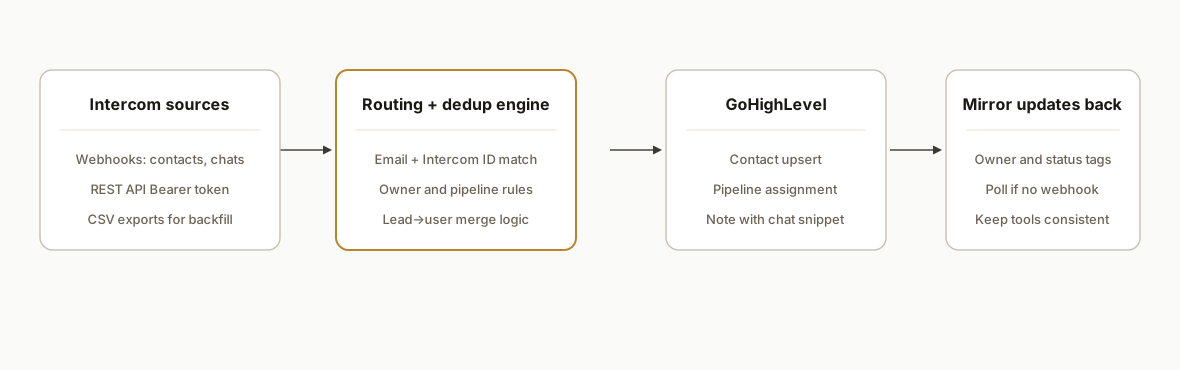
We subscribe to Intercom webhooks for contacts and conversations. An orchestration layer applies routing rules, deduplicates on email and Intercom IDs, and upserts GoHighLevel contacts and tasks. For two-way behavior, we listen to GoHighLevel events where available or poll on a short cadence, then tag or assign in Intercom to keep owners in sync.
- Intercom webhooks: Intercom sends real-time events for contacts and conversations to our endpoint. Auth to Intercom's REST API uses Authorization: Bearer with a private access token or OAuth 2.0. Source: Intercom developer docs.
- Routing and dedup engine: We map by email, domain, and Intercom lead vs user status, merge duplicates, and apply owner rules by territory or tag. Leads are merged into users in Intercom when needed so GoHighLevel sees a single contact.
- GoHighLevel upsert: We create or update the contact, attach the latest conversation snippet, and queue follow-up tasks. There is no official Intercom to GoHighLevel connector, so we use Make or a webhook plus API calls.
- Two-way owner sync: When GoHighLevel ownership changes, we reflect that to Intercom via tags or assignment. If an event is not exposed natively, we poll safely.
- Backfill lane: We run a one-time CSV conversation export from Intercom for historical context, then hydrate GoHighLevel notes without touching live routing.
Step-by-step: how to build it
1) Register Intercom webhooks and create a private access token
Create a private app in Intercom and add webhooks for contacts and conversations in the Developer Hub. Generate an access token. Intercom's REST API base is https://api.intercom.io and uses Authorization: Bearer.
# Example: store credentials
export INTERCOM_TOKEN="xoxp_your_intercom_token"
export ROUTER_URL="https://your-domain.com/intercom/webhook"
Key point: keep the token server-only and never embed it in browser code.
2) Build a webhook receiver that queues work, not processes inline
We receive Intercom events and enqueue them for processing to avoid timeouts and retries piling up.
// server/webhook.js
import express from "express";
const app = express();
app.use(express.json({ limit: "1mb" }));

app.post("/intercom/webhook", async (req, res) => {
  const evt = req.body; // contains event type and object references
  await queue.add("intercom-event", evt); // e.g., Redis or a job queue
  res.sendStatus(200);
});

app.listen(3000);
Gotcha: process-heavy work inside the webhook risks retries and duplicates. Queue first, process later.
3) Fetch authoritative Intercom records with Bearer auth
On the worker, fetch the latest Intercom contact or conversation before syncing, so you never route based on stale payloads.
// server/intercom.js
const BASE = "https://api.intercom.io";

async function intercomGet(path) {
  const resp = await fetch(`${BASE}${path}`, {
    headers: {
      Authorization: `Bearer ${process.env.INTERCOM_TOKEN}`,
      Accept: "application/json"
    }
  });
  if (!resp.ok) throw new Error(`Intercom ${resp.status}`);
  return resp.json();
}

export async function loadContactById(id) {
  // Path depends on the Intercom object you are loading
  return intercomGet(`/contacts/${id}`);
}
Note: Intercom's API supports private app tokens and OAuth 2.0. We use tokens for server jobs. Source: Intercom Authentication docs.
4) Normalize contact and apply routing rules
Transform Intercom records into a canonical shape, then pick pipeline and owner in one place.
// server/routing.js
export function normalizeContact(ic) {
  return {
    email: (ic.email || "").trim().toLowerCase(),
    name: [ic.name || ic.first_name, ic.last_name].filter(Boolean).join(" "),
    companyDomain: ic.companies?.[0]?.domain || null,
    intercomId: ic.id,
    tags: ic.tags || []
  };
}

export function route(normalized) {
  // Example rules: by domain, by tag, fallback owner
  if (normalized.companyDomain?.endsWith(".edu")) return { pipeline: "Education", owner: "Casey" };
  if (normalized.tags.includes("enterprise")) return { pipeline: "Enterprise", owner: "Jordan" };
  return { pipeline: "Inbound", owner: "RoundRobin" };
}
Tip: treat routing as data. Keep rules in a table the ops team can edit without code changes.
5) Upsert into GoHighLevel and attach the latest conversation snippet
Use Make's GoHighLevel modules or your own webhook target to upsert contacts, then add a note with the latest Intercom message. When there is no native event, we bridge with a webhook target that your GoHighLevel automations pick up.
// server/ghl.js
export async function upsertGHLContact(contact, routing) {
  const payload = { contact, routing, source: "intercom" };
  const resp = await fetch(process.env.GHL_WEBHOOK_URL, {
    method: "POST",
    headers: { "Content-Type": "application/json" },
    body: JSON.stringify(payload)
  });
  if (!resp.ok) throw new Error(`GHL upsert ${resp.status}`);
  return resp.text();
}
Bridge pattern: send a single clean payload into GoHighLevel via a webhook or Make router, then let GoHighLevel automations handle pipeline placement and owner assignment.
6) Mirror owner changes back to Intercom
For two-way behavior, listen for GoHighLevel owner changes where available or poll owners on a short cadence, then reflect to Intercom by applying a tag or updating assignment.
// server/sync-back.js
export async function reflectOwnerInIntercom(intercomId, ownerName) {
  // Use Intercom's REST API with Bearer auth and update the contact's tags or assignment
  // Exact path depends on your Intercom object model
  return true; // placeholder for your update call
}
Practical note: there is no official Intercom to GoHighLevel connector. We bridge with webhooks, Make, or polling when a specific event is not exposed.
7) Backfill safely with Intercom CSV exports
For history, export Intercom conversations as CSV and write them into GoHighLevel notes in batches. Keep the backfill lane separate from live webhooks.
# Backfill runner outline
node backfill/read-intercom-csv.js | node backfill/write-ghl-notes.js
Caveat from Intercom docs: the Content Data Export API does not include raw message content. For message bodies, process conversation exports or fetch per-conversation via the REST API.
Where it gets complicated
Leads vs users in Intercom. Intercom differentiates leads and users. For a clean one-to-one with a GoHighLevel contact, merge leads into users where appropriate so you do not create duplicates downstream.
There is no native Intercom to GoHighLevel connector. Community requests exist for a direct integration. We ship this with webhooks, Make's official apps, or a lightweight middleware so you are not blocked.
Export concurrency limit. Intercom allows one pending export job. A second request returns HTTP 429. Batch backfills and wait for a job to finish before starting the next.
Message content vs analytics. Intercom's Content Data Export API provides delivery and engagement data, not raw bodies. Use conversation CSV exports or live REST fetches to get content for notes.
Idempotency and dedup rules. Webhooks can retry. Always upsert by a stable key order: Intercom ID, then email. Keep a small ledger of processed event IDs to avoid duplicate notes.
What this actually changes
In production this removed manual copy paste between Intercom and GoHighLevel. New Intercom chats now appear as properly routed GoHighLevel contacts with an owner and a first follow-up task, while owner changes in GoHighLevel flow back so replies stay with the right person. Speed-to-lead matters: companies that respond within five minutes are significantly more likely to qualify a lead than those that wait longer. One study reported a 21x multiple versus 30 minutes. Source: Harvard Business Review, The Short Life of Online Sales Leads, https://hbr.org/2011/03/the-short-life-of-online-sales-leads.
Frequently asked questions
Does Intercom have an API we can use for this?
Yes. Intercom exposes a public REST API at https://api.intercom.io and supports Authorization: Bearer with private access tokens or OAuth 2.0. We use server-side tokens for webhook processing and backfills. Source: Intercom Authentication docs.
Is there a native Intercom to GoHighLevel integration?
No. There is no official Intercom to GoHighLevel connector today. We bridge the gap with Intercom webhooks plus Make or a lightweight webhook target so GoHighLevel automations can handle the last mile. Community requests for a direct connector exist.
Can it sync conversation bodies or only metadata?
We sync the latest message body for context by processing conversation webhooks and CSV exports, or by fetching the record via the REST API. Intercom's Content Data Export API does not include raw message content, so we do not rely on it for bodies.
Will this create duplicates in GoHighLevel?
No, not when built correctly. We upsert by a stable key order: Intercom ID first, then email as a fallback. We also merge Intercom leads into users so there is one canonical contact before pushing to GoHighLevel.
Does it run in real time?
New Intercom events arrive via webhooks in near real time. We reserve CSV exports for backfills and audits. For two-way ownership sync from GoHighLevel, we use webhooks where exposed or poll on a short cadence.
What does this cost monthly?
There is no new platform fee for Intercom's API access on your account. Running costs are the automation platform you choose, such as Make or your serverless middleware, plus minimal hosting. The primary cost is the initial build.
If you want this wired into your stack so every Intercom chat lands in the right GoHighLevel pipeline with an owner and the next step already queued, we have built and shipped this exact integration. See our GoHighLevel automation work in this related post, read our broader CRM automation services, and when you are ready to scope yours, book a 15 minute call.
Want us to build this for you?
Nine questions, about 90 seconds. You see the hours it is costing you, then pick a time. No pitch.
Get your free assessment