
We built a production integration that turns Fathom AI action items from your recorded calls into ClickUp tasks with the right assignee and due date. It runs on Fathom webhooks and the ClickUp API so tasks land in the correct list within seconds of a meeting ending. This post shows how it works and the exact steps to build it safely.
Fathom to ClickUp automation is: a webhook and API based workflow that converts Fathom meeting outputs into structured ClickUp tasks with owners, due dates, and links back to the recording.
The problem it solves
Teams discussed action items in Fathom, then someone copy pasted them into ClickUp, picked an owner, guessed a due date, and added the call link for context. That manual step slipped when days got busy. Duplicates appeared when two people did the same admin. Tasks lost context when the call link was missing.
| Manual workflow | Automated workflow |
|---|---|
| Copy paste action items into ClickUp after every call | Fathom fires a webhook. Task is created in ClickUp instantly |
| Remember who owns it and pick a due date | Owner and due date mapped by rules from attendees and phrasing |
| Add the recording link by hand | Task description includes a deep link to the Fathom meeting |
| Risk of duplicates across attendees | Idempotency key prevents double creation |
| Backfill missed calls by reading inbox | One CLI backfill against the Fathom API fills gaps |
What keeping your systems in sync is worth
Move the sliders to your own numbers. The defaults are only an example business, not client data.
Revenue from deals that stop slipping each year
$100,800
80 a month × 12 × 5% × 70% × $3000
- Deals kept a year
- 34
- 80 × 12 × 5% × 70%
- Staff cost of doing it by hand each year
- $9,100
- 5 hrs a week × $35/hr × 52 weeks
- Hours handed to the system each month
- 22 hrs
- 5 hrs a week × 52 ÷ 12
How the automation works
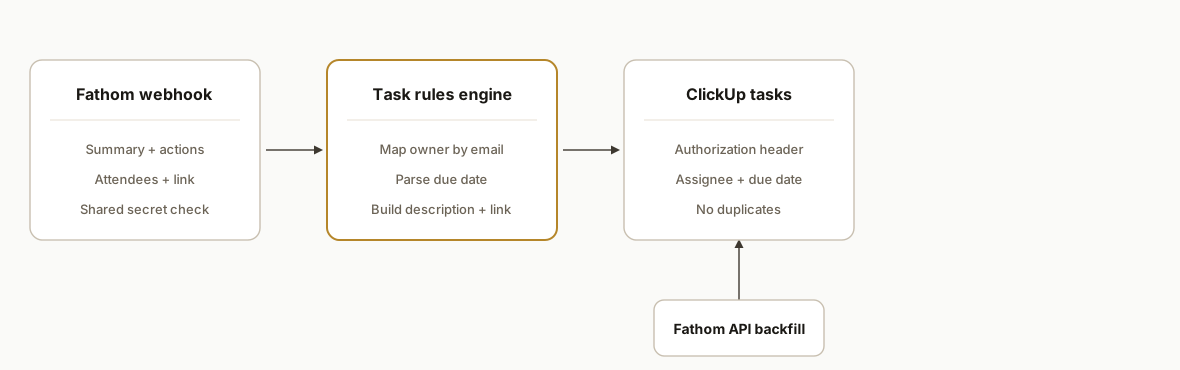
The system listens for Fathom webhooks that include meeting summaries and action items. A small rules engine maps each action item to an assignee and due date, then creates a task in the correct ClickUp list with a link back to the Fathom recording. For missed webhooks or historical meetings, a backfill job pulls from the Fathom API.
- Fathom webhooks: Configured in Fathom Settings to POST meeting payloads that can include summary, transcript, and action items to our endpoint. Auth is a shared secret at the edge. Fathom also exposes a public API at https://api.fathom.ai/external/v1 using an X-Api-Key header when we need to fetch meetings directly.
- Task rules engine: Parses action item text for date phrases, maps attendees to ClickUp users, sets priority labels, and appends the Fathom link to the task body.
- ClickUp API: Uses a personal API token or OAuth 2.0 Authorization Code flow with the Authorization header to create tasks in the chosen list and assign owners and due dates.
- Idempotency store: Caches a hash per meeting action item so reruns or retries never create duplicates.
- Backfill sync: Calls Fathom's meetings endpoints when we need to reprocess a date range or catch missed webhooks.
Step-by-step: how to build it
1) Receive and verify Fathom webhooks
Answer-first: stand up an HTTPS endpoint that accepts Fathom's meeting webhooks, validates a shared secret, and enqueues processing per action item.
// server/webhooks/fathom.ts (Node + Express)
import express from "express";
import crypto from "crypto";

const app = express();
app.use(express.json({ limit: "1mb" }));

function verifySharedSecret(req: any) {
  const got = req.headers["x-fathom-secret"] as string;
  return got && got === process.env.FATHOM_WEBHOOK_SECRET;
}

app.post("/api/webhooks/fathom", async (req, res) => {
  if (!verifySharedSecret(req)) return res.status(401).send("unauthorized");
  const payload = req.body; // includes meeting, attendees, action_items when configured
  // fan out per action item for parallel safety
  for (const item of payload.action_items ?? []) {
    await enqueue({
      kind: "fathom.action",
      meetingId: payload.meeting?.id,
      actionId: item.id,
      text: item.text,
      attendees: payload.attendees,
      meetingUrl: payload.meeting?.share_url,
      occurredAt: payload.meeting?.ended_at
    });
  }
  res.json({ ok: true });
});

app.listen(process.env.PORT || 3000);
Gotcha: Fathom webhooks are configurable. Include action items in the webhook so you do not need a second API call for the common path.
2) Parse owners and due dates from action text
Answer-first: keep parsing deterministic. Prefer attendee maps and explicit phrases like by Tuesday over freeform LLM guesses.
// lib/rules.ts
import { parseISO, addDays, nextTuesday } from "date-fns";

const OWNER_BY_EMAIL: Record<string, string> = {
  "alex@yourco.com": "clickup_user_id_alex",
  "maria@yourco.com": "clickup_user_id_maria"
};

export function resolveAssignee(attendees: any[]): string | undefined {
  for (const a of attendees || []) {
    const id = OWNER_BY_EMAIL[a.email?.toLowerCase?.() || ""];
    if (id) return id;
  }
}

export function resolveDueDate(text: string, meetingEnd?: string): string | undefined {
  const t = text.toLowerCase();
  const base = meetingEnd ? parseISO(meetingEnd) : new Date();
  if (t.includes("by eod")) return addDays(base, 0).toISOString();
  if (t.includes("by tomorrow")) return addDays(base, 1).toISOString();
  if (t.includes("by next tuesday")) return nextTuesday(base).toISOString();
  const m = t.match(/by (\d{4}-\d{2}-\d{2})/);
  if (m) return new Date(m[1] + "T17:00:00Z").toISOString();
}
Gotcha: default all-day times to a consistent hour in the team's timezone. Document that convention so expectations match behavior.
3) Prevent duplicates with a stable key
Answer-first: hash meetingId + actionId to produce a unique key, and store it before creating the task.
// lib/dedupe.ts
import crypto from "crypto";
import { kv } from "@vercel/kv"; // any key-value store works

export function actionKey(meetingId: string, actionId: string) {
  return crypto.createHash("sha256").update(`${meetingId}:${actionId}`).digest("hex");
}

export async function alreadyProcessed(key: string) {
  return (await kv.get(key)) === "1";
}

export async function markProcessed(key: string) {
  await kv.set(key, "1", { ex: 60 * 60 * 24 * 90 }); // 90 days
}
Gotcha: mark the key only after a successful ClickUp create response to avoid false positives on transient failures.
4) Create the ClickUp task with auth applied
Answer-first: use ClickUp's Authorization header with a personal token or OAuth access token and POST to your configured task creation URL. Keep the URL in config so you can swap lists without code changes.
// lib/clickup.ts
import fetch from "node-fetch";

type NewTask = {
  name: string;
  description?: string;
  assignees?: string[];
  due_date?: number; // ms epoch per ClickUp formats
};

export async function createClickUpTask(t: NewTask) {
  const url = process.env.CLICKUP_CREATE_TASK_URL as string; // stored config
  const token = process.env.CLICKUP_TOKEN as string; // or an OAuth access token
  const resp = await fetch(url, {
    method: "POST",
    headers: {
      "Content-Type": "application/json",
      Authorization: token
    },
    body: JSON.stringify(t)
  });
  if (!resp.ok) throw new Error(`clickup_error_${resp.status}`);
  return resp.json();
}
Gotcha: ClickUp supports personal API tokens and OAuth 2.0 Authorization Code. The token endpoint is documented at https://api.clickup.com/api/v2/oauth/token. Pick the method that matches your tenancy and consent model.
5) Tie it together in the worker
Answer-first: assemble the task name, description with the Fathom link, assignee, and due date, check the dedupe key, then create.
// worker/consume.ts
import { resolveAssignee, resolveDueDate } from "../lib/rules";
import { actionKey, alreadyProcessed, markProcessed } from "../lib/dedupe";
import { createClickUpTask } from "../lib/clickup";

export async function onFathomAction(msg: any) {
  const key = actionKey(msg.meetingId, msg.actionId);
  if (await alreadyProcessed(key)) return;

  const assignee = resolveAssignee(msg.attendees);
  const dueIso = resolveDueDate(msg.text, msg.occurredAt);

  const body = [
    msg.text,
    "",
    `Source: Fathom meeting ${msg.meetingId}`,
    msg.meetingUrl ? `Link: ${msg.meetingUrl}` : undefined
  ].filter(Boolean).join("\n");

  await createClickUpTask({
    name: msg.text.slice(0, 140),
    description: body,
    assignees: assignee ? [assignee] : undefined,
    due_date: dueIso ? Date.parse(dueIso) : undefined
  });

  await markProcessed(key);
}
Gotcha: keep names under your team's naming guardrail and add a label or prefix for meeting generated tasks so humans can filter them in ClickUp easily.
6) Backfill missed meetings safely
Answer-first: for gaps, pull recent meetings from Fathom's API and replay action items through the same worker.
// scripts/backfill-fathom.ts
import fetch from "node-fetch";

async function listMeetings(fromIso: string, toIso: string) {
  const url = new URL("https://api.fathom.ai/external/v1/meetings");
  url.searchParams.set("started_after", fromIso);
  url.searchParams.set("ended_before", toIso);
  const resp = await fetch(url.toString(), {
    headers: { "X-Api-Key": process.env.FATHOM_API_KEY as string }
  });
  if (!resp.ok) throw new Error(`fathom_list_${resp.status}`);
  return resp.json();
}
Gotcha: Fathom API keys are user scoped. You only see meetings the key holder has access to. For cross team coverage use OAuth or ensure sharing permissions are set for the key owner.
Where it gets complicated
- Fathom OAuth transcript shape: OAuth apps cannot use include_transcript or include_summary parameters. Fetch the transcript from recordings endpoints when you need it, then derive action items in your service.
- User scoped visibility: Fathom API keys are tied to a user. If the person leaves or loses access, the backfill job will miss meetings. Decide on an app level auth path early.
- Webhook vs API parity: Teams sometimes forget to enable action items in webhooks. When a payload arrives without them, fall back to an API fetch for that meeting so you do not drop tasks.
- ClickUp auth choices: Personal token is the quickest path. OAuth 2.0 is better for multi workspace consent. The Authorization header is required in both cases.
- Assignees for outside attendees: When the attendee is external, route to a default owner or create an unassigned task and mention the meeting host in the description so it does not stall.
- Time zones and date phrases: Natural phrasing like by Friday maps to different dates across time zones. Normalize to the team's working zone and document the rule in your README.
What this actually changes
In production this removed the post call admin step. Tasks were in the backlog before the team left the meeting. That lifted follow through because nothing relied on memory, and duplicates disappeared due to idempotency. As a benchmark for the problem space, Asana's Anatomy of Work report found knowledge workers spend an estimated 58 percent of their time on work about work like status updates and handoffs: https://asana.com/resources/anatomy-of-work.
The structural value is simple: action items become work immediately with the right context. Owners have a due date. The recording link is one click away. If a webhook is missed, backfill covers it.
Frequently asked questions
Does Fathom have an API for this?
Yes. Fathom exposes a public API at https://api.fathom.ai/external/v1 and authenticates with an X-Api-Key header for user scoped keys. OAuth is also available for public apps. Webhooks can be configured to include summary, transcript, and action items.
Can this run in near real time?
Yes. Webhooks fire as meetings complete and your endpoint can create ClickUp tasks within seconds. For historical coverage or gaps, a backfill job calls the Fathom API over a date range and replays action items through the same worker.
How do you assign the right ClickUp owner?
We map meeting attendees by email to ClickUp user IDs. When no internal attendee matches, we fall back to a default owner or create an unassigned task with the meeting host mentioned. The mapping table lives in configuration so non engineers can update it.
What authentication do we need for ClickUp?
ClickUp supports personal API tokens and OAuth 2.0 Authorization Code. Both use the Authorization header. Teams often start with a personal token and move to OAuth when multiple workspaces or user consent flows are required.
Can we include transcripts or summaries in the task?
Fathom webhooks can include summaries and transcripts when configured. If you build an OAuth app, fetch the transcript through the recordings endpoints rather than relying on include parameters, then add a snippet or link into the task body.
How do you prevent duplicates?
We compute a stable key from the Fathom meeting ID and action item ID and store it in a key value store. On retries or reruns we check that key before creating a task. Only a successful task creation marks the key as processed.
If you want this running against your real meetings, we have shipped this pattern across CRMs and task tools and can adapt it to your ClickUp lists and routing rules quickly. See our service overview at /services#crm-automation, our related guide on automate-fathom-meeting-notes, and book time at /book.
Sources
Want this built around your systems?
Nine questions, about 90 seconds. You see the revenue it is costing you, then pick a time. No pitch.
See your optionsRather talk to a person first? Meet the team or tell us which system you run.