
We built a Pipedrive automation that listens to inbound documents and activity, enriches contacts, writes clean notes, and moves deals to the right stage based on deterministic rules. For sales and operations teams, it removes the copy-paste and keeps the pipeline current without babysitting.
Pipedrive enrichment automation is a service that converts raw inputs like emailed PDFs, uploads, and engagement signals into structured CRM updates: enriched contacts, readable notes, and safe stage transitions.
The problem it solves
Most teams were doing this by hand: download a PDF or read a forwarded email, pull out a few facts, search LinkedIn, paste highlights in a note, tag the record, and slide the deal to the next stage. Then repeat when the prospect replies or sends another document. It is accurate but slow and inconsistent across reps.
| Manual process | Automated system |
|---|---|
| Read inbound docs and retype key facts into Pipedrive | Parse docs and post a readable note automatically |
| Google for company size, LinkedIn, and phone each time | Enrich once with a provider and write back in seconds |
| Remember when to move a deal to the next stage | Apply rule-based stage moves with guardrails |
| Duplicates slip in when data comes from multiple sources | Idempotency keys and dedup rules prevent clones |
| Backfills require hours of rework | One backfill job reprocesses historical items safely |
How the automation works
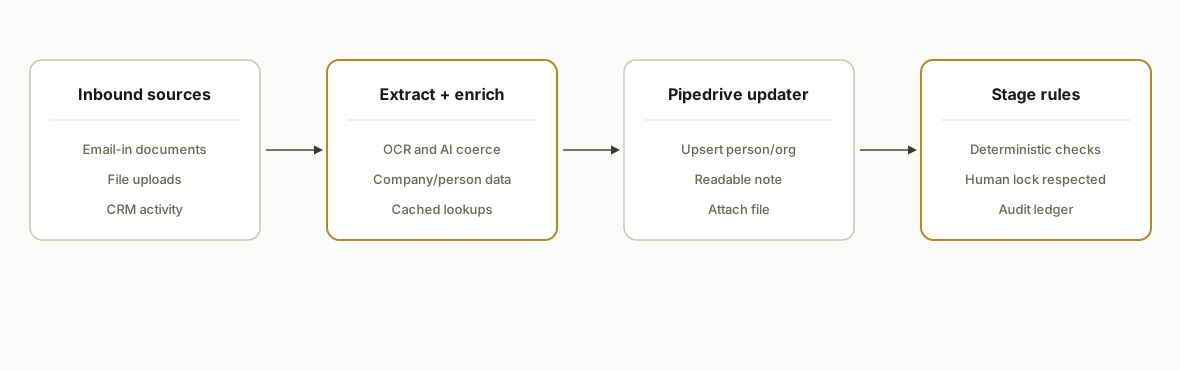
The service sits between your inbound channels and Pipedrive. It normalizes events from email-in, uploads, and engagement activity, extracts facts from documents, enriches the people and company, writes a human-readable note, attaches files, and evaluates stage-move rules with abort conditions to prevent bad transitions.
- Inbound capture: We subscribe to the sources you already use: an email-in address for documents, a file-upload folder, and CRM activity events. Everything becomes a normalized event with a consistent schema.
- Document extraction: PDFs and images are parsed. For scanned content we run OCR. For semi-structured docs we use an AI extraction step, then validate and coerce types before write-back.
- Enrichment: On the first touch we call an enrichment provider to append company size, industry, website, social profiles, and verified contact data. We cache the result and avoid re-billing on later events.
- Pipedrive updater: The service upserts the person and organization, writes a formatted note, and attaches the original file. All writes are idempotent using a ledger keyed by a stable event ID.
- Stage rules: Deterministic rules move deals when a checklist is satisfied: for example, document received plus contact verified plus a qualifying activity. Every rule has an escape hatch to stop moves when a human has locked the deal or flagged a blocker.
Which Pipedrive automations are worth building first
If you are starting from zero, these Pipedrive automations deliver fast wins without changing how reps work:
- Contact enrichment and note-writing from inbound docs: what this guide covers end to end.
- Instant lead follow-up tasks: when a new person is verified, create and assign a first-touch task with a due time today. We outlined the pattern in our playbook on automating CRM lead follow-up.
- Email sync and intent signals: log key emails and replies for qualification timestamps. See our guide on syncing Gmail with Pipedrive and other CRMs.
- Prospect list hygiene: feed scraped or bought lists through a validation step before import. Our lead scraping and enrichment pipeline pattern shows how we stage and verify data before it touches the CRM.
These sit cleanly beside native Pipedrive automations. We keep business logic in our service, and we let Pipedrive do notifications and assignment.
Scalelist data enrichment for Pipedrive: how we connect it
We have shipped this pattern with list vendors that output either a CSV export, a scheduled file drop, or a webhook. If your Scalelist plan provides any of those, we plug it in without changing your workflow. The service treats Scalelist as the enrichment source and Pipedrive as the sink with idempotent writes.
- Transport: CSV upload or scheduled fetch from storage, or a webhook if available.
- Idempotency key: the vendor row id when present, otherwise email plus domain.
- Merge strategy: fill blanks on the person and organization, and append a dedicated enrichment section in a note for transparency.
Example: ingest a CSV from storage and upsert to Pipedrive with a readable note.
// src/providers/scalelist-csv.ts
import fs from "fs";
import { parse } from "csv-parse/sync";
import crypto from "crypto";
import { upsertPersonAndOrg, addNoteToDeal } from "../pipedrive";

export async function processScalelistCsv(path: string, defaultStageDealId: number) {
  const csv = fs.readFileSync(path, "utf8");
  const rows = parse(csv, { columns: true, skip_empty_lines: true });

  for (const r of rows) {
    const email = (r.email || "").trim().toLowerCase();
    const domain = (r.domain || (r.website || "").replace(/^https?:\/\//, "").split("/")[0]).toLowerCase();
    const personName = r.contact_name || r.name || "";
    const orgName = r.company || r.company_name || domain || "";

    const idemKey = crypto
      .createHash("sha256")
      .update(`scalelist:${r.id || email + ":" + domain}`)
      .digest("hex");

    const { personId } = await upsertPersonAndOrg({
      person: { name: personName, email, phone: r.phone },
      org: { name: orgName, website: r.website }
    });

    const note = [
      "Scalelist enrichment:",
      `- Title: ${r.title || ""}`,
      `- Department: ${r.department || ""}`,
      `- Company size: ${r.company_size || ""}`,
      `- Industry: ${r.industry || ""}`,
      `- LinkedIn: ${r.linkedin_url || ""}`
    ].join("\n");

    await addNoteToDeal(defaultStageDealId, note, idemKey);
  }
}
We keep the CSV parser resilient to column drift and never overwrite rep-edited fields. If you prefer a daily refresh instead of continuous writes, we stage diffs and only apply changes when a material field improved.
Upcell data enrichment for Pipedrive: our integration pattern
For Upcell, we use the same adapter shape: accept either a webhook payload, a file export, or a pull job from a storage location. The service normalizes fields, generates a stable idempotency key, and writes into Pipedrive with conservative merging.
- Transport: webhook into our "/webhooks/inbound" handler or periodic file pull.
- Mapping: email and company domain anchor the record. Optional fields are appended in a note.
- Guardrails: we skip writes when a deal is locked or marked do not update.
Example: accept a generic enrichment webhook and post a scoped note.
// src/providers/upcell-webhook.ts
import type { Request, Response } from "express";
import crypto from "crypto";
import { upsertPersonAndOrg, addNoteToDeal } from "../pipedrive";

export async function upcellWebhook(req: Request, res: Response) {
  const p = req.body; // trust boundary enforced by shared secret at the router
  const email = (p.email || "").toLowerCase();
  const domain = (p.companyDomain || "").toLowerCase();
  const orgName = p.company || domain || "";

  const idemKey = crypto
    .createHash("sha256")
    .update(`upcell:${p.externalId || email + ":" + domain}`)
    .digest("hex");

  const { personId } = await upsertPersonAndOrg({
    person: { name: p.contactName || "", email, phone: p.phone },
    org: { name: orgName, website: p.website }
  });

  const note = [
    "Upcell enrichment:",
    `- Seniority: ${p.seniority || ""}`,
    `- Tech stack hints: ${Array.isArray(p.techs) ? p.techs.slice(0, 8).join(", ") : ""}`,
    `- Social: ${p.linkedin || ""}`
  ].join("\n");

  await addNoteToDeal(p.dealId, note, idemKey);
  res.status(202).json({ ok: true });
}
This keeps Upcell as the source of truth for enrichment while preserving rep edits in Pipedrive. If Upcell delivers a later correction, the same idempotency key prevents duplicate notes while allowing updates when a field materially changes.
Step-by-step: how to build it
1. Normalize inbound events from email, uploads, and CRM activity
Set a small web service to accept webhooks and route events to a queue. Email-in and uploads push through a lightweight adapter so every item becomes an Event with source, externalId, and payload. The handler verifies signatures where supported.
// src/server.ts
import express from "express";
import crypto from "crypto";
import { enqueue } from "./queue";

const app = express();
app.use(express.json({ limit: "10mb" }));

app.post("/webhooks/inbound", async (req, res) => {
  const event = req.body; // already normalized by adapters
  // Basic idempotency: hash stable fields per source
  const idemKey = crypto
    .createHash("sha256")
    .update(`${event.source}:${event.externalId}`)
    .digest("hex");

  await enqueue({ idemKey, event });
  res.status(202).json({ ok: true });
});

app.listen(3000);
Key gotcha: do not trust upstream uniqueness. Compute your own idempotency key from stable fields like source plus an external identifier.
2. Extract facts from documents safely
Use a tiered extractor: fast PDF text for digital PDFs, OCR for scans, then an AI pass to coerce fields. Always validate critical fields before writing any note.
// src/extract.ts
import { parse } from "pdf-parse-safe"; // any safe PDF lib
import { ocrImage } from "./ocr";
import { aiCoerce } from "./llm";

export async function extractFacts(file: Buffer, mime: string) {
  let text = "";
  if (mime === "application/pdf") text = await parse(file);
  if (!text || text.trim().length < 20) text = await ocrImage(file);

  const { fields, confidence } = await aiCoerce(text, [
    { name: "company_name", type: "string" },
    { name: "contact_name", type: "string" },
    { name: "email", type: "email" },
    { name: "phone", type: "phone" },
    { name: "doc_type", type: "enum", values: ["intro", "requirements", "contract", "other"] },
  ]);

  if (confidence < 0.7) return { fields: {}, confidence };
  return { fields, confidence };
}
Gotcha: treat OCR and AI outputs as untrusted. Add type checks and minimum confidence thresholds before any write-back.
3. Enrich people and companies once, then cache
Call your chosen enrichment provider sparingly. Cache by email and domain so repeated events do not re-bill. Merge cautiously to avoid overwriting rep-entered fields.
// src/enrich.ts
import { getCache, setCache } from "./kv";
import fetch from "node-fetch";

export async function enrich(email: string, domain?: string) {
  const key = `enrich:${email || domain}`;
  const cached = await getCache(key);
  if (cached) return cached;

  const resp = await fetch(process.env.ENRICH_URL as string, {
    method: "POST",
    headers: { "Content-Type": "application/json", Authorization: `Bearer ${process.env.ENRICH_TOKEN}` },
    body: JSON.stringify({ email, domain }),
  });
  const data = await resp.json();
  await setCache(key, data, 60 * 60 * 24 * 14); // 14 days
  return data;
}
Gotcha: never hard-merge enrichment onto user-edited fields. Use a precedence order and only fill blanks or add to a dedicated custom section in the note.
4. Upsert in Pipedrive and write a readable note
Wrap Pipedrive reads and writes in a client module so your code does not depend on any one field naming convention. Keep writes idempotent by storing your idemKey on the record in a dedicated place your service can read later.
// src/pipedrive.ts
export async function upsertPersonAndOrg(p: {
  person: { name: string; email?: string; phone?: string };
  org?: { name: string; website?: string };
}) {
  // Find or create organization, then person. Return IDs.
  // Implementation hidden by this wrapper to stay swappable.
  return { orgId: 123, personId: 456 };
}

export async function addNoteToDeal(dealId: number, markdown: string, idemKey: string) {
  // Check if a note with this idemKey exists; if not, create it.
}

export async function attachFileToDeal(dealId: number, filePath: string, displayName: string) {
  // Upload and link the file to the deal's files section.
}
Gotcha: keep your service the owner of idempotency. Do not rely on guessing from free-text notes.
5. Apply deterministic stage-move rules with guardrails
Express stage transitions as a checklist. Every rule must be reversible and must skip when a human has locked the deal or added a blocker label.
// src/stage-rules.ts
export type DealState = {
  stage: string;
  hasVerifiedContact: boolean;
  hasRecentQualifyingDoc: boolean;
  lastInboundReplyAt?: string;
  lockedByHuman?: boolean;
};

export function nextStage(state: DealState): string | null {
  if (state.lockedByHuman) return null;
  if (state.stage === "New" && state.hasVerifiedContact) return "Contacted";
  if (state.stage === "Contacted" && state.hasRecentQualifyingDoc) return "Qualified";
  if (state.stage === "Qualified" && state.lastInboundReplyAt) return "Proposal";
  return null;
}
Gotcha: never move stages solely on model output. Use objective signals like verified contact or a specific document type received.
6. Backfill safely and keep a ledger
Add a backfill job that can reprocess historical items using the same idempotency keys. Store a small ledger so re-runs are safe and observable.
-- schema.sql
create table if not exists write_ledger (
  idem_key text primary key,
  deal_id integer not null,
  wrote_note_at timestamptz,
  moved_from text,
  moved_to text,
  created_at timestamptz default now()
);
Gotcha: backfills must run in dry-run first. Print a diff per record and require an explicit flag to apply changes.
Where it gets complicated
- Webhook retries and idempotency: Upstream systems retry on timeouts. Without a ledger keyed to a stable id, you will duplicate notes, files, or even deals. Treat every handler as at-least-once.
- Scanned documents and layout drift: Digital PDFs are easy. Scans and variable templates are not. Add OCR and train your extraction prompts to identify confidence drops. Fall back to a human queue on low confidence.
- Activity signal mismatches: An email reply, a form submit, and a calendar booking all signal intent differently. Normalize to a common set of booleans and timestamps before applying rules so every source is treated fairly.
- Attachment size and lifecycle: Large files can exceed upload limits. Store in object storage and attach a permalink in the note when a direct upload is not safe.
- Rate limits and write bursts: Stage moves often trigger clusters of writes. Queue and batch where possible, add jitter, and back off when the provider tells you to slow down.
What this actually changes
In production this removed the two most error-prone steps: hand enrichment and stage nudging. New documents and inbound engagement now translate to a clean note, a verified person, and a safe stage move with a paper trail. Speed matters. Harvard Business Review found that responding to online leads within an hour made companies nearly seven times more likely to qualify the lead compared to waiting longer (source: https://hbr.org/2011/03/the-short-life-of-online-sales-leads). Automated enrichment and rules move you closer to that window by default.
Frequently asked questions
Does Pipedrive support this kind of automation?
Yes. Pipedrive provides an API and event hooks that let a service read and write records programmatically. We build against that layer so contact upserts, notes, attachments, and stage moves happen reliably without touching your reps' workflows.
Will it override what my reps type into Pipedrive?
No. We merge conservatively. The automation fills blanks, adds a dedicated note section for enrichment, and respects human locks and blocker labels. If a rep changes a field, our rules will not fight them.
How do you prevent duplicates?
We generate an idempotency key per inbound item and keep a small ledger. We also deduplicate people by email and organizations by domain, and we check for an existing deal before creating anything new.
Can it run in real time?
Yes. Event-driven sources process within seconds, and polled sources run on a short cadence. For large files we stream or defer attachments so notes and stage moves are not blocked by uploads.
What does this cost monthly?
Infrastructure is light. The main costs are the enrichment provider and AI extraction when used. Most clients run this comfortably on a small container plus a queue and object storage. We quote the build as a fixed project and hand off with your own accounts.
Can a non-developer configure it after handoff?
Yes. We expose rules and provider toggles in a small admin UI and keep defaults in environment variables. Your team can add or pause rules, switch providers, and review the ledger without touching the code.
If you want Pipedrive to enrich itself, leave readable notes from inbound docs, and move deals safely without more clicks, we have shipped this pattern before. See our related write-up on the Revver to Pipedrive sync, our primer on automating CRM lead follow-up, and our guide to syncing Gmail with Pipedrive. For broader prospect data plumbing, review our lead scraping and enrichment pipeline. When you are ready, visit our CRM automation services and book a 20-minute call.
Want us to build this for you?
Nine questions, about 90 seconds. You see the hours it is costing you, then pick a time. No pitch.
Get your free assessment