
We built a production bridge that turns Silvertrac patrol and incident CSV reports into billable line items and owner-friendly summaries. It runs on scheduled Silvertrac report emails, a small inbound parser, and a rate rules engine. It is for guard companies that invoice by patrols, incidents, or checkpoints and need clean owner reporting without touching every PDF.
Silvertrac integration is: connecting scheduled CSV reports to a parser that normalizes events and produces invoice lines and owner reports in your billing cadence.
The problem it solves
A guard company's revenue lives inside field activity: tours, checkpoints, incidents, and maintenance tickets. Silvertrac captures that work. Billing systems and owner dashboards do not see it natively. Without a bridge, someone downloads reports, copies counts into a spreadsheet, applies rates, and pastes totals into invoices. Miss a row and you underbill. Miss a cutoff and owners ask for an audit.
| Manual workflow | Automated with our integration |
|---|---|
| Log in, run 3 to 5 Silvertrac reports per client, export CSV or PDF | Silvertrac sends scheduled CSV reports to a dedicated inbox every day or week |
| Paste counts into a billing spreadsheet, apply rates | Inbound webhook parses CSV, normalizes events, applies rate rules |
| Reconcile time zones and date cutoffs by hand | Cutoffs and time zones are applied in code, not people's heads |
| Create invoices and owner summaries by template | Invoice-ready line items and owner summaries are generated automatically |
| Find and fix duplicates after a client flags them | Idempotency keys prevent double billing and flag anomalies up front |
How the automation works
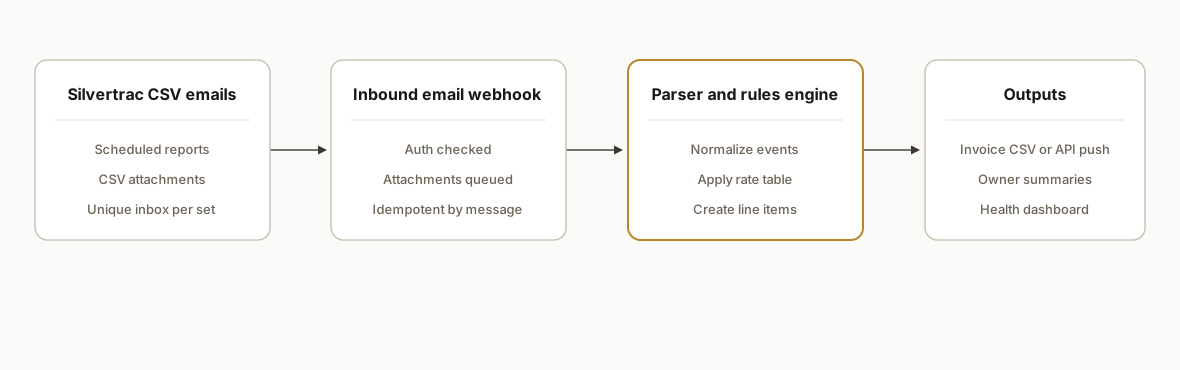
A scheduled report delivery in Silvertrac emails CSV attachments to a dedicated address. Our inbound endpoint parses attachments, normalizes the schema, applies rate rules, and writes event and line-item rows to a database. A nightly job composes invoice CSVs or pushes line items to your billing system, and emails owner summaries.
- Silvertrac scheduled CSV reports: Silvertrac can export many reports as CSV and email them on a schedule. CSV is the integration surface we rely on.
- Inbound email webhook: A unique address receives scheduled reports. The email service posts JSON with attachments to our endpoint for parsing and authentication.
- Parser and normalizer (accent): We parse CSV, coerce timestamps and site codes, map report columns to a canonical event schema, and compute billable quantities per your rules.
- Billing and reporting outputs: We write invoice_line rows to your database, aggregate per client and period, generate owner summaries, and deliver to accounting or as CSVs.
Step-by-step: how to build it
1) Schedule Silvertrac CSV reports to a unique inbox
Create automated reports in Silvertrac and set delivery to a dedicated integration email. Use CSV format. Keep one report per use case: incidents, checkpoints, and tours, each filtered to your billing window. Avoid reusing an address that is tied to another Silvertrac feature to prevent delivery issues.
Key gotcha: Silvertrac automated reports can fail to deliver if an email address is reused elsewhere. Use a unique distribution address and test receipt.
2) Expose an inbound email webhook for attachments
Point the mailbox at a trusted inbound email service that posts JSON to your API with base64 attachments. Authenticate via a shared secret on the webhook URL or HMAC headers.
// pages/api/inbound-email.ts (Next.js API route example)
import type { NextApiRequest, NextApiResponse } from "next";
import crypto from "crypto";

export default async function handler(req: NextApiRequest, res: NextApiResponse) {
  // Simple HMAC check
  const sig = req.headers["x-webhook-signature"] as string;
  const body = JSON.stringify(req.body);
  const hmac = crypto.createHmac("sha256", process.env.INBOUND_SECRET!).update(body).digest("hex");
  if (sig !== hmac) return res.status(401).json({ ok: false });

  const { messageId, attachments = [] } = req.body as {
    messageId: string;
    attachments: { filename: string; contentType: string; contentBase64: string }[];
  };

  for (const a of attachments) {
    if (!a.filename.toLowerCase().endsWith(".csv")) continue;
    const buf = Buffer.from(a.contentBase64, "base64");
    await queueCsvForProcessing({ messageId, filename: a.filename, content: buf });
  }

  return res.json({ ok: true });
}

async function queueCsvForProcessing(input: { messageId: string; filename: string; content: Buffer }) {
  // Persist to object storage and enqueue a job idempotently
  // ...implementation depends on your job runner
}
Gotcha: keep attachment handling idempotent. Use the email provider's messageId to avoid reprocessing on retries.
3) Parse and normalize the CSV into a canonical event table
Normalize headers and coerce timestamps and durations. Centralize the mapping from each report type to your schema.
import { parse } from "csv-parse/sync";
import { DateTime } from "luxon";
import crypto from "crypto";
import { sql } from "@vercel/postgres"; // or any Postgres client

export interface RawRow { [k: string]: string }

export async function ingestCsv(messageId: string, filename: string, content: Buffer) {
  const sha = crypto.createHash("sha256").update(content).digest("hex");
  const rows: RawRow[] = parse(content, { columns: true, skip_empty_lines: true });

  let i = 0;
  for (const r of rows) {
    i += 1;
    const occurredAt = DateTime.fromFormat(r["Date"], "M/d/yyyy h:mm a", { zone: "America/Los_Angeles" }).toUTC().toISO();
    const siteCode = r["Property"]?.trim() || r["Site"]?.trim() || null;
    const eventType = r["Type"]?.trim() || r["Event"]?.trim() || "Unknown";
    const checkpoint = r["Checkpoint"]?.trim() || null;
    const durationMin = Number(r["Duration (min)"] || 0);

    await sql`
      insert into incident_events
        (message_id, file_sha256, row_no, site_code, event_type, checkpoint, duration_min, occurred_at, raw)
      values
        (${messageId}, ${sha}, ${i}, ${siteCode}, ${eventType}, ${checkpoint}, ${durationMin}, ${occurredAt}, ${r})
      on conflict (file_sha256, row_no) do nothing;
    `;
  }
}
Minimal schema and uniqueness guard:
create table if not exists incident_events (
  id bigserial primary key,
  message_id text not null,
  file_sha256 text not null,
  row_no int not null,
  site_code text,
  event_type text not null,
  checkpoint text,
  duration_min numeric,
  occurred_at timestamptz not null,
  raw jsonb not null
);
create unique index if not exists ux_events_file_row on incident_events(file_sha256, row_no);
4) Apply rate rules and create invoice_line records
Keep rate logic out of the parser. Store it in a small table that can be edited without deploys.
create table if not exists billing_rates (
  id serial primary key,
  site_code text not null,
  match_type text not null, -- 'event_type' or 'checkpoint'
  match_value text not null,
  unit text not null,       -- 'each' or 'minute'
  rate numeric not null,
  active boolean not null default true
);

create table if not exists invoice_lines (
  id bigserial primary key,
  period_start date not null,
  period_end date not null,
  client_id text not null,
  site_code text not null,
  description text not null,
  quantity numeric not null,
  unit text not null,
  unit_rate numeric not null,
  amount numeric not null,
  source_event_ids bigint[] not null,
  unique (client_id, site_code, description, period_start, period_end)
);
Transformer example:
export async function createLinesForPeriod(periodStart: string, periodEnd: string) {
  const { rows: events } = await sql`
    select * from incident_events
    where occurred_at >= ${periodStart}::date
      and occurred_at < (${periodEnd}::date + interval '1 day')
  `;

  // Fetch rates once
  const { rows: rates } = await sql`select * from billing_rates where active = true`;

  // Group and match
  const groups = new Map<string, { site: string; desc: string; unit: string; qty: number; rate: number; ids: number[] }>();
  for (const e of events as any[]) {
    const match = rates.find(r => (
      (r.match_type === 'event_type' && r.match_value === e.event_type) ||
      (r.match_type === 'checkpoint' && r.match_value === e.checkpoint)
    ) && r.site_code === e.site_code);
    if (!match) continue; // unbillable or manual review

    const unit = match.unit;
    const qty = unit === 'each' ? 1 : Number(e.duration_min || 0);
    const key = `${e.site_code}|${match.match_type}:${match.match_value}|${unit}|${match.rate}`;
    const desc = `${match.match_value} (${unit})`;

    if (!groups.has(key)) groups.set(key, { site: e.site_code, desc, unit, qty: 0, rate: match.rate, ids: [] });
    const g = groups.get(key)!;
    g.qty += qty;
    g.ids.push(e.id);
  }

  for (const g of groups.values()) {
    const amount = g.qty * g.rate;
    await sql`
      insert into invoice_lines
        (period_start, period_end, client_id, site_code, description, quantity, unit, unit_rate, amount, source_event_ids)
      values
        (${periodStart}, ${periodEnd}, ${g.site}, ${g.site}, ${g.desc}, ${g.qty}, ${g.unit}, ${g.rate}, ${amount}, ${g.ids})
      on conflict do nothing
    `;
  }
}
5) Generate owner summaries and deliver outputs
Compose a concise summary per property owner: total patrols, incidents by type, exceptions. Email a PDF or HTML summary and attach a CSV of line items if the accounting system prefers import.
import nodemailer from "nodemailer";

export async function sendOwnerSummary(ownerEmail: string, siteCode: string, periodStart: string, periodEnd: string) {
  const { rows: lines } = await sql`
    select description, quantity, unit, amount
    from invoice_lines
    where site_code = ${siteCode}
      and period_start = ${periodStart}::date
      and period_end = ${periodEnd}::date
  `;

  const total = lines.reduce((s: number, l: any) => s + Number(l.amount), 0);
  const html = `
    <h3>Security summary ${periodStart} to ${periodEnd}</h3>
    <p>Total amount: $${total.toFixed(2)}</p>
    <ul>${lines.map((l: any) => `<li>${l.description}: ${l.quantity} ${l.unit}, $${Number(l.amount).toFixed(2)}</li>`).join("")}</ul>
  `;

  const tx = nodemailer.createTransport({
    host: process.env.SMTP_HOST,
    port: 587,
    auth: { user: process.env.SMTP_USER, pass: process.env.SMTP_PASS }
  });

  await tx.sendMail({ from: "billing@yourdomain.com", to: ownerEmail, subject: "Monthly security summary", html });
}
Gotcha: align time zones with contract language. Parse all timestamps in the site's local zone then store in UTC with the original zone noted for audit.
6) Add idempotency, monitoring, and backfill paths
- Enforce uniqueness on file hash plus row number to prevent duplicate event ingestion.
- Store the email messageId and a processed flag to skip repeats.
- Keep a reprocessing CLI that can ingest a manual CSV export for a date range to repair gaps safely.
- Publish daily counts to a health dashboard to catch report delivery failures early.
Where it gets complicated
No public API documented. We found no public developer portal or webhook docs for Silvertrac. The bridge leans on CSV exports and automated email delivery, not direct API calls. Design for batch cadence rather than event webhooks.
Automated report delivery quirks. Silvertrac can fail to deliver automated reports if an email address is reused elsewhere. Use unique distribution addresses per report set and confirm receipt with a test schedule before launch.
Photos and media handling. Photos are captured in the app and cannot be added from or saved to the device gallery. Build reports from CSV data fields and include Silvertrac links when needed rather than expecting raw media in your pipeline.
Checkpoint hardware differences. NFC checkpoints work on Android only. If officers carry iPhones, plan QR or barcode checkpoint flows, and reflect that classification in your rate rules where needed.
CSV schema drift across reports. Column names vary by report. Centralize a header map and add tests so a renamed column does not zero out quantities silently.
Time zones and cutoff boundaries. Contracts bill by local business day, not UTC midnight. Parse in the site time zone, store UTC, and apply period cutoffs in the same local zone.
What this actually changes
For a multi-site guard company, the bridge removed weekly spreadsheet work and the month-end scramble. Dispatch kept using Silvertrac the same way. Finance got a nightly ledger of billable lines that matched contracts and rolled up into owner summaries. Duplicate billing risk dropped because the system writes only once per file and row.
One external benchmark: McKinsey estimates that at least 30 percent of the activities in most occupations could be automated. Source: https://www.mckinsey.com/capabilities/mckinsey-digital/our-insights/a-future-that-works-automation-employment-and-productivity
Frequently asked questions
Does Silvertrac have an official API?
We found no public developer portal or API documentation. Our production integrations rely on CSV reports and automated email delivery, which Silvertrac supports, rather than direct API calls.
Is there a native Zapier or Make.com app for Silvertrac?
We did not find a Silvertrac app in Zapier or Make's public directories. The reliable pattern today is scheduled CSV by email, an inbound webhook, and a small parser plus database.
Can this run in real time?
Silvertrac's documented surface is scheduled reports by email or manual CSV downloads. In practice, near real time means setting report frequency to daily or intra-day and processing on receipt. There is no confirmed webhook stream for individual events.
How do you prevent duplicate billing lines?
We hash each CSV file and pair it with a row number for a unique key. We also store the email messageId for idempotent processing. Invoice lines carry the array of source_event_ids, so re-runs are safe and auditable.
What does this cost monthly to operate?
Infrastructure is light: one inbox or inbound email service, a serverless API, and a small database. The main cost is the build. Ongoing run costs are typically nominal because CSV parsing and email delivery are inexpensive at the observed volumes.
What do you need from us to start?
Access to create automated CSV reports in Silvertrac, one sample export per report type, your rate card and billing rules, the owner summary template, and a sending domain or SMTP credentials for outbound emails.
If you run Silvertrac and want billing and owner reporting without spreadsheets, we have shipped this exact bridge. See our related guard-platform write-up on TrackTik to owner billing. For broader operations help, see our services. If you want us to scope your workflow, book a 15-minute call.
Want us to build this for you?
Nine questions, about 90 seconds. You see the hours it is costing you, then pick a time. No pitch.
Get your free assessment