
We built a self-storage integration that captures web leads in real time, creates a lead in SiteLink when licensed API access is approved, and runs tenant reminders from SiteLink report exports through your CRM for on-time SMS and email. This is for multi-facility operators who want faster speed-to-lead and reliable rent or move-in reminders without adding another tool to babysit. Below we show the API route, the report-scheduler route, and where the gotchas live.
Definition: SiteLink integration automation is the workflow that moves web and tenant data between SiteLink and a CRM or messaging system so you can respond to leads instantly and run reminders on schedule.
The problem it solves
Site managers juggle web inquiries, phone calls, and manual reminder lists. Web leads sit in inboxes. Reminders go late when lists are not refreshed. Operators split time between SiteLink and a separate CRM that does not talk to it.
| Process | Manual workflow | Automated workflow |
|---|---|---|
| Web lead capture | Form emails land in a shared inbox. Manager copies into SiteLink later. | Webhooks receive the lead. If API access is licensed, create the lead in SiteLink immediately. Always log to CRM. |
| Tenant reminder list | Pull reports, sort in Excel, send ad hoc texts and emails. | Scheduled SiteLink reports arrive by email, parser updates CRM, sequences send on the right day. |
| Multi-facility routing | Staff guess the right store and owner file. | Facility code mapping and deterministic dedupe route to the right pipeline. |
| Tracking and audit | No single source of truth. | Central timeline in CRM with event logs, retries, and idempotency keys. |
How the automation works
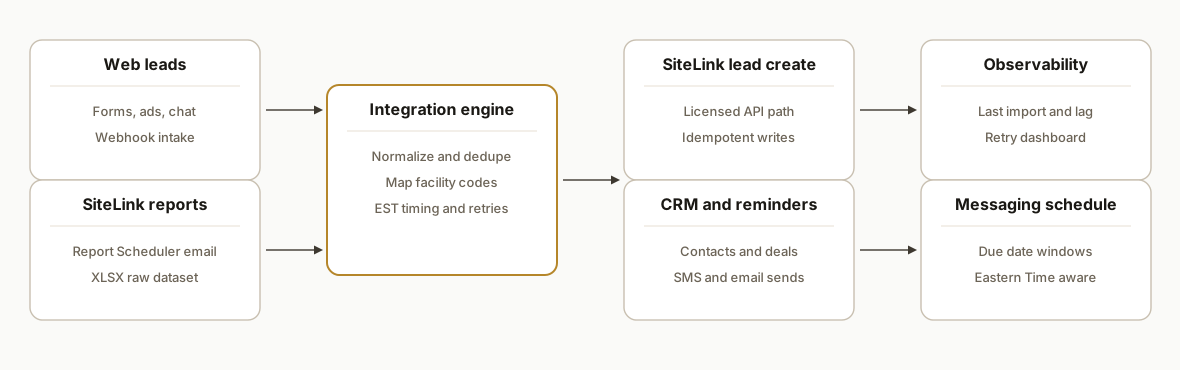
The architecture respects SiteLink's integration reality: there is a 3rd party API behind a license agreement, and there is a robust Report Scheduler that can email reports on a cadence. We use both depending on what you have today.
- API connector: When your business holds licensed API access, we create or update the SiteLink lead as soon as a web inquiry lands. We do not publish auth or endpoint details here because SiteLink gates that under its license.
- Report Scheduler intake: Where marketing sync is missing, we schedule SiteLink reports to email raw datasets to a secure inbox. Our service ingests the attachments, parses XLSX, and updates the CRM for reminders and follow-ups.
- CRM and messaging: Leads and tenants flow into your CRM. SMS and email sequences run off due dates computed from the report data, not from guesswork.
- Idempotent processing: Every item carries a deterministic key so retries never double-create. Eastern Time offsets are normalized before scheduling.
- Observability: A small dashboard shows last import, next send windows, and any delayed job caused by high-load windows.
Step-by-step: how to build it
1) Capture web leads via a webhook
Expose a HTTPS endpoint that your site form or ad lead source posts to. Validate, normalize, and stamp a deterministic key.
// server/leads.ts (Express)
import express from "express";
import crypto from "crypto";
const app = express();
app.use(express.json());

function leadKey(p: { email?: string; phone?: string; facility?: string }) {
  const norm = `${(p.email||'').toLowerCase()}|${(p.phone||'').replace(/\D/g,'')}|${p.facility||''}`;
  return crypto.createHash("sha1").update(norm).digest("hex");
}

app.post("/webhook/lead", async (req, res) => {
  const { name, email, phone, facility } = req.body || {};
  if (!email && !phone) return res.status(400).json({ error: "email or phone required" });
  const key = leadKey({ email, phone, facility });
  await queue.enqueue("lead.intake", { key, name, email, phone, facility });
  res.json({ ok: true });
});

export default app;
Gotcha: sanitize phone to digits and lower-case email up front. This key becomes your idempotency guard across all systems.
2) Ingest SiteLink Report Scheduler emails
Have SiteLink email scheduled reports to a secure inbound address. Parse the XLSX and push rows into a queue. We have used a generic inbound email webhook pattern for this.
// server/inbound-email.ts
import xlsx from "xlsx";

app.post("/webhook/inbound-email", async (req, res) => {
  const { attachments = [] } = req.body;
  for (const a of attachments) {
    if (!a.filename.endsWith(".xlsx")) continue;
    const wb = xlsx.read(Buffer.from(a.content, "base64"));
    const ws = wb.Sheets[wb.SheetNames[0]];
    const rows = xlsx.utils.sheet_to_json(ws, { raw: false });
    for (const r of rows) {
      const rec = normalizeTenantRow(r);
      await queue.enqueue("tenant.report.row", rec);
    }
  }
  res.json({ ok: true });
});
Gotcha: SiteLink sends on Eastern Time and has high-load windows that can delay delivery. Expect day-boundary drift and design retries.
3) Normalize, map facility, and dedupe
Build a single normalization function for both web leads and report rows. Use facility codes that match SiteLink and your CRM pipelines.
function normalizeTenantRow(r: any) {
  const email = (r.Email || "").toLowerCase();
  const phone = String(r.Phone || "").replace(/\D/g, "");
  const facility = facilityFrom(r.FacilityCode || r.FacilityName);
  const key = leadKey({ email, phone, facility });
  return { key, email, phone, facility, name: r.TenantName || r.Name, dueDate: r.DueDate };
}
Gotcha: use a deterministic composite key so replays and duplicate sources never create duplicates downstream.
4) Create or update in your CRM and schedule messages
Post to your CRM's contact endpoint, then schedule reminder jobs keyed by due dates computed from the report data.
async function upsertCrm(rec: any) {
  await fetch(process.env.CRM_CONTACT_WEBHOOK!, {
    method: "POST",
    headers: { "Content-Type": "application/json" },
    body: JSON.stringify({
      key: rec.key,
      email: rec.email,
      phone: rec.phone,
      facility: rec.facility,
      name: rec.name
    })
  });
}

async function scheduleReminder(rec: any) {
  const when = computeSendWindow(rec.dueDate, "09:30", rec.facility);
  await queue.enqueueAt("reminder.send", when, { key: rec.key, channel: pickChannel(rec) });
}
Gotcha: keep reminder scheduling separate from CRM writes so a CRM outage does not block time-critical sends.
5) Gate SiteLink API writes behind licensed access
When your API access is approved, call the SiteLink connector. Until then, hold a queue to create a daily ops list for staff.
async function maybeCreateSiteLinkLead(lead: any) {
  if (!process.env.SITELINK_API_ENABLED) return log.info("SiteLink API off: queued", lead.key);
  // Details hidden by license: inject your authorized connector here.
  await siteLinkConnector.createLead({
    key: lead.key,
    name: lead.name,
    email: lead.email,
    phone: lead.phone,
    facility: lead.facility
  });
}
Gotcha: SiteLink's API is gated by an application and license agreement, and use is restricted from replicating core SiteLink functionality. Keep scope focused and document operator intent.
6) Build idempotency and retries
Persist a small ledger so every job can be retried safely.
-- postgres
create table job_ledger (
  job_key text primary key,
  kind text not null,
  payload jsonb not null,
  first_seen timestamptz not null default now(),
  last_run timestamptz,
  status text not null default 'pending'
);
async function runOnce(kind: string, key: string, fn: () => Promise<void>) {
const row = await db.oneOrNone("select status from job_ledger where job_key=$1", [key]);
if (row && row.status === "ok") return; // idempotent
try { await fn();
await db.none("insert into job_ledger(job_key,kind,status) values($1,$2,'ok') on conflict(job_key) do update set status='ok', last_run=now()", [key, kind]);
} catch (e) {
await db.none("insert into job_ledger(job_key,kind,status) values($1,$2,'err') on conflict(job_key) do update set status='err', last_run=now()", [key, kind]);
throw e;
}
}Gotcha: use the same composite key everywhere so API writes, CRM writes, and message sends can be deduped consistently.
Where it gets complicated
- Licensed API access and scope: SiteLink operates a 3rd party API under a license agreement and application. Auth specifics are not public. The agreement restricts using the API to replicate core SiteLink functionality, so keep integrations focused on your workflow outcome.
- Scheduler timing and load: Report Scheduler jobs run on Eastern Time. Midnight, first and last day of month, and first day of the year are high-load windows that can delay delivery. Build slack and retries into your pipeline.
- Report job constraints: A reporting job can include up to five reports. If you need more, split jobs and space their schedules.
- iPaaS gap: We have not found an official SiteLink app in Zapier or Make. Plan on a custom connector or partner route rather than a point-and-click recipe.
- XLSX variability and email delivery: Use strict header mapping and safe parsers. Monitor attachment sizes and sender reputation so the scheduler emails reach your webhook inbox.
What this actually changes
For a multi-facility operator we built this for, web leads flowed straight into a central CRM and, once the license cleared, into SiteLink without staff copy-paste. Tenants due for reminders landed in sequences driven by the latest SiteLink report drop, not by stale spreadsheets. The structural win: a two-system routine now has one source of truth and a clock. External research shows responding to a new lead within five minutes can be many times more effective than waiting even 30 minutes, improving contact likelihood dramatically. Source: Harvard Business Review, The Short Life of Online Sales Leads, https://hbr.org/2011/03/the-short-life-of-online-sales-leads
Frequently asked questions
Does SiteLink have an official API?
Yes. SiteLink lists a 3rd party integrations API on its public status page and provides a license agreement and application. Access is gated and details like auth and base URL are not public. We help clients apply and then wire the connector once approved.
Can we integrate without API access?
Yes. Use SiteLink's Report Scheduler to email raw datasets on a schedule. Our service ingests the attachments, updates your CRM, and runs reminders. For lead creation in SiteLink before API approval, we queue a daily ops list for staff or build a narrow RPA wedge where appropriate.
Is there a SiteLink Zapier or Make app?
We have not found an official SiteLink app listed in Zapier or Make. Vendors integrate via partner routes. Plan on a custom connector or licensed API path rather than a point-and-click recipe.
Can this run in real time?
Web leads are near real time through webhooks. Scheduler-driven data follows the cadence you set and can be delayed around end-of-month and other high-load windows. We normalize to Eastern Time and design retries so sends still meet your window.
How long does this take to implement?
The scheduler-to-CRM path typically ships in 3 to 5 business days. API-backed SiteLink lead creation depends on license approval. Once approved, the connector is a 1 to 2 week add-on with shadow-mode testing before go-live.
What does it cost to run monthly?
Infrastructure is modest. You are paying for queueing, storage, and messaging volume. The main investment is the build and the time to obtain API access. Ongoing costs are usually a fraction of a part-time coordinator.
If you run SiteLink and want your web leads answered instantly and your reminders on autopilot, we have shipped this exact pattern with both the licensed-API route and the scheduler-only route. See our broader CRM automation services at /services#crm-automation, and compare the vertical-SaaS bridge we used in our Buildium post /blog/automate-buildium-reports-api-integration. When you are ready to scope your facilities and cadence, book a 15-minute call.
Want us to build this for you?
Nine questions, about 90 seconds. You see the hours it is costing you, then pick a time. No pitch.
Get your free assessment