
We integrate Jackrabbit Class with Salesforce by combining three proven paths: live events through Jackrabbit's official Zapier app, reliable CSV exports for backfills, and the public class openings feed to keep program inventory visible for routing and attribution. In production this keeps contacts, enrollments, and waitlists current in Salesforce with no double entry. If you run a multi-location studio and live in Salesforce, this guide shows exactly how we ship it.
Definition: a Jackrabbit Class to Salesforce integration is a bridge that mirrors families, students, enrollments, and waitlist intent into Salesforce using supported Jackrabbit surfaces plus a normalization and dedup layer.
The problem it solves
You collect families and students in Jackrabbit, then someone re-keys that information into Salesforce so marketing journeys, tasks, and pipeline views make sense. Enrollments are late, waitlist intent goes stale, and class capacity changes never reach reps. Spreadsheets and BCC inbox rules are the glue. One hiccup and duplicates or missed follow-ups pile up.
| Process | Manual re-keying | Automated sync |
|---|---|---|
| New family or student | Copy contact info from Jackrabbit into Salesforce, hope the name format matches | Live Zapier trigger creates or updates a Salesforce record with normalized names and phones |
| New enrollment | Ops emails a rep to tag the contact, rep updates a pipeline stage later | Enrollment event drops a linked record in Salesforce immediately and sets routing rules |
| Waitlist | Periodic CSV pull and a to-do to follow up | Waitlist intent enters Salesforce as a lead or task with class context |
| Class capacity visibility | Staff checks Jackrabbit before promising a spot | Class openings feed informs SDR scripts and suppresses full classes |
| Backfill history | One-off spreadsheet imports on weekends | Scheduled CSV export and importer job fill gaps reliably |
Hard data point: speed-to-lead matters. Firms that attempted contact within one hour were nearly seven times more likely to qualify a lead than those who tried even an hour later. Source: Harvard Business Review, The Short Life of Online Sales Leads (https://hbr.org/2011/03/the-short-life-of-online-sales-leads).
What keeping your systems in sync is worth
Move the sliders to your own numbers. The defaults are only an example business, not client data.
Revenue from deals that stop slipping each year
$100,800
80 a month × 12 × 5% × 70% × $3000
- Deals kept a year
- 34
- 80 × 12 × 5% × 70%
- Staff cost of doing it by hand each year
- $9,100
- 5 hrs a week × $35/hr × 52 weeks
- Hours handed to the system each month
- 22 hrs
- 5 hrs a week × 52 ÷ 12
How the automation works
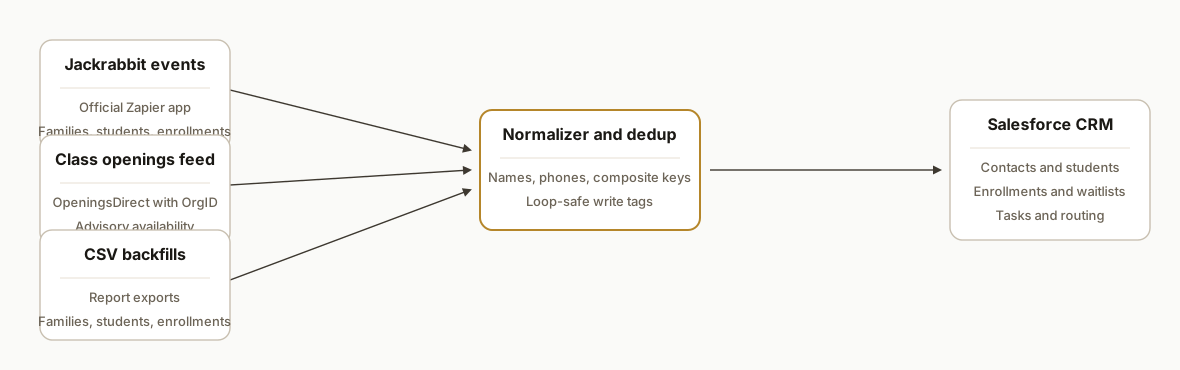
We do not rely on an undocumented general API. Jackrabbit's own help states there is no API for Events and notes JSON support is not available. Instead we combine supported surfaces with a thin normalization layer and write cleanly into Salesforce.
- Jackrabbit Zapier app: Jackrabbit provides an official Zapier app and in-app Zapier API key. We use it to catch live changes across families, contacts, students, classes, enrollments, and waitlists, then send structured payloads forward.
- CSV exports for backfill: Jackrabbit reports export to CSV or Excel. We schedule and ingest those files to reconcile history and fix drift. If you prefer a Sheets-based staging step, see our Jackrabbit to Google Sheets automation for exports and backfills at /blog/jackrabbit-class-to-google-sheets-automation.
- Class openings feed: The public listings endpoints with your OrgID keep an up-to-date inventory view that sales can trust. URLs: OpeningsJS and OpeningsDirect with OrgID. No auth shown in docs, so we treat it as a read-only hint, not a system of record.
- Normalizer and dedup engine: A small middleware gives us consistent names, phones, and composite keys. It prevents duplicates when the same family touches multiple channels. For an overview of build options for this layer, compare Make, n8n, and Apps Script at /blog/make-vs-n8n-vs-gas.
- Salesforce write: We create or update standard CRM records with clear ownership and routing. No fragile field-by-field automations buried in dozens of places.
Step-by-step: how to build it
1) Connect Jackrabbit to Zapier and capture live events
Create Zaps for the Jackrabbit objects you need: families or contacts for parents, students for children, enrollments, and waitlists. Use the in-app Zapier API key from Jackrabbit to authenticate. Point each Zap to a single webhook or code step that forwards a normalized payload.
{
  "source": "jackrabbit",
  "object": "student",
  "familyId": "{{12345}}",
  "studentId": "{{67890}}",
  "names": { "first": "{{First Name}}", "last": "{{Last Name}}" },
  "dob": "{{Birth Date}}",
  "parent": { "email": "{{Family Email}}", "phone": "{{Family Phone}}" },
  "context": { "event": "created", "occurredAt": "{{Zap Meta Timestamp}}" }
}
Gotcha: do not build record logic in 10 different Zaps. Fan all Jackrabbit triggers into one webhook to centralize mapping and dedup.
2) Normalize names, phones, and composite keys
A thin function makes downstream work predictable. Normalize casing, extract E.164 phones, and create a stable key per person. We use a family email plus student first name plus birthdate as a conservative key in this domain.
export function normalizeStudent(e) {
  const clean = s => (s || "").trim();
  const phone = (raw => raw ? raw.replace(/\D+/g, "") : "")(e.parent.phone);
  const key = [clean(e.parent.email).toLowerCase(), clean(e.names.first).toLowerCase(), e.dob].join("|");
  return {
    student: { first: clean(e.names.first), last: clean(e.names.last), dob: e.dob },
    parent: { email: clean(e.parent.email).toLowerCase(), phone },
    familyId: e.familyId,
    studentId: e.studentId,
    key
  };
}
Gotcha: phone formats vary by source. Normalize once at the edge or you will fight duplicates later.
3) Upsert into Salesforce with clear ownership
From the normalizer, write into Salesforce. Keep the write-side simple: one place that creates or updates the right records and attaches enrollment or waitlist context. Leave your segmentation and workflows to Salesforce automation rules after the records exist.
async function upsertToCrm(norm) {
  // 1) Ensure parent contact exists
  const contactId = await ensureContact({ email: norm.parent.email, phone: norm.parent.phone });
  // 2) Ensure student record exists and links to parent
  const studentId = await ensureStudent({
    externalKey: norm.key,
    first: norm.student.first,
    last: norm.student.last,
    dob: norm.student.dob,
    parentContactId: contactId
  });
  return { contactId, studentId };
}
Gotcha: avoid bi-directional triggers that loop records back into Zapier. Tag your writes so upstream filters ignore integration-authored updates.
4) Backfill history with Jackrabbit CSV exports
Use Jackrabbit's report exports to CSV for families, students, and enrollments. Run a one-time cleaner that maps columns to your Salesforce fields and replays history without creating dupes.
# csv_backfill.py
import csv, hashlib

def student_key(email, first, dob):
    base = f"{email.lower().strip()}|{first.lower().strip()}|{dob}"
    return hashlib.sha1(base.encode()).hexdigest()[:16]

with open('students.csv') as f:
    for row in csv.DictReader(f):
        key = student_key(row['Family Email'], row['Student First'], row['Birth Date'])
        payload = {
            'parent_email': row['Family Email'],
            'parent_phone': row['Family Phone'],
            'student_first': row['Student First'],
            'student_last': row['Student Last'],
            'student_dob': row['Birth Date'],
            'external_key': key
        }
        # call your same upsertToCrm path here
Gotcha: CSV headers drift over time. Pin a mapping file and version it so backfills stay deterministic.
5) Mirror class availability with the openings feed
Jackrabbit documents public class listing embeds. We read the OpeningsDirect URL with your OrgID and cache the content for sales scripts. Treat it as advisory, not authoritative.
import fetch from "node-fetch";

async function fetchOpenings(orgId) {
  const url = `https://app.jackrabbitclass.com/jr3.0/Openings/OpeningsDirect?OrgID=${orgId}`;
  const html = await (await fetch(url)).text();
  // parse the bits you need: class name, location, age, openings as strings
  return html;
}
Gotcha: this surface is an unauthenticated embed. Structure can change. Monitor it and fail safe if it does.
6) Route waitlists to fast follow-up
Waitlist events become tasks or leads with class context so staff can reply while interest is hot. Pair this with a simple sequence in Salesforce to send a helpful reply and a nudge to alternative classes if the target is full. For practical playbooks on follow-up timing and steps, see how we automate CRM lead follow-up at /blog/automate-crm-lead-followup.
async function handleWaitlist(event) {
  const norm = normalizeStudent(event);
  const ids = await upsertToCrm(norm);
  await createTask({
    ownerHint: "registrar",
    subject: `Waitlist: ${event.className}`,
    whoId: ids.contactId,
    dueInHours: 4,
    notes: `Requested ${event.className} at ${event.location}`
  });
}
Gotcha: the Online Class Listing Table in Jackrabbit does not allow multi-select in one step. If you want bulk follow-up or alternatives, generate those options on the Salesforce side.
Does Jackrabbit integrate with Salesforce?
Yes. We ship it by combining supported Jackrabbit surfaces and a small middleware: the official Jackrabbit Zapier app for live events, CSV or Excel exports for backfills, and the public class openings feed for availability context. There is no general Jackrabbit JSON API to call directly, so this pattern is the reliable and supportable path. If you are evaluating middleware choices, our comparison of Make, n8n, and Apps Script at /blog/make-vs-n8n-vs-gas outlines tradeoffs for cost, speed, and maintainability.
Salesforce object mapping for Jackrabbit: what we use
A clean mapping keeps reports and automations simple:
- Parent: Salesforce Contact. Keyed by normalized email and phone.
- Student: custom object linked to Contact. Keyed by a conservative composite like parent email, student first name, and DOB.
- Enrollment: custom object linked to Student and optionally to a Program or Location picklist. Stores class reference and status.
- Waitlist intent: Task or Lead with class context. Routed to a registrar queue with due dates inside a few hours.
Example seed schema we deploy in production:
salesforce_objects:
  contact:
    keys: [email_normalized]
  student__c:
    keys: [external_key__c]
    fields: [first__c, last__c, dob__c, contact__c]
  enrollment__c:
    keys: [student__c, class_external_id__c]
    fields: [status__c, program__c, location__c, start_date__c]
  task:
    fields: [subject, whoId, owner, dueDate, description]
This mirrors how we handle HubSpot for similar studios. If you want to compare CRM approaches across platforms, see our Jackrabbit to HubSpot integration breakdown at /blog/jackrabbit-class-to-hubspot-integration.
How to backfill Jackrabbit into Salesforce without duplicates
- Export families, students, and enrollments from Jackrabbit as CSV on a fixed schedule.
- Generate a stable external key at import time using parent email, student first name, and DOB. The same key powers both live and historical writes.
- Use the same upsert path your Zapier events use. One write path prevents drift between real time and batch.
- Version your column mapping and keep a checksum of the last processed file.
Sample mapping seed:
source_column,salesforce_field
Family Email,contact.email
Family Phone,contact.phone_normalized__c
Student First,student__c.first__c
Student Last,student__c.last__c
Birth Date,student__c.dob__c
Class External ID,enrollment__c.class_external_id__c
Enrollment Status,enrollment__c.status__c
If you prefer to land exports in Sheets before ingest, our guide at /blog/jackrabbit-class-to-google-sheets-automation shows a tested pattern.
Where it gets complicated
- No general API in Jackrabbit: Jackrabbit's help states there is no API for Events and that JSON support is not available. Design around supported surfaces: Zapier app for live events, CSV exports for backfill, and the public openings feed for visibility.
- Embed surfaces can change: The openings endpoints are documented as embed URLs with OrgID, not a contractually stable data API. Parse lightly and monitor for changes.
- Preventing duplicate records: Parents often try again with a second email or phone. Use conservative composite keys, avoid over-aggressive merges, and centralize dedup in one place.
- Bi-directional loops: If Salesforce automations update records that your Zapier triggers also watch, you can create loops. Tag integration-authored updates and filter them out upstream.
- Picklists and time zones: Age groups, program names, and locations drift. Normalize to your Salesforce picklists. Align all timestamps to one canonical zone before you compare recency.
What this actually changes
We shipped this for a multi-location children's activity company that runs sales and retention out of Salesforce. After go-live, enrollment actions and waitlist intent appeared where reps already work. Operations stopped re-keying and backfills became an overnight job instead of a weekend chore. The structural win: first contact moved from when someone remembered to look, to minutes after a waitlist or enrollment event.
One relevant benchmark: firms that attempt contact within one hour are nearly seven times more likely to qualify a lead than those who wait longer. Source: Harvard Business Review (https://hbr.org/2011/03/the-short-life-of-online-sales-leads). Putting intent into Salesforce quickly makes that response-time target realistic.
Frequently asked questions
Does Jackrabbit Class have an API we can call directly?
Jackrabbit's own help indicates there is no general API for Events and notes that JSON support is not available. Practical integration paths are the official Zapier app, report exports to CSV or Excel, and the documented class listings embed URLs that take an OrgID.
Can this sync in real time or near real time?
Yes for live events through the Jackrabbit Zapier app. Those triggers flow within minutes under typical load. Historical backfill and reconciliation run on a scheduled CSV import so data stays aligned even if something is missed live.
What Salesforce edition do we need?
Any edition that allows you to connect automation tools and write records programmatically will work. We keep the write-side simple and push clean contact and enrollment context so your existing Salesforce automations can take over.
How do you prevent duplicates between families and students?
We generate conservative composite keys at the edge and centralize dedup in a single normalization service. Emails, names, and birthdates are normalized before matching, and our writes are tagged so upstream watchers ignore integration-authored changes.
Can a non-developer set this up with Zapier alone?
A basic sync is possible with Zapier alone. The parts that save pain in production are the normalization, dedup, backfill, and monitoring layers. We recommend a small middleware so your mapping and keys live in one place instead of scattered across many Zaps.
What about automated responses when a waitlist is created?
We route a task or lead with context to Salesforce and pair it with a short follow-up sequence so families hear back quickly. If you want to layer messaging or templated replies, see our playbook on AI customer response automation at /blog/ai-customer-response-automation.
If you are growing a studio on Jackrabbit and running sales in Salesforce, we have shipped this bridge already. See our broader CRM automation services at /services#crm-automation, read our related post on Jackrabbit Class to HubSpot integration at /blog/jackrabbit-class-to-hubspot-integration, and when you are ready to scope yours, book a short call at /book.
Sources
- 1.The Short Life of Online Sales Leadshbr.org
Want us to build this for you?
Nine questions, about 90 seconds. You see the revenue it is costing you, then pick a time. No pitch.
See your options