
We integrated FieldRoutes to a client's CRM by combining FieldRoutes trigger-rule webhooks, its public API, and a small scheduling layer. The result: automatic service reminders, on-brand review requests, and clean contact history in the CRM without manual exports. This guide shows how that production system works and what to watch for.
FieldRoutes CRM follow-up automation is: a webhook and API bridge that syncs jobs and customers from FieldRoutes to your CRM, then schedules and sends reminders and review requests from your preferred channels.
The problem it solves
Teams in pest control and lawn care often jump between FieldRoutes for operations and a separate CRM for marketing. Without a bridge, staff export CSVs, paste contacts, and manually send reminders and review asks. It is slow, inconsistent, and easy to miss post-visit follow-ups when the day gets busy.
| Manual process | Automated with FieldRoutes bridge |
|---|---|
| Export CSVs weekly, dedupe by hand | Real-time webhooks fire on job events and write to CRM immediately |
| Copy contact details into CRM | Upsert contacts and attach timeline notes programmatically |
| Staff remember to send reminders | A scheduler sets send times based on job dates and windows |
| Sporadic review requests | Automatic review asks with brand-safe templates after job completion |
| No audit trail | Message logs and CRM activities capture every touch |
What instant follow up on every lead is worth
Move the sliders to your own numbers. The defaults are only an example business, not client data.
Your own estimate. Replies in the first few minutes convert far better than replies the next day.
Revenue from leads you stop losing each year
$144,000
150 a month × 12 × 40% × 10% × $2000
- Extra customers a year
- 72
- 150 × 12 × 40% × 10%
How the automation works
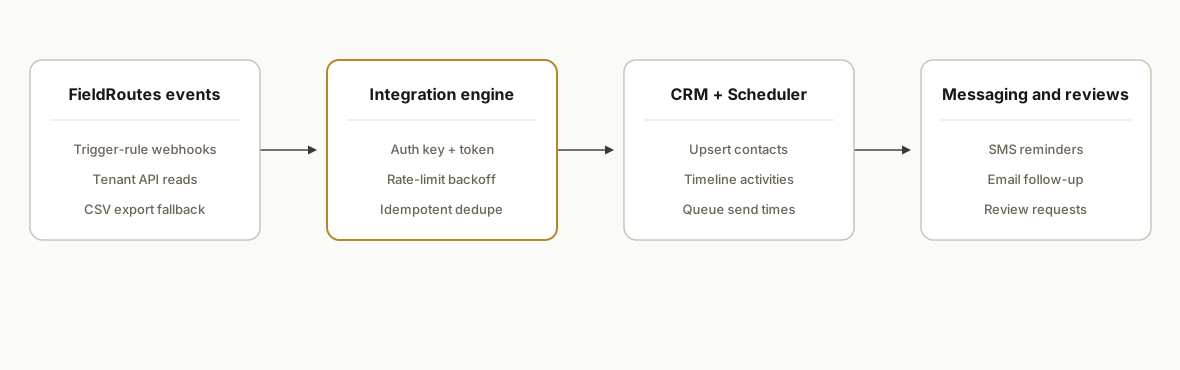
A FieldRoutes tenant posts job and customer events to our webhook. We enrich when needed via the FieldRoutes API, upsert the customer into the CRM, and enqueue channel messages. A small worker sends SMS or email at the right time and records outcomes.
- FieldRoutes trigger rules: In-app rules POST JSON to our webhook when jobs schedule, reschedule, complete, or cancel. This keeps the CRM in sync without polling.
- FieldRoutes API: When an event omits context, we call the tenant API on your YOURDOMAIN.pestroutes.com base with authenticationKey and authenticationToken to fetch the missing pieces. We respect FieldRoutes' documented rate limits and pagination ceilings.
- CRM upsert: We normalize names, phones, emails, address, tags, and last service date. Contacts are upserted and activities are attached so reps see the history.
- Message scheduler: A Postgres table tracks planned sends: reminders T-minus to appointment, and review requests T-plus after completion. A worker scans due rows and sends via Twilio or your ESP.
- Monitoring and idempotency: Every inbound event carries a dedupe key so retries never duplicate CRM records or messages. We expose a dashboard for counts and last errors.
Where to find FieldRoutes API documentation and keys
FieldRoutes publishes tenant-scoped developer documentation. Access is from your FieldRoutes environment. The base for calls is your subdomain: https://SUBDOMAIN.pestroutes.com under the api namespace. Authentication uses two query parameters: authenticationKey and authenticationToken. Use HTTPS and store both secrets outside code.
- Auth pattern: include authenticationKey and authenticationToken as query params on each request.
- Rate limits: plan around the documented defaults of 3,000 reads and 3,000 writes per office at 60 per minute.
- Triggers: configure trigger-rule webhooks in the UI to POST JSON to your receiver for real-time sync.
Example read using fetch:
const BASE = `https://${process.env.FR_SUBDOMAIN}.pestroutes.com`;
const KEY = process.env.FR_AUTH_KEY;
const TOKEN = process.env.FR_AUTH_TOKEN;

async function frGet(path, params = {}) {
  const q = new URLSearchParams({ authenticationKey: KEY, authenticationToken: TOKEN, ...params });
  const url = `${BASE}/api/${path}?${q.toString()}`;
  const resp = await fetch(url);
  if (resp.status === 429) throw new Error("rate_limited");
  if (!resp.ok) throw new Error(`fr_error:${resp.status}`);
  return resp.json();
}
If you prefer lightweight tooling to receive and route webhooks without a full service, see our comparison of Make, n8n, and Apps Script at /blog/make-vs-n8n-vs-gas and our overview of practical connector patterns at /blog/tools-to-connect-your-apps.
Can FieldRoutes create appointments and auto-assign technicians?
Yes with the right tenant permissions. FieldRoutes offers trigger-rule webhooks and a tenant API. We use them to hold or book appointments and assign a technician automatically when your office allows API writes. Where create or assign is not exposed, we create a draft record and notify dispatch for one-click confirmation.
How we implement this in production:
- A qualified lead in your CRM requests a date window and service type.
- We read technician capacity and zones from FieldRoutes using the API, then score by zone match, skills, drive time, and workload.
- If your tenant exposes create and assign permissions, we create the job and assign the technician. Otherwise we place a draft with a hold and alert dispatch in Slack.
Pseudo-implementation:
// pick an available tech by service area and load
async function pickTech({ serviceAreaId, dateWindow }) {
  const techs = await frGet("...", { serviceAreaId }); // technicians in area
  const loads = await frGet("...", { date: dateWindow.start }); // capacity snapshot
  return scoreAndChoose(techs, loads, dateWindow);
}

async function createOrHoldAppointment({ customerId, serviceTypeId, dateWindow }) {
  const tech = await pickTech({ serviceAreaId: inferArea(customerId), dateWindow });
  const job = { customerId, serviceTypeId, preferredStart: dateWindow.start, preferredEnd: dateWindow.end, technicianId: tech?.id };

  try {
    // If your tenant exposes create permissions, post the job then optionally patch assignment.
    const created = await frPost("...", job); // documented create path for your tenant
    return created;
  } catch (e) {
    // Fallback: write a draft to your CRM and alert dispatch for confirmation
    await createCrmTask(customerId, `Hold window ${dateWindow.start} to ${dateWindow.end} for ${serviceTypeId}`);
    await notifyDispatch({ customerId, dateWindow, job });
    return { status: "held" };
  }
}
Guardrails we shipped:
- Respect blackout dates, travel buffers, and invoice status before scheduling.
- Never auto-assign if the tech has overlapping windows or skill mismatches.
- For after-hours calls, pair this with an AI phone agent that offers only valid windows and writes the hold. See our guide on booking by phone at /blog/best-way-to-build-ai-phone-agent-booking.
FieldRoutes CRM: what we actually sync
For operators that keep marketing and service separate, we mirror essential FieldRoutes data into the external CRM so sales and service share one timeline.
- Customer profile: name, phone, email, service address, normalized for dedupe.
- Job lifecycle: scheduled, rescheduled, completed, canceled. We write timeline activities for each.
- Service context: last service date and service type where available to segment messaging.
- Appointment windows: next window, so the CRM can drive reminders accurately.
- Technician label: name or code where available to personalize notifications.
Mapping notes from our build:
- Use a stable external id derived from the FieldRoutes object id to prevent duplicates.
- Normalize phones to E.164 and split name fields consistently.
- Keep consent flags in CRM and suppress outreach when invoices are overdue or tickets are open.
Step-by-step: how to build it
1) Create a secure webhook endpoint and capture FieldRoutes trigger posts
Expose an HTTPS endpoint that validates a shared secret and logs raw events for replay. In FieldRoutes, add a trigger rule that POSTs to this URL on the events you care about.
// server/webhook.js
import express from "express";
import crypto from "crypto";

const app = express();
app.use(express.json());

const SHARED_SECRET = process.env.FR_WEBHOOK_SECRET;

function verifySignature(req) {
  // If you add a signature header in FieldRoutes, check it here.
  const provided = req.get("X-Hook-Signature");
  if (!provided) return true; // fall back to IP allowlist or basic auth
  const computed = crypto.createHmac("sha256", SHARED_SECRET)
    .update(JSON.stringify(req.body))
    .digest("hex");
  return crypto.timingSafeEqual(Buffer.from(provided), Buffer.from(computed));
}

app.post("/api/fieldroutes/webhook", async (req, res) => {
  if (!verifySignature(req)) return res.status(401).send("bad sig");

  const event = req.body; // contains job and customer context per your trigger config
  // Persist for idempotency and replay
  await saveInboundEvent(event);

  // Enqueue downstream processing
  await queueJob("process-fieldroutes-event", { id: event.id });

  res.status(200).send("ok");
});

app.listen(process.env.PORT || 3000);
Gotcha: FieldRoutes does not ship a native Zapier or Make app. If you prefer no-code, use Webhooks by Zapier or Make's HTTP module to receive the POST and forward it. We compare these options in /blog/make-vs-n8n-vs-gas.
2) Enrich with FieldRoutes API using authenticationKey and authenticationToken
When the webhook payload lacks fields your CRM requires, fetch them from the API. FieldRoutes documents tenant-scoped APIs at YOURDOMAIN.pestroutes.com.
// lib/fieldroutes.js
const BASE = `https://${process.env.FR_SUBDOMAIN}.pestroutes.com`;
const KEY = process.env.FR_AUTH_KEY;
const TOKEN = process.env.FR_AUTH_TOKEN;

async function frGet(path, params = {}) {
  const q = new URLSearchParams({ authenticationKey: KEY, authenticationToken: TOKEN, ...params });
  const url = `${BASE}/api/${path}?${q.toString()}`;
  const resp = await fetch(url, { method: "GET" });
  if (resp.status === 429) throw new Error("rate_limited");
  if (!resp.ok) throw new Error(`fr_error:${resp.status}`);
  return resp.json();
}

export async function fetchCustomerById(id) {
  // Use the appropriate documented path for your tenant and object type
  return frGet("...", { id });
}
Tip: Respect FieldRoutes' default caps: 3,000 reads and 3,000 writes per office at 60 per minute, and plan for pagination ceilings on search and get result sizes.
3) Upsert contacts and timeline notes into your CRM
Choose your CRM and map consistently. We store a deterministic dedupe key so every event idempotently updates the same record.
// lib/crm.js
import crypto from "crypto";

function dedupeKey(frCustomer) {
  return crypto.createHash("sha1").update(`fr:${frCustomer.id}`).digest("hex");
}

export async function upsertContact(frCustomer) {
  const contact = {
    external_id: dedupeKey(frCustomer),
    first_name: frCustomer.firstName,
    last_name: frCustomer.lastName,
    email: frCustomer.email || null,
    phone: frCustomer.phone || null,
    address: `${frCustomer.addressLine1 || ""} ${frCustomer.city || ""}`.trim(),
    tags: ["FieldRoutes"],
    last_service_at: frCustomer.lastServiceDate || null
  };
  // Write via your CRM API client here
  return writeContact(contact);
}

export async function logActivity(contactId, summary, meta) {
  return writeActivity({ contactId, summary, meta, source: "FieldRoutes" });
}
Key guardrail: add a unique index on external_id in your CRM storage to prevent duplicates when webhooks retry.
4) Schedule reminders and review requests in a queue table
We use a simple Postgres table and a 1-minute worker. Reminders schedule relative to appointment start; review asks schedule after completion.
-- db/schema.sql
create table message_queue (
  id bigserial primary key,
  contact_external_id text not null,
  channel text not null check (channel in ('sms','email')),
  template text not null,
  send_at timestamptz not null,
  dedupe_key text not null unique,
  status text not null default 'pending',
  payload jsonb not null,
  created_at timestamptz not null default now()
);
// lib/scheduler.js
export async function enqueueReviewAsk(contact, job) {
const sendAt = new Date(new Date(job.completedAt).getTime() + 2 * 60 * 60 * 1000); // T+2h
const dedupe = `review:${contact.external_id}:${job.id}`;
try {
await db.query(
`insert into message_queue(contact_external_id, channel, template, send_at, dedupe_key, payload)
values($1,$2,$3,$4,$5,$6)`,
[contact.external_id, "sms", "review_request_v1", sendAt, dedupe, { name: contact.first_name }]
);
} catch (e) {
if (!/unique/i.test(String(e.message))) throw e;
}
}5) Send messages via Twilio or your ESP and record outcomes
The worker reads due rows, sends, and marks status. Add basic retry with jitter.
// workers/sender.js
import twilio from "twilio";
const client = twilio(process.env.TWILIO_SID, process.env.TWILIO_TOKEN);

export async function runSender() {
  const due = await db.query(
    `select * from message_queue where status='pending' and send_at <= now() order by send_at asc limit 100`
  );
  for (const row of due.rows) {
    try {
      if (row.channel === "sms") {
        await client.messages.create({
          to: lookupPhone(row.contact_external_id),
          from: process.env.TWILIO_FROM,
          body: renderTemplate(row.template, row.payload)
        });
      } else {
        await sendEmail(row);
      }
      await db.query(`update message_queue set status='sent' where id=$1`, [row.id]);
    } catch (e) {
      await db.query(`update message_queue set status='error' where id=$1`, [row.id]);
      logError(e, row.id);
    }
  }
}
6) Handle FieldRoutes rate limits and pagination safely
Add exponential backoff on 429, batched reads, and keyset pagination so large searches do not stall.
// lib/http.js
export async function withBackoff(fn, { tries = 5 } = {}) {
  let delay = 500;
  for (let i = 0; i < tries; i++) {
    try { return await fn(); } catch (e) {
      if (String(e.message).includes("rate_limited") && i < tries - 1) {
        await new Promise(r => setTimeout(r, delay));
        delay = Math.min(delay * 2, 8000);
        continue;
      }
      throw e;
    }
  }
}
Where it gets complicated
- No native Zapier or Make app: You can absolutely automate, but you own the webhook receiver or use Webhooks by Zapier or Make's HTTP module. That means you also own retries, auth, and logging.
- API rate limits: FieldRoutes documents default caps of 3,000 reads and 3,000 writes per office at 60 per minute. Build backoff, cache what you can, and avoid chatty fan-outs during backfills.
- Pagination ceilings: Search endpoints cap around 50,000 IDs and get routes at about 1,000 entities. Use keyset pagination and checkpointing so large tenants complete safely.
- Multi-office tenants: Keep authenticationKey and authenticationToken scoped per office. Mixing tokens can create hard-to-debug permission issues.
- Consent and opt-out: Only message opted-in contacts. Store channel-level consent in the CRM and suppress review asks for open complaints or refunds.
- Timing rules: Do not send a review request while a job is incomplete or an invoice is overdue. Use status-based filters on your trigger rules.
What this actually changes
For a mid-sized pest control operator, this removed manual CSV shuffles and made reminder and review outreach consistent every day. Staff stopped babysitting exports and started handling real exceptions. That consistency matters: according to BrightLocal's Local Consumer Review Survey, 88 percent of consumers read online reviews for local businesses (source: https://www.brightlocal.com/research/local-consumer-review-survey/). Automating the ask after a successful visit raises the odds your best work shows up online.
Frequently asked questions
Does FieldRoutes have an official API?
Yes. FieldRoutes publishes developer documentation and examples. Tenants call their YOURDOMAIN.pestroutes.com base with authenticationKey and authenticationToken as documented. FieldRoutes also markets API and integrations for its Operations Suite.
Is there a native FieldRoutes app for Zapier or Make?
No official app listing exists as of July 2026. You can still integrate using Webhooks by Zapier or the HTTP module in Make. FieldRoutes trigger rules in the UI can POST to your webhook URL to start flows like review requests.
Can this run in real time or only in batches?
Real time is straightforward with trigger-rule webhooks. For enrichment or backfills, use the API with backoff and pagination. Respect FieldRoutes' documented default limits and plan concurrency accordingly.
Which pest control scheduling system offers an API to create appointments and assign technicians automatically?
FieldRoutes is one option. We use its trigger-rule webhooks and tenant API to create or hold appointments and assign technicians when your tenant allows writes. Where creation is not exposed, we place a draft and alert dispatch so you still get an automated first pass without risking overbooking.
What does this cost monthly?
Infrastructure is light: a small Node service, a Postgres or hosted DB, and your messaging vendor like Twilio or an ESP. FieldRoutes API usage itself is part of your subscription. The primary cost is the one-time build and minor ongoing maintenance.
How do you prevent duplicate contacts and messages?
We compute a stable external_id per FieldRoutes object and store unique constraints in CRM storage and the message queue. Webhook retries are safe because dedupe keys block re-sends.
How long does an implementation take?
A focused reminders plus review-ask bridge is usually measured in days from kickoff to shadow mode, then a short tuning period before going live. Larger scopes that include multi-office backfills and dashboards take longer.
If you run FieldRoutes and want consistent reminders and reviews without manual exports, we have this running in production. See our broader CRM automation work at /services#crm-automation, read our related post on pest control software integration, and book a 20-minute call to map your tenant and CRM to this pattern.
Sources
- 1.LCRS 2026: Study Shows Reviews Matter More Than Everbrightlocal.com
Want us to build this for you?
Nine questions, about 90 seconds. You see the revenue it is costing you, then pick a time. No pitch.
See your options