
We built and shipped a Tailwind TMS integration that takes completed dispatches into accounting and pushes customer status updates automatically. It runs on Tailwind's integration token model, the built-in QuickBooks Online connector for AR, and a small polling adapter that bridges the missing webhook layer. This is for carriers and brokers on Tailwind who want dispatch to accounting without re-keying and proactive customer updates without a native Zapier or Make app.
Tailwind TMS automation is: a tokened adapter that reads shipment lifecycle from Tailwind, translates it to accounting entries and customer-facing status messages, and sends both on a schedule with idempotent guards. Where Tailwind does not expose a native connector or real-time trigger, we bridge it with polling and document email parsing.
The problem it solves
Operators were exporting or re-keying load data into accounting and copy-pasting milestone emails to customers. Dispatch would mark a load delivered, then someone would build an invoice, attach paperwork, and send a status note. It worked, until volumes scaled and things slipped: invoices lagged, some customers got no updates, and AP/AR went out of sync with the TMS.
A manual process breaks on three edges: it depends on one person remembering, it does not scale beyond a handful of loads per day, and it leaves no audit trail when a customer asks where a truck is or why an invoice does not match the load.
| Task | Manual workflow | Automated workflow |
|---|---|---|
| Dispatch to invoice | Export CSV or re-key line items into accounting | Tailwind to QuickBooks sync uses Tailwind's native QuickBooks Online integration; our adapter only supplies missing fields and guardrails |
| Customer status emails | Copy from a template and send ad hoc per stop | Adapter composes per-milestone messages and sends on a schedule; portals remain available for self-service |
| Proof-of-delivery | Attach PDFs manually and email | Adapter associates documents from Tailwind emails or EDI and links them from the status message or the accounting record |
| Exceptions | Dispatcher pings accounting on Slack | Exceptions are logged to an audit table and alerted; duplicate sends are suppressed |
How the automation works
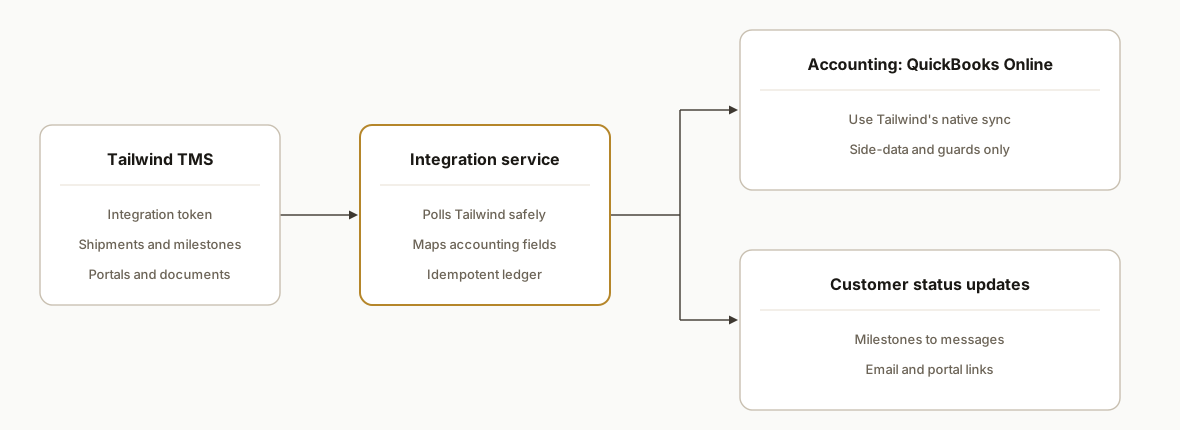
We keep Tailwind as the source of truth. Accounting sync stays on Tailwind's built-in QuickBooks Online integration for AR and vendor items where configured. Our service reads shipment and milestone state with an integration token, normalizes it, and fans out to two paths: accounting side-data that Tailwind's QuickBooks sync can consume, and proactive customer updates. Where Tailwind does not offer webhooks, we schedule polling. If API access is not provisioned, we fall back to parsing outbound Tailwind documents via an email inbound.
-
Tailwind integration token: Tailwind documents an integration token that is generated in-app. We store it as a secret and use it for authenticated access. Public endpoint details are not published, so our adapter keeps Tailwind specifics behind an interface and polls on an interval that respects Tailwind's guidance and observed partner sync cadences.
-
Accounting path: Tailwind's QuickBooks Online integration handles the heavy lift for AR and AP synchronization. We add a small mapping layer for fields Tailwind does not push, and we prevent duplicate invoice creation by writing idempotency keys.
-
Customer status dispatcher: We map internal milestones to customer-facing language, pick the right channel per customer preference, and attach links to portals or documents when available. Where customers already use Tailwind portals, we send a short note with a portal link rather than duplicating the full details in email.
-
Idempotent ledger: Every outbound item is keyed by shipment number plus milestone. The ledger prevents resends when the poller sees the same event twice, and it gives you a visible audit trail.
-
Fallback: email or EDI: If API access is not active, we parse Tailwind documents that are already being emailed out. For customers on EDI, we read status messages through the EDI path after the separate Kleinschmidt setup is complete.
Step-by-step: how to build it
1) Enable the Tailwind integration token and decide your path
Answer first: get your integration token from Tailwind, confirm your subscription tier supports it, and decide if you will poll the API or start with a document-parsing fallback.
- Tailwind documents how to create an integration token. The feature is gated by plan, and EDI requires a separate agreement and token use. Public base URLs and endpoint names are not published, so we keep those details behind an adapter.
# .env
TAILWIND_TOKEN=replace-with-secure-token
POLL_INTERVAL_MINUTES=5
STATUS_CHANNEL=email
PORTAL_LINK_BASE=https://your-portal.example.com
Key gotcha: some Tailwind partner integrations sync on intervals rather than in true real time. We match that reality and set customer expectations accordingly.
2) Keep accounting on Tailwind's native QuickBooks Online sync
Answer first: do not rebuild what Tailwind already does. Use Tailwind's documented QuickBooks Online integration for AR/AP, then add only the missing pieces.
- Configure Tailwind to sync to QuickBooks Online. Map customers and items in Tailwind so invoices land in QuickBooks correctly.
- Our service only writes side-data the native sync does not cover, plus idempotency guards so nothing posts twice.
# accounting-mapping.yaml
invoiceMemo: "Shipment {{shipmentNumber}} • {{customerRef}}"
lineDescription: "{{origin}} → {{destination}} • {{miles}} mi"
customFields:
  - key: tailwind_shipment
    from: shipmentNumber
  - key: pro_number
    from: proNumber
idempotencyKey: "{{shipmentNumber}}:{{milestone}}"
Key gotcha: let Tailwind remain the system of record for AR mapping. The adapter must not create invoices if Tailwind already did. Enforce idempotency.
3) Implement a polling adapter with a strict interface
Answer first: hide Tailwind specifics behind an interface so you can swap polling for EDI or email parsing later without rewriting business logic.
// tailwind-adapter.ts
export type Shipment = {
  shipmentNumber: string
  customerId: string
  status: string
  milestones: { code: string; at: string }[]
  origin: string
  destination: string
  miles?: number
  proNumber?: string
}

export interface TailwindAdapter {
  listRecentlyChangedShipments(sinceIso: string): Promise<Shipment[]>
}

export function createTailwindAdapter(): TailwindAdapter {
  const token = process.env.TAILWIND_TOKEN!
  return {
    async listRecentlyChangedShipments(sinceIso) {
      // Polling implementation lives here. Endpoint and auth details are adapter-internal.
      // Keep retries, backoff, and a last-seen watermark.
      return []
    }
  }
}
Key gotcha: do not leak assumed URLs or header schemes. Tailwind has an integration token, but public endpoint documentation is not published, so keep it swappable.
4) Add an idempotent ledger in Postgres or SQLite
Answer first: record what you sent so you never send it twice.
-- outbound_ledger.sql
create table if not exists outbound_ledger (
  id serial primary key,
  key text unique not null,
  kind text not null,
  payload jsonb not null,
  sent_at timestamptz default now()
);

-- Key pattern: shipmentNumber:milestoneCode
create unique index if not exists outbound_ledger_key_uq on outbound_ledger(key);
Key gotcha: ledger writes must be part of the same transaction that triggers a send or post a side-record, or you risk duplicates during retries.
5) Build the customer status dispatcher
Answer first: translate internal milestones to clear customer language and send on the channel customers actually read.
- Some customers prefer a portal link over a full status in the email body. Support both.
- Keep templates short and factual.
// status-templates.json
{
  "PICKED_UP": {
    "subject": "Pickup confirmed: {{shipmentNumber}}",
    "body": "Your load has been picked up. ETA to delivery: {{eta}}. Track here: {{portalLink}}"
  },
  "DELIVERED": {
    "subject": "Delivered: {{shipmentNumber}}",
    "body": "Your load was delivered at {{deliveredAt}}. POD available here: {{portalLink}}"
  }
}
Key gotcha: set the cadence realistically. One documented Tailwind partner integration syncs every 15 minutes. Sending emails more frequently than you can refresh status produces noise.
6) Schedule the poller and run a shadow period
Answer first: run the integration in shadow mode for 1 to 2 weeks so you can compare against what staff would have sent.
// scheduler.ts
import { createTailwindAdapter } from "./tailwind-adapter"
import { upsertLedgerAndDispatch } from "./dispatch"

const adapter = createTailwindAdapter()
let watermark = new Date(Date.now() - 60 * 60 * 1000).toISOString()

async function tick() {
  const changed = await adapter.listRecentlyChangedShipments(watermark)
  for (const s of changed) {
    for (const m of s.milestones) {
      const key = `${s.shipmentNumber}:${m.code}`
      await upsertLedgerAndDispatch(key, s, m)
    }
  }
  watermark = new Date().toISOString()
}

setInterval(tick, Number(process.env.POLL_INTERVAL_MINUTES || 5) * 60 * 1000)
Key gotcha: timezone alignment. If your customers read Eastern and your ops runs Pacific, send windows must respect the customer timezone and weekends.
Where it gets complicated
-
Plan gating for integration tokens: Tailwind documents token creation and notes that integrations like EDI require higher plans. Confirm entitlement early. Do not design on an assumption that a lower plan exposes the same features.
-
No public endpoint documentation: Tailwind references an open API and token use, but base URLs, endpoints, and rate limits are not publicly documented. Keep a strict adapter boundary so you can change how you connect without touching business logic.
-
Intervals, not real time: Tailwind's own FourKites article describes a 15-minute sync interval. Customer messaging must match that. Over-promising real time when the source is interval-based creates support noise.
-
EDI adds a vendor and rules: Tailwind's EDI article requires Kleinschmidt and uses your token. That brings mapping, test loops, and operational overhead. Use it where customers require EDI 214 and keep email or portal for the rest.
-
Native Zapier/Make connector absence: We did not find a native Tailwind listing in Zapier or Make directories. Plan for custom glue rather than a one-click recipe.
-
Document-parsing fallbacks: Tailwind supports emailing operational documents. If API access is not provisioned, parse those emails and attach artifacts to accounting or customer updates. This works, but you must handle attachment variability and avoid processing the same email twice.
What this actually changes
For a midsize carrier, this pattern removed re-keying between dispatch and accounting and standardized customer status messages. Accounting remained on Tailwind's QuickBooks Online sync. Our adapter only added fields and idempotency guards. Customer updates were predictable and auditable instead of ad hoc.
Industry context: detention and stalled communication compound delays. The American Transportation Research Institute reported that driver detention times of more than two hours occurred in roughly one in five stops, increasing year over year. Clear, proactive status updates help the shipper coordinate docks and reduce avoidable dwell.
Frequently asked questions
Does Tailwind TMS have an API?
Tailwind references an open API and documents creating an integration token in the app. Public developer docs with endpoint details are not published, and base URLs and rate limits are not listed. We implement a tokened adapter behind a strict interface and avoid assuming endpoint specifics in code that your team will see.
Does Tailwind have a native Zapier or Make connector?
We did not find a native app listing in Zapier or Make directories. Tailwind's documented integrations focus on specific partners such as QuickBooks Online, RMIS, and visibility networks. Where a native connector is missing, we bridge with a small service that polls or parses emails and then fans out to the systems you use.
Can this run in real time?
Plan for intervals. Tailwind's own FourKites article cites a 15-minute sync cadence. Unless Tailwind provisions a webhook or pushes events, the safe pattern is polling on a schedule that matches partner intervals and sending customer messages on that cadence.
What Tailwind plan do I need?
Token creation is documented for higher plans, and EDI requires Unlimited plus a separate Kleinschmidt agreement. Confirm entitlement with Tailwind before scoping your build so you do not design for features that are not enabled on your tenant.
How much does this cost monthly?
The Tailwind to QuickBooks Online sync is included as a built-in integration on Tailwind. The custom adapter is lightweight to host. Real monthly cost depends on message volume and which channels you use for customer updates. The primary cost is the initial build and your Tailwind subscription level.
Can my ops manager set this up without a developer?
Tailwind to QuickBooks Online mapping is a configuration task in Tailwind. The dispatch-to-accounting bridge and automated customer updates are real engineering. We recommend a short build with a shadow-mode period, then hand off templates and controls to ops.
If you are running Tailwind and want dispatch to flow into accounting with proactive customer updates, we have already shipped this pattern. See our related post on McLeod integration for similar constraints and bridges in trucking: /blog/mcleod-software-api-integration. If you want help scoping the first iteration, read our services at /services#workflow-automation and then book a short call at /book.
Want us to build this for you?
Nine questions, about 90 seconds. You see the hours it is costing you, then pick a time. No pitch.
Get your free assessment