
Axon to QuickBooks automation works by capturing Axon exports on a reliable schedule, transforming them into accounting-ready entries, posting them into QuickBooks, and generating driver settlement packets from the same source. We built this for a midsize carrier that needed QuickBooks to remain the system of record while Axon continued to run dispatch and operations.
Axon integration, in practical terms, is a bespoke bridge that pulls data from Axon outputs you control and pushes clean accounting and payroll artifacts into your finance stack when native connectors are missing.
The problem it solves
You want QuickBooks to stay the ledger, but Axon positions itself as an accounting replacement. There is no public Zapier or Make app for Axon and no public API docs, so off-the-shelf syncs are not an option. Manually exporting revenue, fuel, advances, deductions, and driver pay, then keying bills and journal entries, causes delays and reconciliation drift.
| Task | Manual process | Automated flow |
|---|---|---|
| Data pull | Staff runs Axon reports and emails CSVs or PDFs | Scheduled export drop into a secure folder that a watcher ingests |
| Accounting entries | Hand-key invoices, bills, fuel, advances, and deductions into QuickBooks | Deterministic mapping produces balanced journal entries and bills every night |
| Driver settlements | Build net pay in spreadsheets and print PDFs | Engine computes gross to net, renders PDFs, and stages ACH files |
| Idempotency | Easy to double-book a week | Ledger prevents re-posting the same Axon batch |
| Reconciliation | Hours of back-and-forth on discrepancies | Exception report lists only the deltas to review |
How the automation works
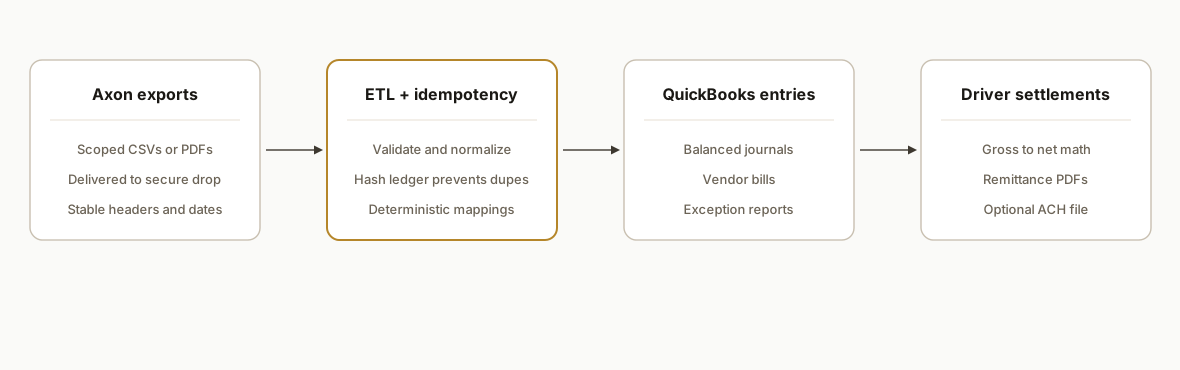
We designed it around a simple truth: public API details for Axon are not published and there is no Zapier or Make listing. The bridge uses exports you already control, a secure drop, and a deterministic engine that writes to QuickBooks and produces settlement artifacts.
- Axon exports in a secure drop: Axon is configured to deliver the same scoped reports on a cadence you control. Formats and scheduling are client-configured because Axon does not publish export automation details publicly. We consume whatever reliable output you can produce.
- ETL and idempotency engine (accent): A service watches the drop, validates headers, normalizes units, and writes a hash ledger so a given Axon batch posts once. Transform rules are code, not prompts, so accounting stays deterministic.
- QuickBooks posting: The engine maps Axon revenue and cost items to your chart of accounts and vendor objects, then posts balanced entries. Implementation respects that Axon markets itself as a QuickBooks replacement, so we keep QuickBooks as the single source of truth on the finance side.
- Driver settlements: The same facts generate per-driver packets: earnings lines, advances, reimbursements, and deductions, plus net pay with remittance PDFs and an optional ACH file for your bank portal.
Step-by-step: how to build it
1) Establish a repeatable Axon export
Pick one reliable Axon output per cycle: revenue, fuel, and pay components. Because Axon's public API is unconfirmed and there is no Zapier or Make app, we anchor the bridge on files you control. Deliver them to an SFTP folder or a secure cloud bucket with a unique batch identifier in the filename.
# Example naming convention for nightly batches
axon_exports/
  2026-06-28_revenue.csv
  2026-06-28_driver_pay.csv
  2026-06-28_fuel.csv
Key gotcha: lock the column headers and date formats before we code the transforms. Small header drifts cause big downstream pain.
2) Ingest and validate with a watcher
A lightweight Node.js service pulls new files, validates headers, and stores a content hash to prevent duplicates.
import SFTPClient from 'ssh2-sftp-client';
import crypto from 'crypto';
import fs from 'fs/promises';
import sqlite3 from 'better-sqlite3';

const db = sqlite3('ledger.db');
db.exec(`CREATE TABLE IF NOT EXISTS batches (
  fname TEXT PRIMARY KEY,
  sha256 TEXT NOT NULL,
  posted_at TEXT NOT NULL
)`);

function sha256(buf){ return crypto.createHash('sha256').update(buf).digest('hex'); }

async function fetchNew(sftpCfg, remotePath){
  const sftp = new SFTPClient();
  await sftp.connect(sftpCfg);
  const list = await sftp.list(remotePath);
  for(const f of list){
    if(!/^\d{4}-\d{2}-\d{2}_.+\.csv$/.test(f.name)) continue;
    const buf = await sftp.get(`${remotePath}/${f.name}`);
    const h = sha256(buf);
    const exists = db.prepare('SELECT 1 FROM batches WHERE fname=?').get(f.name);
    if(exists) continue; // already processed
    await fs.writeFile(`./staging/${f.name}`, buf);
    db.prepare('INSERT INTO batches(fname, sha256, posted_at) VALUES(?, ?, datetime("now"))')
      .run(f.name, h);
  }
  await sftp.end();
}
Key gotcha: do not process partial files. Use a temp name on the producer side, then rename to the final name when the export completes.
3) Map Axon codes to your chart of accounts
We keep a simple mapping table in code or a protected sheet. Every revenue or deduction code maps to a specific GL account and a posting behavior.
const GL = {
  REV_LINEHAUL: { account: '4000 Linehaul Revenue', side: 'credit' },
  REV_FSC:      { account: '4010 Fuel Surcharge',    side: 'credit' },
  COST_FUEL:    { account: '5000 Fuel Expense',      side: 'debit' },
  DED_ADVANCE:  { account: '2210 Driver Advances',   side: 'credit' }
};

function mapRow(row){
  const m = GL[row.code];
  if(!m) throw new Error(`Unmapped code: ${row.code}`);
  const amt = Number(row.amount);
  return m.side === 'debit'
    ? { account: m.account, debit: amt, credit: 0 }
    : { account: m.account, debit: 0, credit: amt };
}
Key gotcha: freeze this mapping under change control. Accounting owns it. Engineering implements it.
4) Compute driver settlements deterministically
We separate calculation from presentation. The engine turns fact rows into a net check and emits both JSON and a human PDF.
function settle(driverId, facts){
  const earnings = facts.filter(f => f.type === 'earning').reduce((s,f)=>s+Number(f.amount),0);
  const reimb    = facts.filter(f => f.type === 'reimb').reduce((s,f)=>s+Number(f.amount),0);
  const deduct   = facts.filter(f => f.type === 'deduct').reduce((s,f)=>s+Number(f.amount),0);
  const net = earnings + reimb - deduct;
  return { driverId, earnings, reimb, deduct, net };
}
Key gotcha: do not let a model compute net pay. Settlements are math, not prose. Keep it deterministic and testable.
5) Post balanced entries into QuickBooks
We batch entries per cycle and post balanced journal entries and vendor bills. We keep QuickBooks as the system of record and never treat Axon as the ledger. The posting layer is abstracted so it can target QuickBooks Online or a Desktop importer as needed.
async function postBatch(qb, journalLines, bills){
  // journalLines: [{ account, debit, credit, memo }]
  // bills: [{ vendor, lines:[{ account, amount, memo }], ref }]
  await qb.postJournalEntry({ lines: journalLines });
  for(const b of bills) await qb.postBill(b);
}
Key gotcha: enforce that debits equal credits before posting. Reject the batch if not balanced and surface a clear exception report.
6) Reconcile and alert on exceptions
After posting, we write a run receipt and generate an exception report: unmapped codes, out of balance batches, and missing drivers. Only exceptions go to email or Slack so the back office stays quiet unless something is wrong.
function exceptions(report){
  return [
    ...report.unmapped.map(c => `Unmapped code: ${c}`),
    ...report.outOfBalance.map(b => `Out of balance: ${b.batch}`)
  ];
}
Key gotcha: treat the exception list as the single source for daily review. If it is empty, the day is clean.
Where it gets complicated
No public Axon API. We found no public API docs or developer portal. That means the bridge must anchor to exports you can control. Plan for a real export discipline and header stability.
No native Zapier or Make app. Axon does not appear in Zapier or Make directories. Low-code shortcuts are not available, so a bespoke watcher and posting layer are required.
Axon's accounting stance. Axon markets itself as a full accounting replacement for QuickBooks. If you must keep QuickBooks as the source of truth, design the bridge so postings are complete and balanced without trying to half-run accounting in two places.
Rigidity and change control. Independent reviews call Axon highly integrated and opinionated. Expect low appetite for custom hooks. Stabilize your exports and handle transformations in your own layer.
Duplicate prevention. Human-run exports easily re-send the same period. A ledger keyed by filename and content hash prevents double-posts.
Cutover and backfill. First load can flood QuickBooks if you do not seed a sent-state. Dry-run against a sandbox, then backfill in dated tranches.
What this actually changes
For a regional carrier, this removed weekly hand entry and spreadsheet settlements. Accounting kept QuickBooks as the ledger while dispatch stayed in Axon. The structural win: files you already control become a nightly, zero-touch posting and settlement run, and the team only looks at exceptions.
One practical market fact: Axon does not have a public Zapier listing and does not appear in Make's directory, which confirms you should budget for a bespoke bridge rather than a plug-and-play connector. Sources: Zapier App Directory and Make Integrations Directory.
Frequently asked questions
Does Axon have an official API?
We found no public API docs or developer portal for Axon. Treat Axon as an export-driven system for integration planning. Build around files you can produce reliably rather than assuming API access.
Is there a Zapier or Make integration for Axon?
No. Axon is not listed in Zapier's App Directory or Make's Integrations Directory. If you see third-party mentions, they are not public connectors you can click to install. Plan for a custom integration.
Can you sync Axon to QuickBooks without replacing QuickBooks?
Yes, by posting balanced entries into QuickBooks from Axon exports. Axon positions itself as a QuickBooks replacement, so there is no native two-way sync to rely on. The bridge keeps QuickBooks as the source of truth and uses Axon as the operational source.
How do you prevent duplicate postings?
We key each batch by filename and a content hash, store it in a ledger, and refuse to post a batch that already exists. We also scope each run to a statement period to avoid reprocessing overlapping files.
Can this run in near real time?
It can, but most accounting teams prefer nightly. Because Axon's public export scheduling is not documented, we recommend a simple, stable cadence that the back office can own, then a watcher that runs every 15 minutes to pick up new files.
What about driver settlements and ACH?
Settlements are computed deterministically from export facts. We render a remittance PDF per driver and can generate an ACH file for upload to your bank, aligned to your banking format requirements.
If you operate on Axon and want QuickBooks to remain the ledger, this export-driven bridge is the safest way to get there. We have shipped this pattern in production. See our related trucking TMS work in Does McLeod Have an API? How to Sync Dispatch to QuickBooks and our broader workflow automation services. When you are ready to scope your Axon to QuickBooks bridge, book a 15 minute call.
Want us to build this for you?
Nine questions, about 90 seconds. You see the hours it is costing you, then pick a time. No pitch.
Get your free assessment