
We designed and shipped a single-pane operations dashboard for a tow company use case: calls, drivers, tickets, and money on one screen. We first delivered a static proof-of-concept for UBK Towing, then mapped the exact path to a live deployment that reads Towbook, Square, Google Sheets, and GPS. This guide shows how we take a dispatch-console demo to production without breaking day-to-day ops.
Definition: a tow company operations dashboard is a single screen that consolidates active calls, driver status and locations, ticketing and invoicing, and daily A R into a live, action-first view for dispatch and management.
The problem it solves
Most towing teams run dispatch off several systems at once. A dispatcher flips between Towbook or InTow for calls, a card processor for payments, a sheet or inbox for tickets and parking enforcement, and group chats to guess where trucks are. That juggling slows response, hides revenue leakage, and makes sales conversations reactive instead of data-backed.
Answer first: the dashboard removes tab-juggling by ingesting the operational sources you already use, normalizing identifiers like driver and truck, and surfacing the two things that matter during a shift: what needs action now and what moved financially today.
| Task | Manual workflow | Automated dashboard |
|---|---|---|
| See active calls | Click into dispatch view, refresh, ask drivers for status | Active calls panel auto-refreshes with status chips and aging |
| Driver location | Call or text drivers, switch to separate map | Live map pins with on-duty filter and last-seen timestamp |
| Parking tickets | Spreadsheet updates, email threads | Tickets table with status, assigned, and due aging highlights |
| Invoicing today | Check processor app and batch reports | Revenue today bar and A R with days-overdue heatmap |
| Flagged drivers | Memory and sticky notes | Flag list with auto rules for late, low rating, or repeat issues |
| Sales convo prep | Hunt last 30 days of jobs | 30-day call volume chart and MTD revenue by service mix |
How the automation works
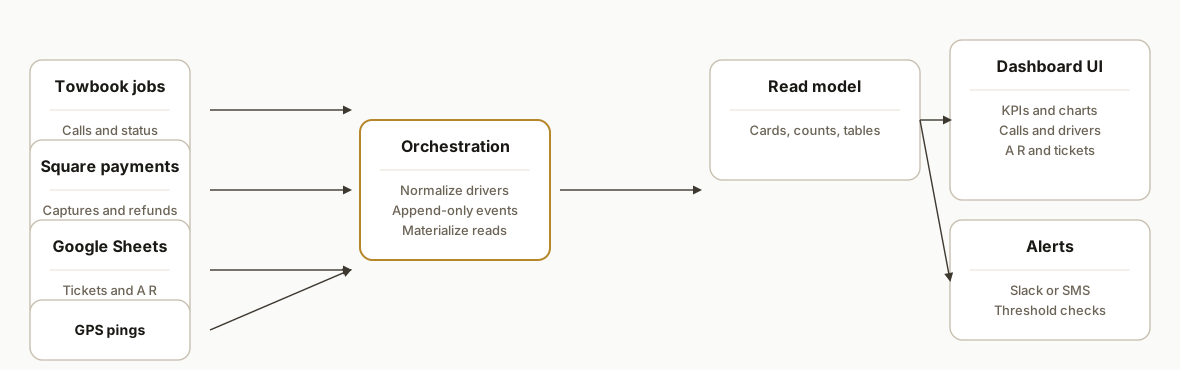
A production deployment keeps your core platforms in place and adds a thin integration layer: webhooks and exports feed an event sink. A small service reconciles entities like drivers and trucks, fills a read model, and the dashboard renders current state with lightweight caching so it stays snappy during a shift.
- Data sources: Towbook or InTow for jobs and status, Square or your processor for payments and refunds, a Google Sheet for parking tickets or exception workflows, and GPS pings from your tracker app.
- Orchestration service: a tiny Node or Python app running on Vercel or Railway ingests webhooks and file drops, resolves driver and truck identities, and writes a normalized state table per panel.
- Read model: a compact Postgres or SQLite store materializes the exact aggregates the UI needs. Think cards, counts, and sorted tables, not raw logs.
- Dashboard UI: a Next.js app renders KPIs, charts, driver tables with expand rows, and aging heatmaps. Incremental static regeneration or short server cache keeps it fast without stalling on writes.
- Alerts and guardrails: budget-friendly checks trigger Slack or SMS when thresholds spike: too many unassigned calls, expired documents, or same-driver repeat flags.
Important note on naming: we built the first version as a proof-of-concept for UBK Towing. It was a static demo to validate layout and flow, not a live deployment. The integration path here is the production version we use when a towing operator signs off.
Towbook integration options: webhook, export, or CSV
Answer first: we ingest whatever Towbook or InTow can reliably send and normalize it before it hits the screen.
- Webhooks where your plan supports push. We record raw payloads and materialize UI tables separately so field changes do not break panels.
- Scheduled exports when push is unavailable. A cron pull or watched bucket brings in new rows at a known cadence and we de-duplicate by source id and timestamp.
- Inbox or CSV watcher as a last resort. We parse attachments to events so dispatch still sees a unified queue.
Related deep dives you can use alongside this build:
- Turn Towbook lists into a working feed without dev lift: see our guide on Towbook to Google Sheets automation.
- Pipe Towbook events into Slack or your CRM for alerts and follow-ups: Towbook webhooks to Slack and CRM.
- If leadership wants richer reporting, the same feed powers Towbook to Power BI reporting off the read model.
- If accounting needs invoice sync, pair the dashboard with Towbook to QuickBooks invoicing sync.
Will this work with InTow too?
Short answer: yes. We designed the intake layer to be vendor agnostic. In production we map InTow job exports or pushes into the same event sink and identity map that Towbook uses. The UI and materializers do not care which vendor produced the job as long as the feed is reliable and timestamped.
- Identity: we key drivers to a canonical driver_id and map InTow user references to it alongside Towbook.
- Intake: we support a mix of push, scheduled exports, or inbox CSV for both vendors.
- Next steps: if you run InTow today, the integration pattern in our InTow API integration guide is the same one we use to feed this dashboard.
Square in the dashboard: captures vs settlements
Answer first: the UI shows what moved today and what settled, side by side, so dispatch and managers are not guessing.
- Revenue Today: sum of payment captures and refunds bucketed to the dispatch timezone so cards match shift reality.
- Net Settled: daily settlement totals for finance conversations. These often lag captures, so we compute both.
- Adjustments: tips and refunds show as separate chips and are reflected in A R and driver scorecards without double counting.
GPS and driver tracking: providers and fallbacks
Answer first: we prefer push pings, but we support polling or a daily export if that is what your tracker offers.
- Source agnostic: phone-based trackers or hardwired units both work. We join pings to a canonical driver record using phone or truck number.
- Freshness: each pin shows last-seen and an on-duty filter. We badge stale locations so dispatch does not trust old dots.
- Privacy windows: quiet hours and off-duty are respected. Pings during off-duty are ignored for the live map and history views.
No Towbook API access: go live anyway
If your plan does not expose push or you cannot get vendor credentials this month, we still take the dashboard live. The pattern: treat the vendor list screens or emails as a feed, normalize events, and backfill nightly.
- CSV watcher: schedule vendor exports to a Drive or S3 folder. We poll the folder, ingest new files, and de-duplicate by a hash of job number and timestamp.
- Email attachments: many offices receive job summaries or tickets by email. Label those messages and forward attachments to the dashboard.
- Sheets bridge: copy key lists into a Google Sheet that the office already uses. We mirror edits into the event sink and keep Sheets as the low-friction UI for exceptions.
Example: Gmail label parser to forward CSV attachments to the dashboard.
// Apps Script: forward CSV attachments for messages in label "Towbook-Exports"
function forwardTowExports() {
  var label = GmailApp.getUserLabelByName('Towbook-Exports');
  if (!label) return;
  var threads = label.getThreads(0, 20);
  var secret = PropertiesService.getScriptProperties().getProperty('WEBHOOK_SECRET');
  threads.forEach(function(t) {
    t.getMessages().forEach(function(m) {
      var atts = m.getAttachments({includeInlineImages: false});
      atts.forEach(function(a) {
        if (a.getName().toLowerCase().endsWith('.csv')) {
          var payload = {
            event: 'job.export.csv',
            filename: a.getName(),
            timestamp: new Date(m.getDate()).toISOString(),
            base64: Utilities.base64Encode(a.getBytes())
          };
          UrlFetchApp.fetch('https://your-dashboard.app/api/inbound/jobs-csv', {
            method: 'post',
            contentType: 'application/json',
            payload: JSON.stringify(payload),
            headers: { 'x-signature': secret }
          });
        }
      });
    });
    t.removeLabel(label); // avoid reprocessing
  });
}
When you later gain API or webhook access, we switch the intake without touching the UI. For Zapier-limited stacks, see our breakdown of practical options in Towbook API integration: Zapier alternatives.
Multi-yard or franchise: how we segment views
Dispatchers often cover multiple yards or cities. We scope the read model and UI by yard_id so teams see what they need without clutter.
- Identity: attach yard_id to drivers, trucks, and calls in the identity map.
- UI filters: quick yard switcher with per-yard aging and KPIs. Global leads and finance still roll up to an all-yards view.
- CRM follow-up: if you route sales tasks by location, pair the dashboard feed with our Towbook to HubSpot CRM integration so missed quotes and VIP accounts get owner-assigned follow-ups.
Step-by-step: how to build it
1) Stand up the UI and seed it with static data
Answer first: ship the screen first so dispatch can react to layout and fields before any integration work.
// app/page.tsx (Next.js 16)
import { KPICardBar } from "./components/kpi-bar";
import { DriversTable } from "./components/drivers-table";
import { CallsPanel } from "./components/calls-panel";

export default async function Dashboard() {
  // Static seed first, replace with live fetch later
  const seed = await import("../lib/mockData");
  return (
    <main className="p-6 space-y-6">
      <KPICardBar data={seed.kpis} />
      <div className="grid gap-6 grid-cols-1 xl:grid-cols-3">
        <section className="xl:col-span-2"><CallsPanel data={seed.calls}/></section>
        <aside><DriversTable data={seed.drivers}/></aside>
      </div>
    </main>
  );
}
Gotcha: freeze the layout early. Changing table columns after integration multiplies work across UI, materializers, and tests.
2) Create a neutral event sink and identity map
Answer first: accept jobs, payments, and tickets in whatever shape they come in, then normalize to driver and truck keys you control.
-- events (append-only)
CREATE TABLE events (
  id TEXT PRIMARY KEY,
  source TEXT NOT NULL,           -- towbook, square, sheets, gps
  kind TEXT NOT NULL,             -- job.created, job.updated, payment.captured, ticket.issued, gps.ping
  occurred_at TIMESTAMP NOT NULL,
  body JSONB NOT NULL
);

-- identity map
CREATE TABLE driver_identity (
  driver_id TEXT PRIMARY KEY,     -- canonical
  towbook_user TEXT,              -- nullable
  phone TEXT,                     -- for GPS join
  truck_number TEXT               -- optional
);
Gotcha: never hinge the UI on third-party IDs. Keep a canonical driver_id and map everything else to it.
3) Ingest Towbook jobs and status safely
Answer first: use whatever Towbook offers in your plan: webhooks, scheduled exports, or a daily CSV to a watched bucket. Translate inbound into append-only events.
// pages/api/inbound/jobs.ts (serverless)
import type { NextApiRequest, NextApiResponse } from "next";
import { upsertEvent } from "../../lib/store";

export default async function handler(req: NextApiRequest, res: NextApiResponse) {
  // Validate shared secret or signed payload per your integration method
  const signature = req.headers["x-signature"];
  if (!signature) return res.status(401).end();

  const kind = req.body?.event || "job.updated"; // do not assume exact field names
  const occurred = new Date(req.body?.timestamp || Date.now());
  await upsertEvent({
    id: `${req.body?.id}:${occurred.getTime()}`,
    source: "towbook",
    kind,
    occurred_at: occurred,
    body: req.body
  });
  res.status(200).json({ ok: true });
}
Gotcha: do not couple to field names. Persist the raw body and evolve materializers separately.
4) Bring in Square daily settlements and same-day payments
Answer first: pull capture events and daily summaries, then compute Revenue Today and A R deltas in your read model.
// jobs/settlement-pull.ts (cron)
import { fetchProcessorSettlements } from "../lib/processor";
import { recordEvent } from "../lib/store";

export async function run() {
  const since = new Date(Date.now() - 1000*60*60*24*2); // 48h safety window
  for await (const p of fetchProcessorSettlements({ since })) {
    await recordEvent({
      id: `square:${p.id}`,
      source: "square",
      kind: p.type, // payment.captured, refund.processed
      occurred_at: new Date(p.created_at),
      body: p
    });
  }
}
Gotcha: settlements can post after midnight. Use a rolling window and idempotent upserts to avoid dropouts.
5) Wire Google Sheets for tickets and manual exceptions
Answer first: keep low-volume workflows in a Sheet the office already uses, but mirror to your store so the dashboard stays the source of truth.
// Apps Script web app: onEdit -> POST to dashboard
function onEdit(e) {
  var row = e.range.getRow();
  if (row < 2) return; // skip header
  var sheet = e.source.getActiveSheet();
  var values = sheet.getRange(row,1,1,sheet.getLastColumn()).getValues()[0];
  var payload = {
    event: 'ticket.updated',
    timestamp: new Date().toISOString(),
    row: row,
    values: values
  };
  UrlFetchApp.fetch('https://your-dashboard.app/api/inbound/tickets', {
    method: 'post',
    contentType: 'application/json',
    payload: JSON.stringify(payload),
    headers: { 'x-signature': PropertiesService.getScriptProperties().getProperty('WEBHOOK_SECRET') }
  });
}
Gotcha: Sheets users edit columns over time. Key off header names on your server, not column numbers.
6) Materialize a read model for snappy UI panels
Answer first: run small jobs that convert events into compact tables the UI can query without joins.
-- calls panel
CREATE TABLE calls_live AS
SELECT
  body->>'job_number' AS job_number,
  MAX(CASE WHEN kind='job.updated' THEN body->>'status' END) AS status,
  MAX(occurred_at) AS updated_at
FROM events WHERE source='towbook'
GROUP BY 1;

-- revenue today
CREATE TABLE revenue_today AS
SELECT
  DATE(occurred_at AT TIME ZONE 'America/Los_Angeles') AS d,
  SUM(CASE WHEN kind='payment.captured' THEN (body->>'amount')::numeric ELSE 0 END) AS captured
FROM events WHERE source='square'
GROUP BY 1;
Gotcha: your timezone matters. Align all day-buckets to the dispatch timezone or the cards will be wrong at shift change.
7) Flip the UI from seed to live and add light caching
Answer first: move the UI to pull from the read model. Add a sub-minute cache per panel so dispatch never waits on a cold query.
// app/api/summary/route.ts (Next.js App Router)
import { kv } from "@vercel/kv"; // or in-memory LRU
import { db } from "../../lib/db";

export async function GET() {
  const cached = await kv.get('summary:v1');
  if (cached) return Response.json(cached);
  const [kpis, calls, drivers] = await Promise.all([
    db.fetchKPIs(), db.fetchCalls(), db.fetchDrivers()
  ]);
  const res = { kpis, calls, drivers };
  await kv.set('summary:v1', res, { ex: 30 }); // 30s cache
  return Response.json(res);
}
Gotcha: keep cache TTLs short for live surfaces, and longer for charts that do not drive second-by-second action.
Where it gets complicated
- Driver identity normalization: the same person can appear with a phone number in GPS, a username in dispatch, and a truncated name in a CSV. Establish a canonical driver record and reconcile the rest.
- Mixed integration modes: some plans expose webhooks. Others rely on scheduled exports or a watched inbox. Plan for at least two intake modes per source.
- Revenue timing: card captures, tips, and refunds land at different times than tickets. Separate Revenue Today from Net Settled and make that distinction visible on the UI.
- Timezone and aging math: a call that is 14 minutes old should not flip to 74 after midnight. Anchor all aging to the dispatch timezone and do not trust client clocks.
- Dashboard hardening: short server caches keep it fast, but long caches hide live movement. Cache per-panel with different TTLs and always show a last-updated hint.
What this actually changes
For the UBK Towing proof-of-concept we shipped a full operator view on day one: KPI cards, 30-day call volume, revenue MTD, driver scorecards with inline details, flagged drivers, parking tickets, and A R aging. In production, the same screen reads your live sources so dispatch stops juggling tabs and managers get instant sales context.
External context: AAA reports that roadside assistance responds to more than 30 million calls per year in the United States, underscoring the volume reality that makes single-pane visibility valuable for operators at any size. Source: https://newsroom.aaa.com/tag/roadside-assistance/
Frequently asked questions
Was the UBK Towing build live or a demo?
It was a case-study demo: a static, single-page dashboard to validate layout and what belongs on screen. The integration plan here is the live path we implement next: Towbook or InTow for jobs, Square for payments, Sheets for tickets, and GPS for pins.
Does Towbook have a way to push data out?
Plans and capabilities vary. We have integrated towing systems using webhooks where available, scheduled exports where they are not, and safe CSV or inbox watchers when a vendor does not expose a push. The dashboard does not need a specific endpoint name to work. It needs a reliable feed at a known cadence.
Can you show driver locations in real time?
Yes when your GPS provider can send periodic pings or a polled export. We store pins against a canonical driver record and render last-seen with a freshness badge. If GPS cannot push, we poll at a safe cadence.
How long does it take to go from demo to live?
Typical pattern: 1 week for intake wiring and identity mapping, 1 week for materializers and UI swap, and a few days of smoke testing with shadow data. Complex ticketing or custom reports add time. We ship the screen first, then flip panels to live as each source is verified.
What does it cost to run monthly?
The dashboard hosting is lightweight. Costs come from your existing tools and a small app runtime. We design for minimal overhead: serverless UI, a compact database, and batch pulls where webhooks are not available. The build is the primary cost, not the hosting.
Can we start with Sheets only and add systems later?
Yes. Several operators begin with Sheets for tickets and A R while we layer in dispatch, payments, and GPS. The event sink and read model let us add sources without breaking the UI.
If you want the same one-screen view we demoed for UBK Towing, we already have the design and the integration pattern. See our related write-up on Towbook integration options in Towbook API Integration: Dispatch Dashboard. For broader operations help, see our workflow automation services. When you are ready to scope yours, book a 15-minute call.
Want us to build this for you?
Nine questions, about 90 seconds. You see the hours it is costing you, then pick a time. No pitch.
Get your free assessment