
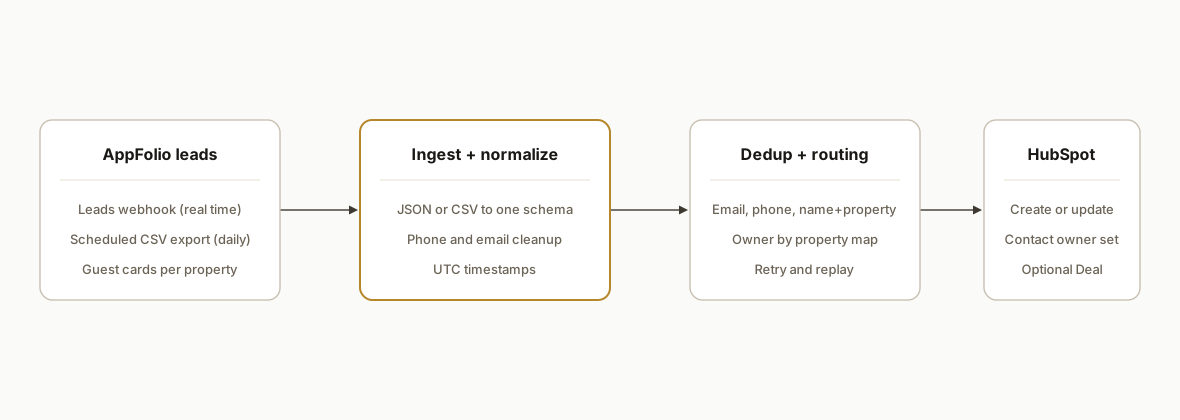
We built and shipped an AppFolio guest card to HubSpot sync that runs two ways: real time from AppFolio leads webhooks when available, or scheduled CSV export when API access is not provisioned. In production it creates or updates HubSpot contacts, assigns owners, and optionally opens a Deal, with duplicate protection and a retry queue.
Guest card to CRM automation is the process that turns each AppFolio inquiry into a routed HubSpot record automatically, so leasing teams can respond fast and keep one source of truth.
The problem it solves
Manual handling of AppFolio guest cards looked like this: export or copy lead details, paste into HubSpot, try to match the contact, set lifecycle stage, and remember who should own the follow-up. It worked on quiet days and broke under volume. Missed or delayed entries meant slow replies and scattered conversations.
| Workflow | Manual process | Automated process |
|---|---|---|
| Lead capture | Staff checks AppFolio, downloads CSV, pastes fields | Webhook fires or CSV arrives and is parsed automatically |
| Dedup | Search by email and phone, guess if it is the same person | Email-first dedupe, phone and name+property fallback, idempotent upsert |
| Routing | Manually pick an owner by building or region | Owner mapping by property or portfolio rules |
| CRM write | Create contact, maybe a Deal, maybe a task | Create or update contact, optional Deal and task, consistent stage and source |
| QA | Spot check in HubSpot weekly | Error log, alerts, and replay queue for any failed writes |
How the automation works
We deploy a small ingestion service that accepts AppFolio leads either as JSON from a leads webhook or as a scheduled CSV export. It normalizes fields, dedupes against HubSpot, then writes contacts and optional deals with owner routing. When a client does not have API access, the daily CSV path covers the gap.
- AppFolio lead source: When available, AppFolio can emit real-time leads webhooks for guest cards. If not available, we configure a daily scheduled CSV export of leads to a controlled ingestion address. Both paths feed the same pipeline. (AppFolio Stack lists a Leads object. Base URL and auth are provisioned through partner onboarding and are not public.)
- Ingestion and normalization: A serverless endpoint transforms webhook JSON or CSV rows into a stable internal schema, trims whitespace, fixes phone formats, and stamps source and property keys.
- Dedup and idempotency: We search HubSpot by email first, then phone, then a name plus property key fallback. We write only deltas, so replays or duplicates do not create extra contacts.
- HubSpot writer: We create or update the Contact, set lifecycle and lead source, attach the property identifier, and optionally open a Deal in the target pipeline with the same routing.
- Error handling: Failures drop into a retry queue with exponential backoff and a dead letter topic for review. We keep a replay button for any payload.
If you also want automated follow-up after the contact lands in HubSpot, we use the same pattern from our post on building reliable CRM follow-up automations: see Automate CRM Lead Follow-up.
Does AppFolio integrate with HubSpot directly?
Short answer: not directly out of the box for property management guest cards. AppFolio Stack documents a Leads object, but the public catalog does not disclose base URL or auth and there is typically a partner onboarding step. We bridge the gap in two supported ways: use real-time leads webhooks when enabled in your environment, or schedule a daily leads CSV to our ingestion address. Both end up as clean, routed HubSpot contacts and optional deals.
Related reads for AppFolio teams adopting automation beyond leasing: Automate AppFolio Owner Statements and Automate AppFolio Work Order Reporting.
AppFolio leads webhook vs CSV: which should you use?
We ship both paths so you can choose based on your tenant and risk tolerance.
- Webhook: best for speed to lead. Near real time. Requires leads webhook availability in your AppFolio environment. Coverage of custom fields can vary by tenant.
- CSV: best for resilience. Predictable once-daily backfill that catches anything the webhook missed or any transient outage. No partner API credentials required.
- Recommendation: run webhook as primary for speed, keep CSV as a daily safety net. Route both into the same idempotent writer so duplicates do not create extra contacts.
Field mapping: what goes from AppFolio guest card to HubSpot?
We standardize to one schema, then map to HubSpot properties. Common mappings we ship:
- Email: email to HubSpot email. If missing, we fall back to phone and create a task to request email.
- Name: first and last to firstname and lastname.
- Phone: normalized E.164 to phone.
- Source: constant AppFolio to a lead source property so reporting is accurate.
- Property identifier: property ID or property name to a custom property like appfolio_property_key for routing and reporting.
- Message or notes: guest message saved on the contact or added as a timeline note. We preserve the raw payload for audits.
If your team relies on HubSpot tasks or sequences, we can also open a new task with SLA due dates once the contact is created. The same approach is used in our reporting automations, for example Automate AppFolio Delinquency Report.
Step-by-step: how to build it
1) Enable the lead source in AppFolio (webhook or CSV)
Answer first: if leads webhooks are available in your environment, turn on the "leads" topic and point it to your HTTPS endpoint. If not, configure a scheduled leads CSV export to run daily and email a controlled ingestion address. Many vendors document these two options. Webhooks provide real time, CSV provides daily reliability when API access is not provisioned.
Key gotcha: webhook availability and coverage varies by tenant. Treat it as environment specific and keep the CSV path as a fallback.
2) Build the ingestion endpoint
Answer first: accept JSON payloads for webhooks and CSV uploads for scheduled exports. Normalize to one internal schema so downstream logic is identical.
// server/index.js
import express from "express";
import multer from "multer";
import { parse } from "csv-parse/sync";

const app = express();
app.use(express.json({ limit: "1mb" }));
const upload = multer();

// Webhook: JSON guest card
app.post("/webhooks/appfolio/leads", async (req, res) => {
  const lead = mapToUnified(req.body); // normalize keys
  await enqueue("lead.ingest", lead);
  res.status(202).json({ ok: true });
});

// CSV: attachment from scheduled export
app.post("/ingest/appfolio/csv", upload.single("file"), async (req, res) => {
  const rows = parse(req.file.buffer, { columns: true, skip_empty_lines: true });
  for (const row of rows) await enqueue("lead.ingest", mapCsvRow(row));
  res.status(202).json({ ok: true, count: rows.length });
});

app.listen(8080);
Key gotcha: CSV headers drift. Make parsing defensive and do not rely on exact header text.
3) Map AppFolio fields to a stable schema
Answer first: define one shape with email, phone, first and last name, message, source, propertyId, and timestamps. Keep raw payload for audits.
function mapToUnified(payload) {
  return {
    email: payload.email?.trim() || null,
    phone: normalizePhone(payload.phone),
    firstName: payload.first_name?.trim() || "",
    lastName: payload.last_name?.trim() || "",
    message: payload.message || "",
    source: "appfolio:webhook",
    propertyKey: payload.property_id || payload.property_name || "",
    receivedAt: new Date().toISOString(),
    raw: payload
  };
}

function mapCsvRow(row) {
  return {
    email: (row.Email || "").trim() || null,
    phone: normalizePhone(row.Phone || ""),
    firstName: (row.FirstName || "").trim(),
    lastName: (row.LastName || "").trim(),
    message: row.Notes || "",
    source: "appfolio:csv",
    propertyKey: row.PropertyID || row.Property || "",
    receivedAt: new Date().toISOString(),
    raw: row
  };
}
Key gotcha: some guest cards do not include email. Fall back to phone plus name, and set a task to request email.
4) Find or create in HubSpot with idempotency
Answer first: search by email first, then phone, then a composite key. Update if found, create if not. Keep a deterministic external ID on the contact to make replays safe.
const HUBSPOT_TOKEN = process.env.HS_TOKEN;
const HS = (path, opts={}) => fetch(`https://api.hubapi.com${path}`, {
  ...opts,
  headers: { Authorization: `Bearer ${HUBSPOT_TOKEN}`, "Content-Type": "application/json" }
});

async function upsertContact(lead) {
  let contactId = null;

  if (lead.email) {
    const search = await HS("/crm/v3/objects/contacts/search", {
      method: "POST",
      body: JSON.stringify({ filterGroups: [{ filters: [{ propertyName: "email", operator: "EQ", value: lead.email }]}]})
    }).then(r => r.json());
    contactId = search?.results?.[0]?.id || null;
  }

  const props = {
    email: lead.email,
    firstname: lead.firstName,
    lastname: lead.lastName,
    phone: lead.phone,
    lead_source: "AppFolio",
    appfolio_property_key: lead.propertyKey
  };

  if (contactId) {
    await HS(`/crm/v3/objects/contacts/${contactId}`, { method: "PATCH", body: JSON.stringify({ properties: props }) });
    return contactId;
  }

  const created = await HS("/crm/v3/objects/contacts", { method: "POST", body: JSON.stringify({ properties: props }) }).then(r => r.json());
  return created.id;
}
Key gotcha: cache HubSpot owner IDs and custom property internal names. The UI label is not the API name.
5) Route owners and create an optional Deal
Answer first: map property or portfolio to an owner. Optionally open a Deal in the correct pipeline and associate it to the contact.
async function assignOwnerAndDeal(contactId, lead) {
  const ownerId = ownerFor(lead.propertyKey); // your mapping table
  if (ownerId) await HS(`/crm/v3/objects/contacts/${contactId}`, {
    method: "PATCH",
    body: JSON.stringify({ properties: { hubspot_owner_id: ownerId }})
  });

  // Optional: create a Deal
  const deal = await HS("/crm/v3/objects/deals", {
    method: "POST",
    body: JSON.stringify({ properties: {
      dealname: `${lead.firstName} ${lead.lastName}, ${lead.propertyKey}`.trim(),
      pipeline: process.env.HS_PIPELINE_ID,
      dealstage: process.env.HS_STAGE_NEW,
      appfolio_property_key: lead.propertyKey
    }})
  }).then(r => r.json());

  // Associate deal to contact
  await HS(`/crm/v4/objects/deals/${deal.id}/associations/CONTACT/${contactId}`, { method: "PUT" });
}
Key gotcha: create associations using the supported association routes. If you see a 404 on association writes, check the version and path you are using.
6) Add retries, alerts, and a daily CSV backfill
Answer first: build a simple retry queue with exponential backoff and a dead letter log. Even with webhooks, keep a once a day CSV import to backfill leads that did not fire events.
async function handleLead(lead) {
  try {
    const contactId = await upsertContact(lead);
    await assignOwnerAndDeal(contactId, lead);
    await ack("lead.ingest", lead);
  } catch (err) {
    console.error("write-failed", { err: err.message });
    await retryLater("lead.ingest", lead);
    await alertOncall(`HubSpot write failed: ${err.message}`);
  }
}
Key gotcha: timestamp everything in UTC and store the original AppFolio time zone if you need local SLA windows.
Where it gets complicated
- API access and onboarding: AppFolio Stack lists a Leads object, but the public catalog omits base URL and auth details. Expect a partner onboarding step to receive credentials. When that is not available, webhooks and scheduled CSV exports bridge the gap.
- Webhook coverage can vary: Community reports note that certain updates or custom fields do not always trigger. Treat coverage as environment specific and keep a daily CSV import to catch anything missed.
- Identity without email: Some guest cards lack email. Do not spray duplicates. Use phone as a secondary key and a name plus property fallback, and create a follow-up task to collect the missing email.
- Owner mapping drift: Leasing teams change. Cache HubSpot owner IDs, build a simple mapping table by property or portfolio, and surface a dashboard that shows unmapped property keys so ops can fix routing without code.
- CSV header drift and encoding: Scheduled exports from AppFolio can change header text or capitalization over time. Make your CSV parser tolerant to missing or renamed columns and normalize encodings to UTF-8.
What this actually changes
For a midsize property manager, the practical change was simple: every inquiry arrived in HubSpot within seconds on the webhook path or by morning on the CSV path. Leasing reps worked their queue in one place with correct owner routing and no manual copy paste. That structurally improves speed to lead.
One cited benchmark: companies that attempt to contact leads within five minutes are about 21 times more likely to qualify them than those who wait 30 minutes or longer. Source: Harvard Business Review, The Short Life of Online Sales Leads, 2011 (https://hbr.org/2011/03/the-short-life-of-online-sales-leads).
Frequently asked questions
Does AppFolio have an official API for guest cards?
AppFolio Stack documents a Leads object, but the public catalog does not disclose base URL or auth. In practice there is a partner onboarding step to receive credentials. Many teams use real-time leads webhooks or scheduled CSV exports when API access is not provisioned.
Can this run in real time?
Yes if leads webhooks are enabled in your AppFolio environment. If webhooks are not available or complete, a daily scheduled CSV export to an ingestion address provides a reliable near-daily sync that covers any gaps.
Do I need Zapier or Make to connect to HubSpot?
Not necessarily. We typically use a small middleware endpoint posting to HubSpot. When teams prefer no-code, HTTP and Webhooks modules in tools like Make can bridge AppFolio outputs to HubSpot. AppFolio Investment Manager markets a Zapier integration, but that does not confirm a Zapier app for the Property Manager product used for guest cards.
How do you prevent duplicate contacts in HubSpot?
We search by email first, then phone, then a name plus property key fallback. We upsert rather than blindly create, and we keep deterministic external IDs so replays and CSV backfills do not generate duplicates.
Can you assign the right owner automatically?
Yes. We maintain a mapping table from property or portfolio to HubSpot owner ID. The writer sets hubspot_owner_id on the contact and uses the same owner for the optional Deal, so routing stays consistent.
How long does this take to deploy?
Webhook path: typically one to two weeks after AppFolio credentials and owner mapping are in place. CSV path: three to five days including a smoke test and a small backfill.
If you want the same outcome: guest cards flowing into HubSpot with correct routing and no manual steps, we already built this pattern. See our related AppFolio post on weekly reporting How to Automate AppFolio Investor Reporting, our broader CRM automations, and book a short working session at /book.
Want us to build this for you?
Nine questions, about 90 seconds. You see the hours it is costing you, then pick a time. No pitch.
Get your free assessment