
We run AI automation projects in Vancouver with on-site discovery, in-person implementation days, and local same-day SLAs so your team sees the system working on your network and tools before we leave the room. This page is for buyers searching for an AI automation agency in Vancouver that supports SMEs on-prem. It covers what is included, pricing ranges, and how engagement works.
Definition: On-site AI automation support is a local, in-person delivery model where discovery, build, and cutover happen at your office with same-day support guarantees.
The problem it solves
On-site exists for a reason: remote-only delivery slows down when Wi-Fi portals, SSO, and change approvals block progress. In-person working sessions clear those gates in minutes, align stakeholders, and let us run a safe shadow-mode before flipping live.
| Manual remote-only delivery | Vancouver on-site package |
|---|---|
| Access hurdles take days: guest Wi-Fi, SSO, MFA, firewall rules | Access cleared in session with IT present; test endpoints live |
| Slow loop on change approvals across email | Workshop: decisions made at the table, recorded in writing |
| Cutovers drift: after-hours windows slip | Scheduled implementation day with rollback plan on site |
| Post-go-live issues bounce between vendors | Same-day SLA with engineer present or dispatched |
| Adoption lag: docs unseen, no hands-on | Hands-on training, recorded walkthroughs, printed quick-cards |
How the on-site Vancouver automation works
Our Vancouver delivery model is a four-part arc: discovery, design, implementation, and same-day support. We built it after shipping local projects that needed headed browsers on real machines, dual-write cutovers to avoid downtime, and secure handoffs that stick.
- Discovery workshop: half-day on site. We map the target workflow, data systems, and constraints. If a platform lacks an API, we set wedge patterns and change controls.
- Design sprint: we stand up a shadow-mode build with test data and reversible flags. Approvals are captured in a runbook you can keep.
- Implementation day: on site with your team. We cut over with rollback prepared, then run verification passes and trainings back-to-back.
- Same-day SLA: a local engineer triages and fixes same day for the first 30 days. Extensions available in 3 or 6 month blocks.
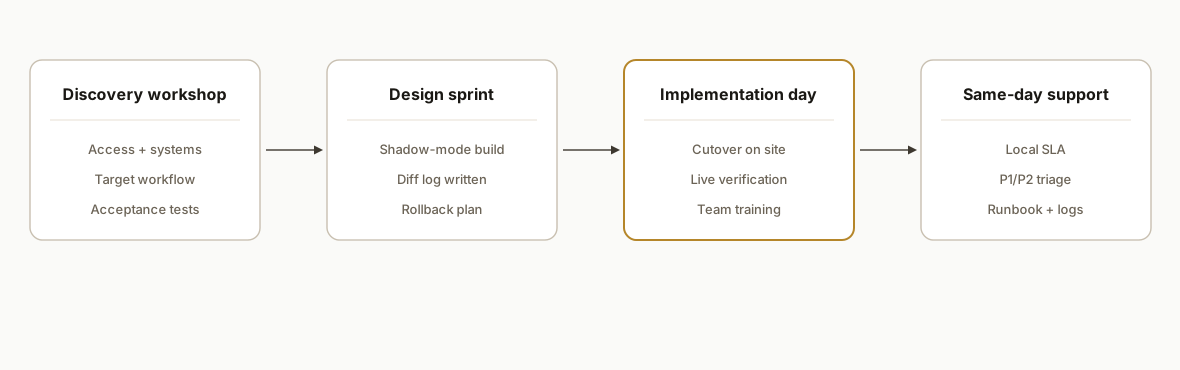
Step-by-step: how to engage and run an on-site build
1) Book a scoped pre-visit and align the target workflow
We start with a 30-minute remote scoping call to define one workflow and the on-site day. You receive a written one-page scope plus an agenda.
# workshop-agenda.yml
org: "<Your Company>"
workflow: "Leads -> CRM -> follow-up + reporting"
session_date: "2026-09-24"
attendees:
  - Owner/GM
  - Ops lead
  - IT contact
  - Sales rep
blocks:
  - name: "Current state & blockers"
    duration: 45m
  - name: "Systems & access review"
    duration: 30m
  - name: "Target state & guardrails"
    duration: 45m
  - name: "Shadow-mode plan & tests"
    duration: 30m
outcomes:
  - "Signed off target workflow"
  - "Access checklist complete"
  - "Shadow-mode acceptance tests listed"
Key gotcha: get the IT contact in the room. Half the speed comes from clearing SSO, MFA, and firewall questions live.
2) Prepare access and environment safely
We provide a minimal-access checklist and secrets template so credentials never end up in slides or chat.
# .env.sample (store in your secrets manager, not in email)
REX_PROJECT_NAME="acme-crm-followup"
REX_ENV="staging"
REX_SUPPORT_SLA_HOURS=4
OAUTH_CLIENT_ID="..."
OAUTH_CLIENT_SECRET="..."
WEBHOOK_ALLOWLIST_CIDRS="203.0.113.0/24,198.51.100.0/24"
Key gotcha: guest Wi-Fi captive portals can block webhooks and headless browsers. Ask IT for a VLAN or a short allowlist window for the implementation day.
3) Run the on-site discovery workshop
We whiteboard data flows, map owners, and confirm acceptance tests. We also capture a rollback plan in case a vendor limit appears during cutover.
{
  "acceptance_tests": [
    {"id": "AT-01", "name": "New lead appears in CRM in <3 min", "method": "live run"},
    {"id": "AT-02", "name": "No duplicate creation on re-ingest", "method": "idempotent replay"},
    {"id": "AT-03", "name": "Opt-out honored across channels", "method": "test contact"}
  ],
  "rollback": {
    "trigger": "error_rate > 2% or P1 regression",
    "actions": ["toggle DRY_RUN=true", "restore prior webhook target", "notify owners"]
  }
}
Key gotcha: decide the idempotency key early. It prevents duplicate records during replays and backfills.
4) Build the shadow-mode and verify in writing
We implement a staging build that runs in parallel without touching customers. Output is logged and compared to your current process.
# shadow-mode.yml
runs:
  schedule: "every 15 minutes"
  dry_run: true
compare:
  source_of_truth: "CRM"
  log_fields: ["external_id", "email", "status", "timestamp"]
  diff_policy: "alert_on_change"
Key gotcha: write the compare policy. Shadow-mode without a clear diff log is just a demo, not verification.
5) On-site implementation day with controlled cutover
We deploy the live config with a timeboxed window and a named approver. Verification runs happen immediately after the switch.
# cutover-plan.yml
window: "2026-09-30 09:00-12:00 PT"
approver: "Ops Lead"
prechecks:
  - "secrets present"
  - "webhooks responding 200"
  - "dry_run toggled off"
postchecks:
  - "AT-01/02/03 pass"
  - "error_rate < 1%"
  - "rollback plan printed"
Key gotcha: print the rollback plan. If a vendor limit surprises us, we roll back in minutes without debate.
6) Same-day SLA and runbook
For the first 30 days we include a same-day SLA. You receive a plain-English runbook and escalation numbers.
# support-runbook.yml
sla:
  response: "2 business hours"
  resolution: "same day (Mon-Fri, 8:30-6 PT)"
severities:
  P1: "Data loss or customer impact"
  P2: "Workflow degraded"
  P3: "How-to or minor issue"
escalation:
  - "support@rexautomaton.com"
  - "+1-604-xxx-xxxx (Vancouver)"
  - "pager: P1 only"
Key gotcha: classify incidents. P1 vs P2 keeps real issues on the front burner and avoids noisy alerts.
7) Handoff, training, and audit trail
We leave you with recorded walkthroughs and printed quick-cards, plus an immutable change log for compliance.
{
  "handoff": {
    "videos": ["admin-console", "day-1-verification", "rollback"],
    "quick_cards": ["daily checks", "what to do on P1"],
    "audit_log": "append-only, signed"
  }
}
Key gotcha: make the log append-only. It prevents quiet edits after an incident and helps future audits.
Where it gets complicated
- Building access and guest Wi-Fi: captive portals and MAC auth break webhook callbacks and browser harnesses. Solve this with a temporary allowlist or a wired drop.
- SSO and MFA session scope: switching networks can expire tokens mid-demo. Have an IT contact ready to re-approve scopes quickly.
- Desktop automation realities: some portals block headless browsers. We run a headed browser on a normal machine when needed and document the maintenance steps.
- Change management: production cutovers need a named approver and printed rollback steps. Verbal approvals are not enough when something regresses.
- Idempotency on replays: if you backfill or rerun a job, you must deduplicate at the sink. Pick the key and enforcement method up front.
What this actually changes
For Vancouver SMEs, on-site delivery compresses weeks into days: access gates cleared at the table, shadow-mode verified with your data, and a live system before we leave. Adoption also accelerates because staff get hands-on training.
One external datapoint: in McKinsey's State of AI 2023, 55 percent of respondents reported AI adoption in at least one function, underscoring that implementation, not experimentation, separates outcomes from pilots (source: https://www.mckinsey.com/capabilities/quantumblack/our-insights/the-state-of-ai-in-2023).
Pricing guidance: most Vancouver on-site builds start with a single workflow. Typical package ranges:
- On-site discovery day: fixed fee
- Design + shadow-mode sprint: fixed fee
- Implementation day + 30-day same-day SLA: fixed fee with optional monthly extensions
We price the first workflow tightly, then expand only after live results.
Frequently asked questions
Do you provide on-site AI automation in Vancouver and the Lower Mainland?
Yes. We serve Vancouver, Burnaby, Richmond, North Shore, Tri-Cities, and the Fraser Valley. We run on-site discovery, implementation days, and include a same-day SLA for the first 30 days, with optional extensions.
What is included in the Vancouver on-site package?
A half-day discovery workshop, a design and shadow-mode sprint, an on-site implementation day with a printed rollback plan, and a same-day support SLA. We also leave recorded walkthroughs, quick-cards, and a change log you can keep.
How fast is the same-day SLA?
We respond within two business hours and target resolution the same business day for P1 and P2 issues, Monday to Friday, 8:30 to 6 PT. P1 after-hours coverage can be added for launch week or extended retainers.
What does this cost for a small business?
We scope one workflow at a time. The on-site discovery day, build sprint, and implementation day are fixed-fee line items. Most SMEs start with one package and add a light support extension after 30 days if needed.
Can you work with SMEs without an IT team?
Yes. We bring the access checklist and coordinate with whoever manages your accounts. When vendors lack an API, we set wedge patterns and guardrails so the system remains maintainable.
Is this different from the best AI automation agencies for small business lists I saw?
This is delivery, not a directory. If you are searching for an AI automation agency in Vancouver for small businesses or SMEs, on-site support and a same-day SLA are what turn a pilot into a working system.
If you want an on-site implementation with a same-day SLA in Vancouver, we built this model to ship one workflow live without surprises. See our broader capabilities under custom AI integration, read how we approached local agency selection in Best AI Automation Agency Vancouver, and book a 15-minute call to lock your on-site date.
Want us to build this for you?
15-minute discovery call. No pitch. We tell you what to automate first.
Book a Discovery Call